
Introduction
This manual provides instructions for the LampVPath AA Battery Holder set, which includes various configurations: single AA, 2-cell AA, 3-cell AA, and 4-cell AA battery holders. Each holder features an integrated ON/OFF switch, a protective cover, and tinned wire leads for easy connection. These holders are designed for use in electronic projects, educational kits, and other applications requiring a portable AA battery power source.

Image: An assortment of eight black AA battery holders, including single, double, triple, and quadruple cell configurations, each with a switch, cover, and red/black wire leads. Screws are also visible.
Setup and Installation
Follow these steps to properly set up and install your AA battery holder:
- Open the Battery Compartment: Slide the cover of the battery holder to open the compartment.
- Insert Batteries: Insert AA batteries into the holder, ensuring correct polarity. Match the positive (+) end of the battery to the positive terminal in the holder and the negative (-) end to the negative terminal. Incorrect insertion can prevent operation and potentially damage the batteries or holder.
- Close the Cover: Slide the cover back into place until it clicks securely.
- Connect Wires: The battery holders come with pre-attached red and black wire leads.
- The red wire is for the positive (+) output.
- The black wire is for the negative (-) output.
- Secure the Holder (Optional): Each battery holder includes a screw for mounting. If permanent installation is desired, use the provided screw to secure the holder to a surface through the designated mounting hole.
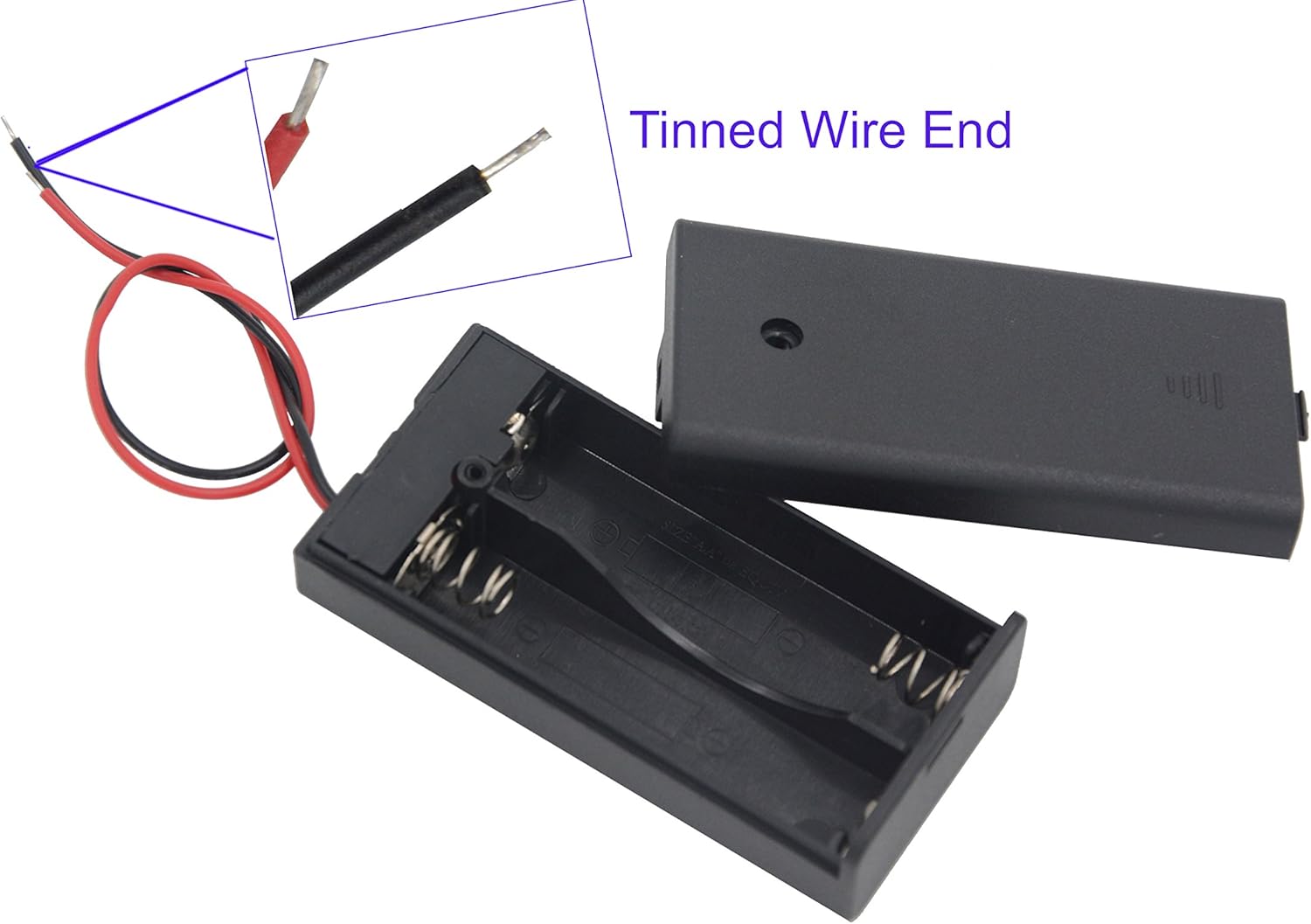
Image: A close-up view of the red and black tinned wire ends, ready for connection to an electrical circuit. An inset shows a magnified view of the tinned copper strands.

Image: An open 2-cell AA battery holder, revealing the internal spring terminals and the positive and negative markings for battery insertion. The cover is detached.

Image: A black AA battery holder with its cover removed, showing the battery compartments and a small black screw next to it, indicating its use for securing the holder.
Operating Instructions
Once batteries are installed and connections are made, operate the holder using the integrated switch:
- Power ON/OFF: Each battery holder is equipped with an ON/OFF slide switch located on the side or back. Slide the switch to the "ON" position to supply power to your connected device. Slide it to the "OFF" position to cut power.
- Voltage Output: The output voltage depends on the number of AA batteries installed (each AA battery provides approximately 1.5V).
- 1 AA Battery Holder: 1.5V output
- 2 AA Battery Holder: 3V output
- 3 AA Battery Holder: 4.5V output
- 4 AA Battery Holder: 6V output

Image: A 3-cell AA battery holder with its ON/OFF switch clearly visible on the side, along with the red and black tinned wire leads extending from it. Dimensions are also indicated.
Maintenance
Proper maintenance ensures longevity and reliable performance:
- Battery Replacement: Replace batteries when they are depleted. Always replace all batteries in a multi-cell holder simultaneously to ensure consistent voltage and prevent issues.
- Cleaning: If terminals become dirty or corroded, gently clean them with a cotton swab and a small amount of rubbing alcohol. Ensure the holder is dry before reinserting batteries.
- Storage: When not in use for extended periods, remove batteries from the holder to prevent leakage and potential damage. Store the holders in a cool, dry place away from direct sunlight and extreme temperatures.
- Wire Inspection: Periodically check the wire leads for any signs of fraying, cuts, or damage to the insulation. Replace the holder if wires are compromised.
Troubleshooting
If you encounter issues, consider the following common troubleshooting steps:
- No Power Output:
- Ensure the ON/OFF switch is in the "ON" position.
- Verify that batteries are inserted with correct polarity (+ and -).
- Check if the batteries are fully charged or new.
- Inspect wire connections for looseness or damage.
- Intermittent Power:
- Check battery terminals for corrosion and clean if necessary.
- Ensure batteries fit snugly within the compartment. Some rechargeable batteries may have slightly different dimensions.
- Verify that wire connections are secure and not loose.
- Holder Damage: If the plastic casing is cracked or wires are severely damaged, discontinue use and replace the holder.
Specifications
Detailed specifications for the LampVPath AA Battery Holders:
| Feature | Description |
|---|---|
| Product Type | AA Battery Holder with Switch and Cover Leads |
| Included Types | Single AA, 2 AA, 3 AA, 4 AA (2 pieces of each type) |
| Voltage Output (per holder) | 1.5V (1xAA), 3V (2xAA), 4.5V (3xAA), 6V (4xAA) |
| Switch Function | Integrated ON/OFF slide switch |
| Wire Leads | Red (positive) and Black (negative) tinned wire ends |
| Wire Length | 5.709 inches / 14.5 cm |
| Wire Diameter (with PVC isolation) | 0.0393 inches / 1 mm |
| Dimensions (L*W*H) |
|
| Weight (approx.) |
|
| Screw Size (L*D) |
|
| Model Number | 1234AA-Cover-8P |
| Manufacturer | LAMPVPATH |
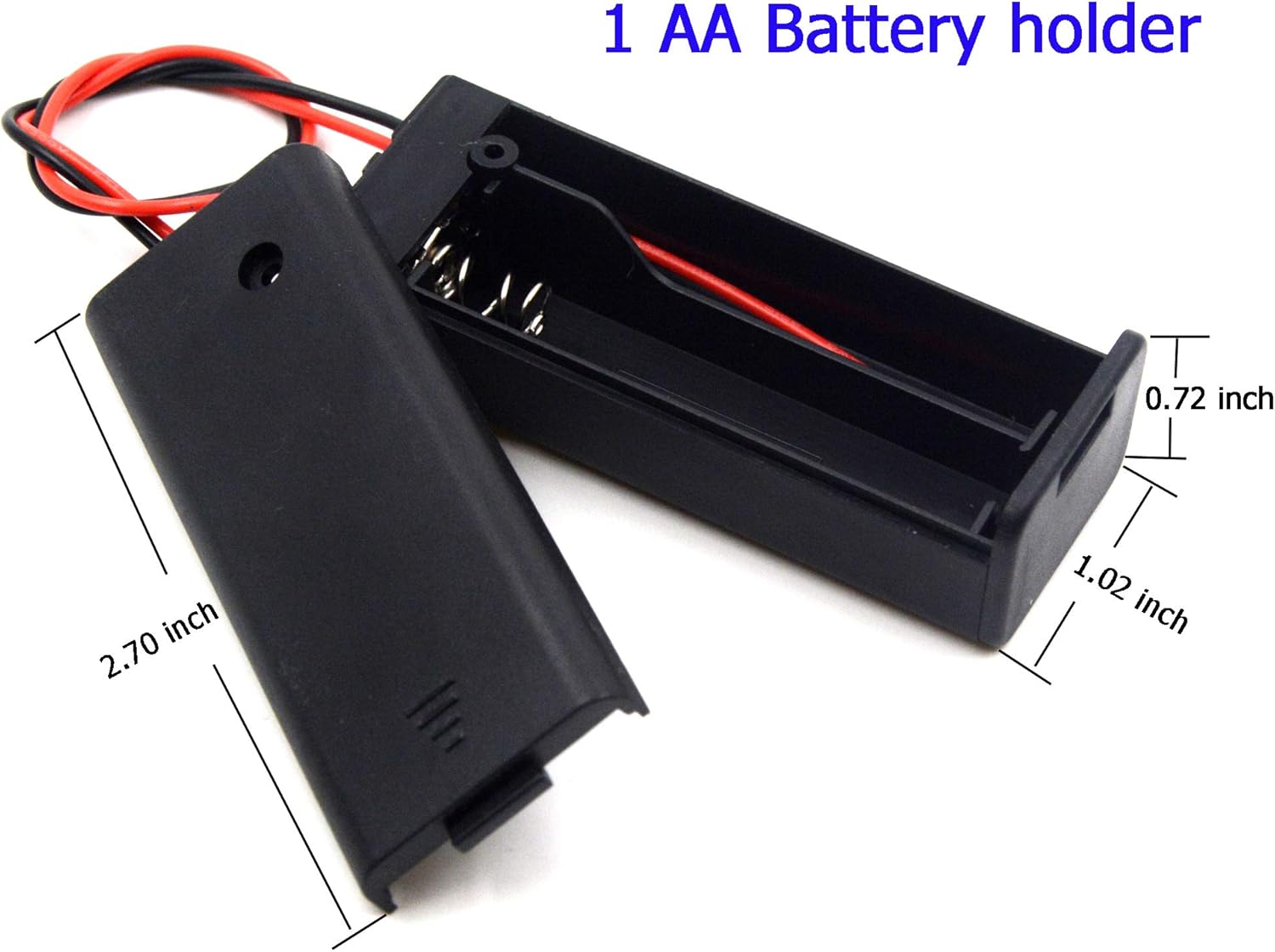
Image: A single AA battery holder with its cover removed, showing the battery compartment and detailed dimensions (length 2.70 inches, width 1.02 inches, height 0.72 inches).

Image: Two 2-cell AA battery holders, one on top of the other, with dimensions indicated (length 2.708 inches, width 1.34 inches, height 0.708 inches).

Image: A 4-cell AA battery holder with its cover removed, showing the battery compartments, and another 4-cell holder with its cover on. Dimensions are indicated (length 2.677 inches, width 2.535 inches, height 0.760 inches).
Warranty and Support
Information regarding warranty and customer support for this product is not explicitly provided in the available documentation. For any inquiries or support needs, please refer to the seller or manufacturer's contact information typically found on the product packaging or purchase platform.


