
1. Introduction and Overview
This manual provides detailed instructions for the setup, operation, and maintenance of your KINGDEL NC3000 Fanless Mini Desktop Computer. This compact and silent computer is designed for various applications, from office work to industrial control, offering robust performance with its Intel Core i5 processor, 16GB RAM, and 512GB SSD.
The fanless design ensures silent operation and reduces dust accumulation, making it suitable for environments where noise and dust are concerns. It supports high-resolution dual display output via HD and VGA ports and offers extensive connectivity options.

Image: The KINGDEL NC3000 Fanless Mini Desktop Computer, showcasing its compact design suitable for various environments.
2. Package Contents
Please verify that all items listed below are included in your package:
- 1 x KINGDEL NC3000 Mini PC
- 1 x Power Supply
- 1 x Power Cable
- 1 x HD Cable
- 2 x Antennas (for WiFi)
- 2 x SATA Wires (for internal storage expansion)
- Screws (for mounting or internal component installation)

Image: The retail packaging for the KINGDEL Mini PC, indicating the product inside.
3. Setup Guide
Follow these steps to set up your KINGDEL NC3000 Mini Desktop Computer:
- Connect Peripherals:
- Connect your monitor(s) to the HD Port and/or VGA port using the provided HD cable or a VGA cable (not included).
- Connect your USB keyboard and mouse to any of the available USB ports (USB 2.0 or USB 3.0).
- Attach the two antennas to the WiFi connectors on the rear panel for wireless network connectivity.
- For wired network access, connect an Ethernet cable to the RJ-45 LAN port.
- If using external audio devices, connect them to the audio input/output jacks.
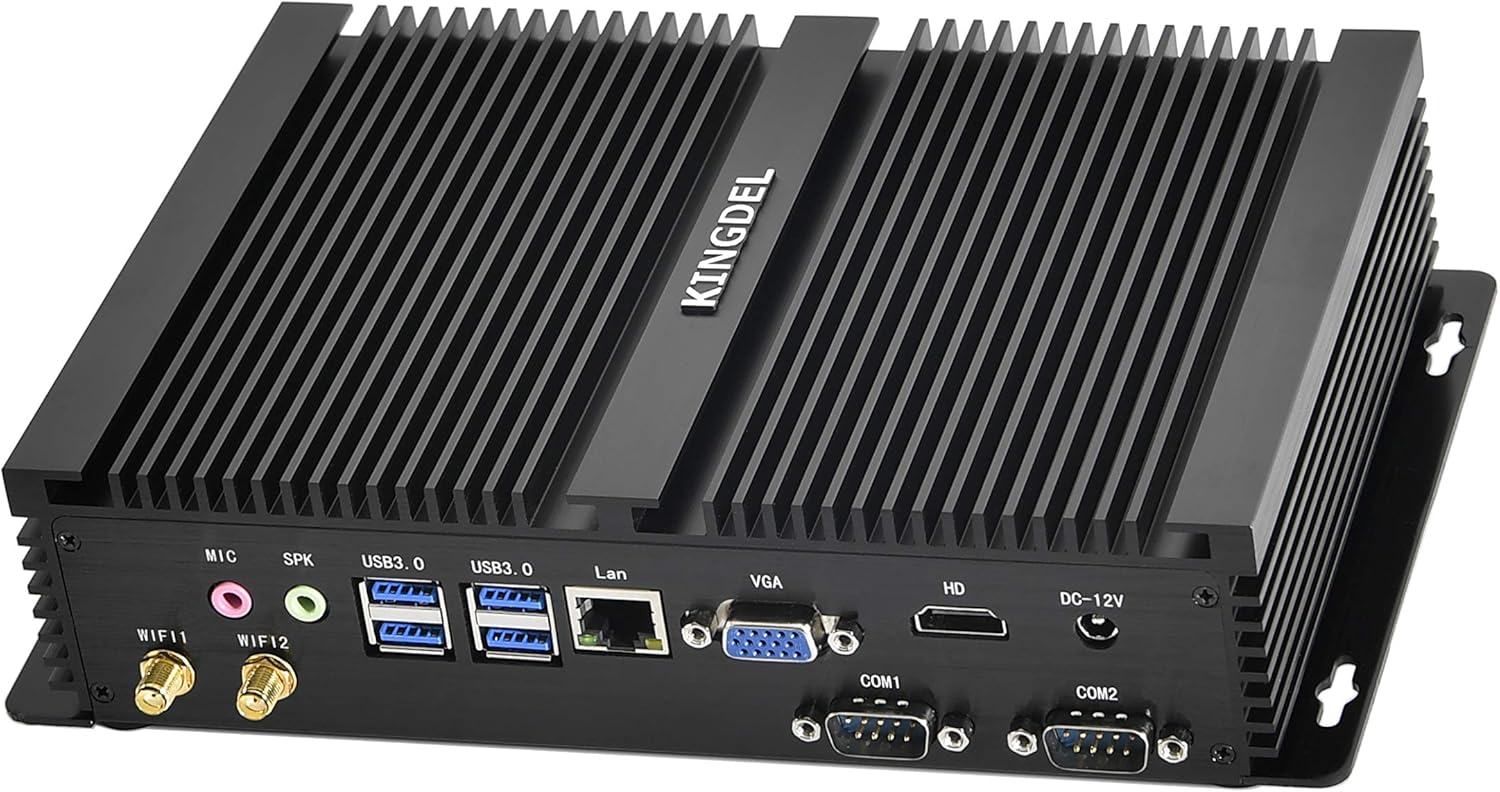
Image: Rear panel of the KINGDEL NC3000, highlighting the HD, VGA, USB, LAN, COM, and audio ports, along with antenna connectors.
- Connect Power:
- Connect the power supply to the DC 12V input port on the rear of the mini PC.
- Plug the power cable into the power supply and then into a wall outlet.
- Power On:
- Press the power button located on the front panel of the mini PC. The power indicator light will illuminate.
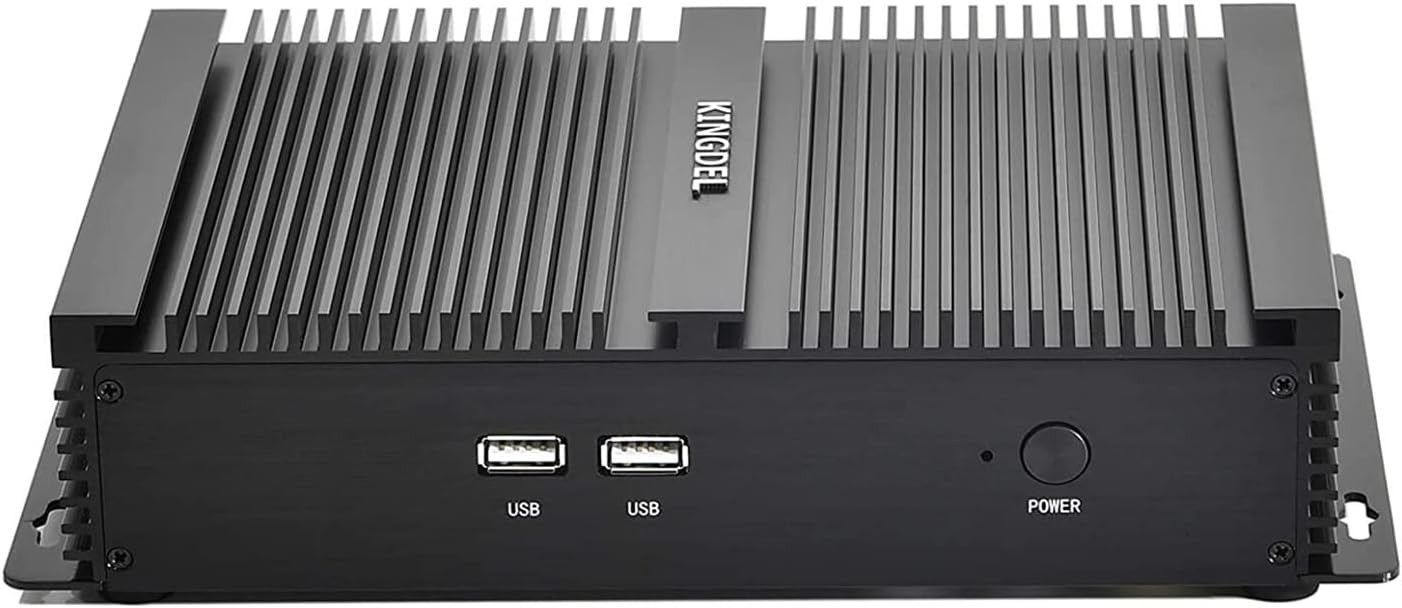
Image: Front panel of the KINGDEL NC3000, showing the power button and two USB ports.
- Initial Boot:
- The computer will boot up. Follow any on-screen instructions for operating system setup if it's the first time powering on.
4. Operating Instructions
This section covers basic operation of your KINGDEL NC3000 Mini Desktop Computer.
4.1 Power On/Off
- To power on, press the power button on the front panel.
- To power off, use the operating system's shutdown function. Alternatively, press and hold the power button for 5 seconds to force a shutdown (use only when necessary).
4.2 Display Configuration
The mini PC supports dual display output. You can connect two monitors simultaneously using the HD and VGA ports.
- Connect your primary monitor to the HD port for optimal resolution (up to 3280x2000@60Hz).
- Connect a secondary monitor to the VGA port.
- Adjust display settings within your operating system to extend or duplicate your desktop.

Image: The KINGDEL NC3000 Mini PC connected to three monitors, demonstrating its multi-display capability.
4.3 Network Connectivity
- WiFi: Ensure antennas are connected. Configure your wireless network settings within the operating system. The device supports 2.4 GHz and 5 GHz dual-band WiFi.
- Ethernet: Plug an Ethernet cable into the RJ-45 port for a stable wired connection.
4.4 USB and COM Ports
- The mini PC features 4x USB 3.0 ports and 2x USB 2.0 ports for connecting various peripherals like external drives, printers, and input devices.
- Two RS232 COM ports are available for industrial or specialized peripheral connections. Ensure proper driver installation if required by your specific device.

Image: A close-up of the KINGDEL Mini PC's ports, emphasizing the 4x USB 3.0, 2x USB 2.0, and 2x COM (RS232) interfaces.
Video: An overview of the KINGDEL Mini PC's features and connectivity options. This video demonstrates the physical aspects and potential uses of the device.
5. Maintenance
The KINGDEL NC3000 is designed for low maintenance due to its fanless construction. However, regular care can extend its lifespan and ensure optimal performance.
- Cleaning: Periodically wipe the exterior of the mini PC with a soft, dry cloth. Avoid using liquid cleaners directly on the device. The fanless design minimizes internal dust buildup, but ensure the heat sink fins are clear of obstructions.
- Software Updates: Keep your operating system and drivers updated to ensure security and performance.
- Ventilation: Although fanless, ensure the mini PC is placed in a location with adequate airflow around its heat sink fins to dissipate heat effectively. Avoid covering the device.

Image: Bottom view of the KINGDEL NC3000, showing the mounting points and rubber feet for stable placement.
6. Troubleshooting
If you encounter issues with your KINGDEL NC3000, refer to the following common troubleshooting steps:
| Problem | Possible Cause | Solution |
|---|---|---|
| No Power | Power cable loose, power supply failure, wall outlet issue. | Check all power connections. Try a different power outlet. Ensure the power adapter is functioning. |
| No Display | Monitor cable loose, incorrect input selected on monitor, monitor power off. | Verify monitor cable connections. Select the correct input source on your monitor (HD or VGA). Ensure monitor is powered on. |
| No Network (WiFi/Ethernet) | Antennas not connected (WiFi), Ethernet cable loose, router issue, driver issue. | For WiFi, ensure antennas are securely attached. For Ethernet, check cable connection to PC and router. Restart router. Check network adapter drivers in OS. |
| Peripherals Not Detected | Loose connection, driver issue, faulty peripheral. | Reconnect the peripheral. Try a different USB/COM port. Install/update necessary drivers. Test the peripheral on another device. |
If the problem persists after trying these steps, please contact KINGDEL customer support for further assistance.
7. Specifications
Detailed technical specifications for the KINGDEL NC3000 Mini Desktop Computer:
| Model | NC3000 |
| Processor | Intel Core i5 (Dual Core CPU), 1.6 GHz (up to 2.6 GHz Turbo) |
| RAM | 16 GB DDR3 (1600 MHz SODIMM) |
| Storage | 512 GB mSATA SSD |
| Graphics | Intel HD Graphics 4400 (Integrated), Base Frequency 200 MHz, Max Dynamic Frequency 1.00 GHz |
| Max Resolution | 3280x2000@60Hz |
| Video Output | 1 x HD Port, 1 x VGA Port (Dual Monitor Support) |
| USB Ports | 4 x USB 3.0, 2 x USB 2.0 |
| Serial Ports | 2 x COM (RS232) |
| Network | RJ-45 Gigabit Ethernet (10/100/1000), WiFi (2.4 GHz/5 GHz, 802.11a/b/g/n) |
| Audio | 2 x Audio Connectors (Mic, Speaker) |
| Operating System | OS (Pre-installed or user-installable) |
| Dimensions (LxWxH) | 9.2 x 5.9 x 2 inches |
| Weight | 3.3 pounds |
| Features | Fanless, Silent Working, Full Metal Body |
8. Warranty and Support
KINGDEL provides comprehensive support for your mini PC:
- Warranty: This product comes with a 2-Year Parts & Labor Warranty.
- Technical Support: Free Lifetime Technical Support is available.
For any assistance or to claim warranty service, please follow these steps:
- Log in to your Amazon account.
- Navigate to "Your Orders".
- Locate your KINGDEL Mini PC order.
- Click on "Ask Product Question" to contact the seller directly.
Support is available 24 hours online for replies.

Image: Information regarding KINGDEL's customer satisfaction service, including warranty details and how to contact support via Amazon.