1. Product Overview
This document provides instructions for the Cut-Rate Batteries 7.4V 2500 mAH Li-ION battery, designed as a compatible replacement for various Icom two-way radios. This battery is engineered for reliable performance and durability, maintaining at least 80% of its rated capacity for 12 months from the date of shipment.
Compatible Radio Models:
- Icom IC-4011, IC-D43TR, IC-F24, IC-F24S, IC-F25, IC-F25S, IC-F26, IC-F26S
- Icom IC-F3011, IC-F3013, IC-F3021, IC-F3021S, IC-F3021T, IC-F3022S, IC-F3022T, IC-F3023, IC-F3023S, IC-F3023T, IC-F3031, IC-F3031S, IC-F3032S, IC-F3033, IC-F3033S, IC-F3036S, IC-F3061, IC-F3061S, IC-F3061T, IC-F3062, IC-F3062S, IC-F3062T, IC-F3063
- Icom IC-F3121, IC-F3160, IC-F3161, IC-F3161D, IC-F3161DS, IC-F3161DT, IC-F3161S, IC-F3161T, IC-F3162, IC-F3162DS, IC-F3162DT, IC-F3162S, IC-F3162T, IC-F3163
- Icom IC-F3230, IC-F3230D, IC-F3230DS, IC-F3230DT
Replaces OEM Part Numbers:
- Icom BP232LI, BP-230, BP-230N, BP-231, BP-231LI, BP-231N, BP-232, BP-232H, BP-232LI, BP-232N, BP-232NH, BP-232WP
Key Features:
- Utilizes high-quality graded and sorted A' Grade cells.
- Features resistance welded gold-plated contacts for optimal performance.
- Provides excellent discharge characteristics.
- Constructed with high-impact ABS and Polycarbonate plastic housings for ruggedness.
- Undergoes comprehensive testing including high altitude performance, vibration, mechanical shock, thermal cycling, external short circuit, and overcharge test simulations.
2. Safety Information
Please read and understand all safety instructions before using the battery. Failure to follow these instructions may result in fire, electric shock, injury, or damage to the battery or radio.
- Do not disassemble: Never attempt to open, modify, or disassemble the battery pack. This can cause internal short circuits, overheating, or rupture.
- Avoid short circuits: Do not allow metal objects to contact the battery terminals. This can cause a short circuit, leading to heat generation and potential fire.
- Temperature exposure: Do not expose the battery to extreme temperatures (above 60°C / 140°F or below -10°C / 14°F). Avoid direct sunlight, heat sources, or leaving it in a hot vehicle.
- Water exposure: Keep the battery dry. Do not immerse it in water or expose it to rain or moisture.
- Impact: Avoid dropping the battery or subjecting it to severe impacts. If the battery is damaged, discontinue use immediately.
- Disposal: Dispose of used batteries according to local regulations. Do not dispose of in household waste or by incineration.
- Children: Keep batteries out of reach of children.
- Charging: Use only chargers specified for Li-ION batteries and compatible with your radio model.
3. Setup and Installation
To install the battery into your compatible Icom two-way radio, follow these general steps. Always refer to your specific radio's instruction manual for detailed installation procedures.
- Ensure the radio is powered off before attempting to install or remove the battery.
- Align the battery pack with the battery compartment on the back of your radio.
- Slide the battery into place until it clicks securely. Ensure the battery latch (if present on your radio) is engaged.
- Gently tug on the battery to confirm it is firmly attached and will not accidentally detach during use.
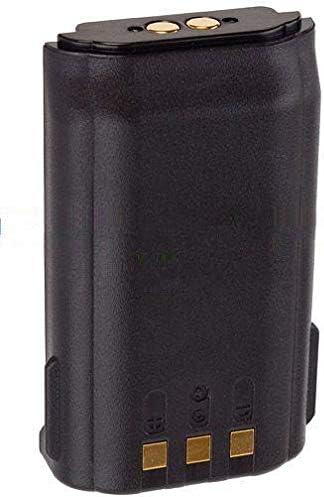
Figure 1: Front view of the battery, highlighting connection points.
To remove the battery, ensure the radio is off, then disengage the battery latch (if applicable) and slide the battery out of the compartment.
4. Operating Instructions
Initial Charging:
Before first use, fully charge the battery. This typically takes several hours depending on the charger and battery's initial state. Refer to your radio's charger manual for specific charging times and indicators.
Regular Charging:
- Always use a compatible charger designed for Li-ION batteries.
- Do not overcharge the battery. Most modern chargers have protection circuits, but it is good practice to remove the battery once fully charged.
- Avoid deep discharge. Recharge the battery before it is completely depleted to prolong its lifespan.

Figure 2: Side view of the battery, showing its profile and additional contacts.
Usage:
Once installed and charged, the battery powers your radio for communication. The operating time will vary based on radio usage, transmission power, and environmental conditions.
5. Maintenance and Storage
Cleaning:
Wipe the battery and its contacts with a clean, dry cloth periodically to remove dust and dirt. Do not use harsh chemicals or abrasive cleaners.
Storage:
- For long-term storage, store the battery in a cool, dry place, ideally between 10°C and 25°C (50°F and 77°F).
- Store the battery with approximately a 50% charge. Fully charged or fully discharged batteries can degrade faster during long-term storage.
- Avoid storing the battery with metal objects that could cause a short circuit.
6. Troubleshooting
If you experience issues with your battery, consider the following common troubleshooting steps:
- Battery not charging:
- Ensure the battery is correctly seated in the charger.
- Check that the charger is properly connected to a power source.
- Verify that the charger is compatible with Li-ION batteries and your radio model.
- Clean the battery and charger contacts with a dry cloth.
- Short operating time:
- Ensure the battery is fully charged before use.
- Operating in high-power transmission mode or extreme temperatures can reduce battery life.
- If the battery is old, its capacity may have naturally degraded.
- Radio not powering on with battery:
- Confirm the battery is fully charged and correctly installed.
- Check the battery contacts for any obstructions or corrosion.
- Test with another known-good battery if available to rule out a radio issue.
If problems persist after attempting these steps, contact customer support.
7. Specifications
| Brand | Cut-Rate Batteries |
| Model Number | IC F25 |
| Battery Cell Composition | Lithium Ion (Li-ION) |
| Voltage | 7.4V |
| Capacity | 2500 Milliamp Hours (mAH) |
| Recommended Uses | Two-Way Radio |
| Unit Count | 1 Count |
8. Warranty and Support
Warranty Information:
This battery includes a 12-month free replacement warranty for manufacturer's defects. This warranty covers defects in materials and workmanship under normal use. It does not cover damage caused by misuse, accident, unauthorized modification, or exposure to extreme conditions.
Customer Support:
For warranty claims, technical assistance, or any questions regarding your Cut-Rate Batteries product, please contact the manufacturer directly. Refer to your purchase documentation or the seller's information for contact details.