
ABD Office Solutions Bizhub C287
Konica Minolta Bizhub C287 Multi-Function Copier User Manual
Model: Bizhub C287
1. Introduction
This manual provides essential information for the safe and efficient operation of your Konica Minolta Bizhub C287 A3 Color Laser Multi-Function Copier. The Bizhub C287 is designed for small to medium-sized offices, offering copy, print, and scan functionalities with automatic duplexing and network connectivity. Please read this manual thoroughly before using the device.
2. Initial Setup
2.1 Unpacking and Placement
Carefully remove the copier from its packaging. Ensure the device is placed on a stable, level surface with adequate ventilation. Allow sufficient space around the unit for operation and maintenance.
2.2 Power Connection
Connect the provided power cord to the copier's power inlet and then to a grounded electrical outlet. Do not use extension cords or power strips that are not rated for the copier's power requirements.
2.3 Loading Paper
The Bizhub C287 supports various paper sizes, including 8.5" x 11" (Letter), 8.5" x 14" (Legal), and 11" x 17" (Tabloid/A3). It features two 500-sheet paper input trays and a 100-sheet bypass tray, with a maximum input capacity of 3,600 sheets with optional trays. Open the desired paper tray, fan the paper stack, and load it with the print side facing up. Adjust the paper guides to fit the paper size securely.
2.4 Network Connection
Connect an Ethernet cable from your network router or switch to the Ethernet port on the rear of the copier. The device supports network connectivity for printing and scanning functions.
2.5 Driver Installation
Printer and scanner drivers are required for full functionality. These drivers are downloadable from the manufacturer's official website. Follow the instructions provided with the driver package for installation on your computer.
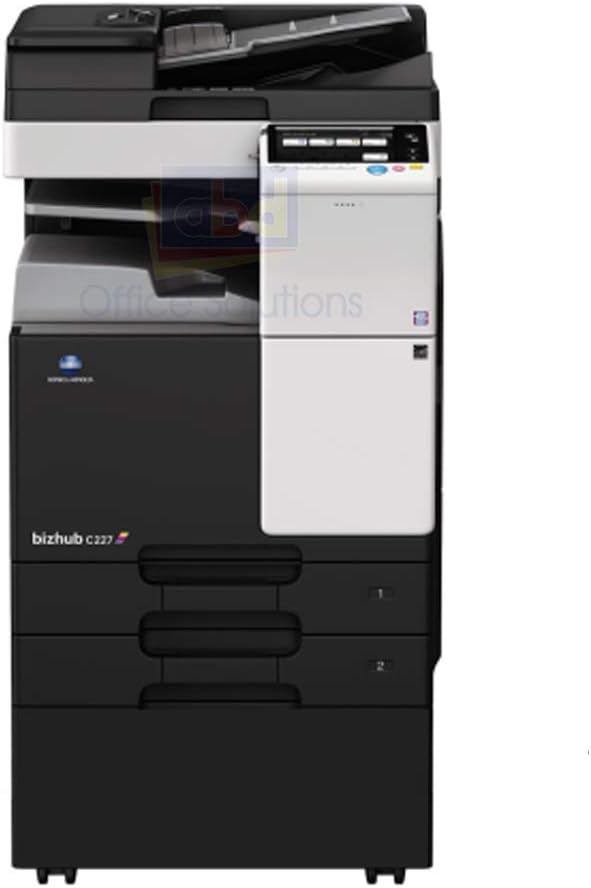
Figure 1: Front view of the Konica Minolta Bizhub C287 (representative model shown as C227). This image illustrates the general layout of the control panel, automatic document feeder, and paper trays.
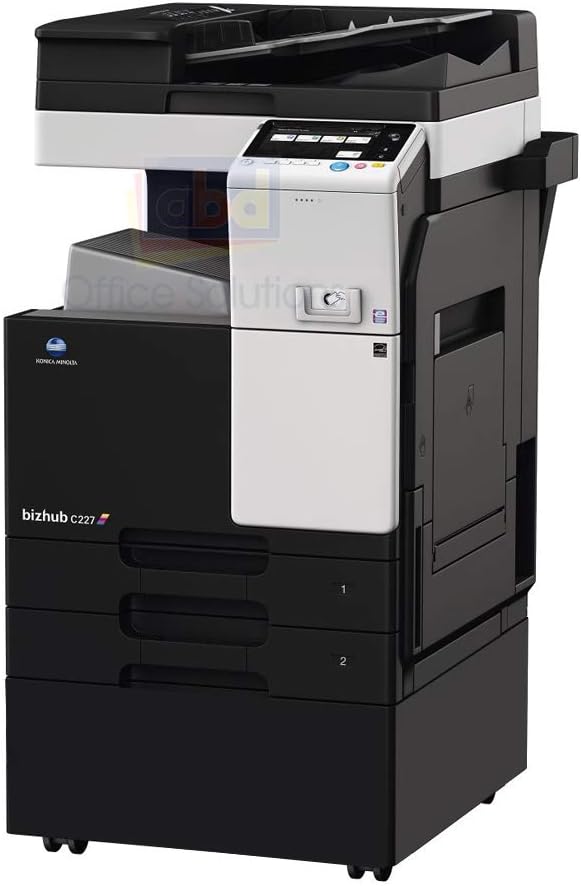
Figure 2: Angled view of the Konica Minolta Bizhub C287 (representative model shown as C227). This perspective provides a view of the side and the multiple paper input trays.
3. Operating Instructions
3.1 Copying Documents
Place your original document on the scanner glass or in the automatic document feeder (ADF). Select the 'Copy' function from the control panel. Adjust settings such as quantity, color/mono, and duplexing (automatic two-sided copying is supported). Press the 'Start' button to begin copying. The maximum copy resolution for both color and black-white is 1800 x 600 dpi.
3.2 Printing Documents
From your computer, select the Konica Minolta Bizhub C287 as your printer. Adjust print settings such as paper size, orientation, and color mode. The printer supports speeds of up to 28 pages per minute for both color and monochrome, with a maximum print resolution of 1800 x 600 dpi. Mobile printing is also supported.
3.3 Scanning Documents
Place your document on the scanner glass or in the ADF. Select the 'Scan' function from the control panel or initiate a scan from your computer using the installed scanner drivers. Choose your desired scan destination (e.g., email, network folder, USB) and file format. The device features a sheetfed scanner type.
4. Maintenance
4.1 Cleaning the Device
Regularly clean the exterior of the copier with a soft, damp cloth. For the scanner glass, use a non-abrasive glass cleaner. Ensure the device is powered off and unplugged before cleaning.
4.2 Toner Replacement
The Bizhub C287 uses Black, Cyan, Magenta, and Yellow toner cartridges. When a toner cartridge is low or empty, a message will appear on the control panel. Follow the on-screen instructions or refer to the quick guide for replacing the specific toner cartridge.
4.3 Paper Tray Management
Ensure paper trays are loaded correctly and paper guides are adjusted to prevent jams. Avoid overfilling trays beyond their maximum capacity.
5. Troubleshooting
5.1 Paper Jams
If a paper jam occurs, the control panel will display an error message and indicate the location of the jam. Carefully open the indicated covers and gently remove any jammed paper. Ensure all paper fragments are cleared before closing the covers.
5.2 Print Quality Issues
Poor print quality (e.g., streaks, faded prints) can often be resolved by checking toner levels, ensuring correct paper type settings, or performing a print head cleaning cycle through the device's utility software.
5.3 Network Connectivity Problems
If the copier is not accessible on the network, verify that the Ethernet cable is securely connected. Check the network settings on the copier's control panel and ensure it has a valid IP address. Consult your network administrator if issues persist.
6. Specifications
| Feature | Detail |
|---|---|
| Model Name | Bizhub C287 |
| Functions | Copy, Print, Scan |
| Printing Technology | Laser |
| Print Speed (Color/Mono) | Up to 28 ppm |
| Max Print Resolution | 1800 x 600 dpi |
| Max Copy Resolution | 1800 x 600 dpi (Color), 600 dpi (Black-white) |
| Duplex Printing | Automatic (Yes) |
| Scanner Type | Sheetfed |
| Paper Sizes Supported | 8.5" x 11" (A4), 8.5" x 14" (Legal), 11" x 17" (A3) |
| Standard Input Capacity | 1,100 sheets (2 x 500-sheet trays + 100-sheet bypass) |
| Max Input Capacity | 3,600 sheets (with options) |
| Connectivity | Ethernet |
| Ink Color | Black, Cyan, Magenta, Yellow |
| Product Dimensions | 26 x 23 x 28.9 inches |
| Item Weight | 124.6 pounds |
7. Warranty Information
This refurbished Konica Minolta Bizhub C287 comes with a 30-Day Parts Warranty. This is a limited warranty covering parts. For specific terms and conditions, please refer to the warranty documentation provided at the time of purchase or contact your vendor.
8. Support and Contact
For technical assistance, troubleshooting beyond this manual, or warranty claims, please contact your vendor, ABD Office Solutions. Drivers and additional software can be downloaded from the official Konica Minolta manufacturer website.
- Manufacturer: ABD Office Solutions
- Model: Bizhub C287
- UPC: 041979721169