
1. Introduction
The GOLD AKS LR-TR is an advanced long-range precious metal detector designed for authentic gold, silver, copper, and stone underground detection. It utilizes microcomputer CPU control and reflection conductivity with a P6FE1M algorithm for smart development, offering superior deep-seeking technology for treasure hunting.
This device is characterized by its rapid response to targets and its ability to locate metals and targets up to 70 meters deep and at a distance of up to 5 kilometers. It features four distinct search systems: gold, copper, silver, and diamond.
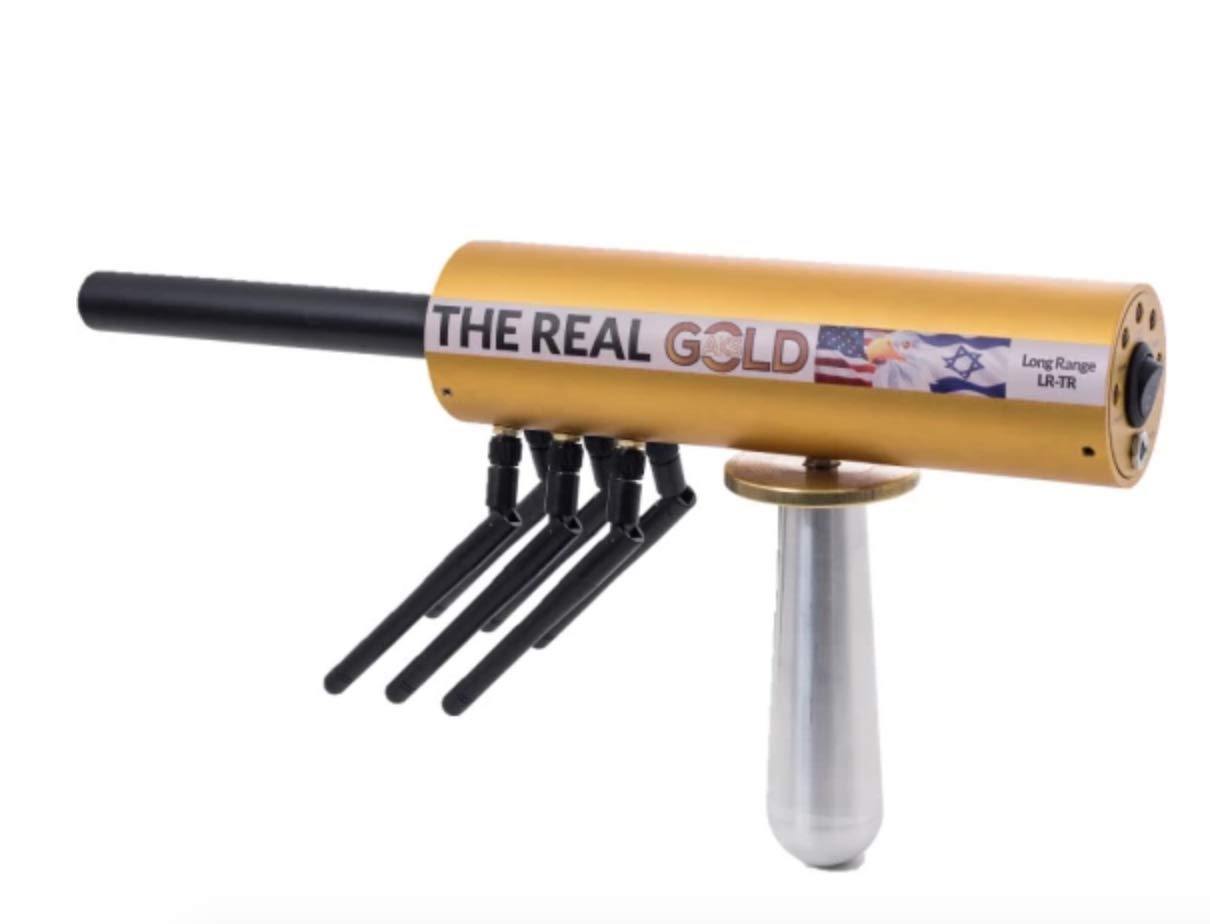
Figure 1.1: The GOLD AKS LR-TR Precious Metal Detector, showcasing its main unit with antennas and ergonomic handle.
2. Components and Parts Identification
Familiarize yourself with the main components of the GOLD AKS LR-TR detector for proper assembly and operation.

Figure 2.1: Main Unit Components and Dimensions.
- Super Antenna: The primary antenna for long-range detection.
- Pair of Front Receiving Antennas: Assists in signal reception.
- Pair of Middle Receiving Antennas: Further enhances signal reception.
- Pair of Rear Receiving Antennas: Completes the antenna array for comprehensive detection.
- Ergonomic Handle with Body and Electrical Connection: Connects directly to the device's chip, including antennas and sensors.
- Body of the Main Unit: Contains the sensors, computer unit with the chip processor, and unique algorithm.
- Unique Serial Number: Located on the right side of the device for identification.

Figure 2.2: Control Box Components and Dimensions.
- ON / OFF Power Switch: Controls the power to the control box.
- Copper Filter: Selects the copper detection mode.
- Silver Filter: Selects the silver detection mode.
- Gold Filter: Selects the gold detection mode.
- Diamond Filter: Selects the diamond detection mode.
- Clips for Pants: For attaching the control box to clothing.
- Filter Control Box: The main unit for selecting target materials.
- Unique Serial Number: For identification purposes.

Figure 2.3: Charging Port and Scanner Interface.
- Charger Port: For connecting the power adapter to charge the device.
- ON/OFF Power Switch: Main power control for the device.
- Scanner Indicator: Light indicating scanning activity.
- Diamond Filter Light: Illuminates when Diamond filter is active.
- Gold Filter Light: Illuminates when Gold filter is active.
- Silver Filter Light: Illuminates when Silver filter is active.
- Copper Filter Light: Illuminates when Copper filter is active.
3. Setup
Follow these steps to prepare your GOLD AKS LR-TR detector for operation.
- Unpacking: Carefully remove all components from the protective case. Ensure all parts listed in Section 2 are present.
- Battery Installation/Charging: The device requires batteries for operation. If not pre-installed, insert the included batteries into the designated compartment. Ensure the device is fully charged before first use by connecting the charger to the Charger Port (Figure 2.3, item 1). The scanner indicator light may provide charging status.
- Antenna Assembly: Attach the Super Antenna and the three pairs of receiving antennas (Front, Middle, Rear) to their respective ports on the main unit as shown in Figure 2.1. Ensure they are securely fastened.
- Control Box Connection: Connect the control box to the main unit. The ergonomic handle provides the electrical connection. Ensure a firm connection for proper functionality.
4. Operating Instructions
This section details how to operate your GOLD AKS LR-TR detector for effective treasure hunting.
- Powering On: Locate the ON/OFF Power Switch on the control box (Figure 2.2, item 1) and on the main unit (Figure 2.3, item 2). Turn both switches to the 'ON' position. The scanner indicator light (Figure 2.3, item 3) should illuminate, indicating the device is active.
- Selecting Search System: Use the filter buttons on the control box (Figure 2.2, items 2-5) to select your desired target material:
- Copper Filter: For detecting copper.
- Silver Filter: For detecting silver.
- Gold Filter: For detecting gold.
- Diamond Filter: For detecting diamonds.
- Scanning and Detection:
- Hold the device steady and sweep it slowly across the search area.
- The device uses reflection conductivity and a smart algorithm to identify targets.
- The scanner indicator light and potentially other visual/auditory cues will signal a detection.
- The GOLD AKS LR-TR is capable of detecting targets up to 5 kilometers in distance and 70 meters in depth.
- Fine Tuning: The device is designed for fine tuning and ease of use. Adjust your sweeping motion and sensitivity as needed based on environmental conditions and target size.
- Powering Off: When finished, turn both the ON/OFF Power Switches on the control box and the main unit to the 'OFF' position.
5. Maintenance
Proper maintenance ensures the longevity and optimal performance of your GOLD AKS LR-TR detector.
- Cleaning: After each use, especially in dusty or damp environments, wipe down the main unit, antennas, and control box with a soft, dry cloth. Avoid using abrasive cleaners or solvents.
- Battery Care:
- Recharge the batteries regularly, especially after prolonged use or before long periods of storage.
- Do not overcharge the batteries.
- If storing the device for an extended period, remove the batteries to prevent leakage.
- Storage: Store the detector in its original protective case (Figure 5.1) in a cool, dry place, away from direct sunlight and extreme temperatures. This protects the sensitive electronic components and antennas.

Figure 5.1: The protective carrying case for the GOLD AKS LR-TR detector, ideal for storage and transport.
6. Troubleshooting
This section provides solutions to common issues you might encounter with your GOLD AKS LR-TR detector.
| Problem | Possible Cause | Solution |
|---|---|---|
| Device does not power on. |
|
|
| Inaccurate or inconsistent detection. |
|
|
| Scanner indicator light not working. |
|
|
7. Specifications
| Feature | Detail |
|---|---|
| Brand | GOLD AKS |
| Model Number | GOLD AKS LR-TR |
| Detection Range | Up to 5 KM (distance) |
| Detection Depth | Up to 70 meters |
| Search Systems | Gold, Copper, Silver, Diamond |
| Power Source | Battery Powered (Batteries included) |
| Material | Copper, Metal |
| Item Weight | 3.18 kg (3 kg 180 g) |
| Extended Length | 7E+1 Metres (70 meters) |
| Adjustable Length | Yes |
| International Protection Rating | IP54 |
| Recommended Use | Treasure Hunting |
| Display Type | Digital |
| Package Dimensions | 41.15 x 31.75 x 11.68 cm |
8. Warranty and Support
Your GOLD AKS LR-TR detector comes with a manufacturer's warranty. For specific details regarding the warranty period and coverage, please refer to the documentation provided with your purchase or contact the manufacturer directly.
Detector Power, as a distributor, offers a hassle-free 15-day return policy. For any inquiries, technical assistance, or support, please contact their customer service team. They are available to provide detailed information on the most modern, effective, and functional metal detectors and remote locators.
For customer service, please refer to the contact information provided at the point of purchase or on the official GOLD AKS / Detector Power website. Se habla Español.