
Panasonic SL-S230
Panasonic SL-S230 Portable CD Player Instruction Manual
Model: SL-S230
Introduction
This manual provides essential information for the safe and efficient operation of your Panasonic SL-S230 Portable CD Player. Please read this manual thoroughly before using the device and retain it for future reference.
Important Safety Instructions
- Do not expose the unit to rain or moisture.
- Do not open the casing. Refer all servicing to qualified personnel.
- Avoid placing the unit near heat sources or in direct sunlight.
- Use only the specified power supply or batteries.
- Clean the unit with a soft, dry cloth. Do not use liquid cleaners.
Parts Identification
Familiarize yourself with the various parts and controls of your Panasonic SL-S230 Portable CD Player.
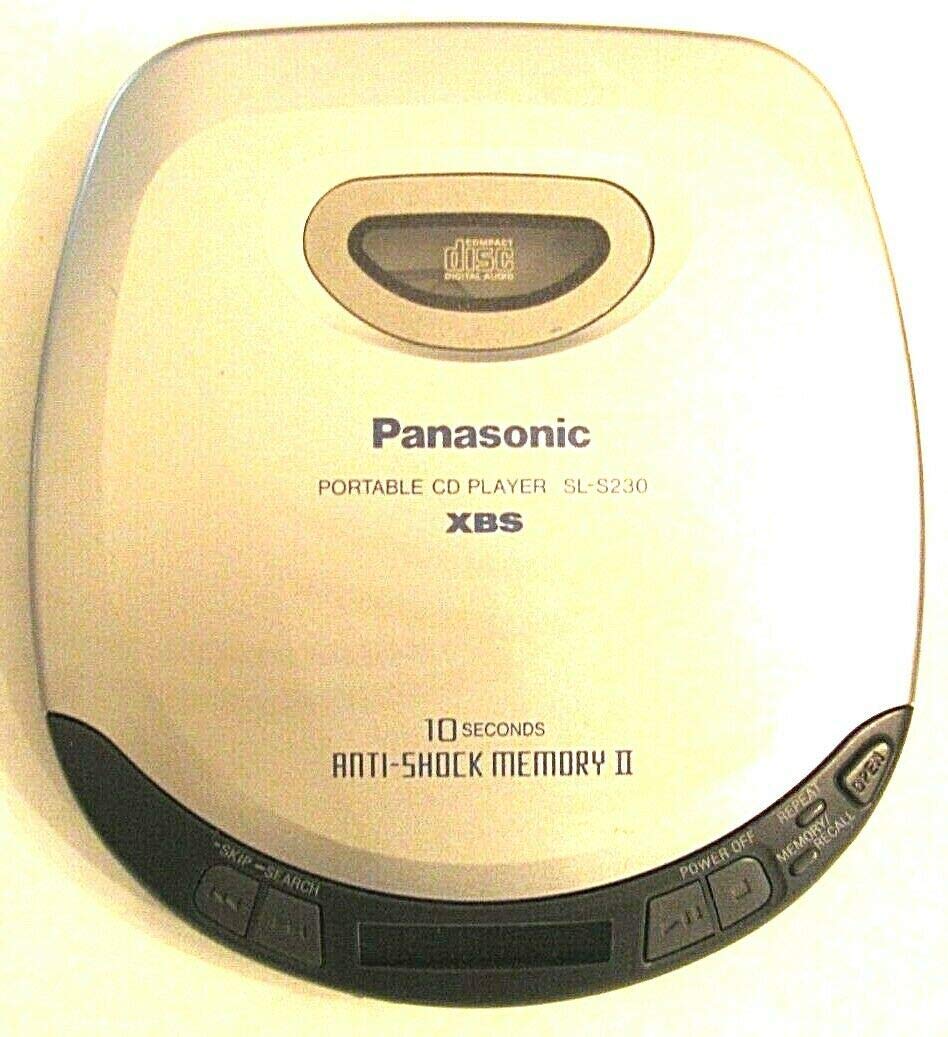
Image: Top view of the Panasonic SL-S230 Portable CD Player. The image displays the device's light grey casing with a central oval-shaped disc compartment cover. Below the compartment, the "Panasonic" logo is visible, followed by "PORTABLE CD PLAYER SL-S230" and "XBS". Towards the bottom, "10 SECONDS ANTI-SHOCK MEMORY II" is printed. Along the bottom edge, control buttons are visible: "SKIP-SEARCH" buttons on the left, and "POWER OFF", "REPEAT", "MEMORY/RECALL", and "OPEN" buttons on the right side of the disc player.
- Disc Compartment: Area where the compact disc is inserted.
- OPEN Button: Used to open the disc compartment lid.
- POWER OFF Button: Turns the unit off.
- REPEAT Button: Controls playback repetition modes.
- MEMORY/RECALL Button: Used for programming tracks and recalling programmed sequences.
- SKIP-SEARCH Buttons (◀◀/►►): Used to skip tracks or search within a track.
- XBS (Extra Bass System): Enhances bass sound.
- 10 Seconds Anti-Shock Memory II: Provides protection against sound skipping during movement.
Setup
Power Source
The Panasonic SL-S230 can be powered by batteries or an optional AC adapter.
- Battery Installation: Open the battery compartment on the underside of the unit. Insert two (2) AA batteries, ensuring correct polarity (+/-). Close the compartment securely.
- AC Adapter (Optional): Connect a compatible Panasonic AC adapter (not included) to the DC IN jack on the unit and plug it into a standard wall outlet.
Loading a CD
- Press the OPEN button to open the disc compartment lid.
- Place a compact disc onto the center spindle with the label side facing up.
- Gently close the disc compartment lid until it clicks shut.
Operating Instructions
Basic Playback
- Ensure a CD is loaded and the power source is connected.
- Press the PLAY/PAUSE (►/██) button to start playback. The track number and elapsed time will be displayed.
- Press the PLAY/PAUSE (►/██) button again to pause playback. Press it once more to resume.
- To stop playback, press the STOP (■) button.
- To turn off the unit, press the POWER OFF button.
Skipping and Searching Tracks
- To skip to the next track, press the SKIP-SEARCH (►►) button briefly.
- To skip to the beginning of the current or previous track, press the SKIP-SEARCH (◀◀) button briefly. Press it multiple times to go back further.
- To search forward within a track, press and hold the SKIP-SEARCH (►►) button during playback. Release to resume normal playback.
- To search backward within a track, press and hold the SKIP-SEARCH (◀◀) button during playback. Release to resume normal playback.
Using Anti-Shock Memory II
The SL-S230 features a 10-second Anti-Shock Memory II system to prevent sound skipping caused by vibrations or shocks. This feature is automatically active during playback.
XBS (Extra Bass System)
Engage the XBS feature (usually a switch or button on the side/bottom) to enhance the bass response for a richer audio experience.
Repeat Playback
Press the REPEAT button to cycle through repeat modes:
- Repeat 1: Repeats the current track.
- Repeat All: Repeats all tracks on the disc.
- Off: Disables repeat playback.
Program Playback (Memory/Recall)
The Memory/Recall function allows you to program tracks to play in a specific order.
- In stop mode, press the MEMORY/RECALL button.
- Use the SKIP-SEARCH buttons to select the desired track.
- Press MEMORY/RECALL again to store the track. Repeat for up to 20 tracks.
- Press PLAY (►) to start programmed playback.
- To clear the program, open the disc lid or turn off the power.
Maintenance and Care
- Cleaning the Unit: Wipe the exterior of the unit with a soft, dry cloth. Do not use abrasive cleaners or solvents.
- Cleaning the Lens: If playback issues occur, the optical lens may be dirty. Use a commercially available CD lens cleaner disc. Do not touch the lens directly.
- Disc Care: Handle CDs by their edges. Keep them clean and free from scratches. Store discs in their cases when not in use.
- Battery Life: Remove batteries if the unit will not be used for an extended period to prevent leakage.
Troubleshooting
| Problem | Possible Cause | Solution |
|---|---|---|
| No power. | Batteries are dead or inserted incorrectly. AC adapter not connected properly. | Replace batteries or check polarity. Ensure AC adapter is securely connected. |
| Disc does not play. | Disc inserted incorrectly. Disc is dirty or scratched. Lens is dirty. | Insert disc with label side up. Clean disc. Use a CD lens cleaner. |
| Sound skips or distorts. | Disc is dirty or scratched. Unit is subjected to excessive vibration. | Clean disc. Ensure Anti-Shock Memory is active. Avoid severe shocks. |
| Buttons do not respond. | Unit is in hold mode (if applicable). Temporary malfunction. | Check for a "Hold" switch and disable it. Turn off the unit and turn it back on. |
Specifications
- Model Number: SL-S230
- Product Dimensions: 5.75 x 1 x 5 inches
- Item Weight: 9.2 ounces
- Supported Audio Format: MP3 (Note: While the product data mentions MP3, this model primarily supports standard Audio CDs. MP3-CD playback capability should be verified with original product documentation if crucial.)
- Number Of Discs: 1
- Connectivity Technology: Auxiliary
- Special Feature: Portable, 10 Second Anti-Shock Memory II, XBS
- Power Source: DC IN (for optional AC adapter), AA Batteries
Warranty Information
For detailed warranty information, please refer to the warranty card included with your product or visit the official Panasonic website. Keep your purchase receipt as proof of purchase for any warranty claims.
Customer Support
If you encounter any issues not covered in this manual or require further assistance, please contact Panasonic customer support. Contact details can typically be found on the official Panasonic website or in the documentation provided with your product.
You can visit the Panasonic Store on Amazon for more information.