1. Introduction
The Blaupunkt EP1000X Digital Bass Enhancer is designed to restore and enhance the low-frequency information in your car audio system. This unit processes the audio signal to reproduce deep, impactful bass notes that may be lost during the recording or compression process, providing a richer and more dynamic listening experience. This manual provides essential information for proper installation, operation, and maintenance of your EP1000X.
2. Safety Information
Please read all instructions carefully before installation and use. Failure to follow these guidelines may result in damage to the unit, your vehicle, or personal injury.
- Always disconnect the vehicle's negative battery terminal before beginning any electrical work.
- Ensure all wiring is properly routed and secured to prevent pinching or damage.
- Use the recommended fuse rating (1 Amp) to protect the unit and your vehicle's electrical system.
- Do not expose the unit to moisture or extreme temperatures.
- Consult a professional car audio installer if you are unsure about any installation steps.
3. Package Contents
Verify that all items are present in the package:
- Blaupunkt EP1000X Digital Bass Enhancer
- Remote Bass Control Knob
- Wiring Harness (Power/Ground/Remote)
- Mounting Hardware
- User Manual
4. Product Features
The EP1000X offers advanced features for superior bass reproduction:
- Digital Bass Enhancement: Restores and enhances low-frequency signals.
- Adjustable Bass Controls: 'Wide' and 'Sweep' controls for precise tuning of bass characteristics.
- Balanced Inputs: Minimizes noise interference for a clean signal.
- High Headroom PWM Power Supply: Ensures stable and efficient operation.
- Compact Design: Allows for flexible installation in various vehicle types.

Image 4.1: A list of additional technical features and specifications for the Blaupunkt EP1000X, including maximum input/output levels, frequency response, total harmonic distortion, signal-to-noise ratio, input/output impedance, power supply type, power draw, and recommended fuse rating.
5. Controls and Connections
Familiarize yourself with the layout of the EP1000X unit:

Image 5.1: The front panel of the Blaupunkt EP1000X Digital Bass Enhancer, showing the 'Wide' and 'Sweep' control knobs, input/output RCA connections, and power terminals.
- Wide Control: Adjusts the Q factor (bandwidth) of the bass enhancement. Turn clockwise for a wider, more encompassing bass effect, or counter-clockwise for a narrower, more focused bass.
- Sweep Control: Selects the center frequency for the bass enhancement. This allows you to target specific bass frequencies for restoration. Options typically include 35Hz, 50Hz, and 80Hz.
- Max. Bass Control: This knob, often located on the remote, controls the overall output level of the enhanced bass.
- Balanced Input (RCA): Connect your head unit's low-level outputs here.
- Output (RCA): Connect these outputs to your amplifier's inputs.
- Dash Remote: Port for connecting the wired remote bass control knob.
- +12V (Power): Connect to a constant +12V power source.
- Ground: Connect to a solid chassis ground point.
- Remote: Connect to your head unit's remote turn-on lead.
6. Setup and Installation
Proper installation is crucial for optimal performance. Follow these general steps:
- Mounting: Choose a secure, dry location for the EP1000X, away from heat sources and direct sunlight. Ensure adequate ventilation. Use the provided mounting hardware.
- Power Wiring:
- Connect the +12V terminal to a fused constant +12V power source from the vehicle's battery.
- Connect the Ground terminal to a clean, bare metal chassis ground point.
- Connect the Remote terminal to the remote turn-on output of your head unit or amplifier.
- Audio Connections:
- Connect the RCA outputs from your head unit (or signal processor) to the Balanced Input RCAs on the EP1000X.
- Connect the Output RCAs from the EP1000X to the RCA inputs of your amplifier(s).
- Remote Bass Control: Connect the remote bass control knob to the 'Dash Remote' port and mount it in an accessible location for easy adjustment.
- Final Check: Double-check all connections for proper polarity and security before reconnecting the vehicle's battery.
7. Operating Instructions
Once installed, you can fine-tune the bass enhancement to your preference:
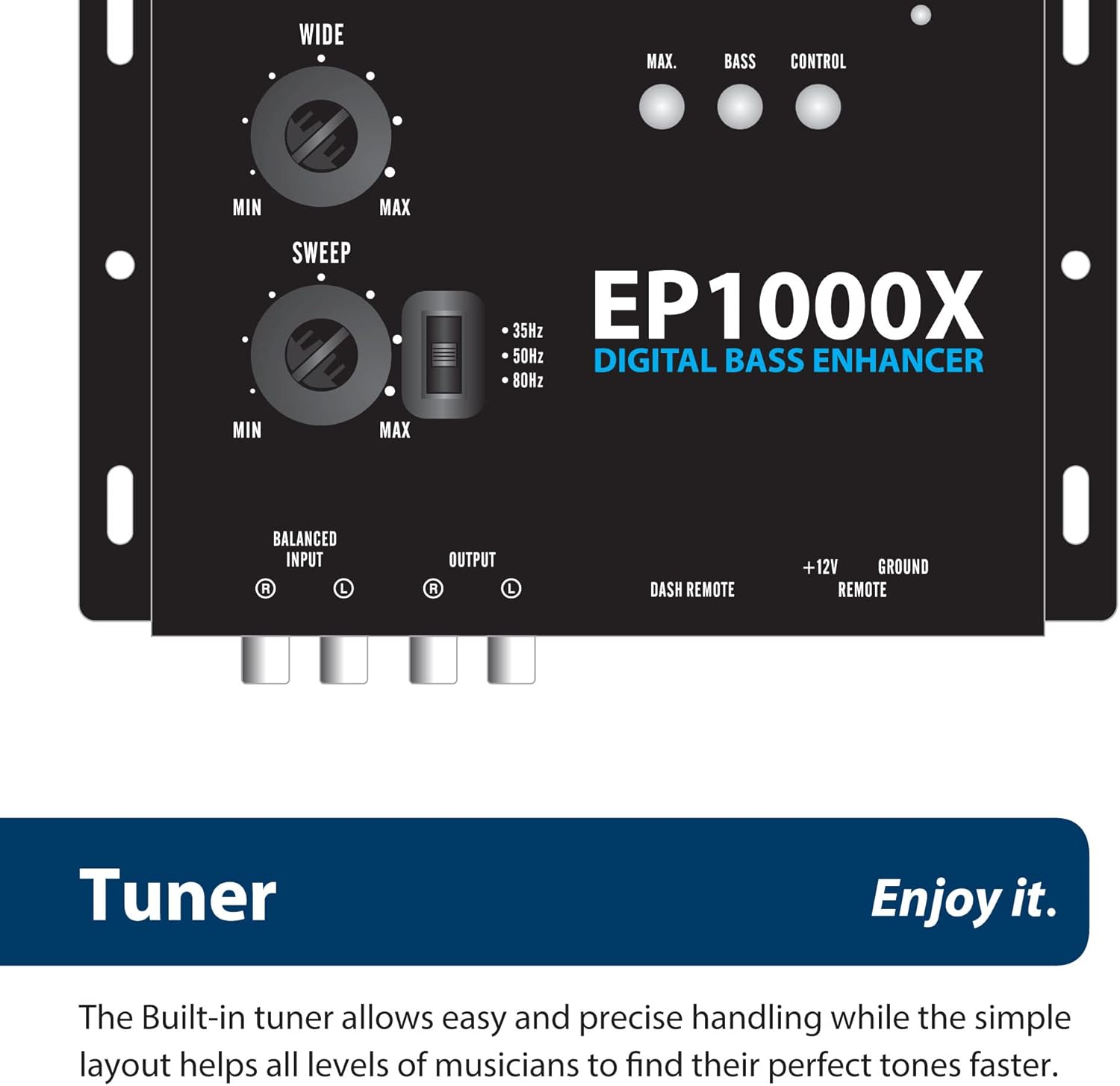
Image 7.1: Close-up view of the 'Wide' and 'Sweep' tuning knobs on the Blaupunkt EP1000X, highlighting the frequency selection options for the bass enhancement.
- Adjusting the Sweep Control: Start by setting the 'Sweep' control to the lowest frequency (e.g., 35Hz). Play music with prominent bass. Gradually increase the 'Sweep' frequency until you hear the desired bass restoration and enhancement. This control helps target the specific frequency range where bass notes are most lacking or desired.
- Adjusting the Wide Control: Once the 'Sweep' frequency is set, adjust the 'Wide' control. Turning it clockwise will broaden the frequency range affected by the bass enhancement, making the bass sound fuller and more spread out. Turning it counter-clockwise will narrow the affected range, resulting in a more focused and punchy bass.
- Using the Remote Bass Control: Use the dash-mounted remote knob to adjust the overall intensity of the enhanced bass output. This allows for on-the-fly adjustments based on music genre or personal preference without needing to access the main unit.
Experiment with these controls to find the optimal settings for your vehicle's acoustics and your personal listening taste.


