
Tovendor F5020D
TOVENDOR Electric Water Flosser User Manual
Brand: Tovendor | Model: F5020D
1. Introduction and Overview
The TOVENDOR Electric Water Flosser is a cordless, rechargeable dental oral irrigator designed to enhance your daily dental hygiene routine. It utilizes high water pressure and a rotating nozzle to effectively remove plaque and food debris from hard-to-reach areas, complementing your regular brushing and flossing.
Key features include:
- Complete Dental Hygiene: Removes plaque with high water pressure and a rotating nozzle.
- Professional Equipment: Cordless, waterproof (IPX7) design with 3 modes (Normal, Soft, Pulse) for personalized cleaning.
- Long Lasting Battery: Provides 25-30 days of use on a 4-hour charge.
- Generous Water Tank: Features a 300ml water tank for a full cleanse.
- Smart Technology: Memory function retains your preferred mode; auto-shuts off after 120 seconds to protect the motor.
- Travel-Friendly: Compact design with USB charging for convenience on the go.

Image: The TOVENDOR Electric Water Flosser unit alongside its product packaging, showcasing the sleek design and included accessories.
2. Safety Information
Please read and understand all safety information before using the TOVENDOR Electric Water Flosser.
- Keep out of reach of children.
- Do not use if you have open oral wounds or severe periodontal disease.
- Consult your dentist before use if you have had oral surgery.
- Do not submerge the charging base in water.
- Use only as directed.
3. Package Contents
Your TOVENDOR Electric Water Flosser package includes:
- 1 x Water Flosser Unit
- 5 x Replacement Flosser Tips (Standard, Orthodontic, Periodontal, Tongue Cleaner, Pik Tip)
- 1 x USB Charging Cable (Note: 5V 1A adapter not included)
- 1 x User Manual

Image: All items included in the TOVENDOR Electric Water Flosser package: the main unit, five interchangeable tips, a USB charging cable, and the user manual.
4. Setup
4.1. Charging the Device
Before first use, fully charge the water flosser. A full charge takes approximately 4 hours and provides 25-30 days of usage.
- Locate the charging port cover at the bottom of the unit.
- Gently remove the cover.
- Insert the USB charging cable into the port.
- Connect the other end of the USB cable to a 5V 1A power source (e.g., power bank, PC USB port, or a compatible USB adapter, which is not included).
- The indicator lights will pulse during charging. Once fully charged, the lights will remain steady or turn off depending on the model.
- After charging, securely replace the charging port cover to maintain the device's IPX7 waterproof rating.

Image: The water flosser being charged via USB, illustrating the 4-hour charging time for 25-30 days of usage. Various charging methods like power bank, 5V adapter, car charger, and PC/Laptop are shown.
4.2. Filling the Water Tank
The water flosser features a 300ml detachable water tank for easy filling and cleaning.
- Detach the water tank from the main unit by twisting or pulling it down (refer to diagram on the unit).
- Fill the tank with lukewarm water. You may add a small amount of mouthwash if desired.
- Reattach the water tank securely to the main unit until it clicks into place.

Image: Illustration of the 300ml water tank being detached and filled with water, highlighting its perfect size for daily or travel use.
4.3. Attaching a Nozzle Tip
The device comes with 5 different nozzle tips for various oral care needs.
- Select the desired tip (e.g., Standard, Orthodontic, Tongue Cleaner).
- Insert the tip into the hole at the top of the flosser unit until it clicks into place.
- To remove a tip, press the release button located on the side of the unit and pull the tip out.
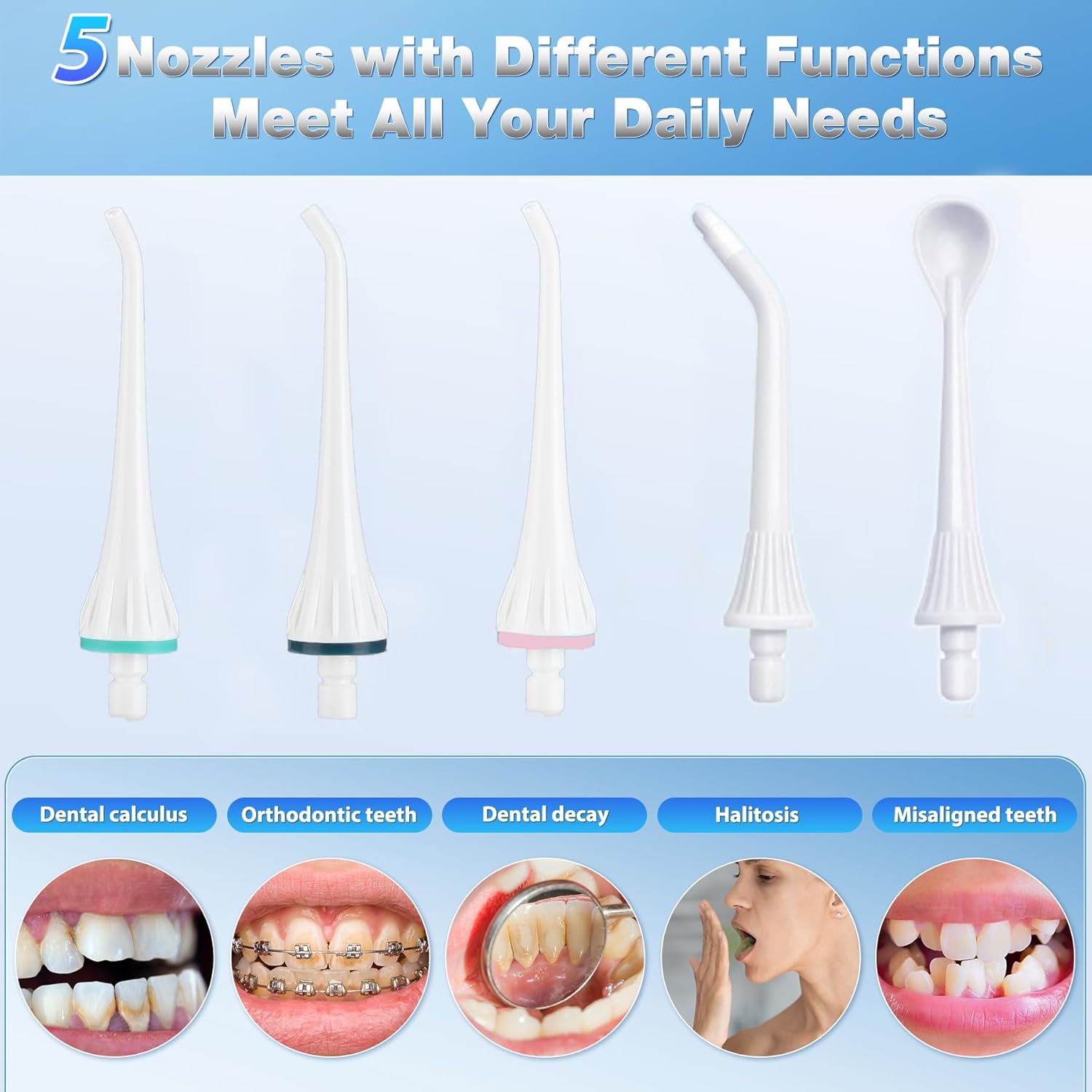
Image: A display of the five different nozzles included with the water flosser, each designed for specific functions like dental calculus, orthodontic teeth, dental decay, halitosis, and misaligned teeth.
5. Operating Instructions
5.1. Power On/Off and Mode Selection
The water flosser offers three cleaning modes to suit different sensitivities and cleaning needs.
- Press the On/Off button to turn the device on.
- Press the Mode button to cycle through the available modes:
- Normal Mode: For powerful, deep cleaning.
- Soft Mode: Gentle pressure for sensitive gums or first-time users. It is recommended to choose Soft mode for your initial use.
- Pulse Mode: For gum massage and enhanced cleaning.
- The device has a memory function that retains your last selected mode for convenience.
- To turn off the device, press the On/Off button again.

Image: Visual representation of the three cleaning modes: Normal for deep clean, Soft for sensitive teeth, and Pulse for gum massage, indicating powerful water pressure and pulses per minute.
5.2. How to Use
For optimal results, follow these steps:
- Lean over a sink and place the nozzle tip in your mouth, aiming the tip at the gumline at a 90-degree angle.
- Turn on the device and select your desired mode.
- Move the tip along the gumline, pausing briefly between teeth. Allow the water to flow into the sink.
- The flosser will automatically turn off after 120 seconds to protect the motor and conserve battery life.
- Empty any remaining water from the tank after each use.
6. Maintenance
6.1. Cleaning the Unit and Tips
Regular cleaning ensures hygiene and extends the lifespan of your water flosser.
- The TOVENDOR Electric Water Flosser is IPX7 waterproof, allowing it to be safely rinsed under running water.
- After each use, detach the water tank and rinse it thoroughly with water.
- Rinse the nozzle tip under running water. For deeper cleaning, tips can be soaked in a denture cleaning solution or a mixture of water and vinegar.
- Wipe the main unit with a soft, damp cloth. Do not use abrasive cleaners or harsh chemicals.
- Ensure the charging port cover is tightly closed when not charging to maintain waterproofing.

Image: The water flosser being splashed with water, demonstrating its IPX7 waterproof rating, making it safe for use in the shower.
6.2. Storage
Store the water flosser in a cool, dry place away from direct sunlight when not in use. Ensure the water tank is empty and clean before storing for extended periods.
7. Troubleshooting
If you encounter any issues with your TOVENDOR Electric Water Flosser, please consider the following common solutions:
- No water flow: Ensure the water tank is properly filled and securely attached. Check if the nozzle tip is correctly inserted.
- Weak water pressure: Verify that the device is fully charged. Clean the nozzle tip as mineral deposits can reduce pressure over time.
- Device not turning on: Confirm the device is charged. If the issue persists after charging, ensure the charging port cover is not interfering with the power button.
- Charging indicator not working: Check the USB cable and power source connection. Ensure the charging port is clean and free of debris.
For persistent problems or issues not listed here, please refer to the complete user manual or contact Tovendor customer support for assistance.
8. Specifications
| Feature | Specification |
|---|---|
| Product Dimensions | 3.94 x 3.94 x 3.94 inches; 10 ounces |
| Item Model Number | F5020D |
| Power Source | Battery Powered |
| Water Tank Capacity | 300ML |
| Waterproof Rating | IPX7 |
| Charging Time | Approx. 4 hours |
| Usage Time per Charge | 25-30 days |
| Cleaning Modes | Normal, Soft, Pulse |
| Included Tips | 5 functional tips |
9. Warranty and Support
Specific warranty details are not provided in this manual. For information regarding warranty coverage, product support, or any other inquiries, please contact Tovendor customer service through their official website or the retailer where the product was purchased.
Always retain your proof of purchase for warranty claims.
Ask a question about this manual
Ask about setup, troubleshooting, compatibility, parts, safety, or missing instructions. Manuals+ will review the question and use this page’s manual context to help answer it.