
Introduction
This manual provides instructions for the VINABTY MKJ36998126 Replacement Remote Control. This remote is designed as a direct replacement for various LG TV models, including the 32LV2400, 42LV4400, 47LV4400, and 55LV4400 series. It is pre-programmed and requires no additional setup beyond battery installation.
The remote control offers a comfortable, ergonomic design and provides full functionality for your compatible LG television, allowing you to control power, volume, channels, input, and other essential TV functions.
Setup
1. Battery Installation
The VINABTY MKJ36998126 remote control requires two (2) AAA batteries (not included) for operation. Follow these steps to install the batteries:
- Locate the battery compartment on the back of the remote control.
- Press down on the latch and slide the battery cover downwards to open it.
- Insert two AAA batteries, ensuring the positive (+) and negative (-) terminals align correctly with the markings inside the compartment.
- Slide the battery cover back into place until it clicks securely.
Note: Always replace both batteries at the same time with new ones. Do not mix old and new batteries, or different types of batteries.
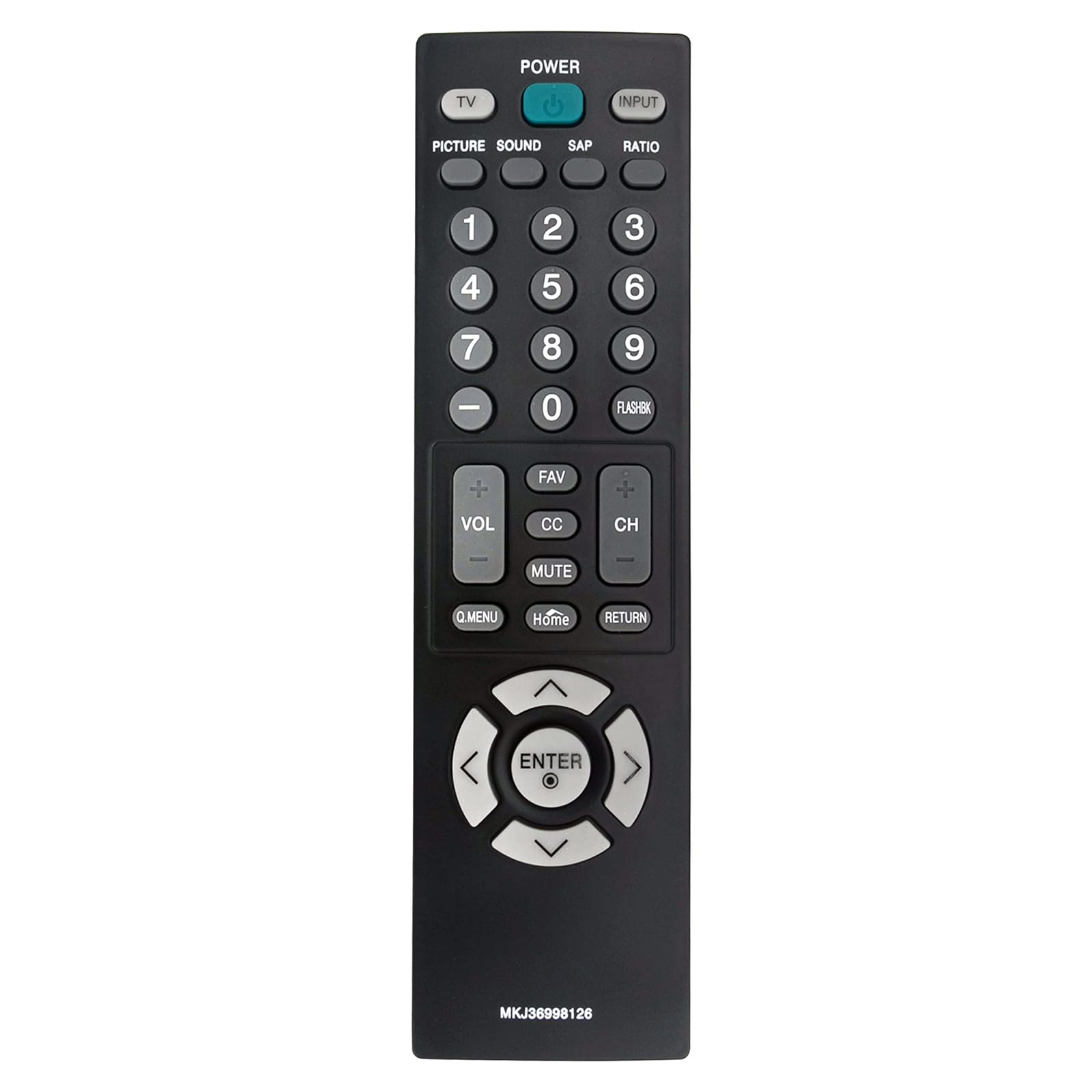
Image: Front view of the VINJABTY MKJ36998126 remote control, showing the button layout. The battery compartment is on the reverse side.
2. Initial Use
This remote control is pre-programmed for compatible LG TV models. Once batteries are installed, it is ready for immediate use. No additional programming or pairing is required.
Operating Instructions
The VINABTY MKJ36998126 remote control provides intuitive access to your LG TV's functions. Below is a general overview of the main buttons and their functions:

Image: A detailed front view of the VINABTY MKJ36998126 remote control, highlighting the various buttons and their labels for easy identification.
- POWER: Turns the TV on or off.
- TV: Switches to TV mode.
- INPUT: Selects the input source (HDMI, AV, Component, etc.).
- PICTURE: Adjusts picture settings.
- SOUND: Adjusts sound settings.
- SAP: Selects Secondary Audio Program (if available).
- RATIO: Changes the screen aspect ratio.
- Number Buttons (0-9): Directly selects channels or enters numerical values.
- FLASHBK: Recalls the previously viewed channel.
- VOL (+/-): Increases or decreases the volume.
- CH (+/-): Changes the channel up or down.
- FAV: Accesses favorite channels.
- CC: Toggles Closed Captions on or off.
- MUTE: Mutes or unmutes the TV sound.
- Q.MENU: Accesses the Quick Menu for common settings.
- Home: Returns to the TV's home screen or main menu.
- RETURN: Goes back to the previous screen or menu.
- Navigation Pad (Up, Down, Left, Right, ENTER): Navigates through menus and confirms selections.

Image: The VINABTY MKJ36998126 remote control shown next to a compatible LG television, illustrating its intended use.
Maintenance
Battery Replacement
When the remote control's performance degrades or it stops responding, it is likely time to replace the batteries. Follow the battery installation steps outlined in the 'Setup' section.
Cleaning
To clean the remote control, use a soft, dry cloth. For stubborn dirt, slightly dampen the cloth with water or a mild, non-abrasive cleaner. Do not use harsh chemicals or immerse the remote in water.
Storage
Store the remote control in a dry place, away from direct sunlight and extreme temperatures. If the remote will not be used for an extended period, it is recommended to remove the batteries to prevent leakage.
Troubleshooting
- Remote not responding:
- Ensure batteries are correctly installed with the correct polarity.
- Replace old batteries with new AAA batteries.
- Check for any obstructions between the remote control and the TV's infrared sensor.
- Ensure you are within the maximum operating range (approximately 33 feet) and pointing the remote directly at the TV.
- Specific buttons not working:
- Clean the remote control, especially around the affected buttons, to remove any debris that might be causing sticking.
- If cleaning does not resolve the issue, the button may be worn or damaged.
- TV not listed as compatible:
- This remote is specifically designed for the listed LG TV models. If your TV model is not listed, full compatibility cannot be guaranteed.
Specifications
| Feature | Detail |
|---|---|
| Brand | VINABTY |
| Model Name | MKJ36998126 |
| Compatible Devices | LG Television (32LV2400, 42LV4400, 47LV4400, 55LV4400 series) |
| Connectivity Technology | Infrared |
| Number of Batteries Required | 2 |
| Battery Type | AAA (Alkaline recommended) |
| Maximum Range | 33 Feet |
| Button Quantity | 30 |
| Item Dimensions (L x W x H) | 5"L x 1.9"W x 0.5"H |
| Special Feature | Ergonomic |

Image: The VINABTY MKJ36998126 remote control with its length (7.28 inches) and width (1.97 inches) clearly marked.
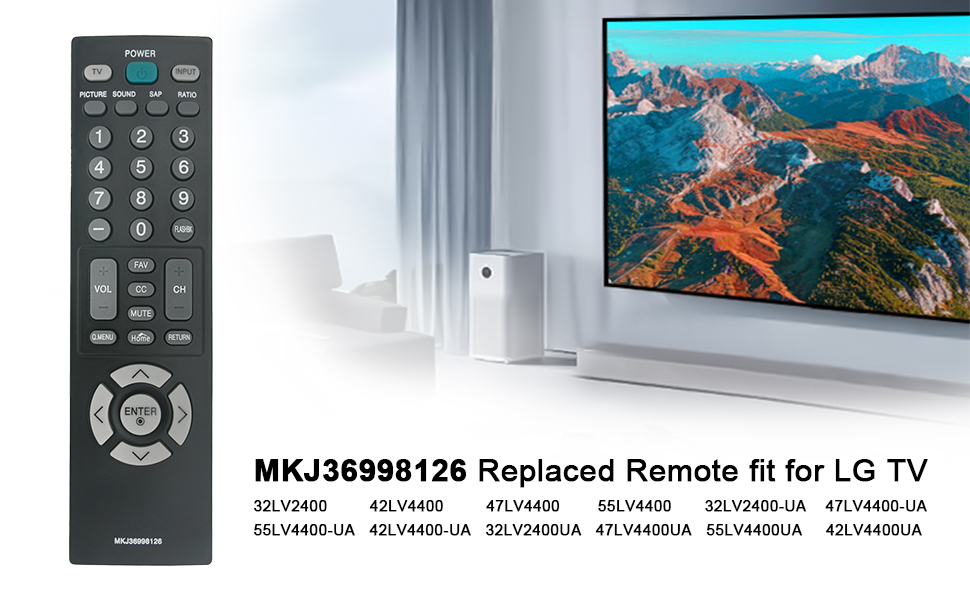
Image: The VINABTY MKJ36998126 remote control displayed alongside a list of compatible LG TV models, including 32LV2400, 42LV4400, 47LV4400, and 55LV4400 series.
Warranty Information
Specific warranty details for the VINABTY MKJ36998126 remote control may vary. Please refer to the retailer's return policy or contact the manufacturer directly for comprehensive warranty information.
Support
For further assistance, troubleshooting, or inquiries regarding your VINABTY MKJ36998126 remote control, please contact your point of purchase or the product manufacturer. Ensure you have your product model number (MKJ36998126) available when seeking support.