
Product Overview
The BEESCLOVER WCDMA Car GPS Tracker LK209A is a robust vehicle GPS locator designed for reliable tracking and security. It features 3G WCDMA connectivity, geo-fence alerts, and free tracking software. This device is suitable for a wide range of vehicles, operating on 12V-60V systems.
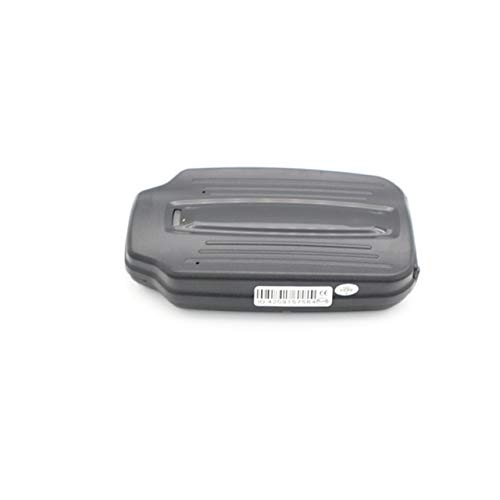
Image: The BEESCLOVER LK209A GPS Tracker, showcasing its compact and durable design.
What's in the Box
Upon unboxing your BEESCLOVER LK209A GPS Tracker, please ensure all the following components are present:
- BEESCLOVER WCDMA Car GPS Tracker (LK209A)
- Battery
- USB Charging Cable
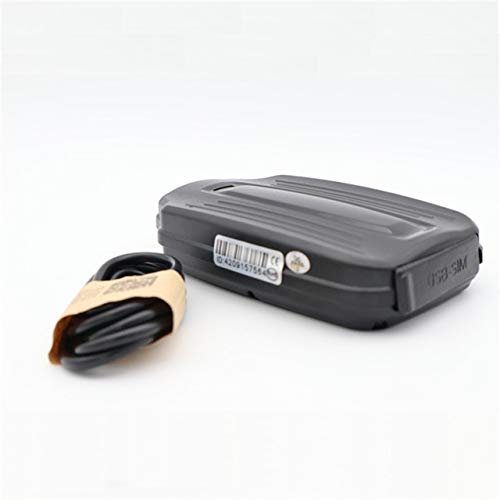
Image: The LK209A GPS Tracker alongside its included USB charging cable, demonstrating the compact size of the device.
Setup Guide
1. Device Preparation
Before initial use, ensure the device is fully charged. Insert a compatible 3G WCDMA SIM card into the designated slot. The SIM card should have an active data plan for tracking functionality.
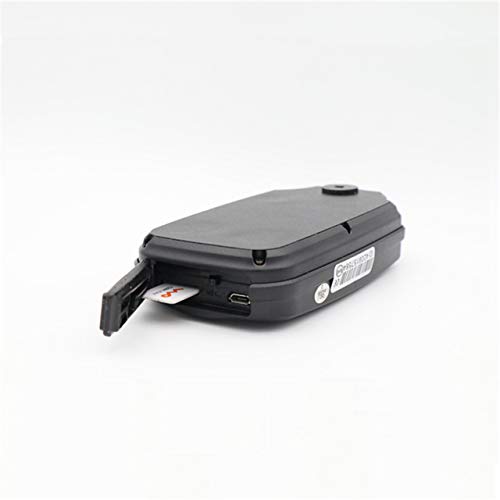
Image: The LK209A GPS Tracker with its SIM card slot open, illustrating where to insert the SIM card for network connectivity.
2. Powering On
Connect the device to a 12V-60V power source in your vehicle. The device will automatically power on and begin searching for a network signal and GPS satellites. Ensure a stable power connection for continuous operation.
3. Initial Configuration
Once powered on and connected to the network, access the free tracking software (details provided with product packaging or online) to register your device. Follow the on-screen instructions within the software to complete the initial setup and begin monitoring.
Operating Instructions
GPS Tracking
Utilize the provided free tracking software or mobile application to view the real-time location of your vehicle. The software allows you to see historical routes, set tracking intervals, and monitor vehicle status.
Geo-Fence Alert
Define specific geographical boundaries (geo-fences) within the tracking software. You will receive an alert notification if the vehicle enters or exits these predefined areas, enhancing security and monitoring capabilities.
Sensor Alerts
The LK209A is equipped with drop, vibration, and motion sensors. Configure these alerts within the tracking software to receive instant notifications for unauthorized movement, tampering, or significant impacts to the vehicle.
Maintenance
To ensure the longevity and optimal performance of your GPS tracker, follow these maintenance guidelines:
- Cleaning: Wipe the device with a soft, dry cloth. Avoid using harsh chemicals or abrasive cleaners.
- Environmental Conditions: While the device is waterproof, avoid prolonged exposure to extreme temperatures or direct submersion in water.
- Battery Care: For devices with internal batteries, ensure regular charging to maintain battery health, especially if the vehicle is not in constant use. The battery life is rated for 30 hours and up.
- Firmware Updates: Periodically check the manufacturer's website or tracking software for any available firmware updates to ensure the device operates with the latest features and improvements.
Troubleshooting
If you encounter issues with your BEESCLOVER LK209A GPS Tracker, refer to the following common problems and solutions:
| Problem | Possible Cause | Solution |
|---|---|---|
| Device not powering on | No power supply or faulty connection. | Check power cable connection and vehicle's power source (12V-60V). Ensure battery is charged if operating on internal power. |
| No GPS signal | Device is in an area with poor satellite reception (e.g., indoors, underground parking). | Move the vehicle to an open area with a clear view of the sky. Allow a few minutes for the device to acquire satellites. |
| No network connection (offline) | SIM card not inserted correctly, no data plan, or out of network coverage. | Verify SIM card insertion. Check SIM card's data plan and network coverage in the area. Restart the device. |
| Inaccurate position | Weak GPS signal, interference, or device not fully initialized. | Ensure the device has a clear view of the sky. Allow time for the device to achieve a stable GPS lock (position accuracy is typically 5m). |
Specifications
Detailed technical specifications for the BEESCLOVER WCDMA Car GPS Tracker LK209A:
| Feature | Detail |
|---|---|
| Model Name | LK209A |
| GPRS Module | MTK 6261 |
| Network | GSM/GPRS, 3G WCDMA (UMTS1900/850/2100/900 MHz) |
| Application Voltage | 12V-60V (for all vehicles) |
| Battery Life | 30 Hours & Up |
| Position Accuracy | 5m |
| Output Power | 60-80mA |
| Item Size | 98mm x 58mm x 32mm |
| Special Features | Waterproof, Geo Fence, Drop/Vibration/Motion/Compact Sensor |
| Manufacturer | BEESCLOVER |
| ASIN | B07R8VRYFC |
| First Available | 29 April 2019 |
Warranty and Support
For information regarding product warranty, returns, or technical support, please refer to the documentation included with your purchase or contact BEESCLOVER customer service directly. Details for contacting support are typically available on the manufacturer's official website or through your point of purchase.
When contacting support, please have your product model (LK209A) and ASIN (B07R8VRYFC) readily available to assist with faster service.