
Calvas CRMC-A675JBEZ
User Manual
Calvas AERMEC Air Conditioner Remote Control
Model: CRMC-A675JBEZ
Introduction
This manual provides detailed instructions for the proper use and maintenance of your Calvas AERMEC CRMC-A675JBEZ Air Conditioner Remote Control. Please read this manual thoroughly before operating the device to ensure optimal performance and longevity.
Product Overview

Figure 1: Front view of the remote control, displaying the screen with current settings (temperature 26°C, time 6:00 AM) and primary control buttons.
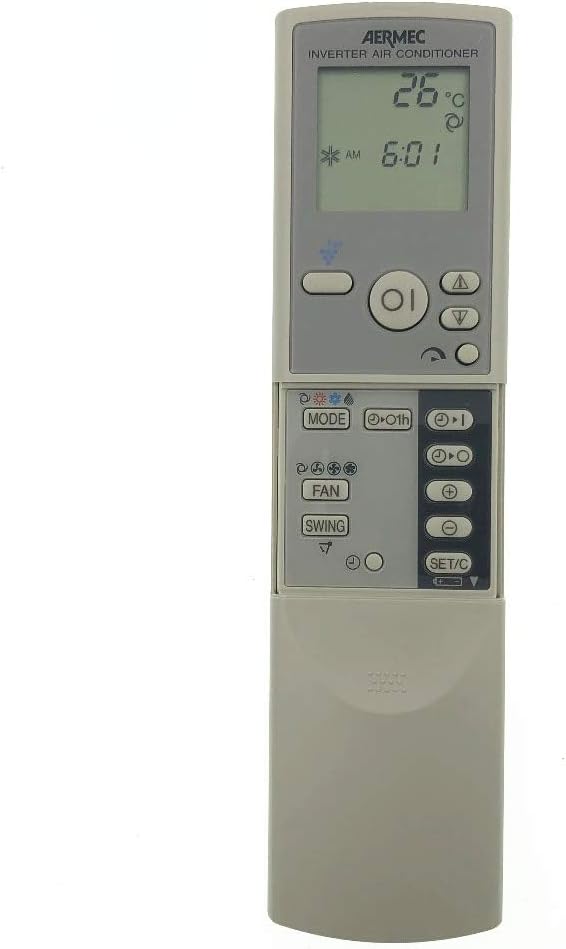
Figure 2: Front view of the remote control with the lower sliding cover open, exposing secondary function buttons such as MODE, FAN, SWING, and SET/C.

Figure 3: Angled perspective of the remote control with the sliding cover extended, providing a clear view of all accessible buttons and the display.

Figure 4: Rear view of the remote control, indicating the model number CRMC-A675JBEZ and battery requirements (R03(AAA) 2PCS).
Setup
Battery Installation
- Locate the battery compartment on the back of the remote control.
- Slide the battery cover downwards to open it.
- Insert two AAA (R03) batteries, ensuring the positive (+) and negative (-) ends align with the markings inside the compartment.
- Slide the battery cover back into place until it clicks securely.
Important: Do not mix old and new batteries. Do not mix alkaline, standard (carbon-zinc), or rechargeable (nickel-cadmium) batteries. Remove batteries if the remote will not be used for an extended period.
Operating Instructions
The remote control features a clear LCD display and various buttons for controlling your AERMEC air conditioner. Familiarize yourself with the button layout as shown in the Product Overview section.
Basic Functions
- Power Button (●): Press to turn the air conditioner ON or OFF.
- Temperature Adjustment (▲ / ▼): Use the up and down arrows to increase or decrease the desired temperature.
- Mode Button (MODE): Press repeatedly to cycle through operating modes (e.g., Cool, Heat, Fan, Dry, Auto). The current mode will be displayed on the LCD.
- Fan Speed Button (FAN): Adjusts the fan speed (e.g., Auto, Low, Medium, High).
- Swing Button (SWING): Controls the vertical louver movement for air distribution.
Advanced Functions (Under Sliding Cover)
Slide down the cover at the bottom of the remote to access additional settings.
- Timer Buttons (▲ / ▼ with clock icon): Used to set ON/OFF timers for the air conditioner. Refer to your air conditioner's main manual for specific timer programming instructions.
- SET/C Button: Typically used to confirm settings or switch between Celsius and Fahrenheit temperature display.
- Other Buttons: Depending on your specific AERMEC air conditioner model, other buttons may include Sleep mode, Turbo, or Health functions. Consult your air conditioner's manual for their specific uses.
Maintenance
Cleaning the Remote Control
- Wipe the surface of the remote control with a soft, dry cloth.
- For stubborn dirt, lightly dampen the cloth with water and a mild detergent, then wipe dry immediately.
- Do not use abrasive cleaners, alcohol, or corrosive liquids, as these can damage the remote's surface or internal components.
Battery Replacement
Replace batteries when the display becomes dim or the remote control's range decreases. Follow the battery installation steps in the "Setup" section.
Troubleshooting
| Problem | Possible Cause | Solution |
|---|---|---|
| Remote control not responding. | Dead or incorrectly installed batteries. | Replace batteries with new AAA batteries, ensuring correct polarity. |
| Remote control range is poor. | Weak batteries or obstruction between remote and AC unit. | Replace batteries. Ensure a clear line of sight to the air conditioner's receiver. |
| Air conditioner does not respond to commands. | Remote control not compatible or AC unit is off/unplugged. | Verify the remote is the correct model (CRMC-A675JBEZ) for your AERMEC unit. Check if the AC unit is powered on. |
Specifications
- Model Number: CRMC-A675JBEZ
- Brand: Calvas
- Compatibility: AERMEC Air Conditioners (specific models may vary, verify with your AC unit's manual)
- Communication: Infrared (IR)
- Power Source: 2 x AAA (R03) Batteries
- Material: Plastic (as indicated by "otro" in source, assuming common remote material)
- Weight: Approximately 99.79 g (without batteries)
Warranty and Support
This product is manufactured by Calvas. For specific warranty information or technical support, please refer to the documentation provided with your purchase or contact the seller directly. As a replacement remote, warranty terms may vary.
For further assistance, you may also consult the official AERMEC air conditioner user manual for detailed instructions on specific functions controlled by this remote.
Ask a question about this manual
Ask about setup, troubleshooting, compatibility, parts, safety, or missing instructions. Manuals+ will review the question and use this page’s manual context to help answer it.