
Introduction
This manual provides instructions for the proper setup, operation, and maintenance of your Calvas 2020B0-B1 remote control. This remote is designed to be compatible with Shaw LCD LED televisions, offering a convenient replacement or secondary control unit. Please read this manual thoroughly before using the device.

Image: Front view of the Calvas 2020B0-B1 remote control.
Setup
1. Battery Installation
- Locate the battery compartment on the back of the remote control.
- Press down on the latch and slide the battery cover off.
- Insert two AAA batteries (not included), ensuring the positive (+) and negative (-) terminals align correctly with the markings inside the compartment.
- Slide the battery cover back into place until it clicks securely.

Image: Back view of the remote control with the battery compartment open.
2. Quick Setup for TV Control
The remote features a quick setup function for initial pairing with your television. Follow these steps:
- Press and hold the SETUP button until the LED light blinks twice.
- Press the TV POWER button.
- Press and hold the OK button.
- Release the OK key when your TV turns off. This indicates successful pairing.
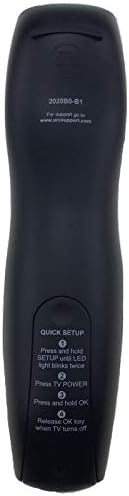
Image: Back of the remote control displaying quick setup instructions.
Note: If the TV does not turn off, repeat the steps or consult the TV's manual for specific remote programming codes if available.
Operating Instructions
The Calvas 2020B0-B1 remote control utilizes infrared (IR) technology. Ensure a clear line of sight between the remote's IR emitter and your TV's IR receiver for optimal performance.
Button Functions:
- POWER: Turns the TV on or off.
- VOL +/-: Increases or decreases the volume.
- CH +/-: Changes the channel up or down.
- MUTE: Mutes or unmutes the TV audio.
- NUMBER PAD (0-9): Directly enters channel numbers.
- GUIDE: Displays the program guide.
- MENU: Accesses the TV's main menu.
- INFO: Displays information about the current program.
- OK / Navigation Arrows: Confirms selections and navigates through menus.
- EXIT: Exits the current menu or screen.
- LAST: Returns to the previously viewed channel.
- DAY +/-: Navigates through days in the program guide.
- MUSIC / FAV: Accesses music channels or favorite channels (functionality may vary by TV model).
Maintenance
Cleaning:
- Wipe the remote control with a soft, dry cloth.
- For stubborn dirt, slightly dampen the cloth with water or a mild, non-abrasive cleaner.
- Do not use harsh chemicals, solvents, or abrasive cleaning pads, as these can damage the remote's surface or internal components.
Battery Replacement:
- Replace batteries when the remote's response becomes sluggish or the LED indicator fails to light up.
- Always replace both batteries at the same time with new AAA batteries.
- Do not mix old and new batteries, or different types of batteries.
- Remove batteries if the remote will not be used for an extended period to prevent leakage.
Storage:
- Store the remote in a cool, dry place away from direct sunlight and extreme temperatures.
- Avoid dropping the remote or exposing it to excessive moisture.
Troubleshooting
- Remote not responding:
- Check if the batteries are inserted correctly and are not depleted. Replace if necessary.
- Ensure there is a clear line of sight between the remote and the TV's IR receiver. Remove any obstructions.
- Try re-pairing the remote with the TV using the "Quick Setup" steps.
- Only some buttons work:
- This might indicate a partial pairing issue or a specific button malfunction. Try re-pairing the remote.
- Clean the remote's surface, especially around the unresponsive buttons, to ensure no debris is interfering.
- Short operating range:
- Replace the batteries with fresh ones.
- Ensure no strong light sources (like direct sunlight or bright fluorescent lights) are interfering with the IR signal.
Specifications
| Brand | Calvas |
| Model Number | 2020B0-B1 (Mfr Part Number: CLS-D41D8CD98F00B204E9800998ECF8427E) |
| Compatible Devices | Television (Shaw LCD LED TVs) |
| Connectivity Technology | Infrared (IR) |
| Controller Type | Button Control |
| Maximum Number of Supported Devices | 1 |
| Maximum Range | 10 Meters |
| Special Feature | Ergonomic design |
Warranty Information
This product is typically covered by a limited warranty provided by the seller or manufacturer. Please refer to your purchase documentation or contact the retailer directly for specific warranty terms and conditions. Keep your proof of purchase for any warranty claims.
Support
For further assistance, technical support, or inquiries regarding your Calvas 2020B0-B1 remote control, please contact the seller or manufacturer through the platform where the product was purchased. Provide your model number (2020B0-B1) and any relevant purchase details when seeking support.