
Introduction
Thank you for purchasing the GEEPAS 2.1 Channel Multimedia Speaker System GMS8807. This manual provides essential information for the safe and efficient operation of your speaker system. Please read it thoroughly before use and retain it for future reference.
Safety Instructions
- Power Source: Ensure the power supply voltage matches the rating label on the speaker system.
- Ventilation: Do not block ventilation openings. Allow adequate space around the speakers for proper airflow.
- Water and Moisture: Keep the speaker system away from water, rain, and excessive humidity. Do not place liquid-filled objects on the unit.
- Heat Sources: Avoid placing the unit near heat sources such as radiators, heat registers, stoves, or other heat-producing appliances.
- Cleaning: Unplug the unit from the power outlet before cleaning. Use a dry, soft cloth. Do not use liquid cleaners or aerosol cleaners.
- Servicing: Do not attempt to service this product yourself. Refer all servicing to qualified service personnel.
- Placement: Place the speakers on a stable, flat surface to prevent accidental falls.
Package Contents
Please check the package for the following items:
- 1 x Subwoofer Unit
- 2 x Satellite Speakers
- 1 x Remote Control
- 1 x Audio Input Cable (AUX)
- 1 x User Manual (this document)
Product Overview
The GEEPAS GMS8807 is a 2.1 channel multimedia speaker system designed to deliver enhanced audio. It consists of a central subwoofer unit and two satellite speakers, controllable via a remote.
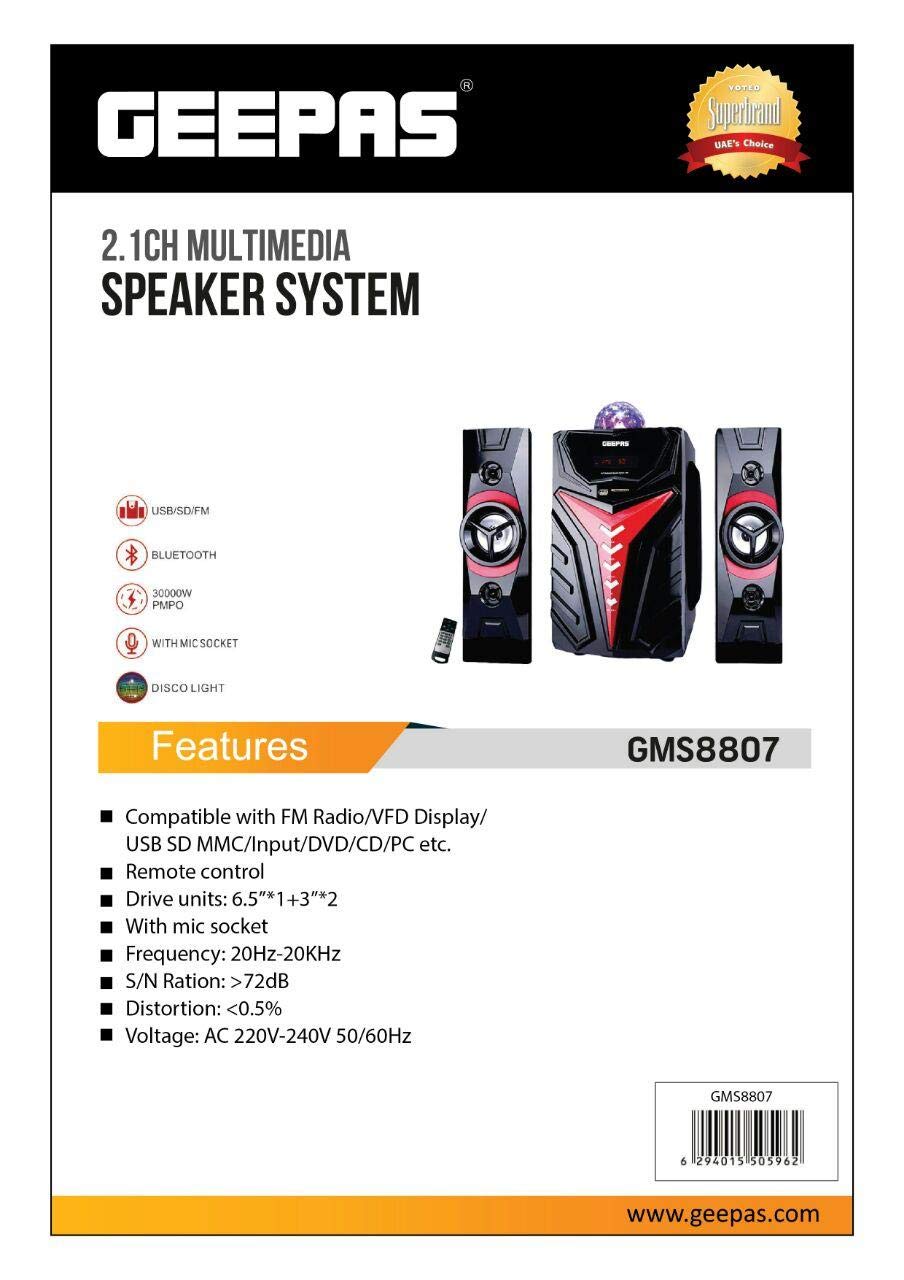
Image: GEEPAS GMS8807 2.1 Channel Multimedia Speaker System. This image displays the main subwoofer unit in the center, flanked by two satellite speakers. A remote control is visible in the lower-left corner. The subwoofer features a red and black design with a decorative light on top, while the satellite speakers are black with red accents around their drivers.
Setup
- Placement: Position the subwoofer on the floor, preferably in a central location. Place the two satellite speakers on either side of your listening area, ensuring they are equidistant from the listener for optimal stereo separation.
- Connect Satellite Speakers: Connect the cables from the satellite speakers to the corresponding output ports on the rear of the subwoofer unit. Ensure a secure connection.
- Connect Audio Source (AUX): Insert one end of the provided audio input cable (AUX) into the "AUX IN" port on the subwoofer. Connect the other end to the audio output jack (e.g., headphone jack) of your audio source (e.g., computer, smartphone, TV).
- Power Connection: Plug the power cord of the subwoofer into a suitable wall outlet.
- Power On: Turn on the speaker system using the power button on the subwoofer or the remote control.
Operating Instructions
Basic Operation
- Power On/Off: Press the POWER button on the remote control or the main unit to turn the system on or off.
- Volume Adjustment: Use the VOL+ and VOL- buttons on the remote or the volume knob on the subwoofer to adjust the master volume.
- Input Selection: Press the MODE button on the remote or the main unit to cycle through available input modes (e.g., AUX, USB, SD Card, Bluetooth if available). For AUX connection, select the AUX input.
Using the Remote Control
The remote control provides convenient access to all functions. Ensure there are no obstructions between the remote and the subwoofer's sensor.
- Mute: Press the MUTE button to temporarily silence the audio. Press again to restore sound.
- Bass/Treble Control: If available, use dedicated buttons on the remote to adjust bass and treble levels.
- Playback Controls: For USB/SD card modes, use PLAY/PAUSE, PREV, and NEXT buttons.
Maintenance
- Cleaning: Wipe the surfaces of the speakers with a soft, dry, lint-free cloth. Do not use abrasive cleaners, waxes, or solvents.
- Dust: Regularly dust the speaker grilles and vents to prevent accumulation, which can affect performance.
- Storage: If storing the system for an extended period, unplug it from the power outlet and store it in a cool, dry place, away from direct sunlight and extreme temperatures.
Troubleshooting
| Problem | Possible Cause | Solution |
|---|---|---|
| No power | Power cord not connected; Power outlet faulty; Unit turned off. | Ensure power cord is securely plugged in. Test the outlet with another device. Press the POWER button on the unit or remote. |
| No sound | Volume too low; Mute function active; Incorrect input selected; Audio cable loose/faulty; Audio source issue. | Increase volume. Press MUTE button. Select correct input (AUX). Check audio cable connections. Verify audio output from source device. |
| Distorted sound | Volume too high; Poor audio source quality; Speaker placement issues. | Reduce volume. Try a different audio source. Adjust speaker placement. |
| Remote control not working | Batteries depleted; Obstruction between remote and unit; Remote sensor blocked. | Replace remote batteries. Remove any obstructions. Ensure remote is pointed at the subwoofer's sensor. |
Specifications
| Brand | Geepas |
| Model Number | GMS8807 |
| Connectivity Technology | Wired |
| Speaker Type | External Speakers (2.1 Channel System) |
| Compatible Devices | All devices with AUX output |
| Input Type | AUX |
| Number of Speakers | 3 (1 Subwoofer, 2 Satellite Speakers) |
| Output Power | 50 - 100 Watts (Nominal) |
| Shape | Rectangular |
| Color | Black |
| Control Method | Remote Control |
| Power Source | Corded Electric |
| Product Weight | 3-5 KG (Approximate) |
Warranty and Support
For warranty information and technical support, please refer to the warranty card included with your product or contact your retailer or the manufacturer directly. Keep your purchase receipt as proof of purchase.
Manufacturer: Geepas
ASIN: B07R7ZSGNL