
1. Introduction
This manual provides comprehensive instructions for the Calvas R06/BGE infrared remote control, designed for use with Condor air conditioning units. It covers setup, operation, maintenance, and troubleshooting to ensure optimal performance and longevity of your remote control.
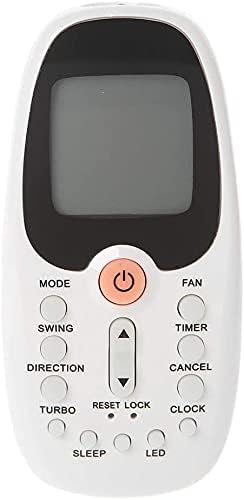
Figure 1: Front view of the R06/BGE remote control, showing the display screen and various control buttons.
2. Setup
2.1 Battery Installation
- Locate the battery compartment on the back of the remote control.
- Slide open the battery cover.
- Insert two AAA batteries (not included), ensuring the correct polarity (+ and -) as indicated inside the compartment.
- Close the battery cover securely.

Figure 2: Back view of the remote control, highlighting the battery compartment and product label.
3. Operating Instructions
3.1 Button Functions Overview
The R06/BGE remote control features a clear digital display and intuitive buttons for controlling your air conditioner. Below is a description of the main buttons:
- POWER (Orange Button): Turns the air conditioner ON or OFF.
- MODE: Cycles through operating modes (e.g., Cool, Heat, Fan, Dry, Auto).
- FAN: Adjusts fan speed (e.g., Low, Medium, High, Auto).
- SWING: Controls the vertical swing of the air conditioner's louvers.
- DIRECTION: Adjusts the horizontal direction of the airflow.
- TIMER: Sets the timer for automatic ON/OFF operations.
- CANCEL: Cancels the currently set timer or other functions.
- TURBO: Activates rapid cooling or heating for quick temperature changes.
- RESET: Resets the remote control settings to default.
- LOCK: Locks the remote control buttons to prevent accidental changes.
- CLOCK: Sets the current time on the remote's display.
- SLEEP: Activates the sleep mode for comfortable night operation.
- LED: Turns the display backlight or unit's LED indicator ON/OFF.
- Temperature Up/Down Arrows: Adjusts the desired temperature setting.
3.2 Basic Operation
- Turning On/Off: Press the orange POWER button to turn the air conditioner on or off.
- Adjusting Temperature: Use the Up and Down arrow buttons to set your desired temperature.
- Changing Mode: Press the MODE button repeatedly to cycle through available operating modes until the desired mode is displayed.
- Adjusting Fan Speed: Press the FAN button to select the desired fan speed.
4. Maintenance
4.1 Cleaning the Remote Control
- Wipe the surface of the remote control with a soft, dry cloth.
- For stubborn dirt, slightly dampen the cloth with water and a mild detergent, then wipe dry immediately.
- Do not use abrasive cleaners, alcohol, or corrosive liquids, as these may damage the remote's surface or internal components.
4.2 Battery Replacement
- Replace batteries when the display becomes dim or the remote control's response becomes sluggish.
- Always replace both batteries at the same time with new ones of the same type (AAA).
- Remove batteries if the remote control will not be used for an extended period to prevent leakage and damage.
5. Troubleshooting
If you encounter issues with your remote control, refer to the table below for common problems and their solutions:
| Problem | Possible Cause | Solution |
|---|---|---|
| Remote not responding to air conditioner. |
|
|
| Display is dim or blank. |
|
|
| Buttons are unresponsive. |
|
|
6. Specifications
Key technical specifications for the Calvas R06/BGE remote control:
| Feature | Detail |
|---|---|
| Model Number | R06/BGE |
| Brand | Calvas |
| Wireless Communication | Infrared (IR) |
| Frequency | 433 MHz |
| Compatible Devices | Condor Air Conditioners |
| Maximum Range | 10 Meters |
| Special Feature | Digital Display |
| Dimensions | 11cm (Length) x 5cm (Width) x 1.5cm (Thickness) |

Figure 3: Side view of the remote control, illustrating its approximate dimensions.
7. Warranty and Support
For any product-related inquiries, technical support, or warranty information, please contact the manufacturer, Calvas, or your original point of purchase. Keep your purchase receipt as proof of purchase for any warranty claims.
