
PRYMAX PS-YXA330
PRYMAX 330W Portable Power Station
Model: PS-YXA330 User Manual
Brand: PRYMAX
1. Introduction
This user manual provides essential information for the safe and efficient operation of your PRYMAX 330W Portable Power Station. Please read this manual thoroughly before using the device and retain it for future reference.
2. Safety Information
Always follow basic safety precautions when using this product to reduce the risk of injury or damage.
- Do not disassemble, repair, or modify the unit.
- Do not expose the unit to fire or high temperatures.
- Do not use or store the unit in direct sunlight or in hot environments.
- Keep away from water, high humidity, and corrosive substances.
- Ensure proper ventilation during use and charging.
- Keep out of reach of children.
- Dispose of the product according to local regulations.
This product contains chemicals known to the State of California to cause cancer and birth defects or other reproductive harm.
3. Product Overview
The PRYMAX 330W Portable Power Station is a versatile power source designed for various applications, from outdoor adventures to emergency backup. It features multiple output ports and a clear LCD display.
3.1. Front Panel Layout

Figure 1: Front panel of the PRYMAX 330W Portable Power Station, highlighting the various input and output ports, and control buttons.
- 1*Car Port (12V/8A): For connecting 12V car appliances.
- 1*DC Input Port (18V): For charging the power station via wall adapter or solar panel.
- Power Button: To turn the unit on/off.
- DC Button: Activates the 12V DC output ports.
- USB Button: Activates the USB-A and Type-C output ports.
- AC Button: Activates the 110V AC outlets.
- 3*DC Output (12V/8A): For DC-powered devices.
- 1*TYPE-C (PD 45W): Power Delivery port for fast charging compatible devices.
- 1*QC3.0 (18W MAX): Quick Charge 3.0 port for rapid charging.
- 2*USB-A (5V/2.4A): Standard USB ports for charging various devices.
- 2*AC Output (Rated 330W, Peak 600W, Pure Sine Wave): Standard AC outlets for household appliances.
3.2. Digital LCD Display Screen
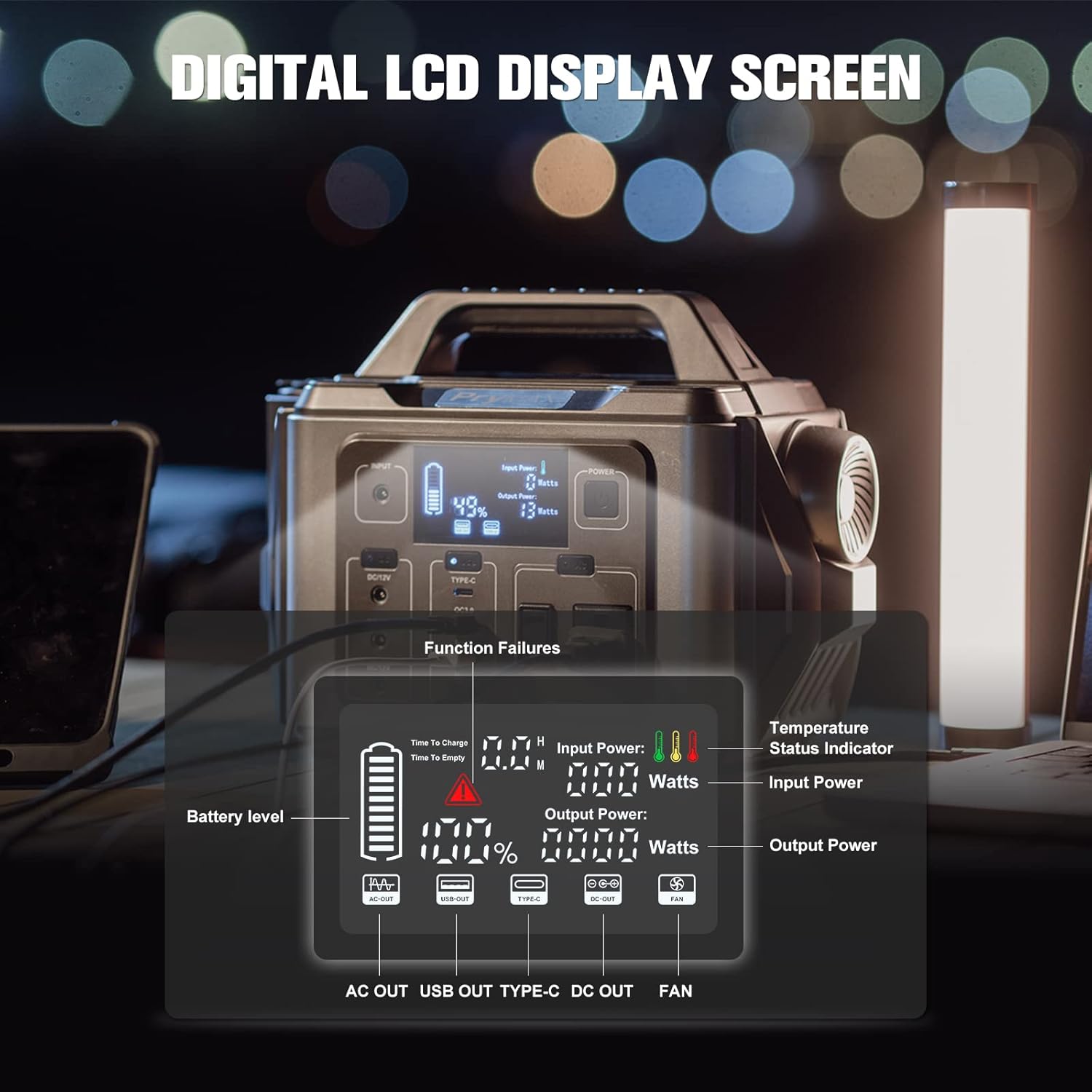
Figure 2: Detailed view of the LCD display, indicating real-time operational status.
- Battery Level: Shows the remaining battery charge.
- Time To Charge/Empty: Estimated time for full charge or depletion.
- Input Power (Watts): Displays the current power input during charging.
- Output Power (Watts): Displays the current power output to connected devices.
- Temperature Status Indicator: Warns of abnormal temperatures.
- Function Failures: Indicates system errors or warnings.
- Output Indicators: Icons for AC OUT, USB OUT, TYPE-C OUT, DC OUT, and FAN status.
4. Setup
4.1. Initial Charging
Before first use, fully charge the power station. Use the provided AC power adapter and connect it to the DC Input Port (18V) on the unit and a standard wall outlet. The LCD display will show charging progress.
4.2. Powering On/Off
Press and hold the POWER button for 3 seconds to turn the unit on or off. The LCD screen will illuminate.
5. Operating Instructions
Once the power station is on, you can activate specific output sections as needed.
5.1. Using AC Outlets
Press the AC button to enable the 110V AC outlets. The AC icon will appear on the LCD. Plug your devices (up to 330W continuous, 600W peak) into the AC outlets. Press the AC button again to turn off the AC output.
5.2. Using DC Outlets
Press the DC button to enable the 12V DC ports and the car port. The DC icon will appear on the LCD. Connect your 12V devices. Press the DC button again to turn off the DC output.
5.3. Using USB Ports
Press the USB button to enable the USB-A, QC3.0, and Type-C ports. The USB and Type-C icons will appear on the LCD. Connect your USB-powered devices. Press the USB button again to turn off the USB output.
5.4. Emergency Light Function
The power station includes an emergency light with four modes: high light, low light, fast flash, and SOS light. To activate, locate the light button (usually near the light itself) and press it to cycle through the modes.
5.5. Typical Applications
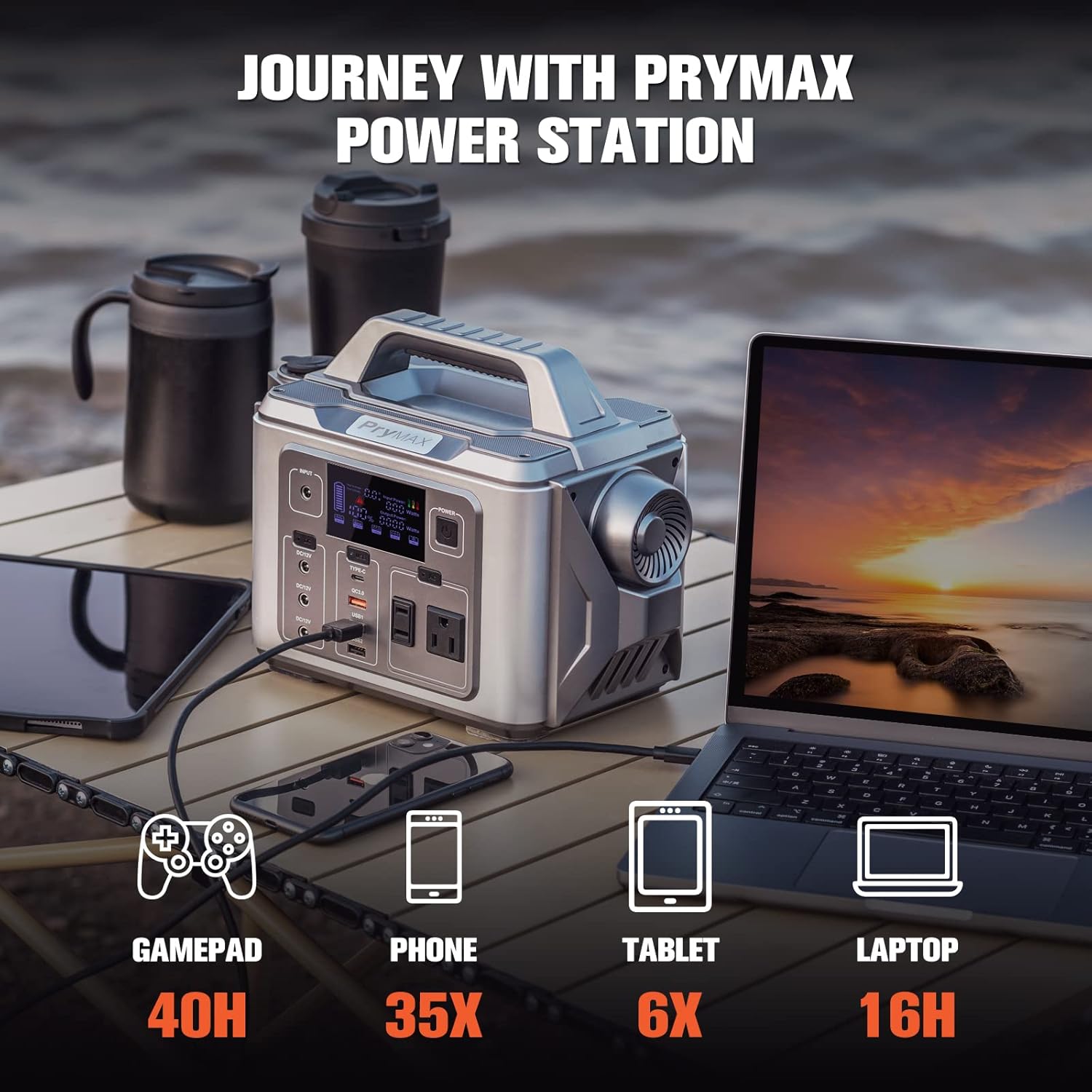
Figure 3: The power station can charge multiple devices simultaneously, making it ideal for various scenarios.
- Outdoor Activities: Camping, hiking, RV trips, tailgating.
- Emergency Backup: Powering essential devices during outages.
- Work/Hobby: Powering tools, lights, or small appliances in remote locations.

Figure 4: Versatile applications of the power station in different environments.
6. Recharging Methods
Your PRYMAX Portable Power Station offers multiple convenient ways to recharge.
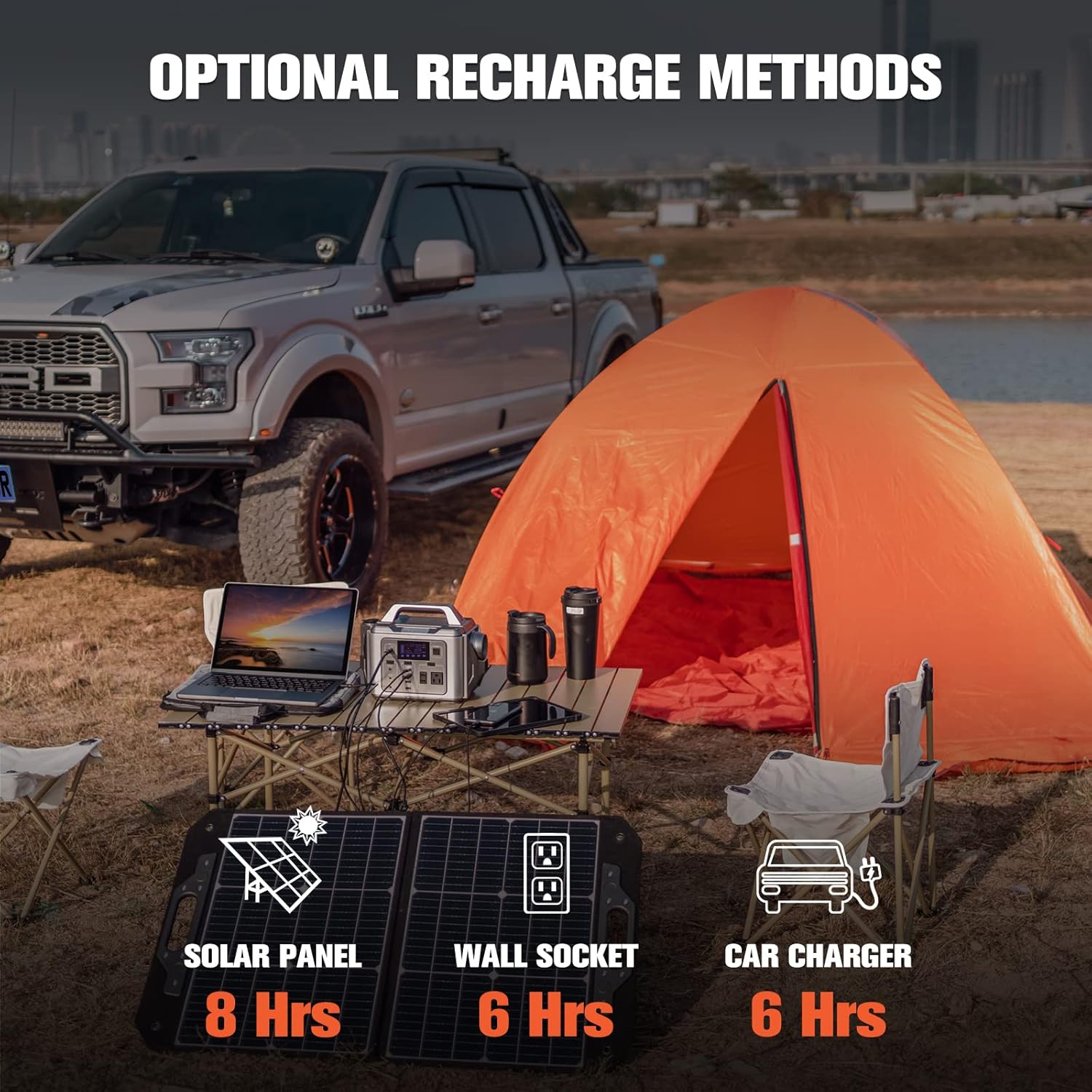
Figure 5: Overview of available charging options and approximate charging times.
- Wall AC Socket: Use the provided AC adapter to charge from a standard 110V wall outlet. (Approx. 6 hours)
- Solar Panels: Connect compatible solar panels (not included) to the DC Input Port. The built-in MPPT technology optimizes charging efficiency. (Approx. 8 hours, depending on sunlight intensity and panel wattage)
- 12V Car Cigarette Lighter Port: Use the included car charging cable to recharge from your vehicle's 12V outlet. (Approx. 6 hours)
7. Battery Management System (BMS)
The PRYMAX Power Station is equipped with an advanced Battery Management System (BMS) to ensure safe and reliable operation, protecting both the unit and your connected devices.

Figure 6: BMS protection features for enhanced safety.
- Overcurrent Protection: Prevents damage from excessive current draw.
- Overcharge Protection: Stops charging once the battery is full to prevent overcharging.
- Over Temperature Protection: Shuts down the unit if internal temperature exceeds safe limits.
- Short Circuit Protection: Automatically cuts power in case of a short circuit.
- Low Battery Protection: Prevents deep discharge to prolong battery life.
- Overload Protection: Protects against drawing too much power from the outlets.
- Overvoltage Protection: Safeguards against excessive voltage input or output.
8. Specifications
| Feature | Detail |
|---|---|
| Model Name | PS-YXA330 |
| Brand | PRYMAX |
| Battery Type | Lithium Polymer |
| Capacity | 296Wh / 80000mAh |
| AC Output | 2 x 110V Pure Sine Wave, 330W Rated, 600W Peak |
| DC Output | 3 x 12V/8A, 1 x 12V/8A Carport |
| USB-A Output | 2 x 5V/2.4A |
| QC3.0 Output | 1 x 18W Max |
| Type-C Output | 1 x PD 45W |
| Input Voltage | 18V (DC Input Port) |
| Dimensions (L x W x H) | 8.5" x 5" x 7" |
| Item Weight | 6.5 Pounds |
| Operating Temperature | (Refer to product for specific range, typically 0-40°C) |
9. Troubleshooting
If you encounter issues with your power station, refer to the common problems and solutions below.
9.1. Unit Not Powering On or Holding Charge
If the unit appears to charge quickly but then immediately dies when a load is applied, or if the AC output stops working, this may indicate an internal battery issue or a fault with the power delivery system. This can sometimes manifest as erratic display readings before failure.
Solution:
- Ensure the charging adapter is securely connected and functioning.
- Verify that the device you are trying to power does not exceed the power station's rated output (330W AC).
- If the issue persists, it may indicate a hardware malfunction. Please contact customer support for assistance.
9.2. LCD Display Not Working
If the LCD display is blank or unresponsive, ensure the unit is powered on. If it remains off, try recharging the unit to see if it was simply out of battery.
9.3. Overload Indication
If the overload icon appears on the display, disconnect the device(s) immediately. The power station has detected an excessive power draw. Reduce the load and restart the unit.
10. Maintenance
- Store the unit in a cool, dry place away from direct sunlight.
- Recharge the unit every 3-6 months to maintain battery health, even if not in use.
- Clean the exterior with a soft, dry cloth. Do not use abrasive cleaners or solvents.
- Ensure ventilation openings are clear of dust and debris.
11. Warranty and Support
This PRYMAX Portable Power Station comes with a 1-year warranty from the date of purchase. This warranty covers manufacturing defects and workmanship under normal use.
For technical support, warranty claims, or any questions regarding your product, please contact PRYMAX customer service through the retailer's platform or visit the official PRYMAX website for contact information.
Please have your model number (PS-YXA330) and purchase date ready when contacting support.
Ask a question about this manual
Ask about setup, troubleshooting, compatibility, parts, safety, or missing instructions. Manuals+ will review the question and use this page’s manual context to help answer it.