
1. Introduction
This manual provides essential instructions for the setup, operation, and maintenance of your Belle Mobile Medical Alert Device. This device is designed to provide 24/7 emergency monitoring and support, offering peace of mind through its mobile connectivity and two-way communication features.
Please read this manual thoroughly before using your device to ensure proper function and safety.

Image: An individual wearing the Belle Mobile Medical Alert Device on a lanyard while engaged in reading.
2. Setup
2.1 Package Contents
- Belle Mobile Medical Alert Device
- Charging Cradle
- Charging Cable (USB)
- Neck Lanyard
- Belt Clip
- User Manual (this document)
2.2 Initial Charging
Before first use, fully charge your Belle device. The device features a long-lasting rechargeable battery, providing up to 30 days of use on a single charge.
- Connect the charging cable to the charging cradle.
- Plug the other end of the charging cable into a standard USB power adapter (not included) or a powered USB port.
- Place the Belle device into the charging cradle. Ensure it is seated correctly.
- The device will indicate charging status (e.g., an indicator light). Allow several hours for a full charge.
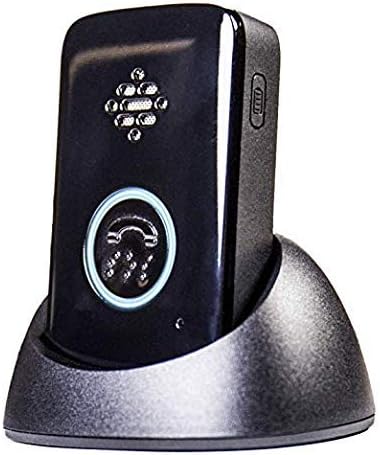
Image: The Belle Mobile Medical Alert Device resting in its charging cradle, ready for charging.
2.3 Device Activation
Activation is required for your Belle device to function. Your purchase includes the first month of 24/7 emergency call response. A one-time activation fee of $35 applies.
- Follow the activation instructions provided with your device packaging.
- A credit card will be required for the $35 activation fee.
- Monthly service plan is $29.99/month after the first included month. No cancellation fees or contracts apply.
2.4 Wearing the Device
The Belle device is lightweight and can be worn in two primary ways:
- Neck Lanyard: Attach the provided lanyard to the device and wear it around your neck for easy access.
- Belt Clip: Attach the belt clip to the device and secure it to your belt or clothing.

Image: An individual wearing the Belle Mobile Medical Alert Device around their neck with the included lanyard.

Image: The Belle Mobile Medical Alert Device secured to a bag using its belt clip attachment.

Image: A close-up view of the detachable belt clip accessory for the Belle device.
3. Operating Instructions
3.1 Making an Emergency Call
In case of an emergency, press the large button on the front of the device. This will connect you to an expert care specialist.

Image: A hand holding the Belle Mobile Medical Alert Device, highlighting the prominent call button.
3.2 Two-Way Voice Communication
The Belle device features two-way voice communication. Once connected to a specialist, you can speak directly through the device. The specialist can hear you and respond, allowing them to assess your situation and dispatch appropriate assistance, whether it's emergency personnel or a designated contact.
3.3 Location Services
The device utilizes 4G LTE nationwide coverage (Verizon network) and WiFi location services to help specialists determine your location during an emergency. This ensures assistance can be sent to your precise location, whether you are at home or away.

Image: An infographic illustrating key features of the Belle device, including battery life, location services, and two-way communication.
3.4 Battery Status Indicators
The device provides indications for battery status:
- The battery light flashes after a call when the battery is low.
- Battery email and text alerts are sent when approximately 1 week (21%) or 2 days (13%) of battery life remain.
- If the user is called, an alert indicates 2 days remaining.
3.5 Testing the Device
It is recommended to periodically test your device to ensure it is functioning correctly. Follow the instructions provided by the service provider for conducting test calls. This helps confirm connectivity and two-way voice functionality.
4. Maintenance
4.1 Charging
To maintain optimal battery performance, charge your device regularly. With up to 30 days of battery life, you can establish a charging routine that suits your usage patterns. Always use the provided charging cradle and cable.
4.2 Water Resistance
The Belle device has an IP67 water-resistant rating, meaning it is protected against dust and can withstand immersion in water up to 1 meter for up to 30 minutes. However, it is not recommended to intentionally submerge the device.
If the device gets wet, dry it thoroughly before placing it back in the charging cradle.
4.3 Cleaning
Clean the device with a soft, damp cloth. Avoid using harsh chemicals or abrasive cleaners, as these can damage the device's finish or internal components.
5. Troubleshooting
5.1 Device Not Activating
If you experience difficulties during the activation process, ensure all steps outlined in Section 2.3 are followed. If issues persist, contact Belle customer support for assistance.
5.2 No Two-Way Voice Communication
If you cannot hear the specialist or they cannot hear you during a call:
- Ensure the device is held close to your mouth and ear.
- Check for any obstructions covering the speaker or microphone.
- Verify that the device has sufficient battery charge.
- Move to an area with better cellular coverage if you are in a remote location.
5.3 Device Not Charging
If the device does not charge when placed in the cradle:
- Ensure the charging cable is securely connected to both the cradle and the power source.
- Verify that the power source is active.
- Check if the device is correctly seated in the charging cradle.
- Inspect the charging contacts on both the device and the cradle for dirt or damage.
5.4 Inaccurate Location Information
While Belle uses 4G LTE and WiFi for location services, environmental factors can sometimes affect accuracy. If you believe location information is inaccurate, ensure the device has a clear line of sight to the sky (for cellular triangulation) or is within range of known WiFi networks.
5.5 General Support
For any other issues or questions, please contact Belle customer support. Refer to the contact information provided with your service agreement.
6. Specifications
| Brand | Belle |
| Model | Mobile Medical Alert Device |
| Color | Black |
| Material | Plastic |
| Battery Type | Lithium-Ion |
| Battery Life | Up to 30 days |
| Water Resistance | IP67 Rated |
| Connectivity | 4G LTE (Verizon Network), WiFi |
| Dimensions | 7.8 x 4.72 x 2.13 inches (Package) |
| Weight | 11.36 ounces (Package) |
| Manufacturer | FreeUs |
7. Warranty and Support
7.1 Warranty Information
For detailed warranty information regarding your Belle Mobile Medical Alert Device, please refer to the documentation included with your purchase or contact Belle customer support directly. Warranty terms typically cover manufacturing defects.
7.2 Customer Support
If you require assistance with your device, have questions about your service plan, or need technical support, please contact Belle customer support. Contact details are usually provided in your service agreement or on the Belle official website.
Remember, there are no cancellation fees or long-term contracts for the service plan.