
1. Introduction
Thank you for choosing the Famidoc FDIR-V4 Digital Infrared Thermometer. This highly qualified thermometer is designed to measure human body temperature and object temperature based on the relationship between temperature and measurable infrared radiation. Its dual-mode functionality allows for both forehead and ear measurements, providing quick and accurate readings for all ages, including infants, adults, and elders.
The device utilizes an updated high-accuracy sensor probe and the latest smart chip to ensure reliable performance. Simply aim the unit's probe towards the surface to be measured to obtain a quick and accurate temperature reading.
2. Product Overview
Familiarize yourself with the components of your Famidoc FDIR-V4 thermometer:

Figure 2.1: Famidoc FDIR-V4 Thermometer Components
- LED Screen: Displays temperature readings, mode icons (forehead/ear), and other indicators. Designed for clear visibility even in dark environments.
- Measurement Button: Used to initiate temperature readings.
- Forehead Cap: Covers the infrared probe for forehead measurements. Can be removed for ear measurements.
- Infrared Probe: The sensor that detects infrared radiation for temperature measurement.
- Battery Cover: Located at the bottom, provides access to the battery compartment.

Figure 2.2: Famidoc FDIR-V4 Thermometer Dimensions
3. Setup
3.1 Battery Installation
The Famidoc FDIR-V4 thermometer requires 2 AAA batteries, which are included. To install or replace batteries:
- Slide open the battery cover located at the bottom of the device.
- Insert two AAA batteries, ensuring correct polarity (+/-) as indicated inside the compartment.
- Close the battery cover securely.
3.2 Unit Conversion (°C/°F)
To switch between Celsius (°C) and Fahrenheit (°F):
- When the LED display is off, press and hold the Measurement/Power button for several seconds.
- The unit will cycle between °C and °F. Release the button when your desired unit is displayed.
4. Operating Instructions
The Famidoc FDIR-V4 thermometer offers two measurement modes: Forehead and Ear.
Video 4.1: Famidoc FDIR-V4 Digital Thermometer Overview and Usage
4.1 Forehead Mode
This mode is suitable for quick, non-invasive temperature checks. The forehead mode icon (a smiley face) will appear on the LED screen when ready.
- Ensure the Forehead Cap is securely attached to the probe.
- Press the Measurement Button to turn on the device.
- Gently place the probe on the center of the forehead.
- Press and hold the Measurement Button, then slowly drag the thermometer across the forehead towards the temple.
- Release the button once the thermometer beeps, indicating the measurement is complete. The temperature will be displayed on the LED screen.
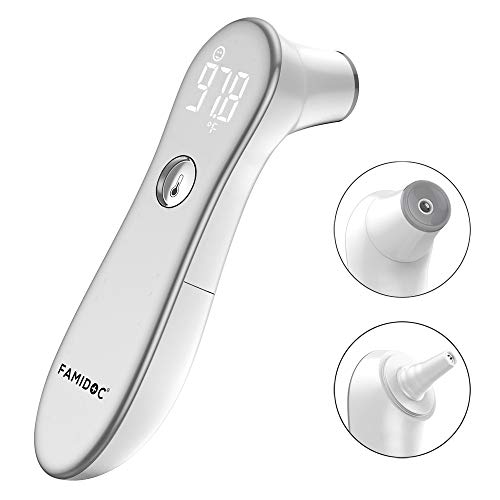
Figure 4.2: Forehead Measurement Display
4.2 Ear Mode
For ear measurements, remove the forehead cap. The ear mode icon (an ear symbol) will appear on the LED screen.
- Carefully remove the Forehead Cap from the probe.
- Gently insert the probe into the ear canal.
- Press the Measurement Button. The thermometer will beep when the reading is complete.
- Remove the thermometer and read the temperature on the LED screen.
4.3 Fever Alarm
The thermometer is equipped with a fever alarm feature. If a temperature indicating a fever is detected (typically above 99.5°F or 37.5°C), the device will emit a series of beeps to alert you.

Figure 4.3: Fever Alarm Indication
4.4 Mute Mode
The device features a mute mode for silent operation, ideal for taking temperatures without disturbing a sleeping baby. Refer to the full user manual for specific instructions on activating and deactivating mute mode.
5. Maintenance
5.1 Cleaning
To ensure hygiene and accurate readings, clean the thermometer regularly:
- Wipe the probe and the body of the thermometer with a soft cloth dampened with alcohol or a mild disinfectant.
- Do not immerse the thermometer in water or any cleaning solution.
- Allow the thermometer to air dry completely before storage or next use.
5.2 Storage
Store the thermometer in a cool, dry place, away from direct sunlight and extreme temperatures. Keep it out of reach of children.
6. Troubleshooting
If you encounter issues with your Famidoc FDIR-V4 thermometer, please refer to the following common problems and solutions:
| Problem | Possible Cause | Solution |
|---|---|---|
| Inaccurate Readings | Improper placement, environmental factors (drafts, direct sunlight), or dirty probe. | Ensure correct placement as per instructions. Take readings in a stable environment. Clean the probe thoroughly. |
| Display Not Turning On | Dead or incorrectly installed batteries. | Check battery polarity. Replace with new AAA batteries. |
| No Beep Sound | Mute mode is activated. | Refer to the full manual for instructions on deactivating mute mode. |
7. Specifications
Detailed technical specifications for the Famidoc FDIR-V4 thermometer:
| Feature | Detail |
|---|---|
| Model Number | FDIR-V4 |
| Product Dimensions | 5.6 x 1.5 x 1.7 inches |
| Weight | 3.84 ounces |
| Batteries | 2 AAA batteries (included) |
| Measurement Range | 32.0°C-42.9°C (89.6°F-109.2°F) |
| Measuring Accuracy | ±0.2°C / 0.4°F |
| Operating Environment | 10.0°C-40.0°C (50.0°F-104°F) |
| High Temperature Alarm | ≥ 38.6°C (101.4°F) |
| Display Type | LED |
| Outer Material | Plastic |
| Color | Silver |
| Age Range | Adult; Baby |
| Manufacturer | Famidoc USA Inc. |
| Certifications | FDA |
8. Warranty and Support
Famidoc stands behind the quality of its products. The FDIR-V4 thermometer comes with a 90-Day Money Back Guarantee and a 1-Year Warranty.
For any questions, concerns, or support needs, please contact Famidoc customer support directly. We aim to respond within 12 hours normally.
Contact Information: Please refer to the contact details provided in your product packaging or visit the official Famidoc website.