
1. Introduction
1.1 Product Overview
The Habitex LED Ceiling Fan m.VTR 4500 is designed to provide efficient air circulation and illumination for your living spaces. This model features a very quiet DC motor, five speed settings, and five silver-finished blades. It offers two primary functions: ventilation and air circulation, with a dual rotation direction for seasonal use. The integrated LED light is dimmable and offers warm, neutral, and cold light modes. The fan is operated via a convenient remote control.
1.2 Safety Information
Please read all instructions carefully before installation and use. Retain this manual for future reference.
- Electrical Safety: Ensure the power supply is disconnected at the main circuit breaker before installation, cleaning, or maintenance. All electrical connections must comply with local codes and standards. If you are unsure about wiring, consult a qualified electrician.
- Mounting: The ceiling fan must be mounted to a structure capable of supporting its weight (approximately 7.84 kg) and the dynamic load of its operation. Ensure the mounting bracket is securely fastened.
- Blade Clearance: Maintain a minimum clearance of 2.3 meters (7.5 feet) from the floor to the bottom of the fan blades and at least 0.5 meters (1.6 feet) from the wall to the blade tips.
- Moving Parts: Avoid placing objects in the path of the fan blades. Do not insert hands or objects into the fan while it is operating.
- Remote Control: Keep the remote control out of reach of children. Do not mix old and new batteries or different types of batteries.
- Cleaning: Always disconnect power before cleaning. Use a soft, damp cloth. Do not use abrasive cleaners.
2. Package Contents
Verify that all components are present and undamaged before proceeding with installation.
- Ceiling Fan Motor Unit
- Fan Blades (5 pieces)
- Mounting Bracket and Hardware
- Downrod (if applicable, not explicitly mentioned but standard)
- Canopy
- LED Light Kit
- Remote Control
- Instruction Manual
Note: 2 x AAA batteries for the remote control are not included.
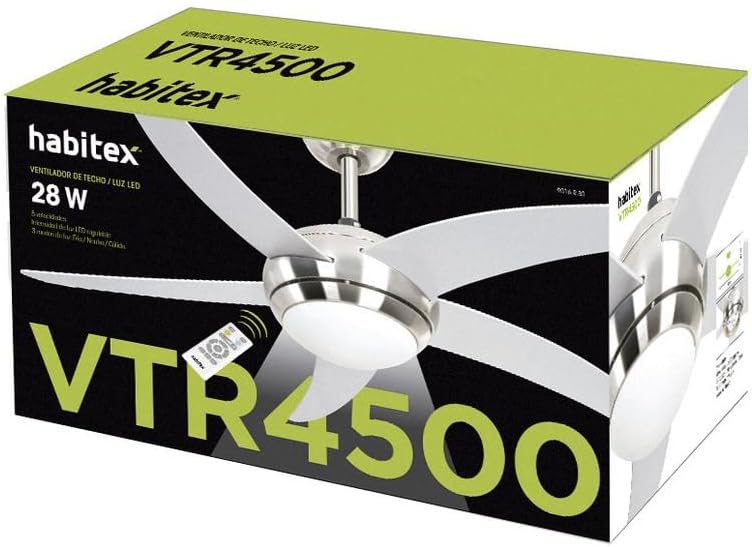
Figure 2.1: Packaging of the Habitex LED Ceiling Fan m.VTR 4500, showing the fan unit and remote control on the box.
3. Setup and Installation
Installation of this ceiling fan requires basic electrical knowledge and adherence to safety guidelines. If you are not comfortable performing the installation, it is recommended to hire a qualified electrician.
3.1 Pre-Installation Checklist
- Ensure power is OFF at the circuit breaker.
- Confirm all package contents are present.
- Gather necessary tools: screwdriver, wire strippers, electrical tape, ladder.
- Verify the ceiling junction box is rated for fan support (typically 15.9 kg / 35 lbs minimum).
3.2 Mounting the Fan
- Attach Mounting Bracket: Secure the mounting bracket to the ceiling junction box using the provided screws. Ensure it is firmly attached to a structural beam or a fan-rated support box.
- Assemble Downrod (if applicable): If using a downrod, feed the motor wires through it and secure the downrod to the motor housing.
- Hang Fan Motor: Carefully lift the fan motor assembly and hang it onto the mounting bracket hook (if available) or have an assistant hold it while making electrical connections.
- Electrical Connections: Connect the fan's electrical wires to the household wiring according to the wiring diagram (typically black to black, white to white, ground to ground). Use wire nuts to secure connections.
- Secure Fan to Bracket: Once wiring is complete, secure the fan motor assembly to the mounting bracket using the screws provided.
- Install Blades: Attach the five fan blades to the motor housing using the screws provided. Ensure all screws are tightened securely.
- Install LED Light Kit: Connect the LED light kit wires to the fan motor wires as per the instructions. Secure the light kit to the bottom of the fan motor housing.
- Install Canopy: Slide the canopy up to the ceiling and secure it to cover the mounting bracket and wiring.
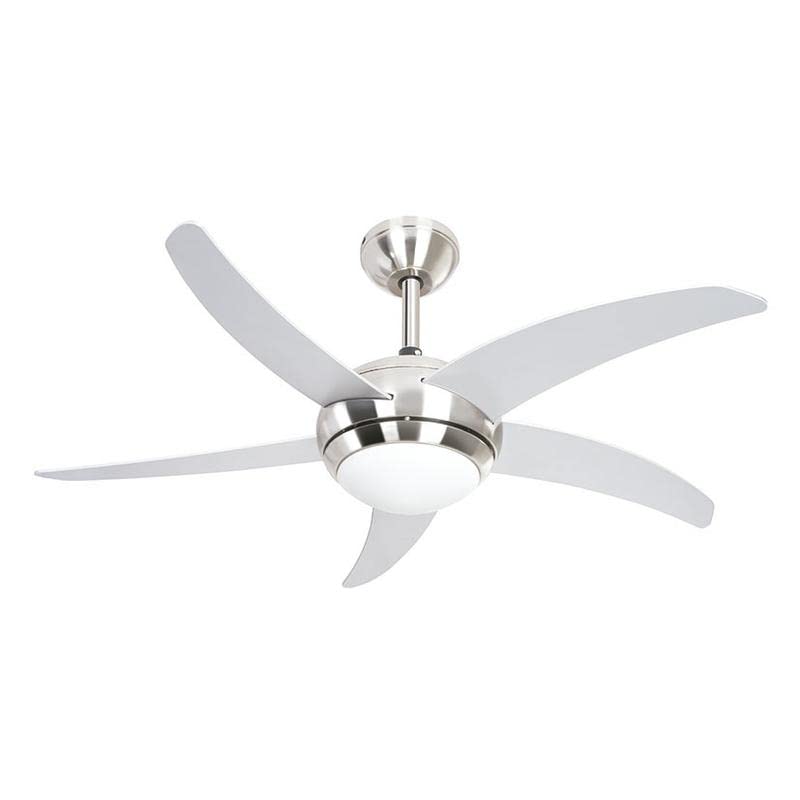
Figure 3.1: Detail of the Habitex LED Ceiling Fan motor housing with integrated LED light and blade attachment points.
4. Operating Instructions
The Habitex LED Ceiling Fan is operated using the included remote control.
4.1 Remote Control Functions
Before use, insert 2 x AAA batteries into the remote control.
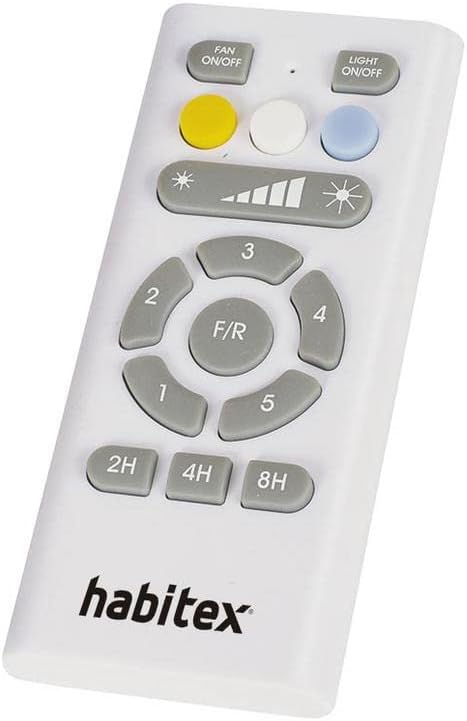
Figure 4.1: The remote control for the Habitex LED Ceiling Fan, showing buttons for fan speed, light control, and timer.
- FAN ON/OFF: Press to turn the fan on or off.
- LIGHT ON/OFF: Press to turn the LED light on or off.
- Speed Control (1-5 buttons): Select desired fan speed from 1 (lowest) to 5 (highest). The remote also shows a visual indicator for speed.
- F/R (Forward/Reverse): Press to change the direction of blade rotation.
- Forward Mode (Counter-clockwise): Creates a downward breeze, ideal for cooling during warm weather.
- Reverse Mode (Clockwise): Creates an upward airflow, circulating warm air near the ceiling, ideal for winter to redistribute heat.
- Light Color Temperature (Yellow, White, Blue buttons): Select between warm, neutral, or cold light modes.
- Light Dimming (Sun icon buttons): Adjust the brightness of the LED light.
- Timer (2H, 4H, 8H buttons): Set the fan to automatically turn off after 2, 4, or 8 hours.
5. Maintenance
Regular maintenance ensures optimal performance and extends the lifespan of your ceiling fan.
- Cleaning: Periodically clean the fan blades and motor housing with a soft, lint-free cloth. For stubborn dirt, a slightly damp cloth can be used. Ensure the fan is completely dry before operating. Do not use abrasive materials or harsh chemicals.
- Blade Balance: If the fan wobbles during operation, check that all blade screws are tight and that the blades are not bent or damaged. Balancing kits are available if needed.
- Electrical Connections: Annually inspect all electrical connections for tightness.
- Light Source: The LED light source is integrated and generally does not require replacement. If issues arise, contact customer support.
6. Troubleshooting
Before contacting customer support, refer to the following common issues and solutions.
| Problem | Possible Cause | Solution |
|---|---|---|
| Fan does not start | No power supply; Loose wiring; Remote control issues. | Check circuit breaker. Ensure all wiring connections are secure. Replace remote control batteries. |
| Light does not work | No power supply; Loose wiring; LED light kit issue. | Check circuit breaker. Ensure light kit wiring is secure. If LED is faulty, contact support. |
| Fan wobbles | Loose blade screws; Unbalanced blades; Loose mounting bracket. | Tighten all blade screws. Check for bent blades. Ensure mounting bracket is securely fastened to the ceiling. Use a blade balancing kit if necessary. |
| Remote control not working | Dead batteries; Incorrect pairing (if applicable); Obstruction. | Replace AAA batteries. Ensure no obstructions between remote and fan receiver. |
7. Specifications
| Feature | Detail |
|---|---|
| Model Number | m.VTR 4500 |
| Brand | HABITEX |
| Motor Type | DC Motor (Very quiet) |
| Fan Speeds | 5 speeds |
| Number of Blades | 5 |
| Blade Diameter | 112 cm (44 inches) |
| Airflow Capacity | 171.96 m³/min |
| Noise Level | 40 Decibels |
| Fan Functions | Ventilation, Air Circulation, Dual Rotation Direction |
| Light Type | Integrated Dimmable LED |
| Light Wattage | 22 W |
| Light Modes | Warm, Neutral, Cold |
| Timer Settings | 2, 4, 8 hours |
| Control Type | Remote Control (2 x AAA batteries not included) |
| Power Consumption (Fan) | 28 W |
| Dimensions (Diameter x Height) | Ø 112 cm x H 42 cm |
| Item Weight | 7.84 kg |
| Material | Plastic or Aluminum |
| Installation Method | Ceiling Mount |
8. Warranty and Support
Specific warranty details are typically provided with your purchase documentation or on the manufacturer's official website. Please retain your proof of purchase for warranty claims.
For technical support, troubleshooting assistance beyond this manual, or warranty inquiries, please contact your retailer or the manufacturer directly.
- Manufacturer: HABITEX
- Model Number: m.VTR 4500
- Date of First Availability: May 28, 2019