
1. Product Overview
The XTUGA MI7 is a 7-piece wired dynamic drum microphone kit designed for professional sound reinforcement and studio recording. This kit provides a tailored frequency response for various instruments, ensuring high-quality audio capture.
Key Features
- Tailored Frequency Response: Designed for kick drums and other bass instruments, providing superb attack and punch.
- Studio Quality Sound: Delivers high-quality audio even at extremely high sound pressure levels.
- Supercardioid Pickup Pattern: Ensures high gain before feedback and excellent rejection of unwanted noise.
- Built-in Locking Stand Adapter: Features an integral XLR connector for simplified installation.
- Standard Thread Compatibility: Each instrument microphone includes standard 3/8" or 5/8" stand threads.
- Versatile Applications: Suitable for close miking of tom-toms, percussion instruments, guitar amplifiers, brass instruments, woodwinds, and vocals.
- Standard XLR Connectors: Compatible with most audio instruments.
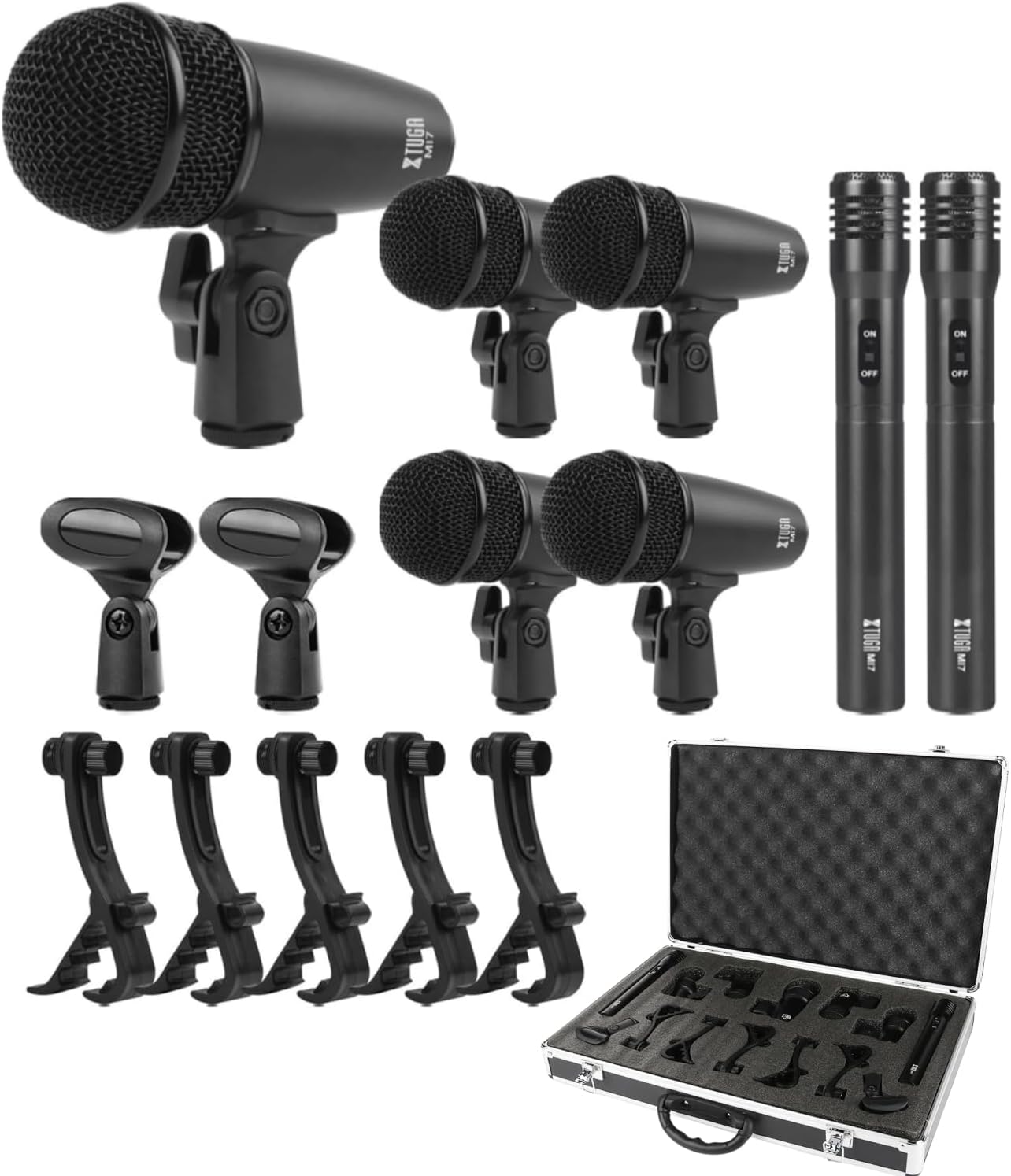
Figure 1: Complete XTUGA MI7 7-Piece Wired Dynamic Drum Microphone Kit with carrying case.
2. Package Contents
The XTUGA MI7 kit includes the following components:
- 1 x Big Drum Microphone
- 4 x Small Drum Microphones
- 2 x Condenser Microphones with Holders
- 4 x Thread Clips
- Thread Inserts
- 4 x Clamps for Snare/Tom Mics
- 2 x Wind Screens for Condenser Mics
- 1 x Aluminum Carry Case
3. Microphone Types and Characteristics
3.1 Big Drum Microphone
This dynamic microphone is specifically designed for kick drums and other bass instruments, providing a powerful low-frequency response.
- Element: Moving Coil Dynamic
- Polar Pattern: Uni-Directional
- Frequency Response: 50 Hz-15 kHz
- Sensitivity: -60 dB +/- 3 dB (0 dB=1 V/Pa at 1 kHz)
- Output Impedance: 500Ω +/-30% (at 1 kHz)

Figure 2: Big Drum Microphone with detailed specifications.
3.2 Small Drum Microphones (4 pieces)
These compact dynamic microphones are ideal for tom-toms, snare drums, and other percussion instruments, offering a clear and focused sound.
- Element: Moving Coil Dynamic
- Polar Pattern: Uni-Directional
- Frequency Response: 50 Hz-14 kHz
- Sensitivity: -52 dB +/- 3 dB (0 dB=1 V/Pa at 1 kHz)
- Output Impedance: 500Ω +/-30% (at 1 kHz)

Figure 3: Small Drum Microphones with detailed specifications.
3.3 Condenser Microphones (2 pieces)
These electret condenser microphones are suitable for cymbals, pianos, and vocals, capturing detailed high-frequency sounds. They require 48V phantom power.
- Element: Electret Condenser
- Polar Pattern: Uni-Directional
- Frequency Response: 50 Hz-18 kHz
- Sensitivity: -45 dB +/- 3 dB (0 dB=1 V/Pa at 1 kHz)
- Output Impedance: 200Ω
- Max Input SPL: 130 dB (at 1 kHz < 1% T.H.D.)
- S/N Ratio: 70 dB
- Power Supply: Phantom 48 V

Figure 4: Condenser Microphones with detailed specifications.
4. Setup Guide
4.1 Attaching Microphones to Clips
Each dynamic microphone (big drum and small drums) comes with a built-in locking stand adapter. The condenser microphones use separate holders. The clamps for snare/tom mics are designed to securely attach the small drum microphones to the drum rims.
- For dynamic microphones, ensure the microphone is securely screwed into its respective clip or stand adapter.
- For condenser microphones, slide the microphone into its holder.
- Attach the drum clamps to the rims of your snare and tom drums.
- Adjust the angle and position of each microphone using the clip's adjustment mechanisms to achieve optimal sound capture.

Figure 5: Detailed view of microphone construction and clip attachment.
4.2 Connecting to an Audio Mixer
The XTUGA MI7 kit uses standard XLR connectors for all microphones, allowing for versatile integration with most audio mixers.
- Connect the XLR cables from each microphone to the input channels of your audio mixer.
- For the two condenser microphones, ensure your mixer provides 48V phantom power. Activate the phantom power on the relevant channels or globally on your mixer.
- Adjust the gain and volume levels on your mixer for each microphone to achieve a balanced sound.
- Connect your mixer's main outputs to your speakers or recording interface.
Video 1: XTUGA MI7 Microphone Set Setup Guide. This video demonstrates the physical setup and connection of the MI7 microphones to a mixer.
Video 2: General Drum Mic Kit to Audio Mixer Connection. This video provides a general guide on connecting drum microphones to an audio mixer, including phantom power considerations.
5. Operating Instructions
5.1 Microphone Placement
Proper microphone placement is crucial for optimal sound quality. Experiment with different positions to find the best sound for your specific drum kit and environment.
- Big Drum Microphone: Place inside or just outside the kick drum's resonant head for a full, punchy sound.
- Small Drum Microphones: Attach to the rims of snare and tom drums. Position them a few inches above the drum head, pointing towards the center for attack, or towards the rim for more body.
- Condenser Microphones: Use as overheads, positioned above the cymbals and drum kit to capture the overall sound, including cymbals and room ambiance.

Figure 6: Recommended microphone placement on a drum kit.
5.2 Adjusting Microphone Angle
The microphone clips and holders allow for flexible adjustment of the microphone angle. Loosen the adjustment knob, position the microphone as desired, and then tighten the knob to secure it.

Figure 7: Adjusting microphone angle for optimal sound capture.
6. Maintenance and Care
To ensure the longevity and optimal performance of your XTUGA MI7 microphone kit, follow these maintenance guidelines:
- Cleaning: Use a soft, dry cloth to wipe down microphones and accessories after each use. Avoid using harsh chemicals or abrasive materials.
- Storage: Store the microphones and accessories in the provided aluminum carry case when not in use. This protects them from dust, moisture, and physical damage.
- Handling: Handle microphones with care. Avoid dropping them or exposing them to excessive force, which can damage internal components.
- Cable Management: Coil XLR cables neatly after use to prevent tangling and damage.
7. Troubleshooting
If you encounter issues with your XTUGA MI7 microphone kit, refer to the following common troubleshooting steps:
- No Sound:
- Check all cable connections to ensure they are secure.
- Verify that the mixer's input gain and channel faders are raised.
- For condenser microphones, confirm that 48V phantom power is activated on the mixer.
- Test microphones with different cables or mixer channels to isolate the problem.
- Distorted Sound:
- Reduce the input gain on the mixer channel to prevent clipping.
- Ensure microphones are not placed too close to the sound source, especially for loud instruments.
- Check for damaged cables or faulty mixer channels.
- Feedback:
- Reposition microphones to avoid pointing directly at speakers.
- Lower the gain on the affected microphone channels.
- Use the mixer's EQ to cut problematic frequencies.
8. Specifications
| Feature | Value |
|---|---|
| Brand | XTUGA |
| Model Name | NEW MI7 |
| Item Model Number | MI7 |
| Connectivity Technology | XLR |
| Connector Type | XLR |
| Microphone Form Factor | Mini |
| Polar Pattern | Unidirectional |
| Audio Sensitivity | 58 Decibels |
| Signal-to-Noise Ratio | 70 dB |
| Material | Metal |
| Color | Black |
| Item Weight | 2.6 Kilograms (5.72 pounds) |
| Product Dimensions (L x W x H) | 4.72 x 19.69 x 14.17 inches |
| Power Source | Corded Electric (for mixer) |
| Number of Batteries | 1 Lithium Ion batteries required (for some condenser mics if mixer lacks phantom power) |
| Hardware Platform | PC |
| Number of Channels | 1 (per microphone) |
| Recommended Uses For Product | Karaoke, Drum Recording, Instrument Miking |
| Date First Available | April 29, 2019 |
9. Warranty and Support
XTUGA products are manufactured to high-quality standards. For warranty information, technical support, or any inquiries regarding your MI7 7-Piece Wired Dynamic Drum Microphone Kit, please contact XTUGA customer support through their official channels or the retailer where the product was purchased.
Please retain your proof of purchase for any warranty claims.