
1. Introduction
Thank you for purchasing the H-come 2 Din Car MP5 Player. This device is designed to enhance your in-car entertainment and connectivity with its versatile features, including a high-definition touch screen, Bluetooth, MirrorLink, and multimedia playback capabilities. Please read this manual carefully before installation and operation to ensure proper use and optimal performance.
2. Package Contents
Please verify that all items listed below are included in your package:
- 1 x Car MP5 Player
- 1 x Remote Control
- 1 x Cable Kits (for MP5 Player)
- 1 x Rear View Camera
- 1 x Cable (for Rear Camera)
- 1 x User Manual

Figure 2.1: Package Contents
3. Product Features
The H-come Car MP5 Player offers a range of features for an enhanced driving experience:
- 7-inch HD Touch Screen: Resolution 480*800, supporting up to HD 1080P video playback.
- Multimedia Playback: Supports various video formats (AVI, MP4, FLV, PMP, RM, RMVB, MPG) and audio formats (DIS, MP3, WMA, ACC, OGG, WAV, RA, AC3, MP2, AMR).
- High-Fidelity Audio: Adopt 24bit DAC, supporting 24bit 96KHz WAV, APE, FLAC, WAV, DIS for superior sound quality.
- FM Radio: Frequency range 87.5-108MHz with automatic scanning and storage for up to 18 FM channels.
- Bluetooth Connectivity: For hands-free phone calls and wireless music streaming.
- MirrorLink Function: Compatible with Android (4.7 to 9) and iOS (up to 11) devices for screen mirroring.
- Rear Camera Input: Automatically switches to rear view display when reversing.
- USB/TF Card Support: For playing media files directly from storage devices.
- Auxiliary Input: For connecting external audio sources.

Figure 3.1: Key Features Overview
4. Setup and Installation
Proper installation is crucial for the functionality and safety of your car MP5 player. It is highly recommended that installation be performed by a professional user.
4.1 Wiring Diagram
Refer to the detailed wiring diagram below for correct connections. Ensure all wires are securely connected to prevent malfunctions.

Figure 4.1: Wiring Instructions
- A1: Parking Line: No need to connect if you want to watch video while driving. It is recommended not to connect.
- A2: Reverse/Back detection line: Connect to the car brake control line. If not connected, the back camera will not work.
- A3: B+: Connect to the car positive battery (+12V).
- A4: Key 1: No need to connect if no multi-function steering.
- A5: ILL: Connect to the headlight control line (not needed for most car models).
- A6: ANT: No need to connect if no this function. Connect to Radio automatic antenna power supply / subwoofer control line.
- A7: ACC: Connect to the key control power supply (+12V).
- A8: GND: Connect to car negative battery / GND (-12V).
Tips for Camera Connection:
- Connect H to A2 (reversing detection cable).
- Connect J and K together and then connect to the positive pole of the backup lamp (BUL).
- Connect L to GND or no need to connect it anywhere.
5. Operating Instructions
The MP5 player features an intuitive touch screen interface. Navigate through functions by tapping the corresponding icons.
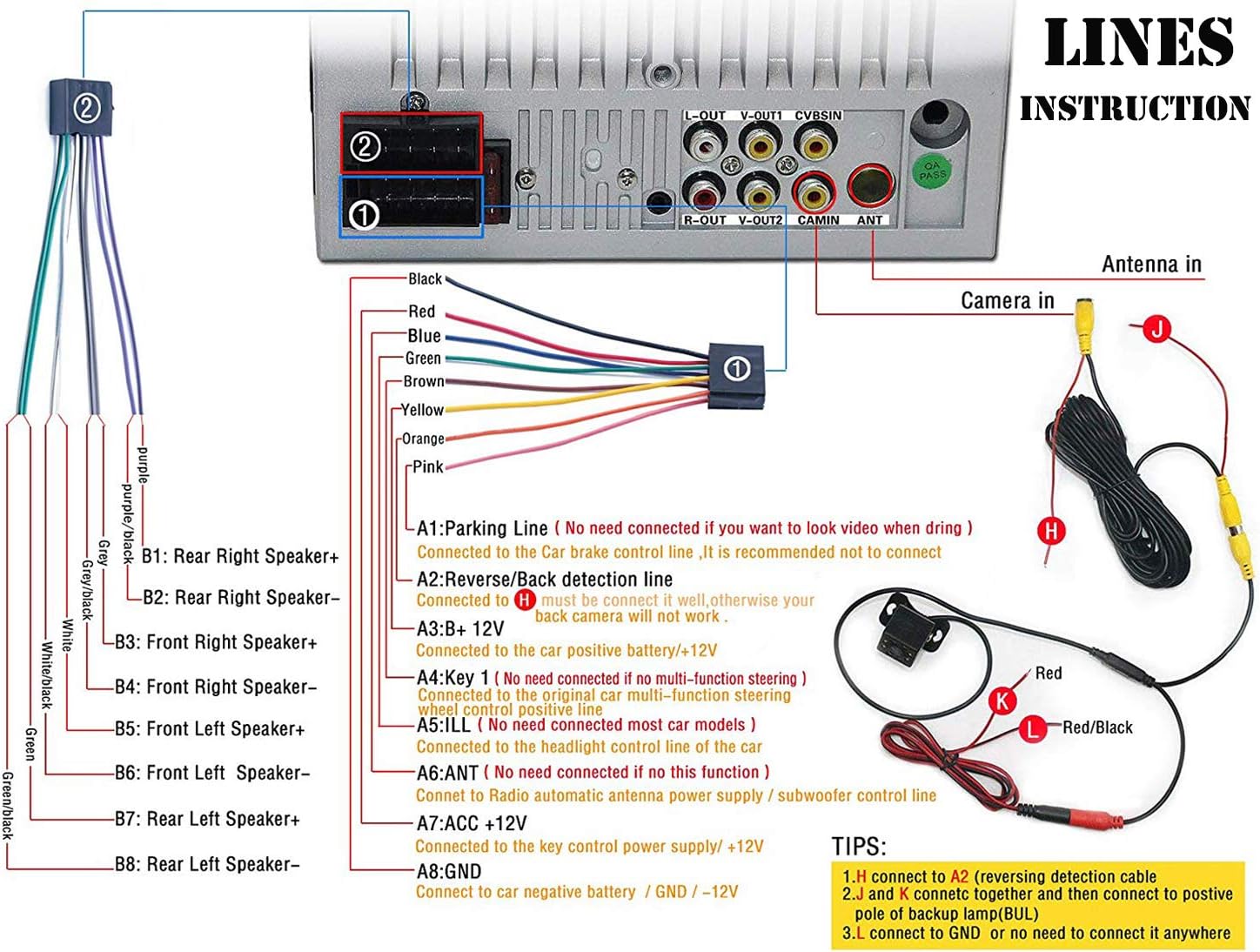
Figure 5.1: User Interface Overview
5.1 Main Functions
- Home Screen: Access various applications like Music, Movie, Photo, Explorer, Bluetooth, FM, AV IN, Settings, Wheel, and PhoneLink.
- Settings: Adjust Audio, Language, Radio Area, Steering Wheel Controls, and Time.
6. Audio and Video Playback
The unit supports a wide range of audio and video formats for your entertainment.
6.1 Supported Formats
- Video Formats: AVI, MP4, FLV, PMP, RM, RMVB, MPG, etc.
- Audio Formats: DIS, MP3, WMA, ACC, OGG, WAV, RA, AC3, MP2, AMR, etc.
- Supports lyrics/ID3 display and picture browsing (JPEG format).
- Features 24bit DAC, supporting 24bit 96KHz WAV, APE, FLAC, WAV, DIS for enhanced sound quality.
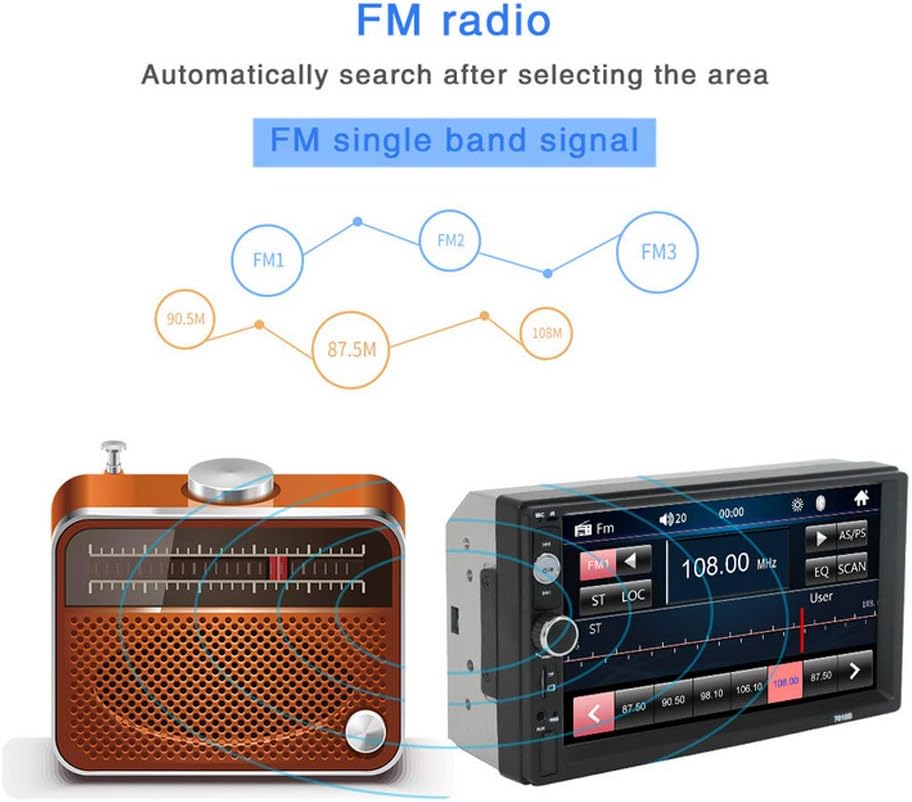
Figure 6.1: Supported Audio Formats
7. FM Radio Operation
The built-in FM radio allows you to listen to your favorite stations.
- Frequency Range: 87.5-108MHz.
- Sensitivity: 25dB.
- Selectivity: 60dB.
- Digital tuning FM radio system automatically scans single band channels.
- Can store up to 18 FM channels.

Figure 7.1: FM Radio Interface
8. MirrorLink Function
The MirrorLink feature allows you to display your smartphone's screen on the MP5 player's display.
- Compatible with Android 4.7 to Android 9.
- Compatible with iOS up to iOS 11 (included).
- Ensure your phone is in developer mode for Android devices and follow on-screen prompts for connection.

Figure 8.1: MirrorLink Feature
9. Bluetooth Connectivity
Connect your smartphone via Bluetooth for hands-free calling and audio streaming.
- Phone Calls: Make and receive calls directly through the MP5 player. Ensure Bluetooth is connected; otherwise, no audio will be heard during calls.
- Music Playback: Stream audio from your device to the car stereo.
10. Rear Camera Input
The unit supports a rear view camera input for safer parking and reversing.
- Automatically displays the rear view when the car is put into reverse.
- Ensure the camera wiring is correctly connected as per the installation section (Section 4.1) if the camera does not display an image.

Figure 10.1: Rear View Camera Display
11. Maintenance
To ensure the longevity and optimal performance of your MP5 player, follow these maintenance guidelines:
- Cleaning: Use a soft, dry cloth to clean the screen and exterior. Avoid abrasive cleaners or solvents.
- Temperature: Do not expose the unit to extreme temperatures or direct sunlight for prolonged periods.
- Moisture: Keep the unit dry. Avoid contact with water or other liquids.
12. Troubleshooting
If you encounter issues with your MP5 player, refer to the following common problems and solutions:
- No sound during phone calls: Please ensure Bluetooth is properly connected. Re-pair your device if necessary.
- Poor radio signal: Radio requires a stronger signal. Check your antenna connection and try tuning in a different location.
- Rear camera not displaying: Check all wire connections for the camera, especially the reverse detection line (A2) and the power supply to the camera.
- Touch screen unresponsiveness/slowness: Ensure the unit's software is up to date (if applicable) and try restarting the device.
- MirrorLink issues: For Android, ensure developer mode is enabled and USB debugging is active. For iOS, ensure the device is compatible with iOS 11 or earlier.
If the problem persists after attempting these solutions, please contact customer support.
13. Specifications
| Feature | Specification |
|---|---|
| Screen Size | 7 inches / 18 cm |
| Resolution | 480*800 (up to HD 1080P) |
| Video Formats | AVI, MP4, FLV, PMP, RM, RMVB, MPG, etc. |
| Audio Formats | DIS, MP3, WMA, ACC, OGG, WAV, RA, AC3, MP2, AMR, APE, FLAC |
| FM Frequency | 87.5-108MHz |
| Connectivity | Bluetooth, Auxiliary, USB |
| Controller Type | iOS, Android |
| Special Feature | Touchscreen |
| Compatible Devices | Speaker, Smartphone |
| Connector Type | USB, 3.5mm Jack |
| Audio Encoding | Stereo |
| Audio Output Mode | Stereo |
| Surround Sound Channel | 4.0 |
| Video Encoding | H.264 |
| Item Weight | 1.59 pounds |
| Package Dimensions | 8.03 x 5.04 x 4.61 inches |
| Model Number | 788807912619 |
14. Warranty and Support
For warranty information and technical support, please refer to the documentation included with your purchase or contact the manufacturer directly. Keep your proof of purchase for any warranty claims.