
Philips TV 58PUS7304/12
Philips Ambilight 58PUS7304/12 Smart TV User Manual
Model: 58PUS7304/12
Introduction
Welcome to the user manual for your Philips Ambilight 58PUS7304/12 Smart TV. This manual provides essential information for setting up, operating, maintaining, and troubleshooting your television. Your Philips TV combines elegant design with high-quality performance, featuring 3-sided Ambilight and rich sound. Experience stunning 4K UHD resolution, Dolby Vision, HDR 10+, and the P5 Perfect Picture Engine, complemented by cinematic Dolby Atmos sound.

Image: Front view of the Philips Ambilight 58PUS7304/12 Smart TV, showcasing its slim bezel and the vibrant 4K UltraHD display. The Ambilight feature illuminates the wall behind the TV with colors matching the screen content.
What's in the Box
Upon unboxing your Philips Ambilight TV, please ensure all the following components are present:
- Philips Ambilight 58PUS7304/12 Smart TV
- Remote Control
- Quick Start Guide
- Brochure
- Batteries for Remote Control
Setup
1. Unpacking and Placement
Carefully remove the TV from its packaging. It is recommended to have at least two people for this process due to the size and weight of the television. Place the TV on a stable, flat surface or mount it on a wall using a compatible VESA mount (not included). Ensure adequate ventilation around the TV.
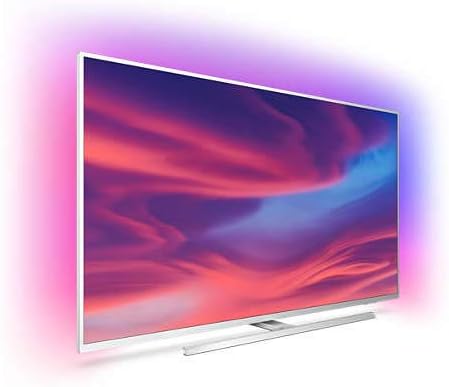
Image: A side view of the Philips Ambilight TV, highlighting its slim profile and the integrated stand.
2. Connecting Peripherals
Connect your external devices such as cable boxes, Blu-ray players, gaming consoles, or sound systems to the appropriate ports on the TV. The Philips 58PUS7304/12 supports various connectivity options including HDMI, USB, Ethernet, Wireless, and Bluetooth.
- HDMI: For high-definition video and audio.
- USB: For media playback from USB drives.
- Ethernet: For a stable wired internet connection.
- Wireless (Wi-Fi): For wireless internet access.
- Bluetooth: For connecting wireless headphones or other Bluetooth devices.
3. Initial Power On and Network Setup
Plug the power cord into an electrical outlet. Press the power button on the remote control or the TV. Follow the on-screen instructions to select your language, country, and connect to your home network (Wi-Fi or Ethernet).
Operating Instructions
1. Remote Control Functions
The included remote control allows you to navigate the TV's features. Insert the provided batteries into the remote control.
- Power Button: Turns the TV on or off.
- Navigation Pad: For menu navigation and selection.
- Volume +/-: Adjusts the volume.
- Channel +/-: Changes TV channels.
- Source Button: Selects input sources (HDMI, USB, etc.).
- Home Button: Accesses the Android TV home screen.
- Voice Assistant Button: Activates Google Assistant for voice commands.
2. Android TV Interface
Your Philips TV runs on Android TV, providing access to a wide range of apps and services. From the home screen, you can access streaming apps like Netflix and YouTube, browse content, and manage settings.

Image: The Philips Android TV home screen, displaying various streaming applications and content recommendations.
3. Ambilight Feature
The 3-sided Ambilight technology projects colors from the screen onto the surrounding wall, creating an immersive viewing experience. You can customize Ambilight settings in the TV menu to suit your preferences, including brightness and saturation.

Image: The Philips Ambilight TV mounted on a wall, with the Ambilight feature actively projecting vibrant colors onto the wall, enhancing the viewing atmosphere.
4. Voice Control (Google Assistant & Alexa)
Your TV is compatible with Google Assistant and Alexa, allowing for hands-free control. Use voice commands to change channels, adjust volume, search for content, or control smart home devices.

Image: A person sitting on a couch, interacting with their Philips TV using voice commands, with a smart speaker visible on a nearby table.
Maintenance
1. Cleaning the TV
To clean the screen, gently wipe it with a soft, lint-free cloth. For stubborn marks, slightly dampen the cloth with water or a screen-cleaning solution. Avoid using harsh chemicals or abrasive materials. Clean the TV frame and stand with a soft, dry cloth.
2. Software Updates
Ensure your TV's software is up to date for optimal performance and access to the latest features. The TV can automatically check for and install updates when connected to the internet. You can also manually check for updates in the TV's settings menu.
Troubleshooting
If you encounter issues with your Philips TV, refer to the following common troubleshooting steps:
| Problem | Possible Solution |
|---|---|
| No Power | Check if the power cord is securely plugged into the TV and the wall outlet. Try a different outlet. |
| No Picture/Sound | Ensure the correct input source is selected. Check all cable connections (HDMI, antenna, etc.). Restart connected devices. |
| Remote Control Not Working | Replace the batteries. Ensure there are no obstructions between the remote and the TV's IR sensor. |
| Wi-Fi Connection Issues | Restart your router and modem. Check Wi-Fi settings on the TV. Ensure the TV is within range of your Wi-Fi network. |
| Ambilight Not Working | Check Ambilight settings in the TV menu. Ensure the TV is not too close to the wall, obstructing the light. |
| Slow Performance/App Crashes | Restart the TV by unplugging it for a few minutes. Clear app caches or reinstall problematic apps. Ensure sufficient storage space. |
For more detailed troubleshooting, please refer to the Philips support website or contact customer service.
Specifications
Key technical specifications for the Philips Ambilight 58PUS7304/12 Smart TV:
- Model Number: 58PUS7304/12
- Screen Size: 146 cm (58 inches)
- Display Technology: LED
- Resolution: 4K UHD (3840 x 2160)
- Refresh Rate: 60 Hz
- Picture Engine: P5 Perfect Picture Engine
- HDR Support: HDR10+, Dolby Vision
- Sound Technology: Dolby Atmos
- Operating System: Android TV
- Voice Assistants: Google Assistant, Alexa compatible
- Connectivity: Wireless (Wi-Fi), Bluetooth, USB, Ethernet, HDMI
- Dimensions (W x H x D): 129.87 x 78.81 x 24 cm (with stand)
- Weight: 19.2 Kilograms (with stand)
- Color: Light Silver
Warranty and Support
Your Philips Ambilight TV comes with a standard manufacturer's warranty. Please refer to the warranty card included in your product packaging for specific terms and conditions.
For technical support, product registration, or to find service centers, please visit the official Philips support website or contact Philips customer service.
Philips Support Website: www.philips.com/support
Related Documents - 58PUS7304/12
 |
Philips 50PUS8209 4K Ambilight TV: QLED, Dolby Atmos, Titan OS - Преглед и Спецификации Подробен преглед на телевизора Philips 50PUS8209 4K Ambilight, включващ QLED технология, Dolby Atmos звук, Titan OS и разширени гейминг функции. Включва пълни спецификации и детайли за свързаност. |
 |
Philips 65OLED820/12 4K Ambilight OLED TV: Immersive Picture, Sound & Gaming Discover the Philips 65OLED820/12 4K Ambilight OLED TV. Featuring stunning visuals with P5 AI Picture Engine, Dolby Vision, immersive Ambilight, powerful IntelliSound, and advanced gaming capabilities with HDMI 2.1. |
 |
Philips 65PUS8109: 4K Ambilight TV mit Alexa, TITAN OS und Dolby Atmos – Technische Daten Entdecken Sie den Philips 65PUS8109 4K Ambilight TV. Erleben Sie brillante Bilder, immersive Ambilight-Effekte, Alexa-Sprachsteuerung, TITAN OS und Dolby Atmos Sound. Alle technischen Spezifikationen und Funktionen im Überblick. |
 |
Philips Televizor Ambilight 4K - The One (43PUS8919/12): Descriere și Specificații Descoperiți Philips Televizor Ambilight 4K, modelul The One (43PUS8919/12). O experiență vizuală și sonoră excepțională cu procesor P5, TITAN OS, Dolby Vision/Atmos și funcții avansate de gaming. Aflați specificațiile complete. |
 |
Philips 4K Ambilight TV 65PUS8609/12: Brillantes Bild, Immersives Ambilight & Gaming Entdecken Sie den Philips 65-Zoll 4K Ambilight TV (65PUS8609/12) mit Pixel Precise Ultra HD, TITAN OS, Dolby Atmos und fortschrittlichen Gaming-Funktionen für ein ultimatives Heimkino- und Spielerlebnis. |
 |
Philips 43PUS8319/12 4K UHD Ambilight TV: Ülevaade ja spetsifikatsioonid Tutvuge Philips 43PUS8319/12 4K UHD Ambilight teleriga. Avastage selle üliterav pilt, Dolby Atmos heli, TITAN OS nutiplatvorm, jätkusuutlikud materjalid ja nutika kodu funktsioonid. |
Ask a question about this manual
Ask about setup, troubleshooting, compatibility, parts, safety, or missing instructions. Manuals+ will review the question and use this page’s manual context to help answer it.