
Optimate O108KIT
Optimate Tecmate USB O-108 KIT Instruction Manual
Smart 3300mA In-Line USB Charger with Sleep Mode and Vehicle Battery Controller
Introduction
This manual provides comprehensive instructions for the installation, operation, maintenance, and troubleshooting of your Optimate Tecmate USB O-108 KIT. This smart in-line USB charger is designed to provide reliable power for your mobile devices while protecting your vehicle's battery.
The Optimate USB O-108 KIT features a 3300mA fast charge capability, sleep mode to prevent battery drain, and an integrated vehicle battery controller.
Product Overview
The Optimate Tecmate USB O-108 KIT includes the main USB charger unit, an 80-inch cable, and a battery lead with ring terminals for direct connection to your vehicle's battery.

Image: Overview of the Optimate Tecmate USB O-108 KIT showing the main unit, USB output, and battery connection cables with ring terminals.
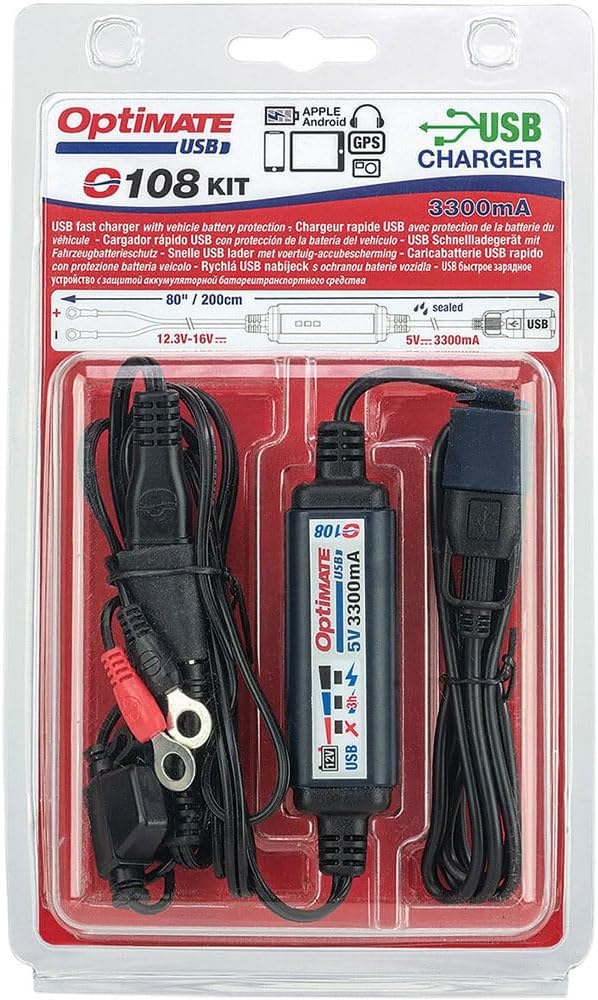
Image: The Optimate Tecmate USB O-108 KIT as it appears in its retail packaging, highlighting key features like 3300mA charging and vehicle battery protection.
Key Features:
- 3300mA Fast Charge: Delivers 5V standard USB voltage for rapid charging of devices.
- Vehicle Battery Protection: Automatically turns on/off to prevent battery drain.
- Sleep Mode: Suspends USB charging after 1 hour when the engine is off.
- Automatic Activation: USB charging starts automatically when vehicle battery voltage is 13.3V or above.
- Weatherproof Design: Ideal for permanent outdoor mounting.
- Battery Status Monitoring: Features an easy-to-read LED indicator.
- Low Current Draw: Draws less than 1mA when the vehicle is parked.
Setup and Installation
Proper installation ensures optimal performance and safety. Follow these steps carefully.
1. Connecting to the Vehicle Battery:
- Ensure the vehicle's ignition is off.
- Locate your vehicle's battery.
- Connect the red ring terminal (positive) of the included battery lead to the positive (+) terminal of the battery.
- Connect the black ring terminal (negative) to the negative (-) terminal of the battery.
- Ensure connections are secure. The battery lead includes a 7.5A (ATM) fuse for protection.

Image: Diagram showing how to connect the Optimate USB charger's battery lead to the vehicle battery terminals. The lead includes M6 (1/4") ring terminals and a 7.5A fuse.
2. Mounting the USB Socket:
The 80-inch cable provides flexibility for mounting the USB socket in a convenient location near your device.
- Zip-tie the USB socket to the handlebar, clutch/brake cable, or other suitable electrical cables.
- Ensure the location is easily accessible and does not interfere with vehicle operation.
- The weatherproof design allows for permanent outdoor mounting.

Image: Example of mounting the Optimate USB socket using zip-ties on a motorcycle handlebar, positioning it conveniently for device charging.

Image: The weatherproof Optimate USB charger unit installed on a motorcycle, demonstrating its suitability for exposure to rain and mud.
Operating Instructions
The Optimate USB O-108 KIT is designed for automatic operation to protect your vehicle's battery.
Automatic On/Off Function:
- When the vehicle engine is running and the battery voltage is 13.3V or above, USB charging will start automatically.
- When the engine is off, the unit will enter standby mode. USB charging will be suspended after approximately one hour to prevent battery drain.
- The unit draws less than 1mA when the vehicle is parked, ensuring minimal impact on battery life.

Image: Illustration of the Optimate USB charger's automatic on/off function, designed to protect the vehicle battery by suspending charging when the engine is off for an extended period.
Battery Status Indicator:
The integrated LED indicator provides a quick visual reference of your vehicle's battery status, indicating if it's ready to start the engine.

Image: Close-up of the Optimate USB charger's LED indicators, showing how it tests the vehicle battery and indicates readiness to start, compatible with AGM and LFP battery types.
Maintenance
The Optimate USB O-108 KIT requires minimal maintenance due to its durable and weatherproof design.
- Cleaning: Periodically wipe the unit and USB port cover with a damp cloth to remove dirt and debris. Ensure the USB port cover is securely closed when not in use to maintain its weatherproof seal.
- Connections: Annually inspect the battery terminal connections for corrosion or looseness. Clean and tighten as necessary.
- Cable Inspection: Check the entire length of the cable for any signs of wear, cuts, or damage. If damage is found, discontinue use and replace the unit.
- Fuse: The battery lead contains a 7.5A ATM fuse. If the unit stops functioning, check this fuse. Replace only with a fuse of the same rating.
Troubleshooting
If you encounter issues with your Optimate USB O-108 KIT, refer to the following common problems and solutions:
| Problem | Possible Cause | Solution |
|---|---|---|
| No power to USB device. |
|
|
| Unit drains vehicle battery. |
|
|
| LED indicator not functioning. |
|
|
Specifications
| Feature | Detail |
|---|---|
| Model | OptiMATE USB O-108 KIT |
| Input Voltage | 12V vehicle battery system (nominal 12.3V - 16V) |
| Output Voltage | 5V DC |
| Output Current | 3300mA (3.3A) |
| Cable Length | 80 inches (200cm) |
| Fuse | 7.5A (ATM) |
| Dimensions (Product) | 0.79 x 78.74 x 0.39 inches (approximate, for main unit and cable) |
| Item Weight | 5.6 ounces (160 Grams) |
| Manufacturer | TecMate International NV/SA |
Warranty Information
For specific warranty details and terms, please refer to the documentation included with your product or visit the official Optimate website. Warranty coverage typically includes defects in materials and workmanship under normal use.
Customer Support
If you require further assistance or have questions not covered in this manual, please contact Optimate customer support.
- Online Support: Visit the official Tecmate website for FAQs, product registration, and contact information.
- Manufacturer: TecMate International NV/SA
Ask a question about this manual
Ask about setup, troubleshooting, compatibility, parts, safety, or missing instructions. Manuals+ will review the question and use this page’s manual context to help answer it.