
1. Product Overview
The Walfront AS804 Digital Sound Level Meter is a high-precision instrument designed for accurate measurement of sound levels in various environments. This device is equipped with a professional sensor to ensure excellent sensitivity and precision, making it suitable for a wide range of applications including vehicle noise testing, industrial equipment noise testing, and home noise assessment.
Key features include a high-intensity backlight screen for clear readings in dim conditions and an automatic shutdown function that conserves battery life by turning off the device after 3 minutes of inactivity.

Figure 1.1: Walfront AS804 Digital Sound Level Meter in operation, held by a hand.
2. Safety Information
Please read and understand all safety instructions before operating the device to ensure safe and proper use.
- General Safety: Always operate the device in accordance with the instructions provided.
- Environmental Conditions: Do not expose the device to extreme temperatures, high humidity, or corrosive environments. Avoid direct sunlight.
- Water Resistance: This device is not waterproof. Avoid contact with liquids.
- Battery Safety: Use only the specified battery type. Do not mix old and new batteries or different types of batteries. Dispose of used batteries responsibly according to local regulations.
- Maintenance: Do not attempt to disassemble or modify the device. Refer all servicing to qualified personnel.
- Children: Keep the device out of reach of children.
3. Product Components and Features
Familiarize yourself with the main components of your Walfront AS804 Digital Sound Level Meter:
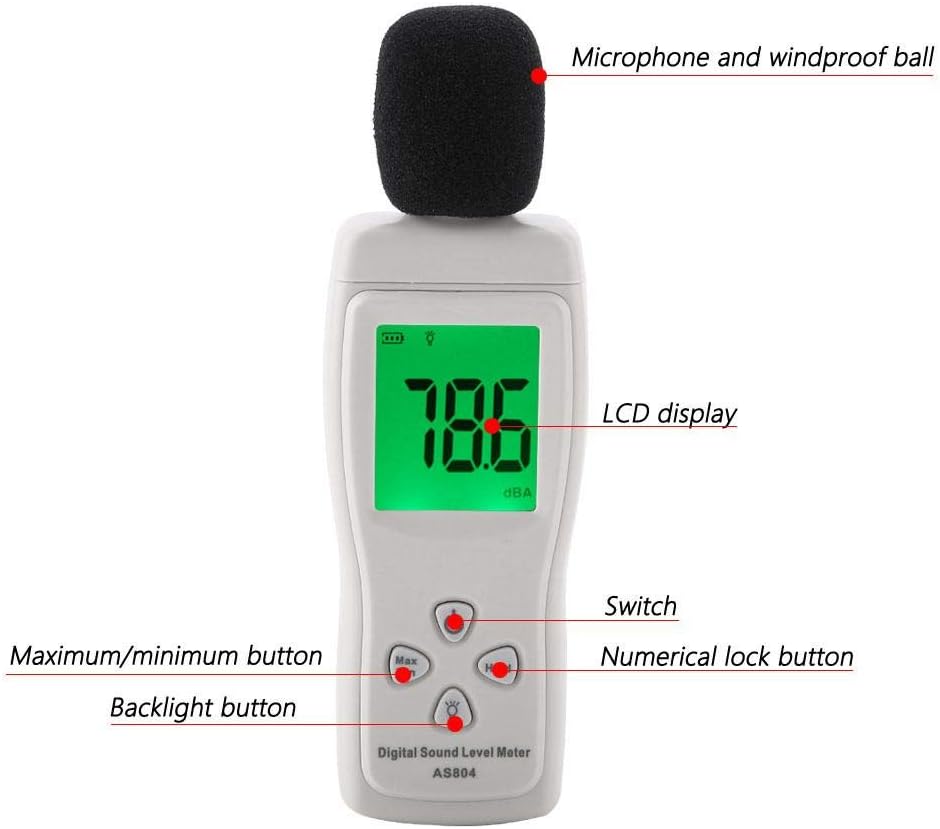
Figure 3.1: Labeled diagram of the Walfront AS804 Digital Sound Level Meter.
- Microphone and Windproof Ball: Captures sound waves. The windproof ball reduces interference from wind noise.
- LCD Display: Shows sound level readings, battery status, and other indicators.
- Power Button (Switch): Turns the device on or off.
- Max/Min Button: Toggles between maximum and minimum sound level readings recorded during a measurement session.
- Hold Button (Numerical Lock): Freezes the current reading on the display.
- Backlight Button: Activates or deactivates the display backlight for improved visibility in low-light conditions.

Figure 3.2: Close-up view of the microphone with the windproof ball removed.
4. Setup
4.1 Battery Installation
The Walfront AS804 requires three (3) 1.5V AAA alkaline batteries (not included).
- Locate the battery compartment cover on the back of the device.
- Slide the cover downwards to open the compartment.
- Insert three AAA batteries, ensuring correct polarity (+ and -) as indicated inside the compartment.
- Replace the battery compartment cover by sliding it back into place until it clicks securely.

Figure 4.1: Open battery compartment for AAA battery installation.
4.2 Powering On/Off
- To Power On: Press the Power button (labeled 'Switch' in Figure 3.1). The LCD display will illuminate.
- To Power Off: Press and hold the Power button for a few seconds until the display turns off.
- Automatic Shutdown: The device will automatically power off after approximately 3 minutes of inactivity to conserve battery life.
5. Operating Instructions
5.1 Basic Sound Level Measurement
- Ensure batteries are installed and power on the device.
- Hold the sound level meter with the microphone pointed towards the sound source you wish to measure. Ensure no obstructions are blocking the microphone.
- The current sound level in dBA will be displayed on the LCD screen. The reading updates rapidly to show real-time sound fluctuations.

Figure 5.1: The sound level meter in an environment, ready for noise measurement.
5.2 Max/Min Measurement
To view the maximum or minimum sound level recorded during a measurement session:
- While the device is measuring, press the Max/Min button.
- The display will show the maximum sound level recorded since the device was powered on or the Max/Min function was reset.
- Press the Max/Min button again to display the minimum sound level recorded.
- Press it a third time to return to real-time measurement.
5.3 Data Hold Function
To freeze the current reading on the display:
- Press the Hold button (Numerical Lock). The current reading will remain on the screen.
- Press the Hold button again to release the hold and resume real-time measurement.
5.4 Backlight Function
To activate the display backlight for better visibility:
- Press the Backlight button (light bulb icon). The display will illuminate.
- Press the Backlight button again to turn off the backlight.

Figure 5.2: The sound level meter displaying a reading with the backlight activated.
6. Maintenance
6.1 Cleaning
- Wipe the device casing with a soft, dry cloth.
- Do not use abrasive cleaners, solvents, or strong chemicals, as these may damage the casing or internal components.
- Keep the microphone area clean and free from dust or debris.
6.2 Storage
- When not in use for extended periods, remove the batteries to prevent leakage and damage to the device.
- Store the device in a cool, dry place, away from direct sunlight and extreme temperatures.
- Keep the device in its original packaging or a protective case to prevent physical damage.
7. Troubleshooting
| Problem | Possible Cause | Solution |
|---|---|---|
| Device does not power on. | Batteries are dead or incorrectly installed. | Check battery polarity. Replace with new AAA batteries. |
| Inaccurate or fluctuating readings. | Microphone obstructed; strong wind interference; device not stable. | Ensure microphone is clear. Use windproof ball. Hold device steadily. |
| Display is dim or blank. | Low battery power. | Replace batteries. |
| Buttons are unresponsive. | Device frozen; internal error. | Remove and reinsert batteries to reset the device. |
8. Specifications
The following are the technical specifications for the Walfront AS804 Digital Sound Level Meter:
- Brand: Walfront (Manufacturer: SMART SENSOR)
- Model: AS804
- Accuracy: 1.5 dB
- Frequency Range: 31.5 Hz to 8.5 kHz
- Measuring Level: 30-130 dBA
- Resolution: 0.1 dB
- Over Range Indication: LCD Display
- Time Weighting: Fast
- Max/Min Hold: Yes
- Power Supply: 3 x 1.5V AAA Alkaline Batteries (not included)
- Microphone: 1/2 inch Electret Condenser Microphone
- Operating Temperature: 0-40 °C (32-104 °F)
- Operating Humidity: 10% to 80% RH
- Storage Temperature: -10-60 °C (14-140 °F)
- Storage Humidity: 10%-70% RH
- Weight: Approx. 111g / 3.9oz
- Dimensions: Approx. 155 × 50 × 25mm / 6.1 × 2.0 × 1.0in
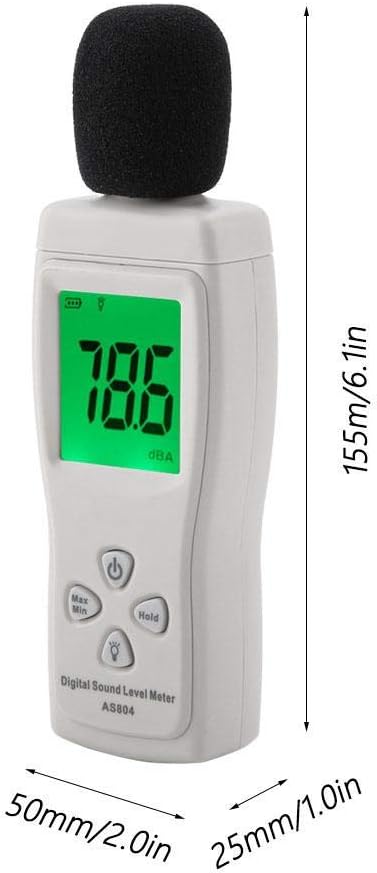
Figure 8.1: Physical dimensions of the Walfront AS804 Digital Sound Level Meter.
9. Warranty and Support
9.1 Warranty Information
No specific warranty information is provided within this instruction manual. For details regarding the product warranty, please refer to your purchase documentation, the seller's terms and conditions, or contact the retailer directly.
9.2 Customer Support
For technical assistance, troubleshooting beyond the scope of this manual, or any other product-related inquiries, please contact the retailer from whom you purchased the Walfront AS804 Digital Sound Level Meter. You may also visit the Walfront official website for additional resources if available.
10. Product Videos
No relevant official product videos from the seller were found for this model in the provided data.