
1. Introduction
This manual provides essential information for the safe and effective use of your NATNO VI04 laptop battery. Please read these instructions carefully before installation and operation to ensure optimal performance and longevity of your battery.
2. Safety Information
Observe the following safety precautions to prevent damage to the battery, your laptop, or personal injury:
- Do not expose the battery to fire or extreme heat.
- Do not disassemble, crush, puncture, or modify the battery.
- Avoid short-circuiting the battery terminals.
- Use only the specified charger for your laptop.
- Keep the battery away from water or other liquids.
- If the battery shows signs of damage, swelling, or leakage, discontinue use immediately.
- Dispose of used batteries according to local regulations.
This battery incorporates advanced safety features including over-charge protection, temperature control, short-circuit protection, and current stabilization to enhance safety and durability.

Image: Advanced Safety Features
3. Compatibility
The NATNO VI04 battery is compatible with various HP laptop models and part numbers. Please verify your laptop model or original battery part number before installation.
Compatible HP Laptop Series:
- HP ProBook 440 G2, 445 G2, 450 G2, 455 G2 Series
- HP Beats Special Edition 15 Series (e.g., 15-p030nr, 15-p390nr, 15-p017au, 15-p099nr, 15-p214dx, 15-p393nr, 15-p016au, 15-p010la, 15-p003au)
- HP Envy 14 Series (14-V000 - V099 / 14-U000 - U099)
- HP Envy 15 Series (15-K000 - K099 / 15-X000 - X099 / e.g., 15-k039tu, 15-k019nr, 15-k049la, 15-k163cl, 15-k208ne)
- HP Envy 17 Series (17-X000 - X099)
- HP Pavilion 15 Series (15-P000 - P099 / 15-X000 - X099 / e.g., 15-p210nt)
- HP Pavilion 17 Series (17-F000 - F099 / 17-X000 - X099 / e.g., 17-f115dx, 17-f215dx)
Compatible Part Numbers:
- VI04, V104, VI04048
- 756478-421, 756479-421, 756745-001, 756743-001, 756744-001
- HSTNN-DB6I, HSTNN-DB6K, HSTNN-LB6J, HSTNN-LB6K
- TPN-Q139, TPN-Q140, TPN-Q141, TPN-Q142, TPN-Q143, TPN-Q144
- 88182750117, G6E88AA, G6E88AA ABB/756478-422
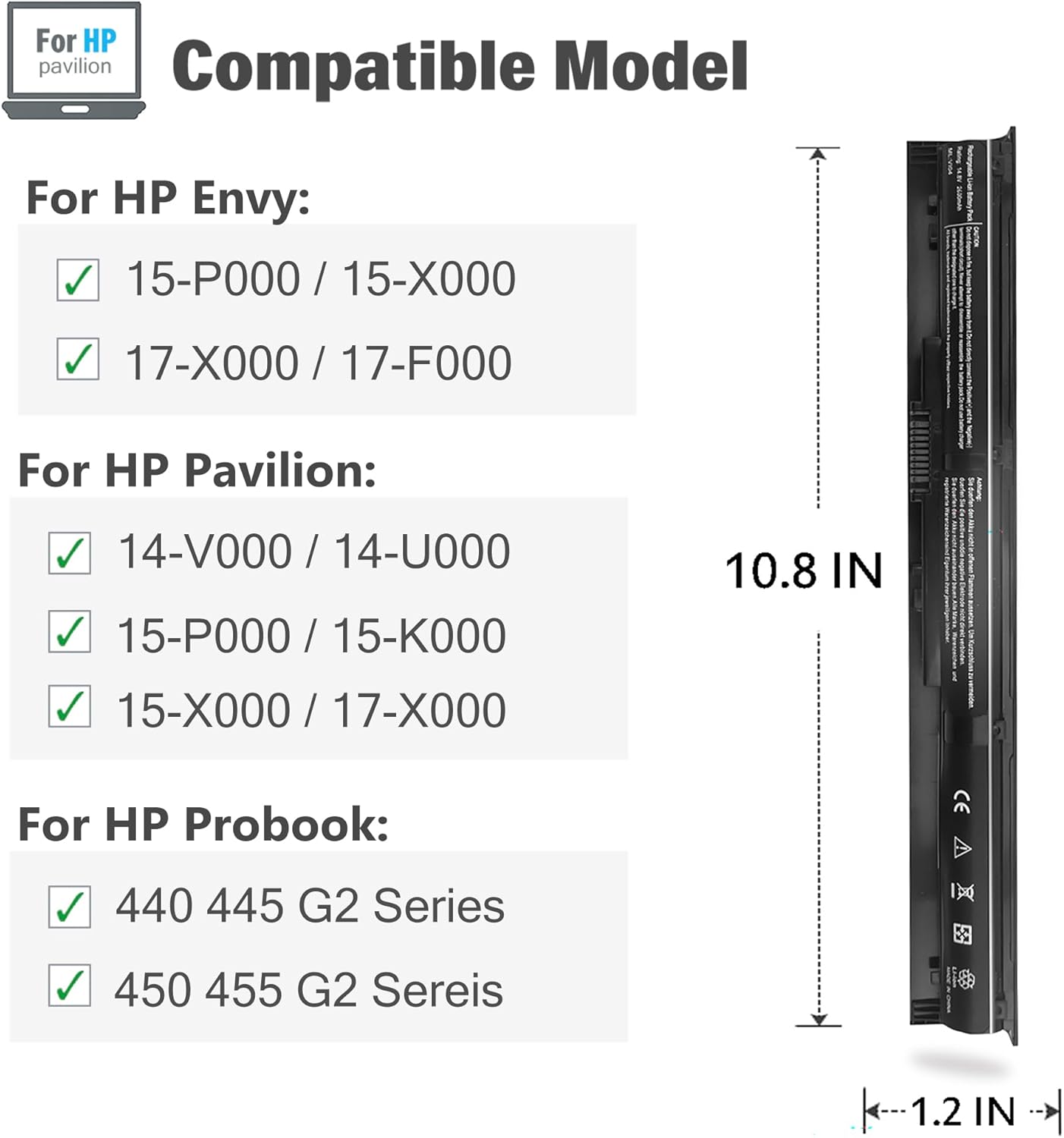
Image: Compatible Models and Dimensions
4. Setup (Battery Installation)
Follow these steps to safely install your new NATNO VI04 laptop battery:
- Power Off: Completely shut down your laptop and disconnect it from the AC power adapter.
- Remove Old Battery: If your laptop has an external battery, locate the release latches (usually two) on the underside of the laptop. Slide the latches to unlock the old battery and carefully remove it. For internal batteries, consult your laptop's service manual for specific removal instructions.
- Insert New Battery: Align the new NATNO VI04 battery with the battery compartment. Gently slide it into place until it clicks securely. Ensure the latches (if external) are in the locked position.
- Reconnect Power: Reconnect the AC power adapter to your laptop.
- Power On: Turn on your laptop.

Image: NATNO VI04 Laptop Battery
5. Operating (First Use and Charging)
For optimal performance and to calibrate your new battery, follow these initial steps:
- Initial Charge: Upon first installation, connect your laptop to the AC adapter and charge the battery to 100% without interruption.
- First Discharge Cycle: After a full charge, disconnect the AC adapter and use your laptop on battery power until the battery level drops to approximately 5-10%. Avoid letting the battery completely drain to 0% during normal use.
- Second Full Charge: Reconnect the AC adapter and charge the battery back to 100%.
This initial charge and discharge cycle helps calibrate the battery's fuel gauge, providing more accurate battery life readings.

Image: Battery in use, highlighting long cycle life
6. Maintenance
Proper maintenance can extend the lifespan and performance of your battery:
- Avoid Extreme Temperatures: Do not expose the battery to very high or very low temperatures. Optimal operating temperature is typically between 10°C and 35°C (50°F and 95°F).
- Regular Use: Use your laptop on battery power regularly. Avoid keeping it constantly plugged in at 100% charge for extended periods.
- Storage: If storing the battery for an extended period, charge it to approximately 50-70% and store it in a cool, dry place. Recharge it every few months to prevent deep discharge.
- Clean Contacts: Periodically clean the battery contacts on both the battery and the laptop with a dry, soft cloth to ensure good connection.
- Software Updates: Keep your laptop's operating system and drivers updated, as power management features can impact battery performance.
7. Troubleshooting
If you encounter issues with your NATNO VI04 battery, consider the following:
- Battery Not Charging:
- Ensure the AC adapter is securely connected to both the laptop and a working power outlet.
- Verify the AC adapter is the correct one for your laptop and is functioning properly.
- Check for any physical damage to the battery or charging port.
- Try restarting your laptop.
- Short Battery Life:
- Perform a battery calibration cycle as described in Section 5.
- Adjust your laptop's power settings to a more power-efficient mode.
- Close unnecessary applications running in the background.
- Reduce screen brightness.
- Battery Not Recognized:
- Ensure the battery is correctly seated in its compartment. Remove and reinsert it.
- Update your laptop's BIOS or battery drivers (consult your laptop manufacturer's support website).
- Verify the battery's compatibility with your specific laptop model and part number (refer to Section 3).
If problems persist after attempting these steps, please contact customer support.

Image: Battery Features (Power Interface, Shell)
8. Specifications
| Feature | Specification |
|---|---|
| Battery Type | Li-ion |
| Capacity | 2600mAh (38Wh) |
| Voltage | 14.8 V |
| Number of Cells | 4-cell |
| Model Number | VI04 |
| Product Dimensions | 10.8 x 1.25 x 0.8 inches |
| Item Weight | 9.1 ounces |
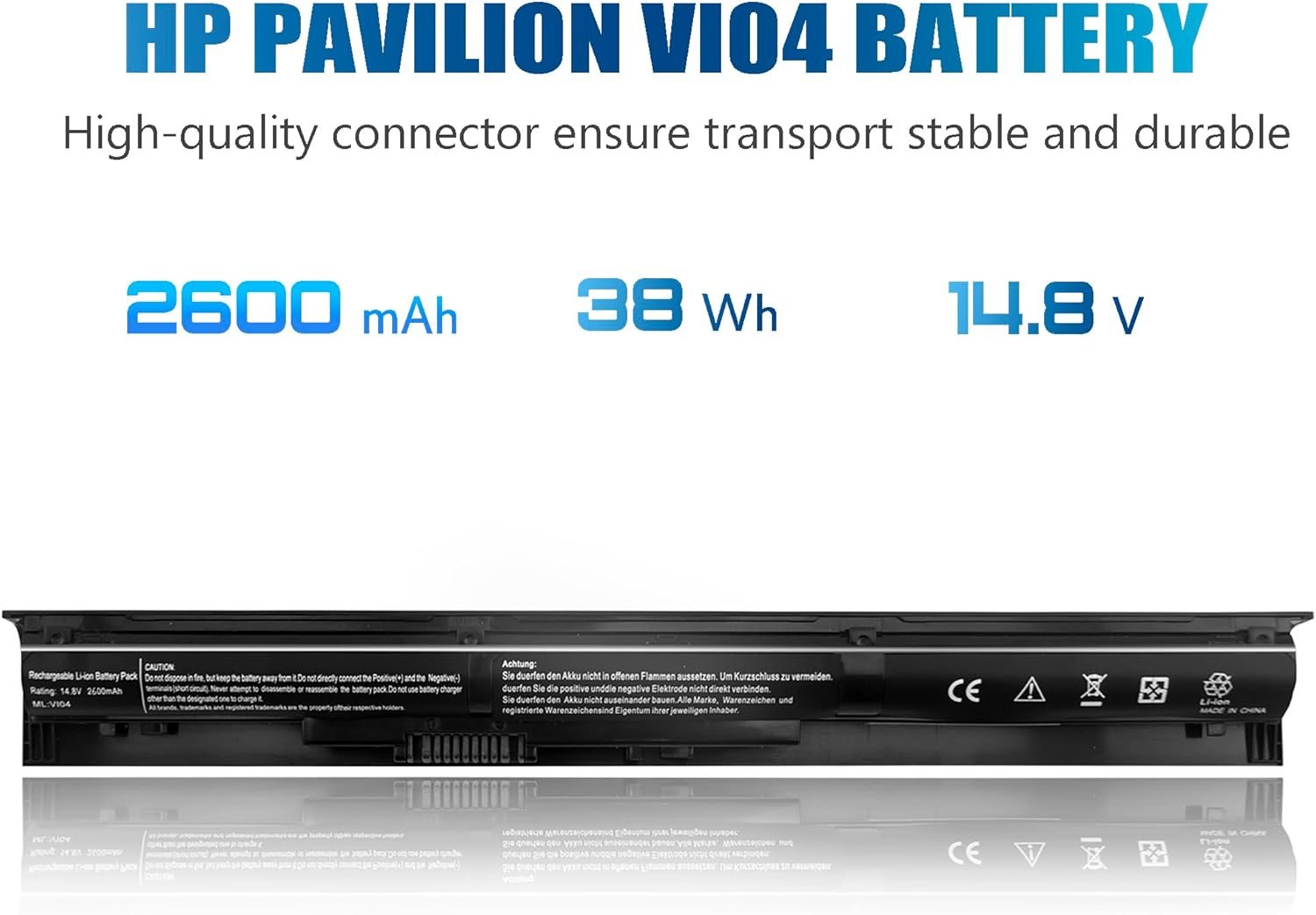
Image: Battery Specifications
9. Warranty and Support
For warranty information or technical support, please refer to the documentation included with your purchase or contact the seller directly. Ensure you have your purchase details and the battery model number (VI04) available when seeking support.