1. Introduction
Thank you for choosing the Linea Brasil Blumenau TV Stand. This manual provides essential information for the safe assembly, proper use, and maintenance of your new furniture. Please read all instructions carefully before beginning assembly and retain this manual for future reference.
2. Safety Information
- Always assemble the product on a soft, clean surface to prevent scratches.
- Ensure all parts are present and undamaged before assembly. Do not proceed with assembly if any parts are missing or damaged.
- Use only the provided hardware. Substituting parts may compromise the structural integrity of the stand.
- Do not overtighten screws, as this can damage the material.
- Keep small parts and packaging materials away from children and pets to prevent choking hazards.
- This TV stand is designed to support televisions up to 65 inches and within the specified weight limits. Exceeding these limits may result in instability and damage.
- Distribute weight evenly on the stand.
- Periodically check all connections to ensure they remain tight.
3. Package Contents
Before starting assembly, verify that all components are present. Refer to the included parts list (usually found in the packaging) to identify each piece. Typical contents include:
- Wooden panels (top, bottom, sides, shelves, doors)
- Hardware pack (screws, dowels, cam locks, hinges, handles, feet)
- Back panel
- Assembly instructions diagram

Figure 3.1: Exploded view diagram showing the overall structure and approximate dimensions of the TV stand. Dimensions are approximately 182 cm (length) x 37 cm (depth) x 71 cm (height).
4. Setup and Assembly
Assembly is required for this product. It is recommended to have two people for assembly. You will need a Phillips head screwdriver and possibly a hammer (not included).
Step 1: Prepare the Base
Identify the bottom panel and attach the feet or base supports according to the diagram in your specific assembly guide. Ensure they are securely fastened.
Step 2: Attach Side Panels and Internal Dividers
Connect the side panels to the bottom panel using dowels and cam locks/screws. Insert any internal vertical dividers or shelves as indicated in the instructions. Pay attention to the orientation of each panel.

Figure 4.1: Detail showing the internal shelving and slatted door design, which will be assembled in this stage.
Step 3: Install Back Panel and Top Panel
Slide or nail the back panel into place. Then, carefully position and secure the top panel to the assembled structure using the appropriate hardware. Ensure all connections are tight and the frame is square.
Step 4: Attach Doors and Shelves
Install the hinges onto the doors and then attach the doors to the main frame. Adjust hinges for proper alignment. Insert any adjustable shelves into their desired positions using shelf pins.
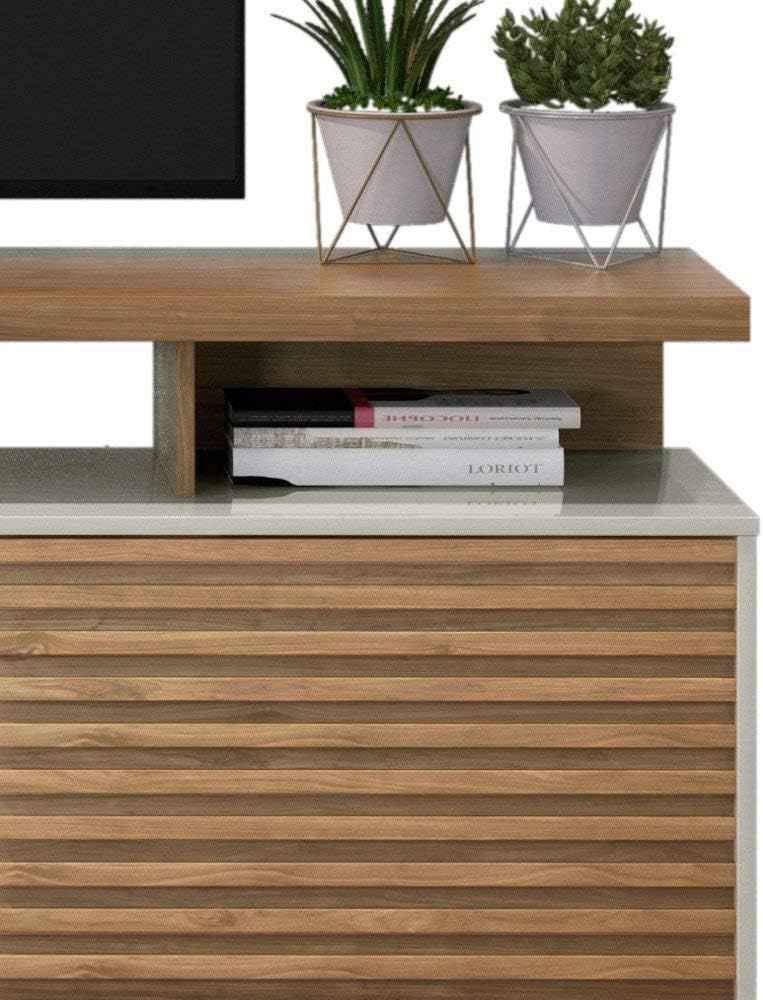
Figure 4.2: This image highlights the open shelf area and the top surface, where a TV and decorative items would be placed.
Step 5: Final Inspection
Once assembly is complete, gently move the stand to its desired location. Ensure it is level and stable. Re-check all screws and connections for tightness. Place your television and other media devices on the stand, ensuring cables are managed safely.

Figure 4.3: The Linea Brasil Blumenau TV Stand fully assembled and in use, showcasing its design and functionality.
5. Operating Instructions
- TV Placement: This stand is designed for TVs up to 65 inches. Ensure the TV base fits securely on the top surface and does not overhang excessively.
- Weight Capacity: Do not exceed the maximum weight capacity for the top surface and internal shelves. Refer to the product specifications for exact limits.
- Cable Management: Utilize any provided cable management openings or routes to keep wires tidy and prevent tripping hazards.
- Ventilation: Ensure adequate airflow around electronic devices placed within the compartments to prevent overheating.
6. Maintenance
- Cleaning: Wipe surfaces with a soft, damp cloth. Avoid abrasive cleaners, harsh chemicals, or excessive moisture, which can damage the finish.
- Spills: Clean up spills immediately to prevent staining or damage to the wood.
- Hardware Check: Periodically (e.g., every 6 months) check all screws, bolts, and connections to ensure they are tight. Retighten if necessary.
- Sunlight Exposure: Avoid prolonged exposure to direct sunlight, which can cause fading or discoloration of the finish.
7. Troubleshooting
- Wobbling/Instability:
- Ensure the stand is on a level surface.
- Check all assembly hardware (screws, cam locks) for tightness.
- Verify that all panels are correctly aligned and seated.
- Doors Not Closing Properly:
- Adjust the hinges. Most furniture hinges allow for minor adjustments to align doors.
- Ensure no obstructions are preventing the door from closing.
- Scratches/Minor Damage:
- For minor scratches, furniture repair pens or wax sticks matching the finish color can be used.
8. Specifications
| Model Number | 2724807168555 |
| Brand | Linea Brasil |
| Material | Engineered Wood |
| Product Dimensions (L x D x H) | 182 cm (Length) x 37 cm (Depth) x 71 cm (Height) Note: Some product specifications may list different dimensions (e.g., 40.9P x 18.5L x 123A cm), which may refer to packaging or an alternative measurement interpretation. The dimensions provided here are based on the product diagram for the assembled unit. |
| Weight | 44.9 Kilograms |
| Assembly Required | Yes |
| Maximum TV Size | Up to 65 inches |
| EAN | 7898567885078 |
9. Warranty and Support
For warranty information or technical support, please refer to the documentation included with your purchase or contact Linea Brasil customer service directly. Keep your proof of purchase for any warranty claims.
Contact Information: Please visit the official Linea Brasil website or refer to your purchase receipt for the most up-to-date contact details.