
Introduction
Thank you for choosing the Toshiba RZE-BT800E Truly Wireless Bluetooth Earbuds. This manual provides essential information for the proper setup, operation, and maintenance of your new earbuds. Please read it thoroughly before use to ensure optimal performance and longevity of the product.
Package Contents
Ensure all items are present in the package:
- Toshiba RZE-BT800E Earbuds (Left and Right)
- Charging Case
- Accessories (e.g., USB charging cable, various ear tips)
Product Overview
Familiarize yourself with the components of your Toshiba RZE-BT800E earbuds and charging case.

Figure 1: Earbuds in Charging Case. This image displays the Toshiba RZE-BT800E earbuds securely placed within their open charging case. The left and right earbuds are clearly visible, each bearing the Toshiba logo. The charging case itself is black and has a smooth, rounded design, indicating where the earbuds are stored and charged.

Figure 2: Individual Earbuds. This image shows the two Toshiba RZE-BT800E earbuds removed from their charging case. They are black, compact, and feature the Toshiba branding on their outer surface. The ear tips, designed for in-ear comfort, are visible, highlighting their ergonomic design.
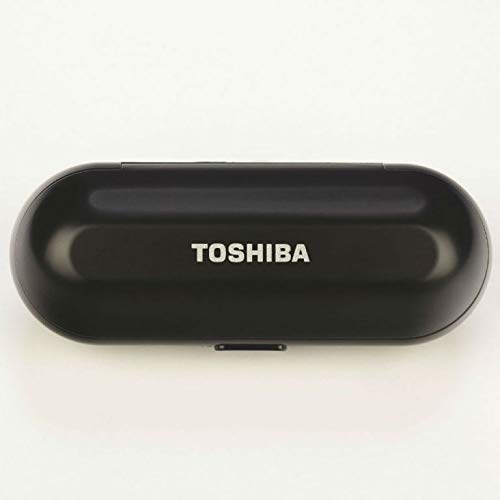
Figure 3: Closed Charging Case. This image presents the Toshiba RZE-BT800E charging case in its closed state. The case is sleek, black, and elongated with rounded edges, featuring the Toshiba logo prominently on its top surface. This compact design makes it portable and ideal for protecting and charging the earbuds on the go.
Setup
1. Charging the Earbuds and Case
Before first use, fully charge the earbuds and the charging case.
- Place both earbuds into the charging case. Ensure they are correctly seated.
- Connect the charging case to a power source using the provided USB charging cable.
- The indicator lights on the case and/or earbuds will show the charging status. Refer to the product's specific LED indicators for full charge notification.
- A full charge typically takes approximately 1-2 hours for the earbuds and 2-3 hours for the case.
2. Bluetooth Pairing
To connect your earbuds to a device (smartphone, tablet, laptop):
- Ensure the earbuds are charged and placed in the charging case.
- Open the charging case lid. The earbuds will automatically enter pairing mode, or you may need to remove them from the case.
- On your device, go to Bluetooth settings and turn Bluetooth on.
- Search for available devices. You should see "RZE-BT800E" or a similar name appear in the list.
- Select "RZE-BT800E" to connect. Once connected, you will hear an audio prompt or see an indicator light change.
- If prompted for a password, enter "0000" (four zeros).
The earbuds will automatically reconnect to the last paired device when removed from the case, provided Bluetooth is enabled on the device.
Operating Instructions
The Toshiba RZE-BT800E earbuds feature touch controls for various functions.
Music Playback
- Play/Pause: Tap either earbud once.
- Next Track: Double-tap the right earbud.
- Previous Track: Double-tap the left earbud.
- Volume Up: Triple-tap the right earbud.
- Volume Down: Triple-tap the left earbud.
Call Management
- Answer/End Call: Tap either earbud once during an incoming call or during an active call.
- Reject Call: Press and hold either earbud for 2 seconds during an incoming call.
- Activate Voice Assistant: Press and hold either earbud for 2 seconds when not on a call (e.g., Siri, Google Assistant).
Power On/Off
- Power On: Remove earbuds from the charging case. They will power on automatically.
- Power Off: Place earbuds back into the charging case. They will power off automatically. Alternatively, press and hold either earbud for 5 seconds to manually power off.
Maintenance
Proper care ensures the longevity of your earbuds.
- Cleaning: Use a soft, dry, lint-free cloth to clean the earbuds and charging case. Do not use abrasive cleaners or solvents.
- Ear Tips: Regularly remove and clean the silicone ear tips with mild soap and water. Ensure they are completely dry before reattaching.
- Storage: When not in use, always store the earbuds in their charging case to protect them and keep them charged.
- Water Resistance: The earbuds are rated as waterproof. However, avoid prolonged submersion in water and ensure they are dry before charging.
Troubleshooting
If you encounter issues, refer to the following common solutions:
| Problem | Solution |
|---|---|
| Earbuds not pairing |
|
| No sound from one earbud |
|
| Earbuds not charging |
|
| Poor audio quality |
|
Specifications
Key technical specifications for the Toshiba RZE-BT800E earbuds:
- Model: RZE-BT800E
- Connectivity: Bluetooth 5
- Wireless Communication Technology: Bluetooth
- Ear Placement: In Ear
- Control Method: Touch
- Microphone: Built-In
- Battery Life (Earbuds): Approximately 4 Hours
- Water Resistance Level: Waterproof
- Item Weight: 50 Grams
- Product Dimensions: 1.6 x 2 x 3 cm
- Material: Silicone
- Included Components: Earbuds, Charging Case, Accessories
Warranty and Support
For warranty information or technical support, please refer to the documentation included with your purchase or visit the official Toshiba support website. Keep your proof of purchase for warranty claims.
For further assistance, you may contact Toshiba customer service.