
1. Introduction
The Pure Daily Care ReNew Skin Scrubber is a professional sonic facial exfoliation device designed to improve skin health and appearance. It utilizes sonic vibrations to exfoliate dead skin cells, extract impurities, and enhance the absorption of skincare products. This device features a hygienic dermatological grade steel edge and offers three distinct modes: Cleansing, Moisturizing, and Lifting.
Important Note: For optimal effectiveness, your skin must remain wet at all times during the use of the ReNew Skin Scrubber.
2. Setup
2.1 What's in the Box
- 1 ReNew Skin Scrubber Device
- 1 Power Cable (USB)
- 1 Instruction Manual (this document)
2.2 Charging the Device
Before first use, fully charge your ReNew Skin Scrubber. Connect the provided USB power cable to the charging port at the bottom of the device and plug the other end into a compatible USB power source. The device features a premium rechargeable battery for quick charging.

Image: The ReNew Skin Scrubber device, highlighting its hygienic sonic extraction plate, blue light, conducting ion bars, mode indicator light, touch power sensor, and USB charging port.
2.3 Initial Skin Preparation
Ensure your face is thoroughly wet before beginning any treatment. You may use your favorite water-based serum, toner, or simply warm water. Re-wet your face as necessary throughout the treatment to maintain optimal device performance.
3. Operating Instructions
3.1 Powering On/Off and Mode Selection
- To power on the device, press and hold the touch power sensor for approximately 2 seconds.
- To cycle through the three modes (Cleansing, Moisturizing, Lifting), tap the power sensor briefly. The mode indicator light will show the active mode.
- To power off the device, press and hold the touch power sensor for approximately 2 seconds.
Video: An official product video demonstrating the features and usage of the Pure Daily Care ReNew Skin Scrubber, including how to power on, select modes, and apply it to the skin for cleansing, moisturizing, and lifting.
3.2 Cleansing Mode (Exfoliate & Peel)
This mode is designed to exfoliate the top layer of dead skin and extract surface blackheads, dirt, oil, and sebum. Ensure your face is wet throughout the process.
- With the device powered on and in Cleansing Mode, position the steel edge pointed down and in towards your skin.
- Apply moderate pressure and move the scrubber across your face, working from the inside out.
- Observe the steel plate for extracted dead skin, oil, and sebum.

Image: A visual guide demonstrating the three steps for effective face cleaning using the Cleansing Mode: 1. Wet face, 2. Apply device with edge pointed down and in, 3. Check for extracted impurities.
3.3 Moisturizing Mode (Nutrient Delivery Enhancer)
This mode helps deliver your pre-applied serums and moisturizers deeper into the skin, enhancing their absorption and effectiveness.
- Apply your preferred serum or moisturizer to your face.
- Switch the device to Moisturizing Mode.
- Ensure the flat surface of the steel spatula is against your skin and facing outwards. Gently glide the device over your face to aid in product absorption.
3.4 Lifting Mode (Skin Lifter)
The Lifting Mode delivers sonic microbursts into the skin, contributing to a temporary lifting effect.
- Switch the device to Lifting Mode.
- Position the flat surface of the steel spatula against your skin, facing outwards.
- Gently move the device upwards and outwards across your face, focusing on areas where lifting is desired.

Image: A diagram showing the three operational modes: Cleansing Mode for exfoliation and blackhead extraction, Moisturizing Mode for enhanced serum delivery, and Lifting Mode for sonic microbursts.
4. Maintenance
4.1 Cleaning the Device
After each use, simply wipe the hygienic stainless steel extraction edge clean with a soft, damp cloth. Do not submerge the device in water.
4.2 Storage
Store the ReNew Skin Scrubber in a cool, dry place away from direct sunlight and moisture. Keep it out of reach of children.
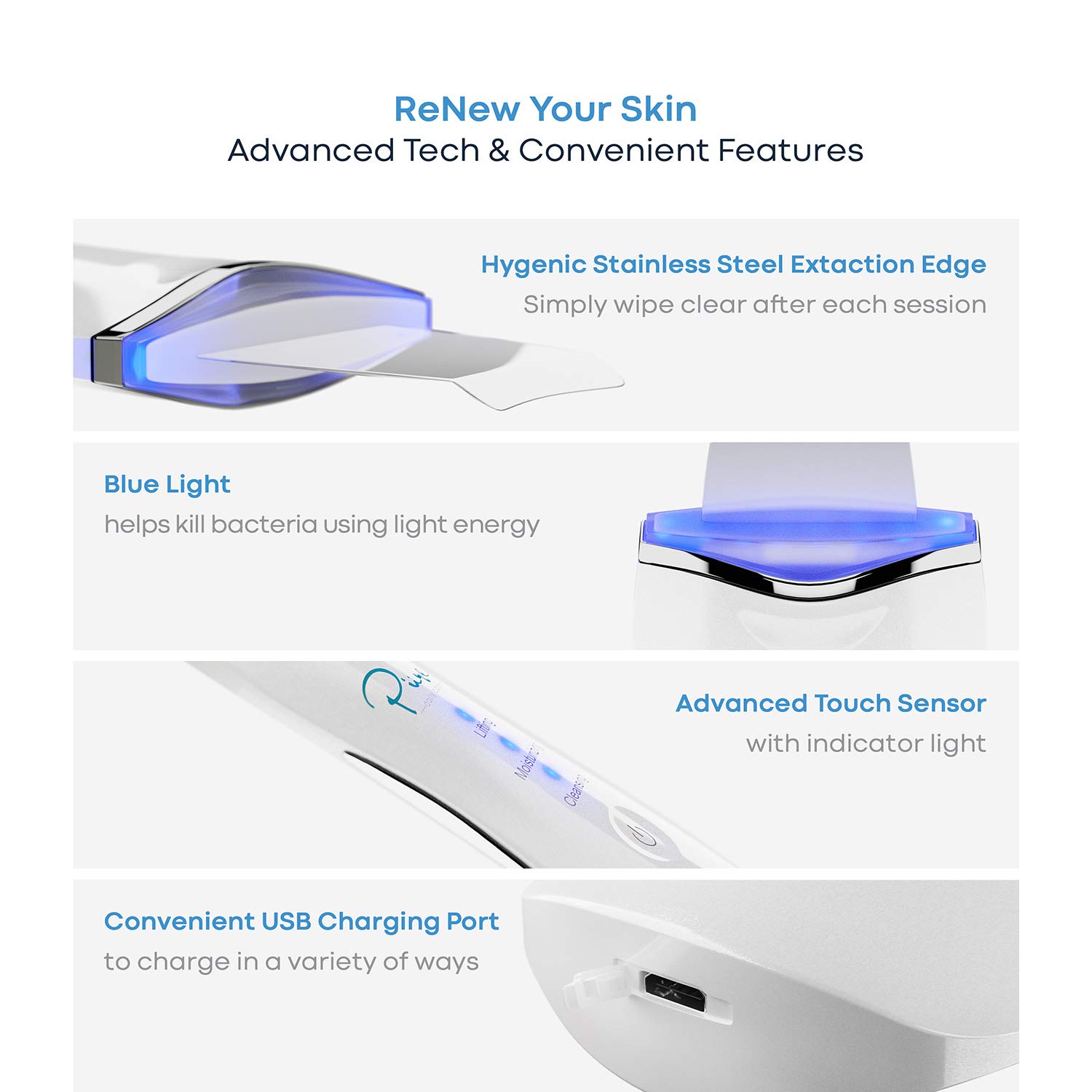
Image: Detailed view of the ReNew Skin Scrubber's advanced features, including the hygienic stainless steel extraction edge, blue light for bacteria reduction, advanced touch sensor with indicator light, and convenient USB charging port.
5. Troubleshooting
- Device not turning on: Ensure the device is fully charged. Press and hold the power sensor for 2 seconds to activate. If the issue persists, contact customer support.
- Device not effective: The ReNew Skin Scrubber requires your skin to be wet at all times for proper function. Re-wet your face if the device seems less effective.
- Mode changes unexpectedly: The device features sensitive touch sensors. Be mindful of how you hold the device to avoid accidentally pressing the control buttons and changing modes.
6. Specifications
| Brand Name | Pure Daily Care |
| Model Number (ASIN) | B07QVWSVLT |
| UPC / GTIN | 810016710158 |
| Material Type | Steel |
| Item Form | Pen |
| Skin Type | Oily (recommended) |
| Batteries | 1 Lithium Polymer battery (included) |
| Package Dimensions | 8.19 x 3.74 x 1.85 inches |
| Item Weight | 8.15 ounces |
| Number of Items | 1 |
| Manufacturer | Pure Daily Care |
7. Safety Information
- Do not use the device on broken skin or if you have a pre-existing skin condition.
- If any blemish persists or worsens after use, discontinue use immediately and consult a medical professional.
- Keep the device away from water and do not submerge it.
8. Warranty and Support
For information regarding product warranty, returns, or technical support, please refer to the official Pure Daily Care website or contact their customer service directly. Contact details are typically available on the product packaging or the manufacturer's official online channels.