
1. Introduction
This manual provides essential information for the safe and effective use of your eMylo Smart Wireless RF Motor Controller Switch Relay Module. This device is designed to control the forward, reverse, and stop functions of DC 12V motors using a wireless remote control. Please read these instructions carefully before installation and operation.
2. Product Overview
The eMylo RF Motor Controller Switch offers reliable wireless control for various motor-driven applications. Key features include:
- Motor Control: Specifically designed to control motor direction (forward/reverse) and stop functions via remote transmitters.
- Enhanced Stability: The relay module provides high signal sensitivity and resistance to interference for consistent performance.
- Extended Range: The RF signal can penetrate walls, floors, and doors, allowing control from a reliable distance of 20-50 meters.
- Simplified Installation: Features durable, insulated press-and-insert terminals for quick and easy wiring, eliminating the need for screwdrivers.
- Versatile Application: Utilizes non-directional wireless encoding technology, suitable for controlling rolling doors, electric curtains, electric door locks, water pumps, and other motor-driven machinery.

Image: Overview of eMylo RF Motor Controller features, including remote control, FCC certification, safety, multiple protection, stable performance, and high sensitivity.

Image: Illustration demonstrating the remote control's effective range, showing the signal passing through walls to control the module.
3. Safety Information
Please observe the following safety precautions:
- Ensure the power supply matches the specified voltage (DC 5-24V).
- Disconnect power before performing any wiring or maintenance.
- Do not exceed the maximum switching current of 10 Amps or wattage of 200 watts.
- Avoid exposing the module to moisture, extreme temperatures, or corrosive environments.
- Installation should be performed by qualified personnel if you are unsure about electrical wiring.
4. Package Contents
A typical package includes:
- eMylo RF Motor Controller Switch Relay Modules (quantity may vary by pack size, e.g., 4 modules for a 4-pack)
- Wireless Remote Control Transmitters (quantity typically matches modules)

Image: A typical package showing four eMylo RF Motor Controller modules and four corresponding remote controls.
5. Setup
5.1 Wiring Instructions
The eMylo controller features press-and-insert terminals for straightforward wiring. Follow the diagram below:
- Identify the Power Input (DC 5-24V) and Load Output connections on the module.
- Connect the Null line and Live line from your DC 5-24V power source to the corresponding input terminals on the module.
- Connect the Null line and Live line from your motor (Load) to the corresponding output terminals on the module.
- Ensure all connections are secure before applying power.

Image: Detailed wiring diagram illustrating the connection of the DC 5-24V power source to the module, and the module to the motor (load).
5.2 Pairing and Mode Configuration
The controller supports different operating modes, typically including Latching (Toggle) and Momentary (Jog) modes. The default mode is usually Latching, where a single press activates the motor until another press stops it. Momentary mode requires holding the button to keep the motor active.
Detailed instructions for changing operating modes and pairing additional remote controls are specific to the product version and are usually provided in the included documentation. Please refer to the specific instructions that came with your product for accurate pairing and mode configuration procedures. Incorrect procedures may lead to unexpected behavior or loss of remote functionality.
6. Operating Instructions
Once the module is correctly wired and paired with the remote control, operation is straightforward:
- Forward/Up Button: Press this button on the remote to initiate the motor in the forward direction (e.g., open a door, lift an object).
- Reverse/Down Button: Press this button to initiate the motor in the reverse direction (e.g., close a door, lower an object).
- Stop Button: Press the middle button to immediately stop the motor's operation.
The behavior of the motor (continuous operation or momentary) depends on the configured operating mode (Latching or Momentary).
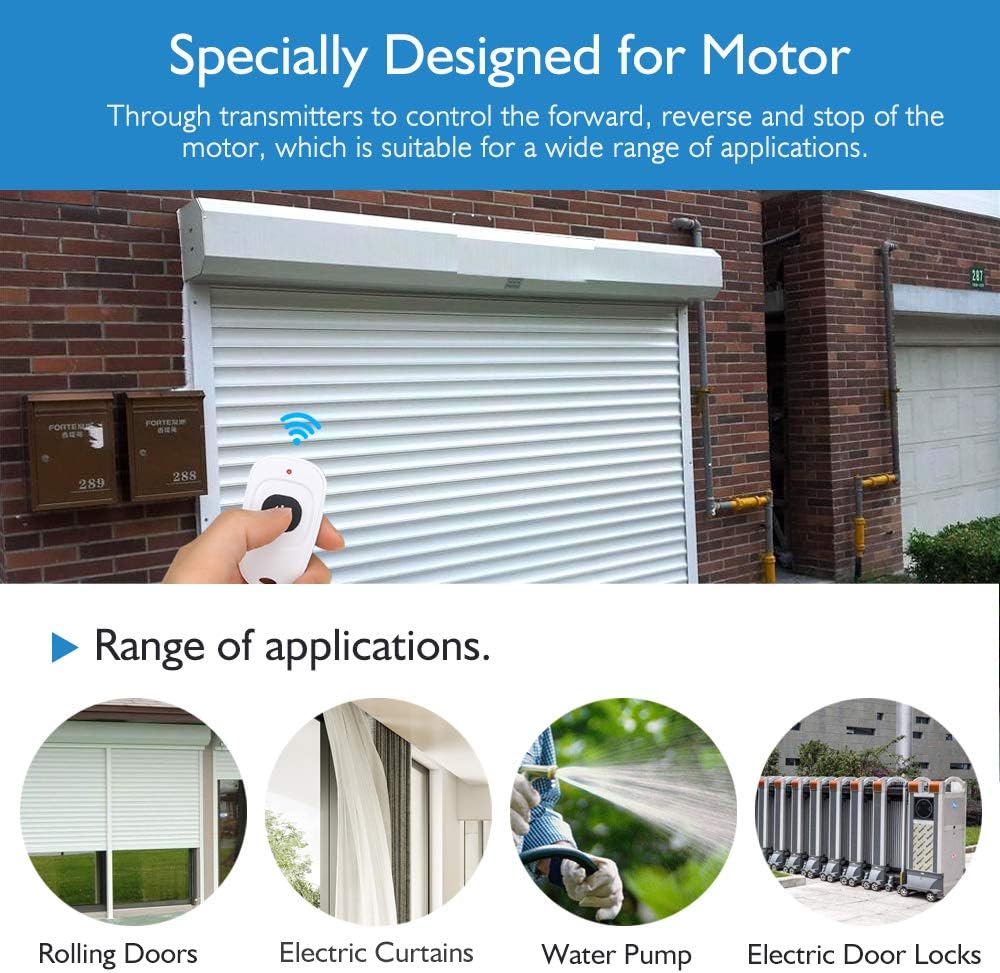
Image: Examples of applications for the eMylo RF Motor Controller, such as rolling doors, electric curtains, water pumps, and electric door locks.

Image: A remote control being used to operate a motor, demonstrating its ability to control forward and reverse movement, such as lifting and lowering a bucket with a crane.
7. Maintenance
The eMylo RF Motor Controller is designed for low maintenance. To ensure optimal performance and longevity:
- Keep the module and remote controls clean and dry.
- Avoid dropping or subjecting the devices to strong impacts.
- Periodically check wiring connections for tightness and signs of wear.
- Replace remote control batteries as needed (battery type not specified in product data, refer to remote for details).
8. Troubleshooting
If you encounter issues with your eMylo RF Motor Controller, consider the following:
- No Response from Remote:
- Check if the remote control battery needs replacement.
- Ensure the module is receiving power.
- Verify that the remote is properly paired with the module. Refer to the pairing instructions provided with your product.
- Motor Not Moving:
- Confirm all wiring connections are secure and correct.
- Check the power supply to both the module and the motor.
- Ensure the motor itself is functional.
- Unexpected Motor Behavior (e.g., continuous operation instead of momentary):
- This indicates an incorrect operating mode configuration. Refer to the mode change instructions provided with your product to reset or reconfigure the mode.
- Reduced Remote Range:
- Check for sources of interference (e.g., other RF devices, large metal objects).
- Ensure the remote control battery is not low.
If problems persist after attempting these troubleshooting steps, please contact customer support.
9. Specifications
| Specification | Detail |
|---|---|
| Brand | Yasorn (eMylo) |
| Model Number | YSE116A4 |
| Coil Voltage | 12 Volts DC |
| Current Rating | 10 Amps |
| Maximum Switching Current | 10 Amps |
| Maximum Switching Voltage | 24 Volts DC |
| Wattage | 200 watts |
| Operation Mode | Automatic (supports Latching/Momentary) |
| Contact Material | Rhodium |
| Material | ABS |
| Product Dimensions | 3.94 x 1.57 x 0.98 inches |
| Item Weight | 14.4 ounces |
| First Available | April 18, 2019 |
10. Warranty and Support
Yasorn, as an authorized eMylo store, is committed to providing quality products and customer service. While specific warranty details are not provided in this manual, we strive to address any issues that may arise with our products. For technical support, troubleshooting assistance, or warranty inquiries, please contact the seller or manufacturer through your purchase platform.