
Thetford C403L
Thetford C403L Control Unit
Instruction Manual
Model: C403L (Part No. 51812-62)
Introduction
This manual provides comprehensive instructions for the installation, operation, and maintenance of your Thetford C403L Control Unit. This unit is designed for use with Thetford C403 series toilets, ensuring reliable control and monitoring of your RV's sanitation system. Please read this manual thoroughly before installation and use to ensure proper function and longevity of the product.
Safety Information
WARNING:
- Always disconnect power to the toilet system before attempting any installation, maintenance, or repair.
- Installation should ideally be performed by a qualified technician to prevent damage to the unit or the toilet system.
- Do not attempt to modify the control unit. Unauthorized modifications can lead to malfunction and void the warranty.
- Keep the unit dry. Exposure to excessive moisture can cause electrical hazards.
Package Contents
- Thetford C403L Control Unit (Part No. 51812-62)
Setup and Installation
The Thetford C403L Control Unit is designed for straightforward replacement or new installation in compatible Thetford C403 series toilets. Ensure all power is disconnected before proceeding.
Installation Steps:
- Prepare the Installation Area: Ensure the area where the control unit will be mounted is clean and dry.
- Access Wiring: Carefully access the existing wiring connections for the toilet's control system. If replacing an old unit, note the existing connections.
- Connect Cables: Connect the necessary cables to the new control unit. The unit features multiple connectors for various functions. Refer to the diagram below for typical connection points.
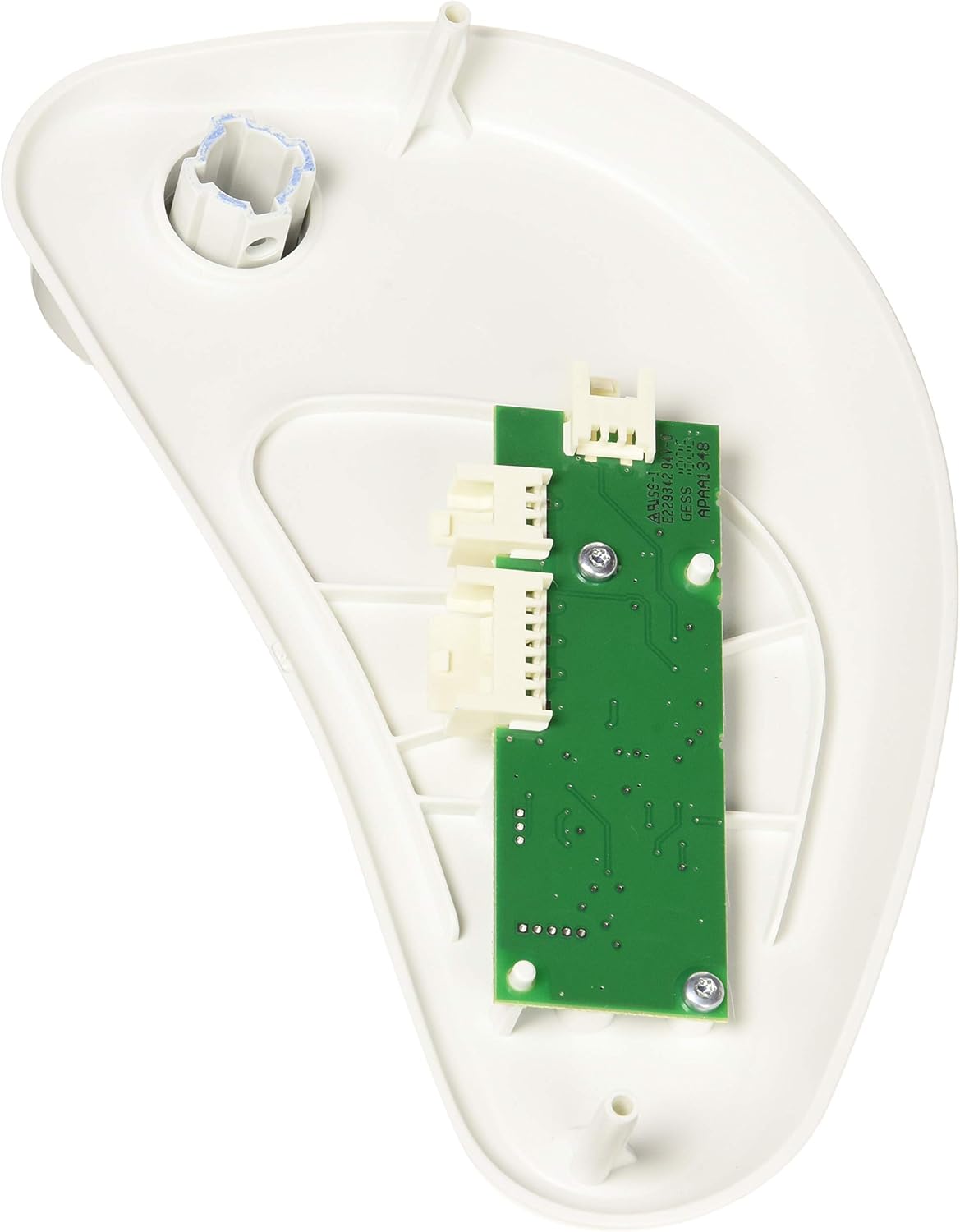
Figure 1: Rear view of the Thetford C403L Control Unit, illustrating the circuit board and connection ports. Ensure all cables are securely attached to their corresponding connectors.
- Mount the Unit: Secure the control unit in its designated position. Ensure it is firmly seated and does not obstruct any moving parts of the toilet.
- Restore Power: Once the unit is securely installed and all connections are verified, restore power to the toilet system.
- Test Functionality: Test the toilet's functions to ensure the control unit is operating correctly.
Operating the Control Unit
The Thetford C403L Control Unit is designed for ease of use, providing intuitive control over your toilet's functions and clear status indications.

Figure 2: Front view of the Thetford C403L Control Unit, showing the main control button and status indicators.
Key Features:
- Main Control Button (Blue Circle): This button typically activates the flush mechanism. Press and hold for a longer flush, or press briefly for a shorter flush, depending on your toilet model's configuration.
- Indicator Lights: The three dots and the tank icon on the unit's face provide visual feedback on the toilet's status, most commonly indicating waste tank levels. Consult your toilet's specific manual for detailed interpretation of these indicators (e.g., green for empty, amber for half-full, red for full).
Maintenance
Regular maintenance ensures the optimal performance and longevity of your Thetford C403L Control Unit.
- Cleaning: Wipe the surface of the control unit with a soft, damp cloth. Do not use abrasive cleaners, solvents, or harsh chemicals, as these can damage the plastic and electronic components.
- Inspection: Periodically check the connections at the rear of the unit to ensure they are secure and free from corrosion. If any signs of damage or wear are observed, consult a qualified technician.
- Environmental Conditions: Ensure the unit is not exposed to extreme temperatures or excessive humidity, which can affect its electronic components.
Troubleshooting
If you encounter issues with your Thetford C403L Control Unit, refer to the following common problems and solutions:
| Problem | Possible Cause | Solution |
|---|---|---|
| Unit not responding / No power | No power supply; Loose connection; Blown fuse. | Check power supply to the toilet system. Verify all cable connections are secure. Check and replace any blown fuses in the toilet's electrical circuit. |
| Indicator lights not working correctly | Faulty sensor; Wiring issue; Unit malfunction. | Ensure sensors are clean and unobstructed. Check wiring connections. If the problem persists, the unit may require professional inspection or replacement. |
| Toilet not flushing | Control unit issue; Water supply issue; Toilet mechanism fault. | Verify water supply to the toilet. Check if the control unit button provides feedback. If other toilet functions work, the issue might be with the toilet mechanism itself. |
If the problem persists after attempting these solutions, it is recommended to contact a qualified RV service technician or Thetford customer support.
Specifications
| Attribute | Detail |
|---|---|
| Brand | Thetford |
| Model | C403L (Bedienelement) |
| Part Number | 51812-62 |
| Item Weight | 4.9 ounces |
| Product Dimensions | 9.45 x 4.72 x 7.09 inches |
| Compatible Toilet Type | Thetford C403 Series |
Warranty and Support
Thetford products are manufactured to high standards and are typically covered by a manufacturer's warranty against defects in materials and workmanship. For specific warranty terms and conditions, please refer to the documentation provided with your purchase or visit the official Thetford website.
For technical support, spare parts, or warranty claims, please contact Thetford customer service or an authorized Thetford service center. You can find contact information and additional resources on the official Thetford website or through your product retailer.
Visit the Thetford Store on Amazon for more information and products.
Ask a question about this manual
Ask about setup, troubleshooting, compatibility, parts, safety, or missing instructions. Manuals+ will review the question and use this page’s manual context to help answer it.