
1. Introduction
This manual provides instructions for the AULCMEET AKB33871414 Replacement Remote Control, designed for use with various LG TV models. This remote control offers a straightforward solution for replacing your original LG TV remote without the need for complex programming.
2. Compatibility
The AULCMEET AKB33871414 remote control is compatible with the following LG TV models:
- 22LS4D-ZD, 19LS4D-ZD, 32LG2000-ZA, 26LG3050-ZA, 37LG2000-ZA, 42LG2000-ZA
- 19LG3000-ZA, 22LG3000-ZA, 26LG3000-ZA, 32LG3000-ZA, 37LG3000-ZA, 42LG3000-ZA
- 32LG5000-ZA, 37LG5000-ZA, 42LG5000-ZA, 47LG5000-ZA, 52LG5000-ZA
- 52LG5010-ZD, 47LG5010-ZD, 42LG5010-ZD, 37LG5010-ZD, 32LG5010-ZD
- 52LG5020-ZB, 47LG5020-ZB, 42LG5020-ZB, 37LG5020-ZB, 32LG5020-ZB
- 52LG5030-ZE, 47LG5030-ZE, 42LG5030-ZE, 37LG5030-ZE, 32LG5030-ZE
- 32LG5700-ZF, 19LG3050-ZA, 22LG3050-ZA, 19LG3060-ZB, 22LG3060-ZB
- 32LG5600-ZB, 32LG3200-ZA, 42LG3200-ZA
- LG20 series (32LG20, 37LG20, 42LG20), LS4D series (22LS4D)
- LG30 series (19LG30, 22LG30, 26LG30, 32LG30, 37LG30, 42LG30)
- LG32 series (32LG32, 42LG32)
- LG5 series (32LG5), LG50 series (37LG50, 42LG50, 47LG50, 52LG50)
- 42CS560, 32CS460, 32CS560, 32LS3400, 42LS3400, 37CS560
- Also replaces AKB33871401 and AKB33871410.
3. Setup
Before using your new remote control, you will need to install batteries.

Figure 1: Front view of the AULCMEET AKB33871414 remote control.
- Open the Battery Cover: Locate the battery compartment on the back of the remote control and slide the cover open.
- Install New Alkaline Batteries: Insert two (2) AAA alkaline batteries, ensuring the positive (+) and negative (-) terminals align correctly with the markings inside the compartment.
- Close the Battery Cover: Slide the battery compartment cover back into place until it clicks securely.
The remote control does not require any programming and is ready for use once batteries are installed.
4. Operating Instructions
To operate your LG TV with this remote control:
- Point the Remote: Direct the remote control towards the infrared (IR) sensor on your LG TV.
- Ensure Clear Path: Make sure there are no obstructions between the remote control and the TV's IR sensor.
- Button Functions: Use the buttons on the remote control as you would with your original LG TV remote. Common functions include:
- POWER: Turns the TV on or off.
- INPUT: Selects input sources (HDMI, AV, etc.).
- VOL +/-: Adjusts volume.
- CH/PR +/-: Changes channels.
- MUTE: Mutes or unmutes sound.
- Number Buttons (0-9): Direct channel selection.
- Navigation Pad (Up, Down, Left, Right, OK): Navigates menus and confirms selections.
- MENU/LIST/GUIDE/INFO/EXIT/BACK: Accesses various TV functions and menus.
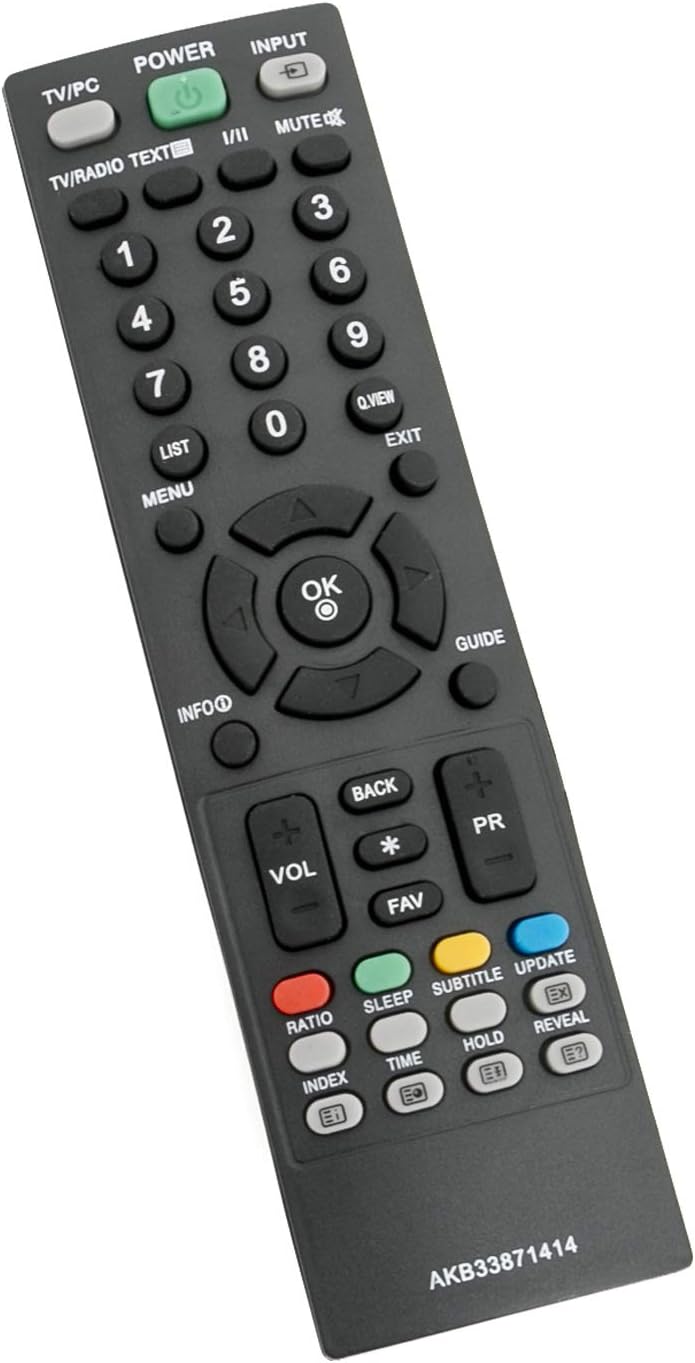
Figure 2: Angled view of the remote control, showing button layout.
5. Maintenance
- Battery Replacement: Replace batteries when the remote control's response becomes sluggish or stops working. Always use new AAA alkaline batteries. Do not mix old and new batteries, or different types of batteries.
- Cleaning: Wipe the remote control with a soft, dry cloth. Do not use liquid cleaners or abrasive materials, as these can damage the remote's surface or internal components.
- Storage: If the remote control will not be used for an extended period, remove the batteries to prevent leakage and potential damage.
6. Troubleshooting
| Problem | Possible Cause | Solution |
|---|---|---|
| Remote control is not working. | Dead or incorrectly installed batteries. | Replace batteries with new AAA alkaline batteries, ensuring correct polarity. |
| Remote control has short range or intermittent response. | Weak batteries; obstruction between remote and TV; remote too far from TV. | Replace batteries. Remove any objects blocking the line of sight to the TV's IR sensor. Ensure you are within the maximum operating range (up to 33 feet). |
| Specific buttons are not responding. | Button malfunction or debris under button. | Gently clean around the button. If the issue persists, the remote may be faulty. |
7. Specifications
| Brand | AULCMEET |
| Model Number | AKB33871414 |
| Compatible Devices | Television (LG TVs) |
| Connectivity Technology | Infrared (IR) |
| Controller Type | Button Control |
| Number of Buttons | 30 |
| Maximum Range | 33 Feet (approx. 10 meters) |
| Batteries Required | 2 x AAA batteries |
| Battery Type | Alkaline |
| Item Weight | 3 Ounces (approx. 85 grams) |
| Item Dimensions (L x W x H) | 5"L x 1"W x 0.5"H (approx. 12.7cm x 2.5cm x 1.3cm) |
| Color | Black |
| Special Feature | Ergonomic |
8. Support
If you encounter any issues or have questions regarding the AULCMEET AKB33871414 Replacement Remote Control, please contact the seller or manufacturer for assistance. Provide your product model number (AKB33871414) and a detailed description of the issue for faster support.