
1. Important Safety Instructions
Always follow basic safety precautions when using electric tools to reduce the risk of fire, electric shock, and personal injury. Read all instructions before operating this circular saw.
- Work Area Safety: Keep the work area clean and well-lit. Cluttered or dark areas invite accidents. Do not operate power tools in explosive atmospheres, such as in the presence of flammable liquids, gases, or dust.
- Electrical Safety: Power tool plugs must match the outlet. Never modify the plug in any way. Avoid body contact with earthed or grounded surfaces, such as pipes, radiators, ranges, and refrigerators.
- Personal Safety: Always wear eye protection. Use hearing protection when operating for extended periods. Wear a dust mask if operations create dust. Dress properly; avoid loose clothing or jewelry. Keep hair, clothing, and gloves away from moving parts.
- Power Tool Use and Care: Do not force the power tool. Use the correct power tool for your application. Disconnect the plug from the power source before making any adjustments, changing accessories, or storing power tools.
- Circular Saw Specific Safety: Keep hands away from the cutting area and the blade. Do not reach underneath the workpiece. Adjust the cutting depth to the thickness of the workpiece. Never hold the workpiece in your hands or across your leg while cutting.
2. Product Overview
The GALAX PRO 1200W 185mm Circular Saw is designed for cutting wood, plastic, and similar materials. It features a powerful motor, adjustable cutting depth, and a bevel angle adjustment for versatile applications.

Image: The GALAX PRO 1200W 185mm Circular Saw, showing the main unit, two saw blades, and a parallel guide.
Key Components:
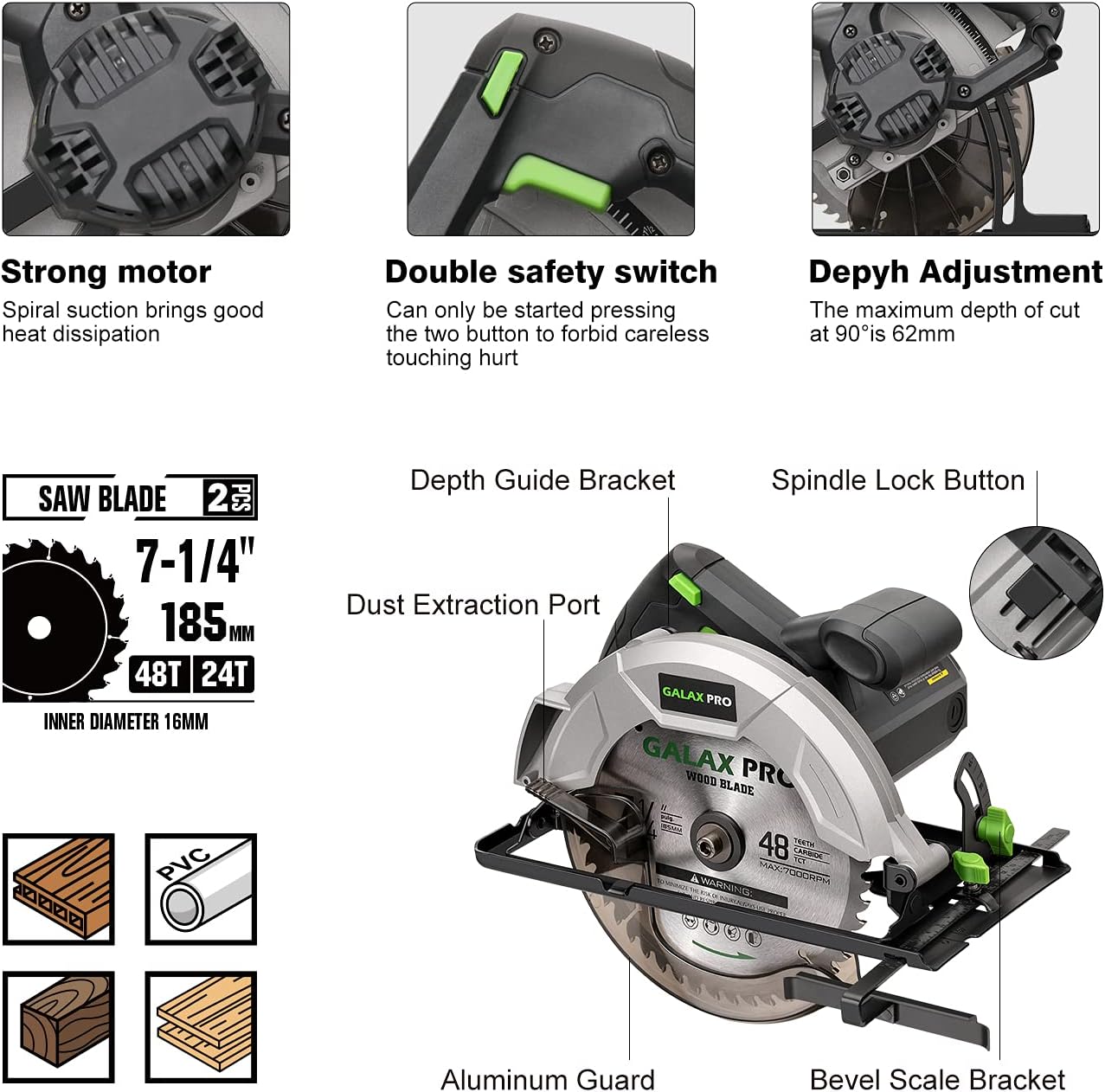
Image: A detailed view of the circular saw with key components labeled, including the strong motor, double safety switch, depth guide bracket, spindle lock button, dust extraction port, aluminum guard, and bevel scale bracket.
- Strong Motor: Provides efficient heat dissipation for prolonged use.
- Double Safety Switch: Requires pressing two buttons simultaneously to start, preventing accidental activation.
- Depth Guide Bracket: For precise control over cutting depth.
- Spindle Lock Button: Secures the spindle for safe blade changes.
- Dust Extraction Port: Connects to a vacuum cleaner for a cleaner work environment.
- Aluminum Guard: Protects the blade during operation.
- Bevel Scale Bracket: Allows for angle adjustments.
3. Setup
Blade Installation:
Ensure the saw is unplugged from the power source before installing or changing the blade.
- Press and hold the spindle lock button.
- Use the provided hex wrench to loosen the blade retaining bolt by turning it counter-clockwise.
- Remove the outer flange and the old blade.
- Place the new blade onto the spindle, ensuring the teeth are pointing in the direction of rotation indicated by the arrow on the saw guard.
- Replace the outer flange and tighten the blade retaining bolt clockwise with the hex wrench while holding the spindle lock button.
Video: This video demonstrates the process of installing and changing the saw blade, as well as adjusting the cutting depth and angle, and performing various cuts.
Adjusting Cutting Depth:
The cutting depth can be adjusted to match the thickness of your workpiece. This ensures a clean cut and reduces kickback risk.
- Loosen the depth adjustment lever located at the front of the saw.
- Raise or lower the saw base to achieve the desired cutting depth. The depth scale will assist in setting the precise measurement.
- Tighten the depth adjustment lever securely.

Image: Illustration showing the depth adjustment mechanism, indicating a maximum cutting depth of 62mm at 90 degrees.
Adjusting Bevel Angle:
For angled cuts, the saw base can be tilted from 0 to 45 degrees.
- Loosen the bevel adjustment knob, usually located at the front or side of the saw.
- Tilt the saw base to the desired angle, using the angle scale for accuracy.
- Tighten the bevel adjustment knob firmly to secure the angle.

Image: Illustration showing the bevel angle adjustment mechanism, indicating a range from 0 to 45 degrees and a maximum cutting depth of 42mm at 45 degrees.
4. Operating Instructions
Making a Cut:
Always ensure the workpiece is securely clamped before cutting. Wear appropriate safety gear.
- Set the desired cutting depth and bevel angle as described in the Setup section.
- Position the saw on the workpiece, aligning the blade with your cut line. Ensure the blade is not touching the workpiece before starting the saw.
- Engage the double safety switch and press the trigger to start the saw. Allow the blade to reach full speed before beginning the cut.
- Guide the saw smoothly and steadily through the workpiece. Do not force the saw; let the blade do the work.
- Once the cut is complete, release the trigger and allow the blade to stop completely before lifting the saw from the workpiece.

Image: A user demonstrating a straight cut on a wooden plank with the circular saw, showing the saw in action with sawdust.

Image: A user demonstrating a bevel cut on a wooden plank, highlighting the saw's ability to cut at an angle.
Materials for Cutting:
This circular saw is suitable for cutting various materials, including:
- Wood
- PVC
- Plasterboard
- Bamboo

Image: The circular saw displayed alongside examples of materials it can cut, such as wood, PVC, plasterboard, and bamboo.
5. Maintenance
Regular maintenance ensures the longevity and safe operation of your circular saw. Always unplug the tool before performing any maintenance.
- Cleaning: Keep the tool's ventilation openings clean to prevent overheating. Use a soft brush or compressed air to remove dust and debris from the motor housing and blade guard.
- Blade Care: Inspect the saw blade regularly for sharpness and damage. A dull or damaged blade can cause kickback and poor cut quality. Replace worn blades promptly.
- Cord Inspection: Check the power cord for any signs of damage, cuts, or fraying. Replace damaged cords immediately to prevent electrical hazards.
- Lubrication: This tool is generally designed for maintenance-free operation. Do not lubricate internal components unless specified by the manufacturer.
6. Troubleshooting
If you encounter issues with your circular saw, refer to the following common troubleshooting steps:
| Problem | Possible Cause | Solution |
|---|---|---|
| Saw does not start | No power supply; Faulty switch; Safety switch not engaged | Check power connection; Ensure safety switch is pressed; Contact service if switch is faulty |
| Blade not cutting efficiently | Dull or damaged blade; Incorrect blade for material; Incorrect cutting depth | Replace blade; Use appropriate blade; Adjust cutting depth |
| Excessive vibration or noise | Loose blade; Damaged blade; Internal component issue | Tighten blade bolt; Replace blade; Contact service |
| Saw kicks back | Improper workpiece support; Dull blade; Forcing the saw; Incorrect cutting depth | Secure workpiece; Replace blade; Guide saw smoothly; Adjust cutting depth |
If the problem persists after attempting these solutions, contact customer support or a qualified service technician.
7. Specifications
Technical specifications for the GALAX PRO 1200W 185mm Circular Saw:
| Feature | Specification |
|---|---|
| Brand | GALAX PRO |
| Model Number | FRGP76331 |
| Power | 1200 Watts |
| No-Load Speed | 5800 RPM |
| Voltage | 240 Volts |
| Blade Diameter | 185 mm (7-1/4 inches) |
| Blade Material | Metal, TCT |
| Max Cutting Depth (90°) | 62 mm |
| Max Cutting Depth (45°) | 42 mm |
| Bevel Angle | 0-45 Degrees |
| Item Weight | 4.26 Kilograms |
| Power Source | Corded Electric |
| Recommended Surface | Wood, Metal, Plastic |
| UPC / GTIN | 745672035072 |
8. Warranty and Support
For information regarding product warranty, technical support, or service, please refer to the documentation included with your product packaging or visit the official GALAX PRO website. Specific warranty terms and conditions may vary by region and retailer.
