Important Safety Instructions
Read all instructions carefully before using the appliance. Keep this manual for future reference.
- Do not attempt to operate this oven with the door open as this can result in harmful exposure to microwave energy.
- Do not place any object between the oven front face and the door or allow soil or cleaner residue to accumulate on sealing surfaces.
- Do not operate the oven if it is damaged. It is particularly important that the oven door closes properly and that there is no damage to the: (1) door (bent), (2) hinges and latches (broken or loosened), (3) door seals and sealing surfaces.
- The oven should not be adjusted or repaired by anyone except properly qualified service personnel.
- Ensure the appliance is properly grounded.
- Do not use corrosive chemicals or vapors in this appliance.
- Always use oven mitts when handling hot items from the oven.
What's in the Box
Upon unpacking, verify that all components are present and undamaged:
- Samsung Convection Microwave Oven (MC28M6035CK/TL)
- Turntable
- Crusty Plate
- Wire Rack
- User Manual
Note: Starter kit is not included with this product.
Setup and Installation
1. Placement
Place the microwave oven on a flat, stable surface strong enough to hold its weight plus the heaviest food item likely to be cooked in it. Ensure adequate ventilation around the oven. Maintain a minimum of 10 cm (4 inches) clearance at the rear, 20 cm (8 inches) at the top, and 5 cm (2 inches) on each side.
2. Electrical Connection
Plug the oven into a properly grounded 230V, 50Hz AC outlet. Do not use extension cords or adapters.
3. Turntable Assembly
- Place the roller ring in the center of the oven cavity.
- Place the glass turntable on top of the roller ring, ensuring it sits securely in the center support.
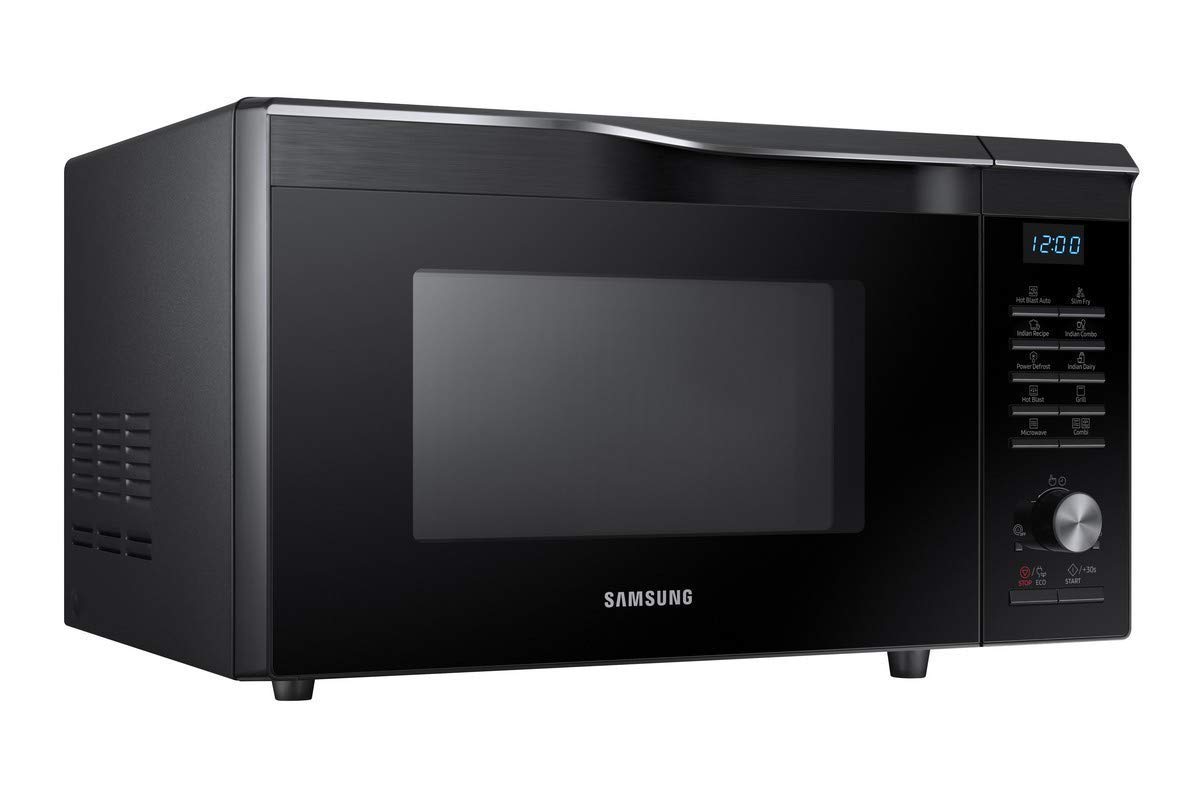
Image: Interior view of the Samsung Convection Microwave Oven with the turntable and roller ring in place. The ceramic enamel interior is visible.
Operating Instructions
This section details the various cooking functions and how to use them.
Control Panel Overview

Image: A detailed view of the control panel on the right side of the microwave oven, showing the digital display, function buttons, and rotary dial.
- Display: Shows time, cooking settings, and indicators.
- Function Buttons: Select cooking modes like Microwave, Grill, Convection, Combi, Defrost, Hot Blast, Slim Fry, Indian Recipe, Indian Dairy.
- Rotary Dial: Adjusts cooking time, weight, or temperature.
- START/+30s Button: Starts cooking or adds 30 seconds to cooking time.
- STOP/ECO Button: Stops cooking or cancels settings.
1. Basic Microwave Cooking
- Place food in a microwave-safe container on the turntable.
- Close the door.
- Press the "Microwave" button.
- Turn the rotary dial to set the desired cooking time.
- Press "START/+30s".
2. Convection Cooking
Convection mode uses a fan to circulate hot air, ideal for baking and roasting.
- Place food on the wire rack or a suitable baking dish.
- Press the "Convection" button.
- Turn the rotary dial to select the desired temperature.
- Press "START/+30s" to preheat (optional).
- Once preheated (or if not preheating), turn the dial to set cooking time.
- Press "START/+30s".

Image: Close-up view of the interior top of the microwave oven, highlighting the convection heating element.
3. Grill Cooking
Use the grill function for browning and crisping food.
- Place food on the wire rack.
- Press the "Grill" button.
- Turn the rotary dial to set the desired cooking time.
- Press "START/+30s".
4. Combi Cooking (Microwave + Convection/Grill)
Combination modes allow for faster cooking with browning results.
- Place food in a suitable dish.
- Press the "Combi" button repeatedly to select the desired combination mode (e.g., Microwave + Grill, Microwave + Convection).
- Turn the rotary dial to set cooking time.
- Press "START/+30s".
5. Power Defrost
This feature allows for quick and even defrosting of various food types.
- Place frozen food in a microwave-safe dish.
- Press the "Power Defrost" button.
- Turn the rotary dial to select the food type and weight.
- Press "START/+30s".
6. Special Features (Hot Blast, Slim Fry, Indian Recipe, Indian Dairy)
These pre-programmed functions offer optimized settings for specific dishes.
- Hot Blast: For faster and more even cooking, similar to a hot air fryer.
- Slim Fry: Allows cooking with minimal oil, achieving a crispy texture.
- Indian Recipe: Pre-set programs for popular Indian dishes.
- Indian Dairy: Specific settings for dairy-based preparations.
To use these features:
- Place food in the appropriate cookware.
- Press the corresponding function button (e.g., "Hot Blast", "Slim Fry", "Indian Recipe", "Indian Dairy").
- Turn the rotary dial to select the specific dish or weight if prompted.
- Press "START/+30s".
Care and Maintenance
1. Cleaning the Oven Interior
- Always unplug the oven before cleaning.
- Wipe the interior cavity, door seals, and door with a damp cloth after each use.
- For stubborn stains, use a mild detergent and then wipe with a clean, damp cloth.
- Do not use abrasive cleaners, steel wool, or harsh chemicals.
- The ceramic enamel interior is designed for easy cleaning.
2. Cleaning the Exterior
- Wipe the exterior surfaces with a soft, damp cloth.
- Avoid getting water into the ventilation openings.
3. Cleaning the Turntable and Roller Ring
- The glass turntable and roller ring can be washed in warm soapy water or in a dishwasher.
- Ensure they are completely dry before placing them back in the oven.
Troubleshooting
| Problem | Possible Cause | Solution |
|---|---|---|
| Oven does not start | Power cord not plugged in; Door not closed properly; Fuse blown or circuit breaker tripped. | Ensure power cord is securely plugged in; Close the door firmly; Check household fuse/circuit breaker. |
| Food is not cooking evenly | Food not stirred or turned; Incorrect power level or cooking time. | Stir or turn food halfway through cooking; Adjust power level and cooking time as needed. |
| Light bulb not working | Light bulb needs replacement. | Contact qualified service personnel for bulb replacement. |
| Excessive steam from door | Normal during cooking, especially with high moisture content foods. | This is normal and not a fault. Ensure proper ventilation. |
If the problem persists after attempting these solutions, please contact customer support.
Product Specifications
| Brand | Samsung |
| Model Number | MC28M6035CK/TL |
| Capacity | 28 Litres |
| Oven Cooking Mode | Convection |
| Installation Type | Countertop |
| Special Features | Defrost, Hot Blast, Slim Fry, Indian Recipe, Indian Dairy |
| Colour | Black |
| Voltage | 230 Volts |
| Material | Ceramic Enamel (Interior) |
| Item Dimensions (LxWxH) | 46.3 x 51.7 x 31 Centimeters |
| Item Weight | 31 kg |
Warranty and Support
This product comes with a 6-month Seller Warranty from the date of purchase. This warranty covers manufacturing defects and malfunctions under normal use.
For warranty claims, technical assistance, or service requests, please contact your seller or authorized Samsung service center. Keep your purchase receipt as proof of purchase.
For further information, you may visit the official Samsung support website or refer to the contact details provided with your purchase documentation.


