
Pro Armor P141S185BL
Pro Armor G2 Front Suspension Seat User Manual
Model: P141S185BL
1. Introduction
This manual provides detailed instructions for the installation, operation, maintenance, and troubleshooting of the Pro Armor G2 Front Suspension Seat. Designed for Polaris RZR models from 2008-2020, this seat offers enhanced comfort and performance with features like marine-grade vinyl, multi-density foams, and a sand drain system.
Product Features:
- Marine-grade vinyl construction for durability and longevity.
- Reinforced with K-Tex material to prevent wear and tear.
- Powder-coated black seat frame for corrosion resistance.
- Removable seat cushion with integrated drain for quick drying.
- Easy pass-through belt slots for simple harness installation and removal.
- Multi-density foams designed to reduce driver fatigue.
2. Safety Information
Read all instructions carefully before installation and use. Failure to follow these instructions may result in injury or damage to your vehicle.
- Always wear appropriate safety gear when working on your vehicle.
- Ensure the vehicle is turned off, in park, and the parking brake is engaged before beginning installation.
- If you are unsure about any part of the installation process, seek assistance from a qualified professional.
- Verify all fasteners are securely tightened after installation and periodically check for tightness during use.
- Do not modify the seat or its mounting hardware.
3. What's in the Box
The Pro Armor G2 Front Suspension Seat package includes:
- 1 x Pro Armor G2 Front Suspension Seat (Model P141S185BL)
- Note: Mounting hardware may be sold separately or utilize existing vehicle hardware. Refer to your vehicle's manual for specific mounting requirements.
4. Setup and Installation
This section outlines the general steps for installing your Pro Armor G2 Front Suspension Seat. Specific vehicle models may have slight variations. Always consult your vehicle's service manual for detailed instructions on seat removal and installation.
Required Tools (Not Included):
- Socket Wrench Set
- Torque Wrench
- Safety Glasses
- Gloves
Installation Steps:
- Prepare the Vehicle: Park your Polaris RZR on a level surface, engage the parking brake, and turn off the engine. Disconnect the negative terminal of the battery if working near electrical components.
- Remove Existing Seat: Locate and remove the bolts or latches securing the factory seat to the vehicle frame. Carefully lift and remove the old seat.
- Inspect Mounting Area: Clean any debris from the seat mounting area. Inspect the mounting points for any damage or corrosion.
- Position the New Seat: Carefully place the Pro Armor G2 Suspension Seat into the desired front seating position. Align the seat's mounting holes with the vehicle's mounting points.
- Secure the Seat: Insert the appropriate mounting bolts (either provided with the seat or reused from the factory seat, as applicable) through the seat frame and into the vehicle's mounting points. Hand-tighten all bolts first.
- Torque Bolts: Using a torque wrench, tighten all mounting bolts to the vehicle manufacturer's specified torque settings. Refer to your Polaris RZR service manual for correct torque values. Do not overtighten.
- Install Harness (if applicable): If installing a multi-point harness, route the harness straps through the designated pass-through slots on the seat. Ensure the harness is properly secured according to the harness manufacturer's instructions.
- Final Check: Gently rock the seat to ensure it is securely mounted and does not wobble. Verify all bolts are tight. Reconnect the battery if it was disconnected.

Figure 4.1: Angled view of the Pro Armor G2 Front Suspension Seat, showcasing its ergonomic design and harness pass-throughs.

Figure 4.2: Front view of the Pro Armor G2 Seat, highlighting the headrest and seat contours.

Figure 4.3: The Pro Armor G2 Seat with its removable bottom cushion detached, revealing the seat base and drain system.

Figure 4.4: Underside view of the Pro Armor G2 Seat, showing the robust frame and suspension webbing.
5. Operating Instructions
The Pro Armor G2 Suspension Seat is designed for comfort and support during off-road use. While seats generally do not have "operating" instructions in the traditional sense, understanding its features enhances user experience.
- Harness Compatibility: The seat features integrated pass-through slots for easy installation and removal of multi-point harnesses. Ensure harnesses are correctly routed and secured according to the harness manufacturer's guidelines.
- Removable Cushion: The bottom seat cushion is removable for cleaning or to allow water and debris to pass through the integrated sand drain. To remove, simply lift the cushion from the seat base. To re-install, align and press firmly until secured.
- Ergonomic Design: The multi-density foam construction is engineered to provide support and reduce fatigue during extended periods of use. Adjust your seating position as needed for optimal comfort.
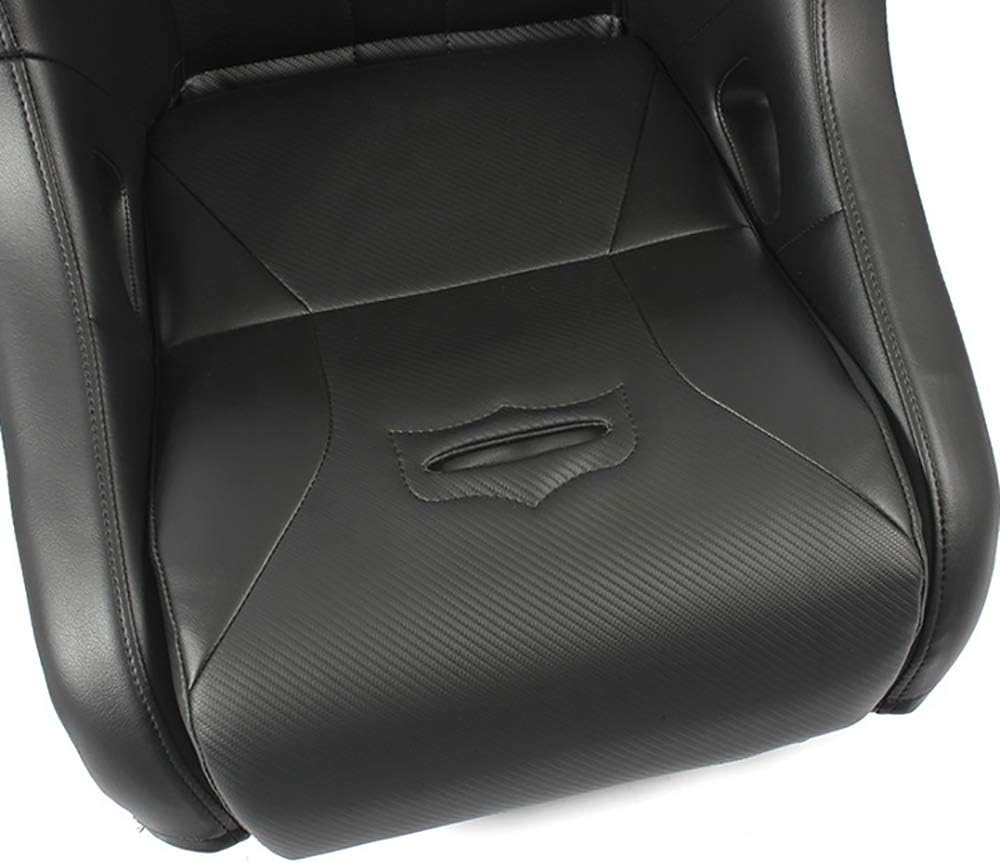
Figure 5.1: Close-up of the seat base, showing the integrated sand drain feature.
6. Maintenance
Proper maintenance will extend the life and appearance of your Pro Armor G2 Suspension Seat.
- Cleaning: Clean the marine-grade vinyl with mild soap and water. Avoid harsh chemicals, abrasive cleaners, or stiff brushes, as these can damage the material. Rinse thoroughly and allow to air dry.
- Cushion Care: The removable cushion can be cleaned separately. Ensure it is completely dry before re-installing to prevent mildew.
- Frame Inspection: Periodically inspect the powder-coated frame for any signs of rust or damage. Touch up any chips in the coating to prevent corrosion.
- Fastener Check: Regularly check all mounting bolts for tightness, especially after off-road use. Retorque to specifications if necessary.
- Storage: If storing the vehicle for extended periods, consider covering the seats to protect them from UV exposure and environmental elements.
7. Troubleshooting
This section addresses common issues you might encounter with your Pro Armor G2 Suspension Seat.
| Problem | Possible Cause | Solution |
|---|---|---|
| Seat feels loose or wobbly. | Mounting bolts are not sufficiently tightened. | Check and retorque all mounting bolts to vehicle manufacturer specifications. |
| Water pooling on seat. | Sand drain is obstructed or cushion is not removed. | Ensure the sand drain is clear of debris. Remove the bottom cushion to allow water to drain. |
| Harness difficult to install/remove. | Harness straps are not properly aligned with pass-through slots. | Ensure harness straps are flat and correctly threaded through the seat's pass-through slots. |
| Unusual noises from seat. | Loose mounting hardware or friction between seat and vehicle components. | Inspect all mounting points and hardware for tightness. Check for any contact points causing friction. |
If you encounter issues not listed here or if solutions do not resolve the problem, please contact Pro Armor customer support.
8. Specifications
| Feature | Detail |
|---|---|
| Brand | Pro Armor |
| Model | P141S185BL (G2 Front Suspension Seat) |
| Color | Black |
| Orientation | Front |
| Material | Marine-grade Vinyl |
| Vehicle Service Type | UTV (Polaris RZR 2008-2020 models) |
| Seat Width | 21 Inches |
| Item Weight | 28 Pounds |
| Product Dimensions (L x W x H) | 43 x 21 x 16 inches |
| OEM Part Number | P141S185BL |
| UPC | 028752813686 |
9. Warranty and Support
For specific warranty information regarding your Pro Armor G2 Front Suspension Seat, please refer to the documentation provided with your purchase or visit the official Pro Armor website. Warranty terms typically cover manufacturing defects.
For technical support, installation assistance, or to inquire about replacement parts, please contact Pro Armor customer service directly. You can often find contact information on the manufacturer's website or through the retailer where the product was purchased.
You can also visit the Pro Armor Store on Amazon for additional product information and support resources.
Ask a question about this manual
Ask about setup, troubleshooting, compatibility, parts, safety, or missing instructions. Manuals+ will review the question and use this page’s manual context to help answer it.