1. Introduction
This manual provides comprehensive instructions for the setup, operation, and maintenance of your LG SL6Y 3.1 Channel High Resolution Audio Sound Bar. Designed to enhance your audio experience, this sound bar features DTS Virtual:X technology for immersive sound and easy wireless connectivity. Please read this manual thoroughly before using the product to ensure proper and safe operation.
2. What's in the Box
Upon unpacking your LG SL6Y Sound Bar, please verify that all components are present:
- Sound Bar Unit
- Wireless Subwoofer
- Remote Control
- Power Cable for Sound Bar
- Power Cable for Subwoofer
- Optical Cable
- Wall Mount Bracket (if included)
- User Manual (this document)
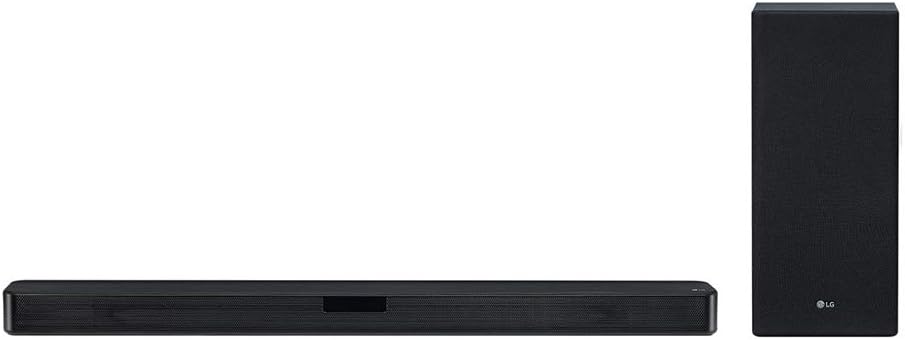
Image: The LG SL6Y Sound Bar and its accompanying wireless subwoofer, shown together. The sound bar is a long, slender black unit, and the subwoofer is a taller, rectangular black unit.
3. Setup
3.1 Placement
Place the sound bar directly in front of your TV, centered. Ensure there are no obstructions in front of the sound bar. The wireless subwoofer can be placed anywhere in the room, ideally near the sound bar for optimal bass response, but its wireless nature allows for flexible placement.

Image: The LG SL6Y Sound Bar positioned below a television on a media console in a modern living room setting. The wireless subwoofer is visible to the right of the console.
3.2 Connecting to Power
- Connect the power cable to the AC adapter of the sound bar, then plug the adapter into a wall outlet.
- Connect the power cable to the wireless subwoofer and plug it into a wall outlet. The subwoofer will automatically pair with the sound bar when both are powered on.
3.3 Connecting to TV
There are several ways to connect your sound bar to your TV:
- HDMI ARC (Recommended): Connect an HDMI cable from the HDMI OUT (TV ARC) port on the sound bar to the HDMI ARC port on your TV. This allows for audio return channel functionality, simplifying control.
- Optical Cable: Connect the included optical cable from the OPTICAL IN port on the sound bar to the Optical Digital Audio Out port on your TV.
- Bluetooth: For wireless audio from your TV (if supported) or other devices, pair via Bluetooth.

Image: A close-up view of the rear panel of the LG SL6Y Sound Bar, highlighting the various input and output ports, including HDMI IN, HDMI OUT (TV ARC), Optical IN, and USB.
4. Operating the Sound Bar
4.1 Basic Functions
- Power On/Off: Press the Power button on the remote control or the sound bar.
- Volume Control: Use the Volume Up (+) or Volume Down (-) buttons on the remote or sound bar.
- Function/Input Selection: Press the Function (F) button on the remote or sound bar to cycle through available inputs (HDMI ARC, Optical, Bluetooth, USB).
- Sound Effects: Use the Sound Effect button on the remote to select different sound modes (e.g., Standard, Bass Blast, DTS Virtual:X).
4.2 Bluetooth Connectivity
To connect a Bluetooth device:
- Press the Function (F) button on the sound bar or remote until "BT" (Bluetooth) appears on the display.
- On your Bluetooth device (e.g., smartphone, tablet), enable Bluetooth and search for "LG SL6Y".
- Select "LG SL6Y" from the list of available devices to pair. Once connected, "PAIRED" will appear on the sound bar display.
The sound bar supports Bluetooth 4.2 for reliable wireless audio streaming.
5. Maintenance
To ensure the longevity and optimal performance of your LG SL6Y Sound Bar, follow these maintenance guidelines:
- Cleaning: Use a soft, dry cloth to clean the surfaces of the sound bar and subwoofer. Do not use liquid cleaners or aerosol sprays, as they may damage the finish or internal components.
- Ventilation: Ensure that the ventilation openings on the sound bar and subwoofer are not blocked. Proper airflow prevents overheating.
- Avoid Direct Sunlight/Heat: Do not expose the unit to direct sunlight or heat sources, as this can affect performance and lifespan.
- Storage: If storing the unit for an extended period, disconnect it from power and store it in a cool, dry place.
6. Troubleshooting
If you encounter issues with your sound bar, refer to the following common problems and solutions:
| Problem | Possible Cause | Solution |
|---|---|---|
| No Sound | Incorrect input selected, volume too low, cables not connected properly. | Check input source (Function button), increase volume, ensure all cables are securely connected. |
| Subwoofer Not Pairing | Subwoofer not powered on, interference, out of range. | Ensure subwoofer is plugged in and powered. Move subwoofer closer to the sound bar. Refer to the full manual for manual pairing instructions if needed. |
| Bluetooth Disconnection | Device out of range, interference, device issue. | Move Bluetooth device closer to the sound bar. Disconnect and re-pair the device. Avoid placing other wireless devices near the sound bar. |
| Remote Control Not Working | Dead batteries, obstruction, remote sensor blocked. | Replace batteries. Remove any obstructions between the remote and the sound bar. Ensure the remote sensor on the sound bar is not covered. |
7. Specifications
| Feature | Detail |
|---|---|
| Brand | LG |
| Model Name | SL6Y |
| Speaker Type | Soundbar |
| Surround Sound Channel Configuration | 3.1 |
| Connectivity Technology | HDMI, Bluetooth, Optical |
| Wireless Communication Technology | Bluetooth |
| Bluetooth Range | 20 Meters |
| Subwoofer Connectivity | Wireless |
| Product Dimensions (Sound Bar) | 3.4"D x 41.7"W x 2.2"H |
| Item Weight | 19.3 Pounds |
| Power Source | Corded Electric |
| Special Feature | USB Port |
| Recommended Uses | For Televisions |
| Compatible Devices | Television, Laptop, Desktop, Projector |
8. Warranty and Support
Your LG SL6Y Sound Bar comes with a limited warranty. For detailed warranty terms and conditions, please refer to the warranty card included with your product or visit the official LG website. For technical support, product registration, or service inquiries, please contact LG customer support through their official channels.
Online Support: www.lg.com