
1. Introduction and Overview
This manual provides detailed instructions for the Hilitand Digital Cyclic Adjustable Delay Relay DC 12V. This versatile module is designed for precise timing control in various electronic applications, offering a wide adjustable range and multiple operating modes.
Key Features:
- Wide Adjustable Range: Time settings from 0.1 seconds to 999 hours.
- Dual Digital Display: Separate displays for setting ON and OFF delay times (T1 and T2).
- Multiple Operating Modes: Features 6 commonly used timing modes to suit diverse application needs.
- High Current Capacity: Capable of controlling AC/DC loads up to 5A.
- Memory Function: Settings are retained even after power loss.
2. Safety Information
Please read and understand all safety instructions before operating this device. Failure to follow these instructions may result in electric shock, fire, or damage to the product.
- Ensure the power supply voltage matches the device's specified input (DC 12V).
- Do not exceed the maximum load current of 5A.
- All wiring should be performed by qualified personnel and with the power disconnected.
- Avoid exposing the device to moisture, extreme temperatures, or corrosive environments.
- Do not attempt to disassemble or modify the device.
3. Product Components and Diagram
Familiarize yourself with the components and connections of your delay relay module.
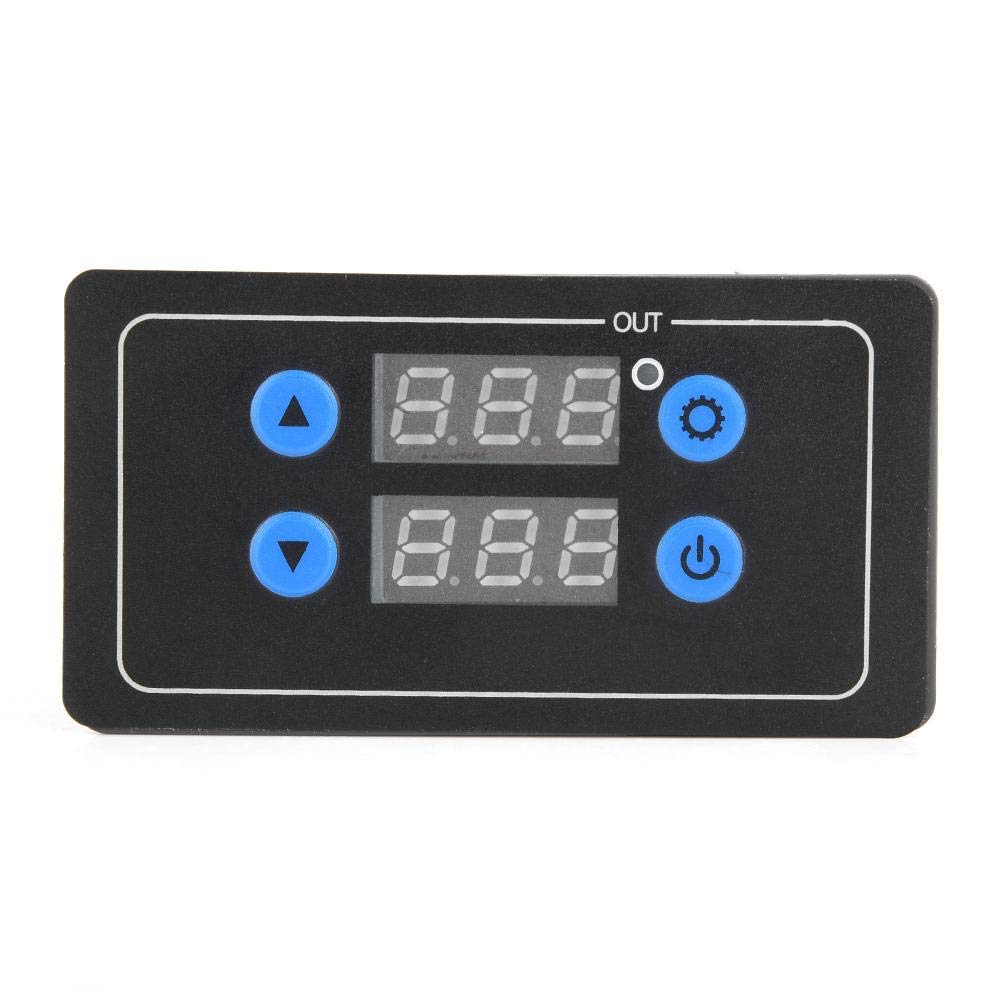
Figure 3.1: Front Panel Layout
This image shows the front panel of the delay relay. It features two digital displays for Delay Time T1 and Delay Time T2, an 'OUT' indicator, a Working Indicator, an Increase button (up arrow), a Decrease button (down arrow), a Setting button (gear icon), and a Confirm button (power icon).
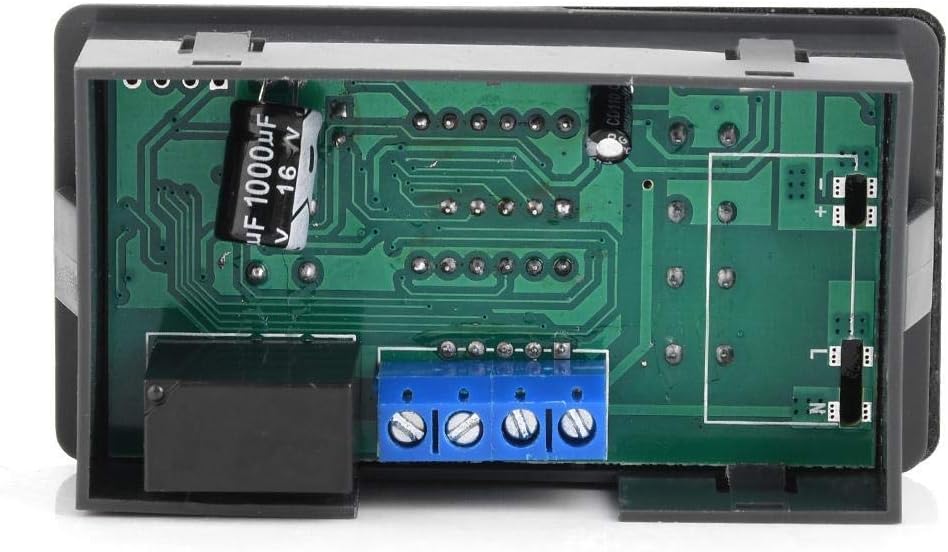
Figure 3.2: Rear View with Circuit Board and Terminals
This image displays the rear of the module, revealing the circuit board and the blue screw terminal block for electrical connections. The relay component is visible on the left side.

Figure 3.3: Side View of Terminal Block
This image provides a closer side view of the blue screw terminal block, highlighting the four connection points for wiring the power input and load.
Terminal Connections:
- V+: Positive DC 12V power input.
- V-: Negative DC 12V power input (Ground).
- NO: Normally Open contact of the relay.
- COM: Common contact of the relay.
- NC: Normally Closed contact of the relay (not always present or used, refer to specific model for details).
Note: The relay output is a dry contact (potential-free). Connect your load between COM and NO for normally open operation, or COM and NC for normally closed operation.
4. Setup
4.1 Wiring Instructions
- Power Supply Connection: Connect your DC 12V power supply to the V+ and V- terminals. Ensure correct polarity.
- Load Connection: Connect your device or load to the relay output terminals. For most applications, connect one side of your load to the COM terminal and the other side to the NO (Normally Open) terminal. This means the load will be activated when the relay switches ON.
- Secure Connections: Ensure all wire connections are tight and secure to prevent loose contacts and potential hazards.
4.2 Initial Power On
After wiring, apply DC 12V power. The digital displays should illuminate, and the module will enter its default or last-saved operating mode.
5. Operating Instructions
The module offers 6 different operating modes and allows for precise setting of two delay times, T1 (ON time) and T2 (OFF time).
5.1 Setting Operating Mode
- Press and hold the Setting button (gear icon) for approximately 3 seconds until the display shows 'P-X' (where X is the current mode number).
- Use the Increase button (up arrow) or Decrease button (down arrow) to cycle through the 6 available operating modes (P-1 to P-6).
- Press the Confirm button (power icon) to select the desired mode and exit the mode setting interface.
5.2 Setting Delay Times (T1 and T2)
- In the normal operating state, a short press of the Setting button (gear icon) will allow you to cycle through setting T1, T2, and the time unit.
- When T1 or T2 is flashing, use the Increase button (up arrow) or Decrease button (down arrow) to adjust the time value.
- To change the time unit (seconds, minutes, hours), press the Setting button until the decimal point position flashes. The decimal point indicates the unit:
- No decimal point: Hours (e.g., 123 = 123 hours)
- Decimal point on the rightmost digit: Seconds (e.g., 12.3 = 12.3 seconds)
- Decimal point on the middle digit: Minutes (e.g., 1.2.3 = 12.3 minutes)
- After setting the desired time and unit, press the Confirm button (power icon) to save the settings and return to the normal operating state.
5.3 Understanding Operating Modes (P-1 to P-6)
Each mode defines how T1 and T2 interact to control the relay output. Refer to the specific mode descriptions below:
- P-1: Delay ON (Single Trigger)
Upon trigger, the relay turns ON after T1, then turns OFF. - P-2: Delay OFF (Single Trigger)
Upon trigger, the relay turns ON immediately, then turns OFF after T1. - P-3: Cyclic ON/OFF (Continuous)
The relay cycles ON for T1, then OFF for T2, continuously. - P-4: Cyclic OFF/ON (Continuous)
The relay cycles OFF for T1, then ON for T2, continuously. - P-5: Delay ON with Trigger Reset
Upon trigger, the relay turns ON after T1. If triggered again during T1, the timer resets. - P-6: Delay OFF with Trigger Reset
Upon trigger, the relay turns ON immediately. After T1, it turns OFF. If triggered again during T1, the timer resets.
Note: Specific trigger inputs (if applicable for P-1, P-2, P-5, P-6) are typically connected to a separate input terminal, not explicitly detailed in the provided product information. For models requiring an external trigger, consult the product's specific wiring diagram.
6. Maintenance
The Hilitand Digital Cyclic Adjustable Delay Relay is designed for low maintenance. Follow these guidelines to ensure optimal performance and longevity:
- Keep the device clean and free from dust and debris. Use a soft, dry cloth for cleaning.
- Ensure proper ventilation around the module to prevent overheating.
- Regularly check wiring connections for tightness, especially in environments with vibration.
- Store the device in a dry, cool environment when not in use.
7. Troubleshooting
If you encounter issues with your delay relay, refer to the following common problems and solutions:
| Problem | Possible Cause | Solution |
|---|---|---|
| Device does not power on. | No power supply; incorrect voltage; incorrect wiring polarity. | Check DC 12V power supply connection. Verify V+ and V- are correctly wired. |
| Relay does not activate/deactivate. | Incorrect load wiring; incorrect mode setting; time values set to zero. | Verify load is connected between COM and NO. Check selected operating mode and ensure T1/T2 are set to non-zero values. |
| Timing is inaccurate. | Incorrect time unit selected (seconds, minutes, hours). | Re-enter time setting mode and verify the decimal point position corresponds to the desired time unit. |
| Settings are not saved. | Settings not confirmed. | Ensure you press the Confirm button (power icon) after making changes to save them. |
If the problem persists after attempting these solutions, please contact customer support.
8. Specifications
| Feature | Specification |
|---|---|
| Brand | Hilitand |
| Model | B07QHVS7HD |
| Input Voltage | DC 12V |
| Time Range | 0.1 seconds to 999 hours |
| Output Current | Max 5A (AC/DC load) |
| Number of Operating Modes | 6 |
| Display Type | Dual Digital Display |
| Color | Black |
| Material | Material (as per product data) |
| Country of Origin | China |
9. Warranty and Support
9.1 Warranty Information
This Hilitand product is covered by a standard manufacturer's warranty against defects in materials and workmanship. The warranty period typically begins from the date of purchase. Please retain your proof of purchase for warranty claims. For specific warranty terms and conditions, refer to the documentation provided with your purchase or contact your retailer.
9.2 Customer Support
If you require technical assistance, have questions about product operation, or need to report a defect, please contact the retailer from whom you purchased the product. They will be able to provide support or guide you to the appropriate service channels.