
1. Introduction
This manual provides detailed instructions for the Nautica NAPBSC904 Bayside Chrono Solar Watch. This timepiece features solar charging, a chronograph for measuring elapsed time, a 24-hour time display, and a date calendar. Please read this manual thoroughly to ensure proper use and maintenance of your watch.
2. Watch Components Overview
Familiarize yourself with the key components of your Nautica NAPBSC904 watch:
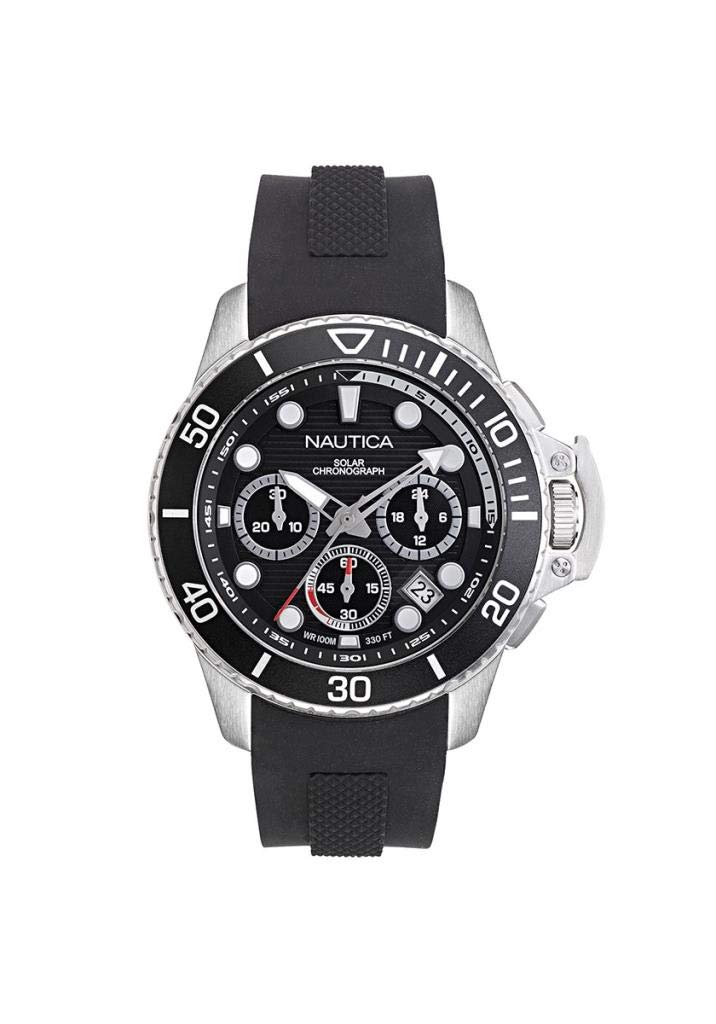
This image displays the Nautica NAPBSC904 Bayside Chrono Solar Watch. The watch features a black dial with white hour markers and hands. Three sub-dials are visible: a 24-hour indicator at the 3 o'clock position, a chronograph minute counter at the 9 o'clock position, and a chronograph second counter at the 6 o'clock position. A date window is located between the 4 and 5 o'clock positions. The watch has a rotating bezel with minute markers and a silver-tone stainless steel case with two pushers flanking the crown on the right side. The strap is black silicone.
- Crown: Used for setting time and date.
- Pushers (A & B): Used to operate the chronograph functions.
- Rotating Bezel: Can be rotated to mark elapsed time or for dive timing.
- Main Dial: Displays hours, minutes, and seconds.
- 24-Hour Sub-dial (at 3 o'clock): Indicates the time in a 24-hour format, synchronized with the main time.
- Chronograph Minute Sub-dial (at 9 o'clock): Measures elapsed minutes during chronograph operation (up to 30 minutes).
- Chronograph Second Sub-dial (at 6 o'clock): Measures elapsed seconds during chronograph operation (up to 60 seconds).
- Date Window: Displays the current date (located between 4 and 5 o'clock).
3. Setup
3.1 Initial Charging
Your Nautica NAPBSC904 watch is powered by solar energy. Before initial use, or if the watch has stopped, expose the dial to a bright light source (natural sunlight is ideal) for several hours to ensure it is sufficiently charged. The watch will begin operating once it receives enough light.
3.2 Setting Time and Date
- Pull the crown out to position 2. The second hand will stop.
- Rotate the crown to set the hour and minute hands. Ensure the 24-hour sub-dial also reflects the correct AM/PM (e.g., 14 for 2 PM).
- Push the crown back to position 1.
- Pull the crown out to position 1.
- Rotate the crown clockwise to set the date. If setting the date between 9 PM and 1 AM, adjust the time first to avoid the date changing at the wrong time.
- Push the crown back to the normal position (0).
4. Operating the Watch
4.1 Chronograph Function
The chronograph allows you to measure elapsed time.
- Start: Press pusher A to start the chronograph. The chronograph second hand (at 6 o'clock) and minute hand (at 9 o'clock) will begin to move.
- Stop: Press pusher A again to stop the chronograph. The elapsed time will be indicated by the chronograph second and minute hands.
- Reset: After stopping, press pusher B to reset the chronograph hands to their zero positions.
4.2 Water Resistance
This watch has a water resistance rating of 100 meters (330 feet). It is suitable for swimming, snorkeling, and showering. Do not operate the crown or pushers while the watch is wet or submerged, as this can compromise the water resistance.
5. Maintenance
5.1 Solar Charging Best Practices
- Regularly expose the watch dial to light to maintain optimal charge.
- Avoid prolonged storage in dark places, which can deplete the power reserve.
- Do not place the watch on a charging device that generates high temperatures, as this can damage the movement.
5.2 Cleaning
Wipe the watch case and strap with a soft, dry cloth. For silicone straps, a mild soap solution and water can be used, followed by thorough rinsing and drying. Avoid harsh chemicals or abrasive materials.
5.3 Storage
When not in use, store your watch in a cool, dry place away from direct sunlight and extreme temperatures. Ensure it receives occasional light exposure to maintain its charge.
6. Troubleshooting
- Watch Not Running: If the watch has stopped, it likely needs to be charged. Expose the dial to bright light for several hours.
- Incorrect Time/Date: Refer to section 3.2 for instructions on how to reset the time and date.
- Chronograph Hands Not Resetting to Zero: If the chronograph hands do not return to the 12 o'clock position after resetting, they may need calibration. Consult a professional watch repair service for this adjustment.
- Condensation Inside Crystal: This may indicate a loss of water resistance. Have the watch inspected by a qualified technician immediately.
7. Specifications
| Feature | Specification |
|---|---|
| Model Number | NAPBSC904 |
| Movement Type | Quartz (Solar Powered) |
| Display Type | Analog |
| Case Material | Stainless Steel |
| Case Diameter | 45 Millimetres |
| Case Thickness | 12.5 Millimetres |
| Band Material | Silicone |
| Band Width | 22 Millimetres |
| Band Colour | Black |
| Dial Colour | Black |
| Crystal Material | Acrylic |
| Water Resistance Depth | 100 Metres (330 Feet) |
| Item Weight | 104.33 g (0.23 Pounds) |
8. Warranty and Support
Your Nautica NAPBSC904 Bayside Chrono Solar Watch comes with a manufacturer's warranty. Please refer to the warranty card included with your purchase for specific terms, conditions, and duration. For technical support or service inquiries, please contact Nautica customer service or an authorized service center.