
COSTWAY EP23485BK
COSTWAY 28-Inch Oscillating Tower Fan User Manual
Model: EP23485BK
Introduction
Thank you for purchasing the COSTWAY 28-Inch Oscillating Tower Fan. This manual provides important information regarding the safe operation, assembly, use, and maintenance of your fan. Please read it thoroughly before use and retain it for future reference.
Important Safety Instructions
- Read all instructions before using this fan.
- Always unplug the fan from the power outlet before cleaning, servicing, or moving it.
- Do not operate the fan with a damaged cord or plug. If the cord or plug is damaged, contact customer support.
- Keep fingers and other objects away from the air inlet and outlet openings.
- Do not use the fan near water or in wet conditions.
- Ensure the fan is placed on a stable, level surface to prevent tipping.
- This appliance is not intended for use by persons (including children) with reduced physical, sensory or mental capabilities, or lack of experience and knowledge, unless they have been given supervision or instruction concerning use of the appliance by a person responsible for their safety.
- Children should be supervised to ensure that they do not play with the appliance.
- The dense netted air outlet is designed to protect fingers from injury. Do not attempt to bypass this safety feature.

Package Contents
Verify that all components are present before assembly.
- Tower Fan Unit
- Round Base
- Power Cord (pre-attached)
Setup and Assembly
The COSTWAY Tower Fan is designed for easy assembly with no tools required.
- Carefully remove all components from the packaging.
- Place the tower fan unit upside down on a soft, flat surface.
- Align the round base with the bottom of the fan unit.
- Secure the base to the fan unit using the provided wing nuts. Ensure they are tightened firmly for stability.
- Place the assembled fan upright on a stable, level surface.

Operating Instructions
Familiarize yourself with the controls for optimal use.
Control Panel Overview

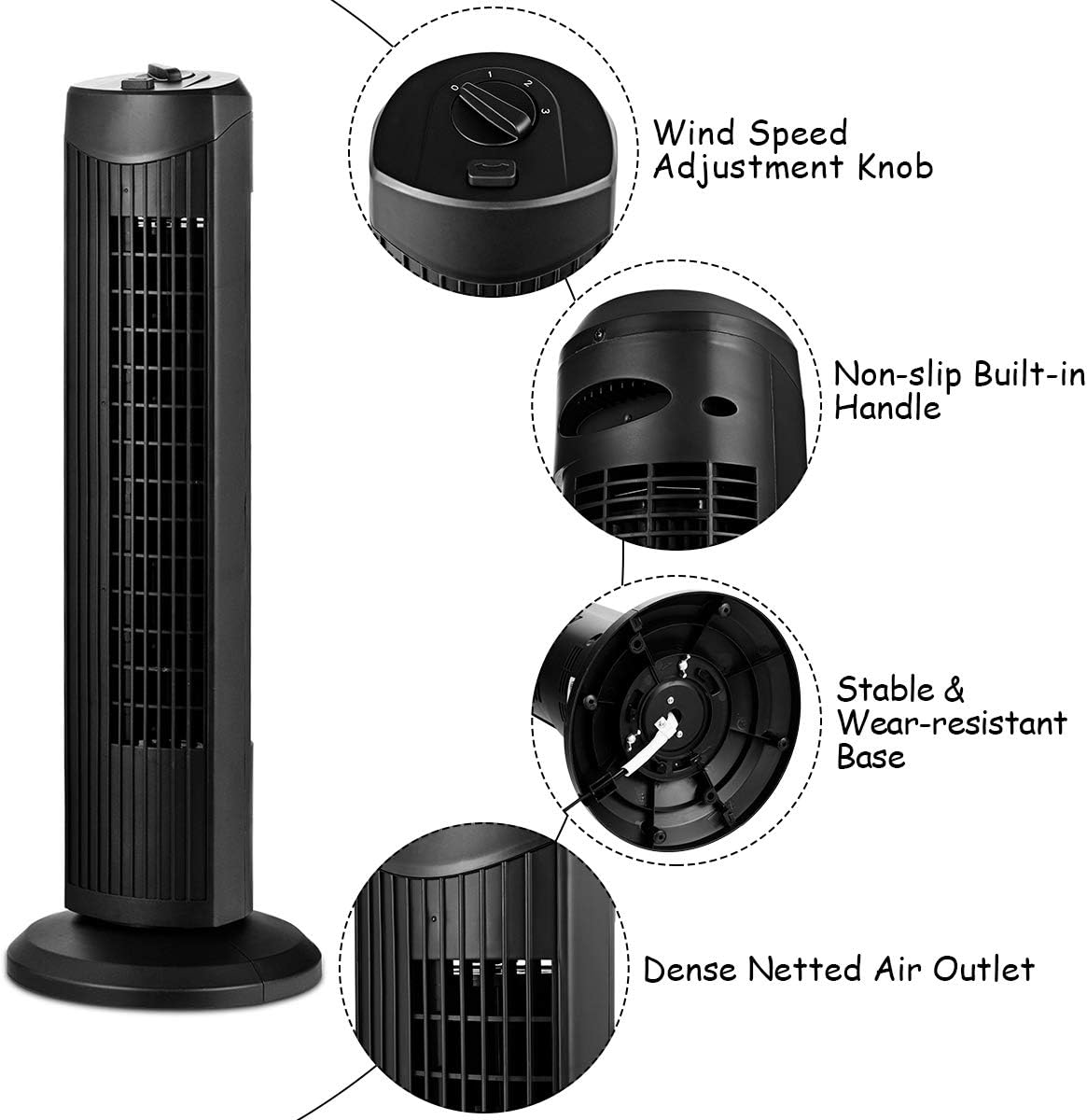
Powering On/Off and Speed Selection
- Plug the power cord into a standard 120V AC electrical outlet.
- Turn the Wind Speed Adjustment Knob clockwise to select your desired fan speed:
- 0: Off
- 1: Low-grade Wind (Soft Wind)
- 2: Mid-grade Wind (Refreshing Wind)
- 3: High-grade Wind (Strong Winds)
- To turn the fan off, rotate the knob counter-clockwise to the "0" position.

Oscillation Function
- To activate the oscillation feature, press the Oscillation Button located next to the speed knob. The fan head will begin to rotate from side to side, distributing air across a wider area.
- To stop oscillation, press the Oscillation Button again.
- Note: The oscillation function operates independently of the fan speed. Ensure both the fan speed knob is set to "0" and the oscillation button is disengaged to fully power off the unit.

Maintenance and Cleaning
Regular cleaning helps maintain the fan's performance and extends its lifespan.
- Always unplug the fan before cleaning.
- Use a soft, damp cloth to wipe the exterior surfaces of the fan. Do not use abrasive cleaners or solvents.
- For dust accumulation in the air outlet, use a vacuum cleaner with a brush attachment or compressed air to gently remove dust. Do not insert any objects into the air outlet.
- Ensure the fan is completely dry before plugging it back in and operating.
- Store the fan in a cool, dry place when not in use, preferably in its original packaging.
Troubleshooting
| Problem | Possible Cause | Solution |
|---|---|---|
| Fan does not turn on. | Not plugged in; power outlet not working; speed knob set to "0". | Ensure the fan is securely plugged into a working outlet. Rotate the speed knob to a setting other than "0". |
| Fan is oscillating but not blowing air. | Oscillation button engaged, but speed knob set to "0". | Turn the speed knob to a setting (1, 2, or 3) to activate airflow. |
| Reduced airflow. | Air inlets/outlets are blocked or dusty. | Unplug the fan and clean the air inlets and outlets as described in the Maintenance section. |
| Unusual noise during operation. | Fan not on a stable surface; internal obstruction. | Place the fan on a firm, level surface. If noise persists, unplug and inspect for any visible obstructions. Do not attempt to disassemble the unit. |
Specifications
- Brand: COSTWAY
- Model Number: EP23485BK
- Product Dimensions: 9.5"D x 9.5"W x 28"H
- Item Weight: 5.5 Pounds
- Color: Black
- Power Source: Corded Electric
- Voltage: 120 Volts
- Wattage: 35 Watts
- Number of Speeds: 3
- Special Features: Bladeless, Oscillating
- Control Method: Button Control (Touch)
- Material: Metal, Plastic
- Indoor/Outdoor Usage: Indoor
Warranty and Customer Support
For warranty information or technical support, please contact COSTWAY customer service. Refer to your purchase documentation for specific warranty terms and contact details.
Website: www.costway.com
Ask a question about this manual
Ask about setup, troubleshooting, compatibility, parts, safety, or missing instructions. Manuals+ will review the question and use this page’s manual context to help answer it.