
1. Introduction
The BYHUBYENG Wireless Guest Paging System is designed to enhance customer service and operational efficiency in various service environments such as restaurants, cafes, clinics, and other establishments where customers wait in line. This system allows staff to notify customers when their order is ready or when it's their turn, reducing wait times and improving the overall customer experience.
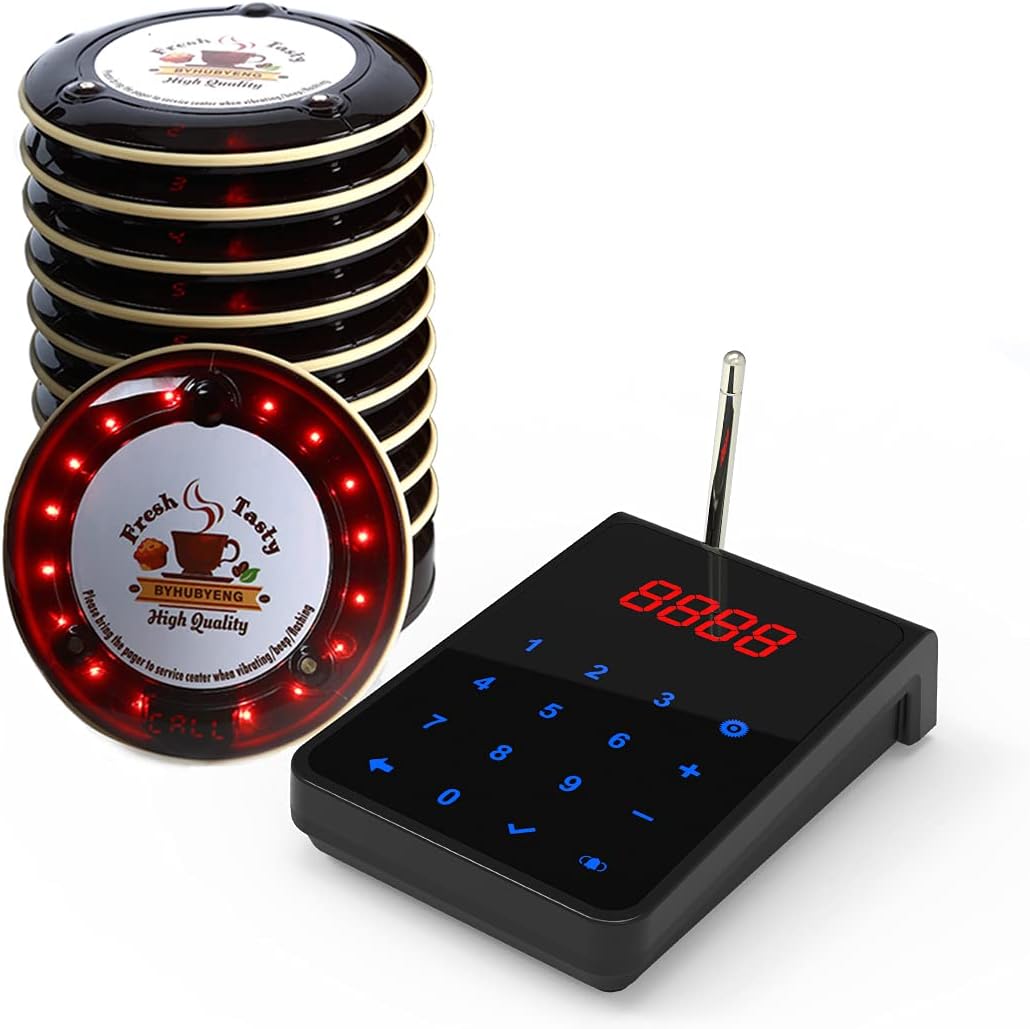
Image 1.1: The BYHUBYENG Restaurant Pager System, showing the keypad transmitter and a stack of ten coaster pagers.
2. Package Contents
Please verify that all items listed below are included in your package:
- 10 x Guest Pagers
- 1 x Signal Transmitter (Keypad)
- 1 x Charging Base
- 1 x User Manual (this document)
- 1 x Power Adaptor (US Standard, unless otherwise specified)
3. Key Features
The BYHUBYENG Pager System offers a range of features designed for reliable and efficient operation:
- Durable Pagers: Wireless coaster pagers are waterproof, wear-resistant, anti-shock, anti-drop, and include temperature rise protection.
- Efficient Charging: Supports magnetic stacking for secure and efficient charging connections.
- Anti-Theft Function: Features an "Out of Range" electronic fence function to minimize pager loss.
- Multiple Prompt Modes: Pagers offer BUZZER, VIBRATION, and LED FLASH modes to alert customers.
- Extended Range: Based on FM radio-frequency, the system provides stable and strong signal penetration through up to 10 walls, with a theoretical transmission distance of up to 2000 meters (1.24 miles) in open areas.
- User-Friendly Keypad: The transmitter features a 4-digit LED screen backlit keyboard with touch control for convenient operation.
- Expandable System: The transmitter can be expanded to work with up to 9999 pager receivers across 99 channels, allowing for system growth.

Image 3.1: Illustration of the system's long-range calling capability and signal penetration through multiple barriers.

Image 3.2: The pagers are designed to be waterproof and feature magnetic stacking for convenient charging.
4. Setup Instructions
Follow these steps to set up your BYHUBYENG Pager System:
- Unpack Components: Carefully remove all components from the packaging and ensure all items listed in Section 2 are present.
- Connect Charging Base: Place the charging base on a stable, flat surface. Connect the power adaptor to the charging base and plug it into a standard electrical outlet.
- Charge Pagers: Stack the guest pagers onto the charging base. Ensure they are properly aligned for magnetic contact. The pagers will begin charging automatically. Allow sufficient time for a full charge before first use (approximately two hours for full charge, standby time over 48 hours).
- Position Transmitter: Place the signal transmitter (keypad) in a central location within your service area, ensuring it is easily accessible for staff.
- Power On Transmitter: The transmitter typically powers on automatically when connected to power or by pressing a designated power button if available.

Image 4.1: Installation diagram illustrating how the transmitter, charging base, and adapter connect with the pagers.
5. Operating Instructions
Using the BYHUBYENG Pager System is straightforward:
- Customer Receives Pager: When a customer places an order or enters a waiting queue, provide them with a charged guest pager.
- Input Pager Number: When the order is ready or it's the customer's turn, locate the corresponding pager number on the keypad transmitter.
- Call Pager: Enter the pager number using the keypad and press the "CALL" (bell sign) button.
- Customer Notification: The assigned pager will activate, alerting the customer through a combination of buzz, vibration, and flashing LED lights.
- Pager Return: The customer returns the pager to the service center. Pagers should be placed back on the charging base for recharging.

Image 5.1: Step-by-step guide on how the pager system is used in a typical service environment.
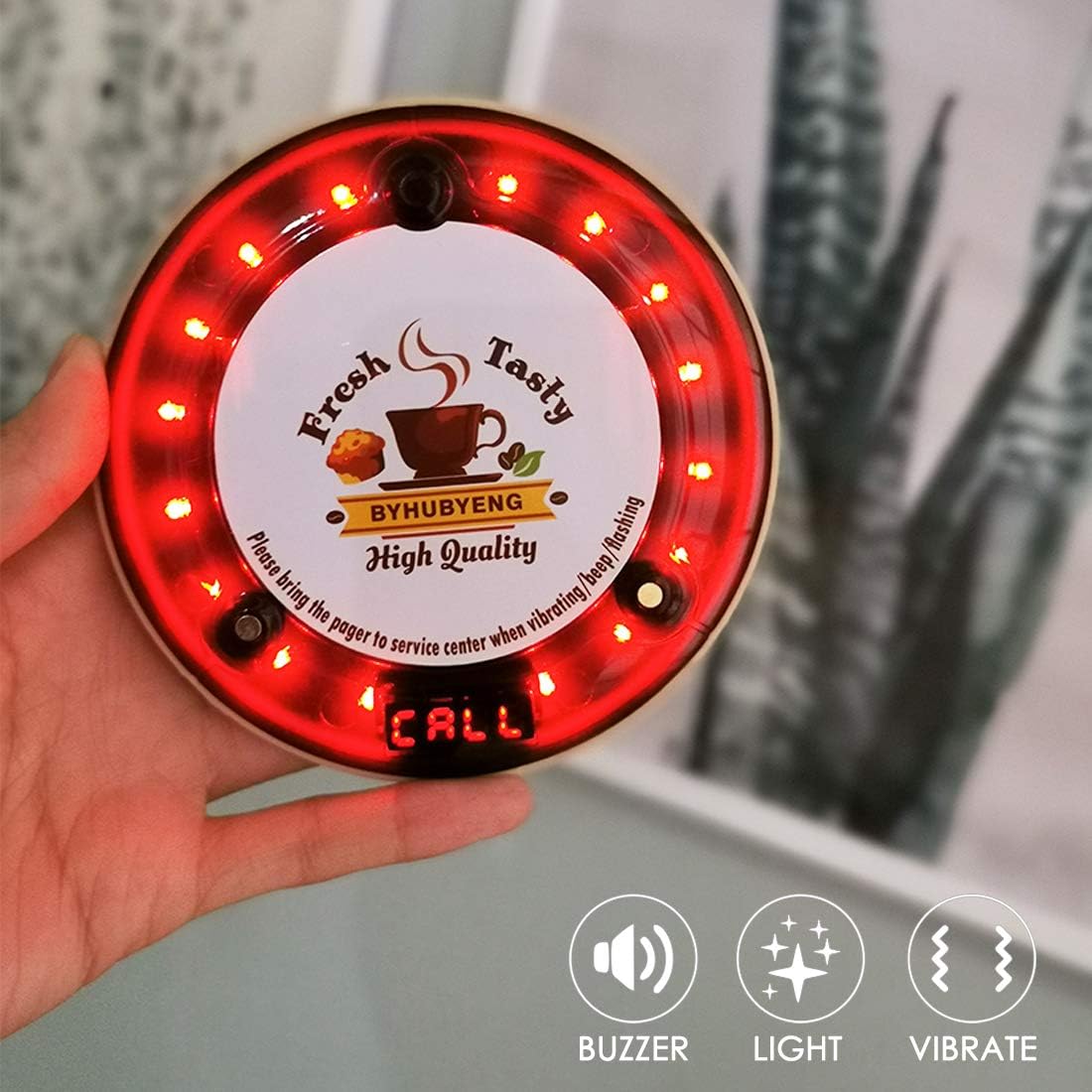
Image 5.2: The pager provides multiple alert modes: buzzer, light, and vibration.
6. Maintenance
Proper maintenance ensures the longevity and optimal performance of your pager system:
- Cleaning: Regularly wipe down the pagers, transmitter, and charging base with a soft, damp cloth. Avoid using harsh chemicals or abrasive cleaners.
- Battery Care: Ensure pagers are consistently placed on the charging base when not in use to maintain battery health. The pagers use AAA rechargeable NiMH batteries.
- Storage: If storing the system for an extended period, ensure all pagers are fully charged before storage. Store in a cool, dry place.
- Inspect Connections: Periodically check the power adaptor and charging base connections for any signs of wear or damage.
7. Troubleshooting
If you encounter issues with your BYHUBYENG Pager System, refer to the following common problems and solutions:
| Problem | Possible Cause | Solution |
|---|---|---|
| Pager not responding to call. | Pager is out of range. Pager battery is low or dead. Incorrect pager number entered. | Move closer to the transmitter. Place pager on charging base to recharge. Verify the pager number on the keypad. |
| Pagers not charging. | Pagers not properly seated on charging base. Charging base not powered. Faulty power adaptor or charging base. | Ensure pagers are correctly aligned for magnetic contact. Check power adaptor connection and wall outlet. Contact customer support if components are faulty. |
| Reduced signal range. | Obstructions (walls, metal objects). Interference from other wireless devices. | Relocate the transmitter to a more central or less obstructed area. Identify and minimize sources of interference. |
| Keypad display not working. | Transmitter not powered. Internal malfunction. | Check power connection to the transmitter. Contact customer support. |
8. Specifications
| Feature | Detail |
|---|---|
| Model Number | CS-30QM restaurant pager system |
| Brand | BYHUBYENG |
| Item Weight | 4.88 pounds (approx. 2.21 kg) |
| Package Dimensions | 13.62 x 10.24 x 4.41 inches (approx. 34.6 x 26 x 11.2 cm) |
| Batteries | 10 AAA rechargeable NiMH batteries (included) |
| Transmission Frequency | 433 MHz |
| Theoretical Transmission Distance | 2000 meters / 1.24 miles (in open area) |
| Signal Penetration | Up to 10 layers/walls |
| Usable Channels | 99 |
| Max Pager Capacity | 9999 pagers |
| Pager Prompt Modes | Buzzer, Vibration, LED Flash |

Image 8.1: Overview of key technical specifications and LORA Technology integration.
9. Warranty and Support
BYHUBYENG is committed to providing excellent customer service and support for your product:
- Technical Support: Lifetime technical support is available from the BYHUBYENG After-Service Team.
- Money-Back Guarantee: A 100% 30-Day money-back guarantee is offered.
- Contact: For any product-related inquiries or issues, please feel free to contact BYHUBYENG customer service.