
1. Introduction
This manual provides essential information for the safe and effective installation, operation, and maintenance of your YWBL-WH 2P40KA DC Photovoltaic Surge Protector. This device is designed to protect household and photovoltaic electrical systems from transient overvoltages caused by lightning strikes and other electrical surges. Please read this manual thoroughly before installation and keep it for future reference.
2. Safety Information
WARNING: Electrical installation should only be performed by qualified personnel. Failure to follow these instructions can result in electric shock, fire, or serious injury.
- Always disconnect power before installing or servicing the device.
- Ensure proper grounding according to local electrical codes.
- Do not operate the device if it appears damaged.
- The device housing is made from PC flame-retardant material, but it is not fireproof.
- Verify correct voltage and current ratings before connection.
3. Product Overview
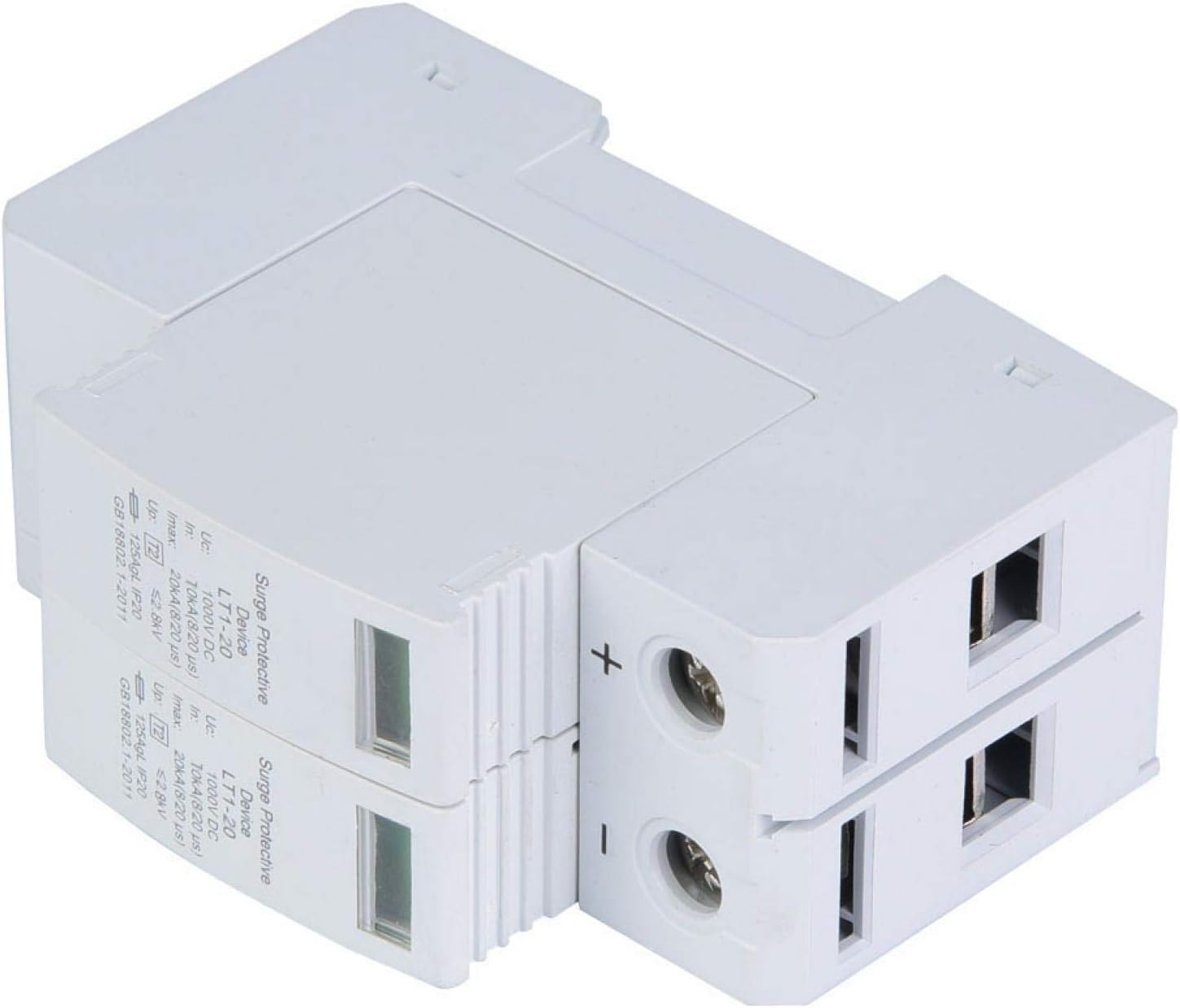
The YWBL-WH 2P40KA DC Photovoltaic Surge Protector features a modular design for ease of use and maintenance. It is equipped with premium copper fittings for superior electrical conductivity and a PC flame-retardant housing for enhanced safety.
Key Features:
- User-Friendly Operation: Modular design for straightforward use and maintenance.
- Flame Retardancy: PC flame-retardant material housing for reduced fire hazards.
- Simple 2P Rail Installation: Designed for easy installation onto standard 36mm DIN rails.
- Superior Conductivity: Premium copper fittings ensure stable current transmission.
Product Images:


Product Videos:
4. Specifications
| Specification | Value |
|---|---|
| Brand | YWBL-WH |
| Model | 2P40KA |
| Voltage | 1000 Volts DC |
| Surge Protection Rating | 40 Kiloamps (Imax) |
| Nominal Discharge Current (In) | 20 Kiloamps |
| Product Dimensions (L x W) | 3.54"L x 1.9"W (90mm x 49mm) |
| Enclosure Material | PC Flame-Retardant Plastic |
| Installation Type | 36mm DIN Rail Mount |
| UPC | 747333735970 |
5. Setup (Installation)
The YWBL-WH 2P40KA DC Photovoltaic Surge Protector is designed for simple 2P rail mounting within a distribution box. Follow these steps for installation:
- Safety First: Ensure all power to the electrical system is disconnected at the main breaker before beginning installation. Use appropriate lockout/tagout procedures.
- Prepare the Enclosure: If replacing an existing surge protector, carefully remove the old device. If installing new, ensure adequate space on a standard 36mm DIN rail within your distribution box.
- Mount the Device: Align the surge protector with the DIN rail and push it firmly until it clicks into place. The device should be securely fastened.
- Wiring Connections:
- Connect the positive (+) DC input wire to the left terminal of the surge protector.
- Connect the negative (-) DC input wire to the right terminal of the surge protector.
- Connect the ground wire to the bottom terminal of the surge protector.
- Verify Installation: Double-check all wiring connections for correctness and security. Ensure no bare wires are exposed.
- Restore Power: Once installation is complete and verified, restore power to the system.
For a visual guide, refer to the 'Product Videos' section above, specifically the installation demonstration.
6. Operating Instructions
The YWBL-WH 2P40KA DC Photovoltaic Surge Protector operates automatically. It continuously monitors the DC voltage in your photovoltaic system and diverts excess voltage to the ground in the event of a surge. The device features an indicator window on each module:
- Green Indicator: Indicates normal operation and protection is active.
- Red Indicator: Indicates that the protective module has been activated by a surge and needs replacement.
7. Maintenance
Regular maintenance ensures the continued effectiveness of your surge protector.
- Visual Inspection: Periodically check the indicator windows on the front of the device. If any indicator is red, the corresponding module needs to be replaced.
- Module Replacement: If a module indicator turns red, it signifies that the module has absorbed a surge and is no longer providing protection. To replace a module:
- Disconnect Power: Always disconnect power to the system before attempting to replace a module.
- Remove Module: Gently pull the red-indicated module downwards and outwards to detach it from the base.
- Insert New Module: Align the new replacement module with the slot and push it firmly upwards until it clicks securely into place. Ensure the indicator window on the new module is green.
- Restore Power: Once the new module is securely installed, restore power to the system.
- Cleaning: Keep the device clean and free from dust and debris. Use a dry, soft cloth for cleaning. Do not use liquid cleaners.
8. Troubleshooting
If you encounter issues with your YWBL-WH 2P40KA DC Photovoltaic Surge Protector, refer to the following:
- Red Indicator: If the indicator window is red, the protective module has functioned as intended by diverting a surge. This is normal operation after a surge event. The module needs to be replaced as described in the Maintenance section.
- No Power/System Malfunction: If your system is not receiving power or is malfunctioning after installation, first check all wiring connections for tightness and correctness. Ensure the main power supply is on. If the issue persists, consult a qualified electrician.
- Device Damage: If the device housing appears cracked, melted, or otherwise damaged, immediately disconnect power and replace the entire unit. Do not attempt to repair a damaged device.
9. Warranty and Support
This YWBL-WH product is covered by a standard manufacturer's warranty against defects in materials and workmanship. For specific warranty terms, technical support, or service inquiries, please contact YWBL-WH customer service through your retailer or the official brand channels. Please have your product model number (2P40KA) and purchase information ready when contacting support.