
Product Overview
The GIDEALED Smart WiFi RGBW LED Strip Lights Kit offers versatile lighting solutions with smart control capabilities. This kit includes RGBW LED strip lights, a Wi-Fi controller, a 24-key RF remote, and a 12V power adapter. It is designed for indoor use and is compatible with Amazon Alexa and Google Assistant for voice control, as well as a dedicated mobile application for comprehensive control.
What's in the Box
- 16.4ft RGBW Strip Lights
- Wi-Fi Controller
- 24 Key RF Remote Control
- 12V Power Adapter

Image: The GIDEALED Smart WiFi RGBW LED Strip Lights Kit components, including the LED strip, Wi-Fi controller, power adapter, and remote control.
Setup Instructions
1. Physical Installation
- Ensure the installation surface is clean and dry.
- Peel off the backing tape from the LED strip lights.
- Carefully adhere the LED strip lights to your desired location. The strip can be cut at designated marks if needed, ensuring the thick glue is cleaned from the cut area.
- Connect the LED strip to the Wi-Fi controller.
- Connect the 12V power adapter to the Wi-Fi controller and then plug the adapter into a power outlet.

Image: A visual guide demonstrating the connection steps for the LED strip lights, including app installation, powering the light sources, and setting up the app.
2. App Installation and Setup
- Download the "Magic Home Pro" app. You can scan the QR code provided in the manual or search for "Magic Home Pro" in your smartphone's app store. Download Magic Home Pro App
- Open your smartphone's Wi-Fi settings and connect to the Wi-Fi signal named "LEDnetxxxxxx".
- Launch the "Magic Home Pro" app and follow the on-screen instructions to connect and control your Wi-Fi device(s). Ensure your phone's positioning and Bluetooth are enabled for easier connection.
- The Wi-Fi controller operates on a 2.4G network only and does not support 5G networks.

Image: Screenshot of the Magic Home Pro app showing device settings and options to change device type or rename.

Image: Screenshot of the Magic Home Pro app showing wiring and sorting settings, indicating that RGB and W can be displayed simultaneously.

Image: Screenshot of the Magic Home Pro app showing the option to display RGB and White (W) colors on the app screen simultaneously.
3. Voice Assistant Integration (Alexa/Google Assistant)
- Open your Amazon Alexa or Google Home app.
- Navigate to the "Skills & Games" or "Works with Google" section.
- Search for "Magic Home Pro" and enable the skill.
- Link your Magic Home Pro account with your voice assistant account.
- Discover devices to allow your voice assistant to control the LED strip lights.
Video: This video demonstrates how the GIDEALED Smart WiFi RGBW LED Strip Lights Kit works with Amazon Alexa and Google Assistant, showcasing voice control commands for changing colors and brightness.
Video: A demonstration of the GIDEALED Smart RGBW Light Kit's compatibility with Amazon Alexa, showing basic voice commands for light control.
Video: A short preview demonstrating the GIDEALED Smart RGBW LED Strip Lights being controlled via app and voice commands.
Operating Instructions
1. Using the RF Remote Control
The included 24-key RF remote control allows for basic light adjustments without the need for the app or voice assistant. Ensure the remote's battery is functional (remove any plastic tab if present).

Image: Diagram of the 24-key RF Remote Control, detailing buttons for power, brightness, speed, color selection (non-dynamic), flash, strobe, fade, and smooth modes. A long press on the 'W' button turns on the white LED.
- ON/OFF: Press the red 'ON' or black 'OFF' buttons to power the lights.
- Brightness/Speed: Use the sun icon buttons to adjust brightness or mode speed.
- Color Selection: Choose from various preset colors using the non-dynamic lighting buttons.
- White LED: Long press the 'W' button for 5 seconds to activate the dedicated white LEDs.
- Dynamic Modes: Select 'FLASH', 'STROBE', 'FADE', or 'SMOOTH' for different lighting effects.
2. Using the Magic Home Pro App
The Magic Home Pro app provides advanced control over your LED strip lights, including a wider range of colors, dynamic modes, music synchronization, and timer functions.

Image: A smartphone displaying the Magic Home Pro app interface, showing a color wheel for selection, brightness control, and options for various lighting modes. It also illustrates remote control and voice control via Alexa.
- Color Selection: Use the color wheel to select from 16 million colors.
- Brightness: Adjust the light intensity using the brightness slider.
- Modes: Access various dynamic modes, including microphone, music, and timer modes.
- Group Control: Create groups to control multiple GIDEALED Wi-Fi strip lights simultaneously.
- Timer Function: Set schedules for the lights to turn on/off, or to simulate sunrise/sunset.

Image: A banner showcasing the Magic Home Pro app interface with a color wheel, indicating app control, RGB+Cold White functionality, Wi-Fi connection, and 16.4ft length.

Image: A smartphone displaying the Magic Home Pro app, highlighting RGB+Daylight features and compatibility with Amazon Alexa and Google Assistant.

Image: Two scenes, a living room and a kitchen, demonstrating the GIDEALED LED strip lights installed for ambient lighting, controlled from anywhere via the app.

Image: Four different room settings (living room, bedroom, kitchen, bar) showcasing the versatility of the 16.4ft RGB+Cold White strip lights with 16 million colors and high brightness.

Image: Examples of voice commands for controlling the strip lights with Alexa or Google Assistant, such as "Alexa, turn on the light!" and "Okay."
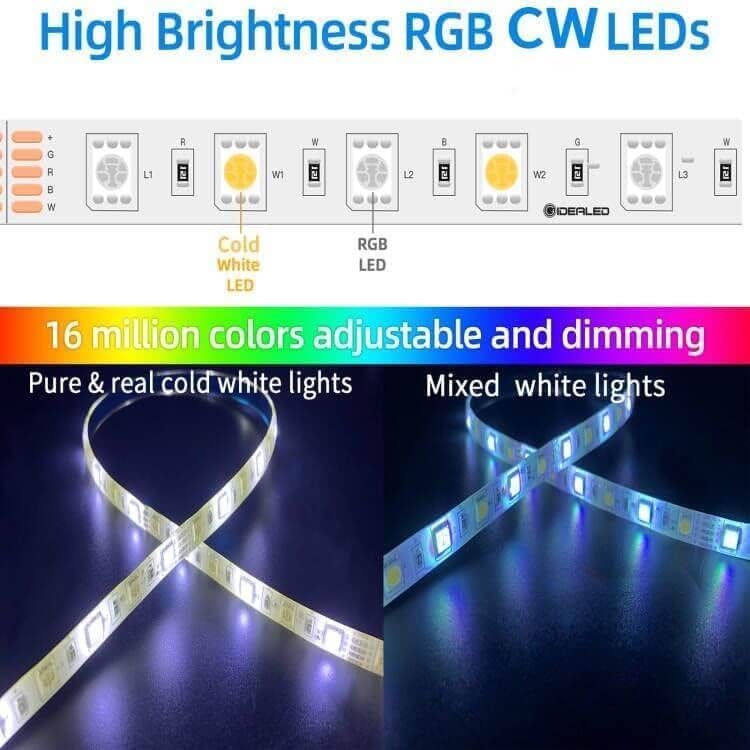
Image: A close-up of the LED strip showing individual Cold White and RGB LEDs, illustrating the capability for pure cold white lights and mixed white lights, with 16 million adjustable colors and dimming.
Features
- Voice control with Amazon Alexa/Google Home: Turn on/off, change color, adjust dim/brighten.
- Smart APP Control (iOS/Android): Control lights remotely via the "Magic Home Pro" app. (Requires 2.4G network, 5G unsupported).
- Advanced APP Functions: Change color, mode, speed; support microphone, music, and timer modes; set groups for simultaneous control.
- Easy Installation: Plug and Play design with included power adapter, Wi-Fi controller, and waterproof light strip. Cuttable at designated marks.
- Dynamic Lighting: RGBW LEDs provide 16 million colors and dedicated cold white light.
- Adjustable, Cuttable, Dimmable.
- Indoor Usage.
Specifications
| Feature | Detail |
|---|---|
| Model Number | GD-RGBW-Strip |
| Color | RGB+Cold White Kit |
| Indoor/Outdoor Usage | Indoor |
| Light Source Type | LED |
| Power Source | DC 12V Power adapter |
| Light Color | RGB+Cool White |
| Style | WiFi RGBW Strip Lights 16.4ft Kit |
| Material | Plastic |
| Controller Type | Amazon Alexa, Google Assistant, Remote Control |
| Number of Light Sources | 300 |
| Voltage | 12 Volts (DC) |
| Wattage | 24 Watt-hours |
| Item Length | 16 Feet |
| Ingress Protection Code Rating | IP65 |
| Control Method | App |
| Plug Format | US Plug |
Important Notes
- For optimal performance, ensure your Wi-Fi network is 2.4G. 5G networks are not supported.
- When cutting the LED strip, ensure to cut only at the designated marks and clean any thick glue from the cut area to maintain functionality.
- If you encounter any issues, please refer to the detailed user guide available via QR code in the setup steps or contact GIDEALED customer support.