
1. Introduction
This manual provides detailed instructions for the installation, operation, and maintenance of your Ciglow Electronic Lock. This intelligent password keypad digital electronic cabinet door combination lock is designed for secure access control in various applications such as cabinets, lockers, and drawers.
2. Product Overview
2.1 Package Contents
The package includes the following items:
- 1 Set x Digital Electronic Password Cabinet Code Lock (Battery Not Included)
- 1 x Instruction Manual
2.2 Key Features
- Made of high-quality zinc alloy and plastic materials for durability.
- Compact design with a keypad for password entry.
- Supports both temporary and fixed password settings.
- Provides distinct sound and light prompts for incorrect password, correct password, and low battery status.
- Energy-efficient design, allowing for extended battery life (up to 10 months with four AAA batteries).

Image 2.1: Overview of the Ciglow Electronic Lock showing the main unit, keypad, and typical applications in lockers and cabinets.

Image 2.2: Close-up view of the keypad, highlighting the serial number (SN) and ID. Note: Do not remove the label containing the lock number (SN).
3. Setup
3.1 Battery Installation
The lock requires four AAA batteries (not included). To install the batteries:
- Locate the battery compartment on the main lock unit.
- Open the battery compartment cover.
- Insert four AAA batteries, ensuring correct polarity (+/-).
- Close the battery compartment cover securely.
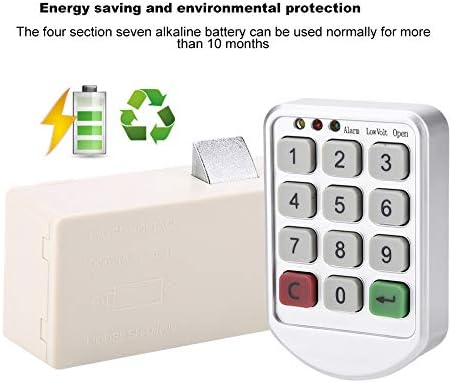
Image 3.1: The main lock unit and keypad, illustrating the energy-saving design and battery requirement.
3.2 Installation
Installation is straightforward and involves minimal drilling:
- Drill a 12 mm through-hole at the desired mounting location on your cabinet or drawer.
- Position the keypad panel over the hole and secure it with four screws.
- Attach the main lock unit to the inside of the cabinet/drawer, aligning it with the keypad mechanism, and secure it with three screws.
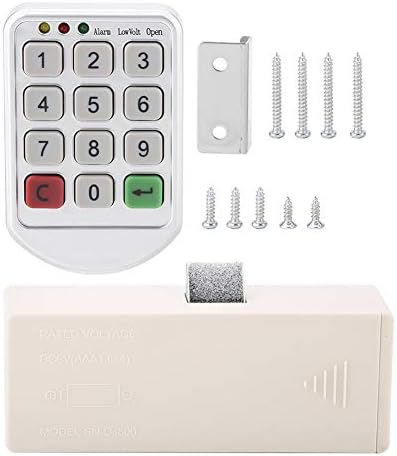
Image 3.2: All components required for installation, including the keypad, main lock unit, screws, and a mounting bracket.
4. Operating Instructions
4.1 Unlocking the Lock
To unlock the cabinet:
- Enter your 4-10 digit password. If no password has been set, use the factory default code "1111".
- Press the "←" (Enter) key to confirm.
- If the password is correct, a green light will illuminate.
- While the green light is on, pull outward on the cabinet door to open it.
The "←" key serves as the password confirmation key, and the "C" key is the clear key.
4.2 Changing Your Password
To change the user password:
- Press the "←" (Enter) button twice. The yellow light will flash.
- Enter your old password.
- Press the "←" (Enter) button to confirm.
- Enter your new password (4-10 digits).
- Press the "←" (Enter) button to confirm the new password.
- The green light will flash once, followed by two beeps, indicating that the new user password has been successfully changed.

Image 4.1: The keypad interface, indicating the flexibility to set either temporary or fixed passwords.
5. Maintenance
5.1 Battery Life
The lock is designed for energy efficiency. A set of four AAA batteries can typically power the lock for over 10 months under normal usage conditions.
5.2 General Care
To ensure the longevity and proper functioning of your lock:
- Keep the lock clean and free from dust and debris.
- Avoid exposing the lock to extreme temperatures or moisture.
- Replace batteries promptly when the low battery indicator appears.
6. Troubleshooting
The lock provides distinct audio and visual cues for different statuses:
- Incorrect Password: If an incorrect password is entered, the yellow lights will flash, and a specific sound will be emitted. Re-enter the correct password.
- Correct Password: A green light will illuminate upon successful password entry.
- Low Battery: The lock will provide specific sound and light messages when the battery power is insufficient. Replace the batteries as soon as possible to ensure continued operation.

Image 6.1: The keypad indicating the visual cues (lights) for incorrect password, correct password, and low battery.
7. Specifications
| Feature | Specification |
|---|---|
| Model Number | Cigloww96pg3g1fy |
| Type | Intelligent Cabinet Lock |
| Power Source | Four AAA Batteries (not included) |
| Material | Zinc alloy, Plastic |
| Panel Dimensions (L x W x H) | 8.5 x 5.5 x 1.8 cm (3.3 x 2.2 x 0.7 in) |
| Lock Unit Dimensions (L x W x H) | 11.8 x 4.5 x 3.0 cm (4.6 x 1.8 x 1.2 in) |
| Weight | 166g (5.9oz) |
| Recommended Uses | Swimming, Sauna, Course Cabinet, Drawers, Office Cabinets |
| Color | Silver |

Image 7.1: Detailed dimensions of both the keypad and the main lock unit.
8. Warranty and Support
For any questions, technical support, or warranty inquiries regarding your Ciglow Electronic Lock, please refer to the contact information provided at the point of purchase or visit the official Ciglow website for customer service details.