
Tavool MT270
Tavool Wood Moisture Meter User Manual
Model: MT270
1. Introduction
The Tavool Wood Moisture Meter is a versatile digital moisture detector designed to accurately measure moisture levels in various materials, including wood, building materials, firewood, walls, paper, and floors. Equipped with high-precision pins, it helps identify hidden water leaks and assess moisture content to prevent damage and ensure optimal material conditions for woodworking, construction, and home maintenance.

Figure 1: Tavool Wood Moisture Meter with protective cap.
2. What's in the Box
- 1 x Tavool Digital Moisture Meter
- 2 x AAA Batteries (included)
- 1 x User Instructions Manual
- 1 x Year Warranty Card
3. Product Features
- Accurate & Quick Measuring: Designed with 2 high-precision pins to penetrate surfaces and quickly determine moisture levels, aiding in the identification of hidden water leaks.
- Professional Device for Wood Measuring: Features 8 calibration scales to measure moisture content (%MC) in various wood types (6%-60% range). Helps prevent cracks, splits, and warping in lumber and hardwoods.
- User Friendly, Simple to Understand: Large, easy-to-read backlit LED screen and a Hold function to freeze readings. Includes Memory function, Max/Min moisture measurement, Temperature display in C/F, and Automatic Power-off after 10 minutes of inactivity.
- Two Measuring Modes: Dedicated modes for Wood (6%-60%) and Building Materials (0-40%) to meet diverse measurement needs.
- Durable and Portable: Sturdy, hand-friendly shape with rubber side grips for comfortable use. Lightweight and easy to carry.
4. Setup
4.1 Battery Installation
The Tavool Moisture Meter requires 2 AAA batteries. To install:
- Locate the battery compartment on the back of the device.
- Slide open the battery cover.
- Insert the 2 AAA batteries, ensuring correct polarity (+/-).
- Close the battery cover securely.
4.2 Initial Power On
Press the MODE button to power on the device. The backlit LCD screen will illuminate, displaying the current measurement mode and readings.
5. Operating Instructions
5.1 General Operation
- H/* Button: Press to hold the current reading on the display. Press again to release. Long press to activate/deactivate backlight.
- °C/°F Button: Press to switch between Celsius and Fahrenheit temperature display.
- MAX/MIN Button: Press to view maximum or minimum recorded moisture readings.
- Arrow Buttons (Left/Right): Use in Wood mode to switch between calibration scales (A-H) to match the wood type.
Video 1: An overview of the Tavool Professional Moisture Meter's features and operation, including button functions and measurement modes.
5.2 Wood Measurement Mode
To measure moisture content in wood:
- Ensure the device is in Wood mode (indicated on the display). If not, press the MODE button to switch.
- Refer to the "Common Calibration Tables for Wood" (Table 1) to identify the appropriate calibration scale (A-H) for your specific wood type.
- Use the Arrow Buttons to select the matching calibration scale on the meter.
- Carefully insert the two pins into the wood material to a depth of 0.5-1 cm.
- Read the moisture content percentage displayed on the screen.
- Use the H/* button to hold the reading for easier recording.

Figure 2: Using the Tavool Moisture Meter for woodworking, measuring moisture in a wooden board.
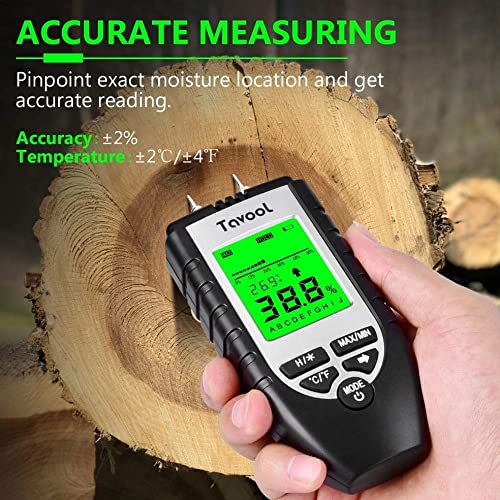
Figure 3: Close-up of the Tavool Moisture Meter displaying an accurate reading while measuring wood.
5.3 Building Material Measurement Mode
To measure moisture content in building materials (e.g., walls, paper, carpet):
- Press the MODE button to switch to Building Material mode (indicated on the display).
- Carefully insert the two pins into the building material.
- Read the moisture content percentage displayed on the screen.
- The meter can help identify dampness in walls, carpets, and other materials, aiding in mold prevention and water damage detection.

Figure 4: The meter supports two distinct measurement modes: Wood (6%-60%) and Building Material (0%-40%).

Figure 5: Detecting hidden water damage in a wall using the Tavool Moisture Meter's backlit LCD display.

Figure 6: The meter's versatility for measuring moisture in various materials including walls, general building materials, carpets/floors, and wood.
5.4 Common Calibration Tables for Wood
Select the appropriate calibration scale (A-H) based on the wood type you are measuring.
| Scale | Wood Types |
|---|---|
| A | Oak (White/Red), Teak, Bamboo, White Pine, Quercas Alba, Acacia wood, Split California black oak firewood, Afromorsia, Rubber Tree Imbuia, Kokro-dua, Niove Bidinkala, Cork, Maple, Rosewood, Locust/Robinia pseudoacacia |
| B | Berlina, Keruing, White Poplar, Beech, Cedar, Tola, Canadian Arch, Cedar (Japanese), Douglas Fir, Hyedunani, Meranti, White/Red/Abies, Araucaria angustifolia |
| C | Lauan, Ash, Fir, Maple, Padauk Oak, Ayon, Beech, European, Blackbutt, Cedar, Western Red, Chestnut, Danta, Pine, Sugar, Jarrah, Larch, Missanda, Spruce |
| D | Basswood, Larch, Pine, Birch, Elm |
| E | Abura, Bitterwood, Cordia, Erimado, Afzelia, Binvang, Elm (White/Rock/English), Lime, Matai, Pecan, Totara, Afzelia spp, Khaya senegalensis, Mitragyna ciliata, Octomeles sumatrana, Podocarpus tetara, Afzelia spp, Cerris, Scottelia Coniacea etc. |
| F | Amboyna, Basswood, Coachwood, Baguicu, Bitterwood, Cordia, Erimado, Hickory, Iroko, Larch, Sycamore, Caryla glabra, Cassipourea, Dipterocarpus, Larix, etc |
| G | Cherry and apple wood, Birch, Cedar, Gequ, Guarea, (White), Redwood, Santa Maria, Calophyllum brasiliense, Hevea brasilensis, etc |
| H | Agba, Birch (European), Cedar (West Indian), Gequ (Nohor), Muhuhi, Musine, Queensland Kaur, Utile, Wandoo Abies procera, Agathis, Betula, Eucalyptus |
Note: The botanical name for Red Oak and White Oak is "Quercus spp". When testing these, switch to MODE "A".
6. Maintenance
6.1 Cleaning
Wipe the device with a soft, dry cloth. Do not use abrasive cleaners or solvents. Ensure the pins are clean and free of debris after each use.
6.2 Storage
Store the moisture meter in a cool, dry place, away from direct sunlight and extreme temperatures. Always replace the protective cap over the pins when not in use to prevent damage and injury.
If storing for an extended period, remove the batteries to prevent leakage.
7. Troubleshooting
- No Display/Device Not Turning On: Check battery installation and ensure batteries are not depleted. Replace with fresh AAA batteries if necessary.
- Inaccurate Readings:
- Ensure pins are fully inserted into the material (0.5-1 cm for wood).
- Verify that the correct wood calibration scale (A-H) is selected for wood measurements.
- Clean the pins if they appear dirty or corroded.
- Ensure the material surface is free from excessive dust or debris.
- Display Flickering: Low battery power. Replace batteries.
- "---" or "OL" on Display: Reading is outside the measurement range for the selected mode.
8. Specifications
| Feature | Detail |
|---|---|
| Model Number | MT270 |
| Product Dimensions | 3.54"W x 5.91"H (3.54 x 3.54 x 5.91 inches) |
| Item Weight | 0.18 Kilograms (6.38 ounces) |
| Color | Sliver |
| Batteries | 2 AAA batteries required (included) |
| Wood Measurement Range | 6% - 60% |
| Building Material Measurement Range | 0% - 40% |
| Temperature Display | Celsius (°C) / Fahrenheit (°F) |
| Auto Power-off | 10 minutes of inactivity |
9. Warranty & Support
The Tavool Wood Moisture Meter comes with a 1-year warranty from the date of purchase. Please retain your proof of purchase for warranty claims.
For technical support, troubleshooting assistance, or warranty inquiries, please refer to the contact information provided in the included User Instructions Manual or visit the official Tavool website.
A digital version of this user guide is also available for download: User Guide (PDF).