
1. Product Overview
The TECSA M16 Proximity Key Card Module, model 221152, is an extension module designed to integrate proximity key card functionality with TECSA M16 control units. This module enhances security systems by allowing access control through proximity key cards.
Key features include:
- 2-zone extension module for M16 TIME control units.
- Zone personalization coding capability.
- Non-volatile memory for data retention.

Figure 1: Top view of the TECSA M16 Proximity Key Card Module (Model 221152). This image displays the main circuit board with various electronic components, including relays, capacitors, and a central integrated circuit. Terminal blocks are visible on the edges for connections.
2. Safety Information
Please read and understand all safety instructions before installing or operating this device. Failure to follow these instructions may result in electric shock, fire, or damage to the product.
- Installation should only be performed by qualified personnel.
- Ensure power is disconnected from the control unit before installation or maintenance.
- Do not expose the module to moisture or extreme temperatures.
- Verify correct wiring connections to prevent damage.
3. Package Contents
Upon opening the package, please verify that all components are present and undamaged:
- TECSA M16 Proximity Key Card Module (Model 221152)
- Instruction Manual (Italian language, French not guaranteed)
4. Setup and Installation
This module is designed for panel mounting and operates with a 12-volt power supply. Follow these general steps for installation:
- Power Disconnection: Ensure the TECSA M16 control unit is completely powered off before beginning installation.
- Mounting: Securely mount the module to a suitable panel using the provided mounting points. The module dimensions are approximately 6 x 9 x 1 cm.
- Wiring: Connect the module to the TECSA M16 control unit according to the wiring diagram provided in the Italian instruction manual. Pay close attention to the 2-way circuit type and 12V power requirements. The module functions as a 2-zone extension.
- Zone Personalization: Refer to the detailed instructions for zone personalization coding to configure the module for your specific security system requirements.
- Power Connection: Once all connections are secure and verified, restore power to the TECSA M16 control unit.
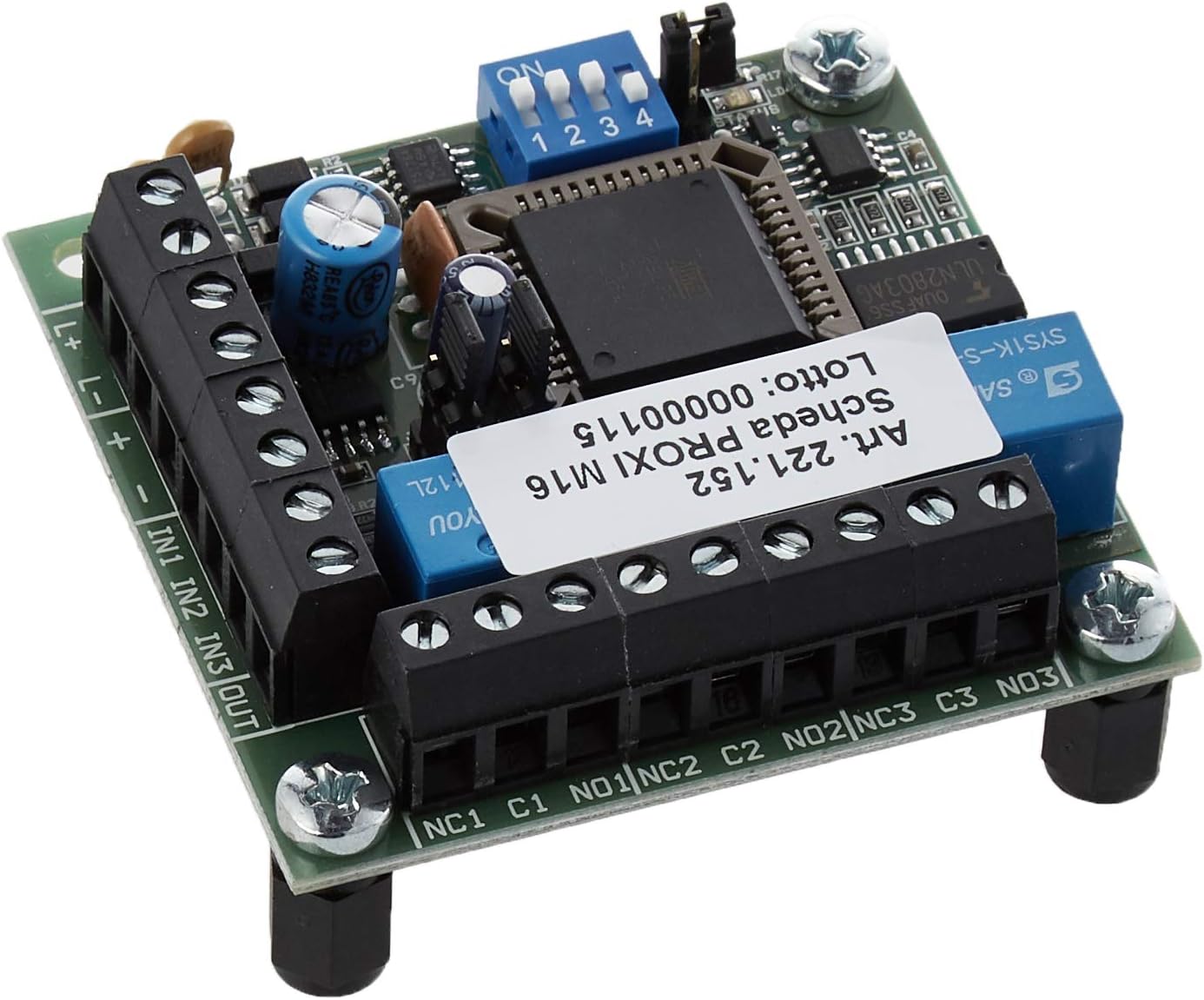
Figure 2: Angled view of the TECSA M16 Proximity Key Card Module, highlighting the various terminal blocks for input, output, and power connections. This view assists in identifying connection points during installation.
5. Operating Instructions
The TECSA M16 Proximity Key Card Module operates as an integrated component of your TECSA M16 control unit. Once installed and configured, it enables access control via proximity key cards.
- Key Card Enrollment: Follow the procedures outlined in your TECSA M16 control unit's main manual to enroll new proximity key cards with the system.
- Access Control: To gain access or disarm a specific zone, present an enrolled proximity key card to the designated sensor connected to this module. The module's sensor control method will verify the card and trigger the appropriate action within the M16 system.
- Status Indicators: Observe any LED indicators on the module or the main control unit for operational status and feedback during key card presentation.
6. Maintenance
The TECSA M16 Proximity Key Card Module is designed for low maintenance. Regular checks can help ensure optimal performance:
- Cleaning: Periodically clean the module's exterior with a soft, dry cloth. Do not use liquid cleaners or solvents.
- Connection Check: Annually inspect all wiring connections to ensure they are secure and free from corrosion.
- Firmware Updates: Consult the TECSA M16 control unit manual or TECSA support for information on potential firmware updates for the system, which may affect module operation.
7. Troubleshooting
If you encounter issues with your TECSA M16 Proximity Key Card Module, consider the following troubleshooting steps:
- Module Not Responding:
- Verify that the module is correctly connected to the M16 control unit.
- Check the 12V power supply to the module and the main control unit.
- Ensure the module is securely mounted and not experiencing any physical damage.
- Key Cards Not Recognized:
- Confirm that the key cards have been properly enrolled in the M16 system.
- Ensure the key card is presented correctly to the sensor.
- Check for any obstructions or interference near the sensor.
- System Errors: Refer to your TECSA M16 control unit's manual for specific error codes and their resolutions.
If problems persist, contact TECSA technical support for further assistance.
8. Specifications
| Feature | Specification |
|---|---|
| Manufacturer | STS ELETTRONICA |
| Brand | TECSA |
| Model Number | 221152 |
| Product Dimensions (L x W x H) | 6 x 9 x 1 cm |
| Item Weight | 25 grams |
| Power Input | 12 Volts |
| Voltage | 12 Volts |
| Number of Items | 1 |
| Switch Type | 2-way |
| Electrical Plug Type | Panel Mount |
| Usage | Professional |
| Control Method | Sensor |
| Country of Origin | Italy |
| International Article Code | 08051732710363 |
9. Warranty and Support
This product is covered by the manufacturer's standard warranty. For warranty details, technical support, or service inquiries, please contact TECSA or your authorized dealer. Keep your purchase receipt as proof of purchase.