
Introduction
This manual provides comprehensive instructions for the installation, operation, and maintenance of your XYC MP-D056 12V 4 Channel Weatherproof Bluetooth Speaker System. Designed for UTVs, ATVs, Golf Carts, Motorcycles, and other 12V vehicles, this system offers robust audio performance in various outdoor conditions. Please read this manual thoroughly before use to ensure proper functionality and safety.
Safety Information
- Power Supply: This system operates on a 12V DC power supply. Ensure your vehicle's electrical system is compatible.
- Wiring: Incorrect wiring can cause damage to the unit or vehicle. If unsure, consult a professional.
- Water Resistance: The unit is weatherproof, but avoid submerging it in water. Ensure all connections are secure and protected from direct water spray.
- Volume Levels: Prolonged exposure to high volume levels can cause hearing damage. Adjust volume responsibly.
- Installation Location: Install the unit and speakers in a location that does not obstruct your view or interfere with vehicle operation.
Package Contents
Verify that all items are present in your package:
- 1x Main Amplifier Unit
- 4x Weatherproof Speakers
- 1x Wired Remote Control
- 1x Wireless Key Fob Remote Control (with 1 Lithium Ion battery included)
- Speaker Mounting Clamps (for handlebars 22mm/0.87"-30mm/1.18")
- Metal Mounting Brackets (for 10MM thread)
- Installation Screws
- Power and Speaker Wiring Harness
Product Features

This image highlights the key features of the audio system, including color display, alarm function, FM radio, USB/TF card support, wireless remote, sound processing, wire control, AUX In, four-channel output, car park searching, and three police voice functions.
- 4-Channel Output: Connect up to four speakers for immersive sound.
- Weatherproof Design: Durable construction suitable for outdoor environments.
- Bluetooth Wireless: Seamlessly connect your Android or iOS device for music playback.
- Multiple Audio Inputs: Supports AUX In, USB, and SD card for versatile music sources.
- FM Radio: Built-in FM tuner for radio stations.
- Alarm Function: Provides security by sounding an alarm if the vehicle is moved without authorization.
- Remote Control: Includes both wired and wireless remote controls for convenient operation.
- Long Speaker Wires: 250cm (2.5m) speaker wires allow for flexible speaker placement.
Setup and Installation
1. Mounting the Speakers

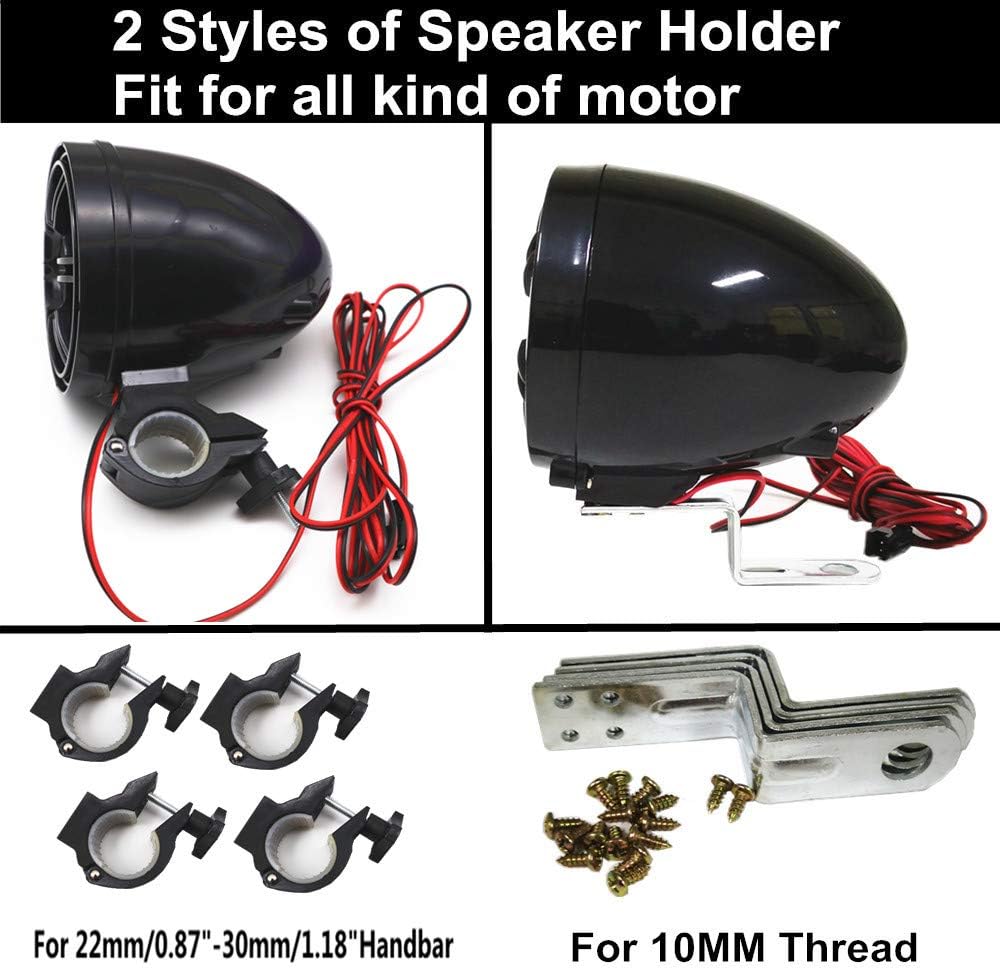
This image shows two different styles of speaker holders provided for versatile installation. One style is a clamp designed for handlebars measuring 22mm/0.87" to 30mm/1.18". The other style is a bracket with a 10MM thread for alternative mounting points.
- Choose the appropriate speaker holder (handlebar clamp or 10MM thread bracket) for your vehicle.
- Securely attach the speakers to your desired locations, ensuring they do not obstruct controls or vision.
- The 250cm speaker wires provide ample length for flexible routing.

This image highlights the generous 250cm (2.5 meter) length of the speaker wires, allowing for flexible placement of the speakers in various positions on your vehicle.
2. Wiring Connections

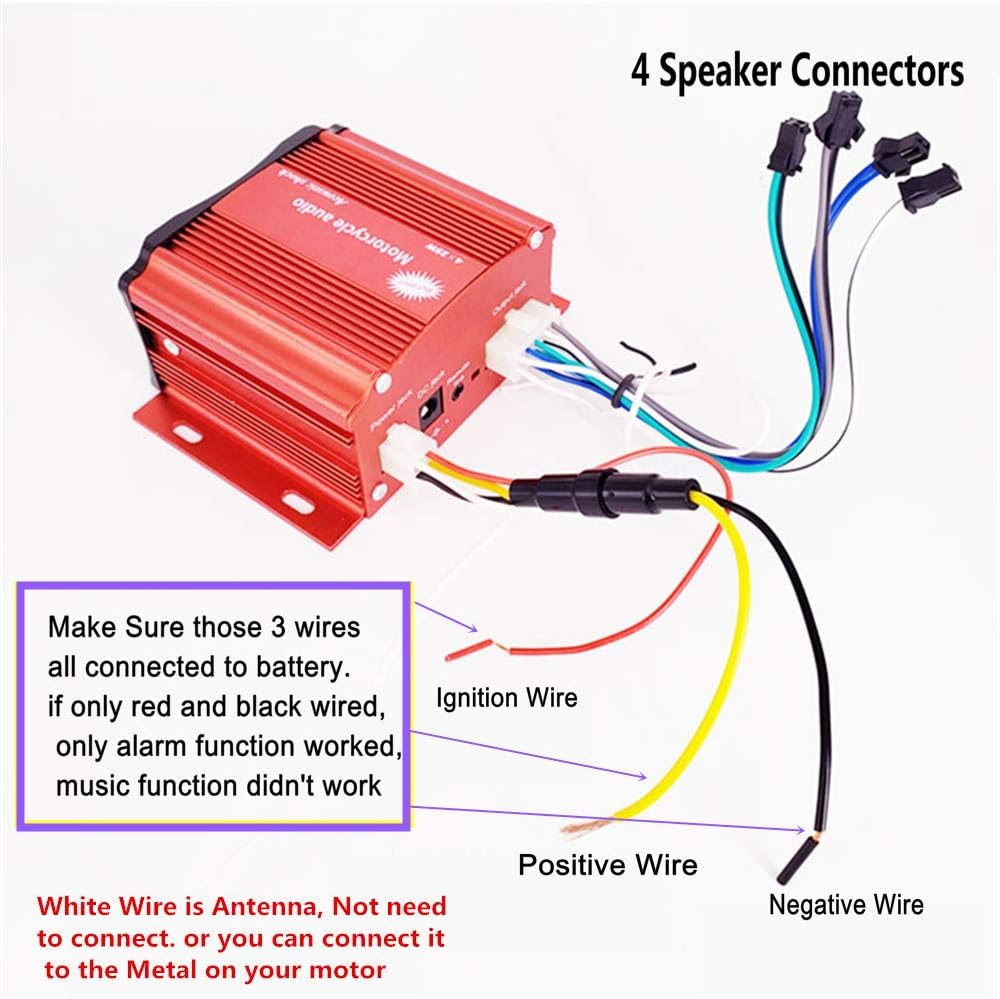
This diagram illustrates the wiring connections. The three main wires (Ignition Wire, Positive Wire, Negative Wire) must all be connected to the battery for full functionality. If only red and black wires are connected, only the alarm function will work, and music playback will not. The white wire is an antenna and does not need to be connected, or it can be connected to the metal frame of your motor vehicle.
- Power Connection: Connect the power harness to your vehicle's 12V DC power source. Ensure the red (Positive), black (Negative), and yellow (Ignition) wires are all correctly connected to the battery for full system functionality. If only red and black are connected, only the alarm will function.
- Speaker Connection: Connect the four speaker wires from the main unit to your speakers. Ensure correct polarity (+/-) for optimal sound.
- Antenna: The white wire serves as an antenna. It can be left unconnected or connected to the metal frame of your vehicle for improved FM reception.
- Remote Control: Connect the wired remote control to the designated port on the main unit.
3. System Overview
This image displays the complete audio system, including the main amplifier unit, four bullet-style speakers, a wired remote control, and a wireless key fob remote control.
Operating Instructions
Main Unit and Remote Controls
This image provides a detailed look at the main unit's front panel, showing the LED display, PREV, MODE, POW, TF slot, AUX IN, VOL-/VOL+, USB slot, MUTE, CLK, and NEXT buttons. It also illustrates the rear connections including Power Jack, DC Jack, remote code button, and Output Jack. Two remote controls are shown, one with Play/Pause/Mode, NEXT, On/Off Alarm, and Equalizer buttons, and another with On/Off Volum +/-, PREV, Alarm, MOD, EQ, and Play/Pause buttons. A notice indicates that the equalizer is only available in TF/USB mode.
- Power On/Off: Press the 'POW' button on the main unit or the power button on the remote control.
- Mode Selection: Press the 'MODE' button to cycle through available modes: Bluetooth, FM Radio, AUX In, USB, and SD Card.
- Volume Control: Use the 'VOL-' and 'VOL+' buttons on the main unit or the volume buttons on the remote.
- Track/Station Navigation: Use the 'PREV' and 'NEXT' buttons to change tracks or radio stations.
- Mute: Press the 'MUTE' button to temporarily silence the audio.
- Clock: Press 'CLK' to display the time.
Bluetooth Operation
- Switch the unit to Bluetooth mode. The LED display will indicate Bluetooth pairing mode.
- On your mobile device, search for available Bluetooth devices and select 'XYC Audio' (or similar name).
- Once paired, you can stream audio wirelessly from your device.
FM Radio Operation
- Switch the unit to FM Radio mode.
- Use the 'PREV' and 'NEXT' buttons to manually tune or auto-scan for stations.
USB/SD Card Playback
- Insert a USB drive into the USB slot or an SD card into the TF slot.
- The unit will automatically switch to USB or SD mode and begin playing compatible audio files.
- Equalizer: The equalizer function is only available when playing from USB or SD card.
AUX In Operation
- Connect an external audio device (e.g., MP3 player) to the 'AUX IN' port using a 3.5mm audio cable.
- Switch the unit to AUX In mode. Audio will play from the connected device.
Alarm Function
- Activate the alarm function via the remote control.
- If the vehicle is moved while the alarm is active, the system will sound an alert.
Maintenance
- Cleaning: Use a soft, damp cloth to clean the unit and speakers. Avoid harsh chemicals or abrasive cleaners.
- Connections: Periodically check all wiring connections to ensure they are secure and free from corrosion.
- Battery: The wireless remote control uses a Lithium Ion battery. Replace it when necessary.
- Storage: If storing the vehicle for an extended period, consider disconnecting the power to the unit.
Troubleshooting
| Problem | Possible Cause | Solution |
|---|---|---|
| No power to the unit. | Incorrect power wiring; Blown fuse; Vehicle battery low. | Check all power connections (red, black, yellow wires). Verify vehicle battery charge. Check for blown fuses in the vehicle's electrical system. |
| No sound from speakers. | Speaker wires disconnected or incorrectly wired; Volume too low; Unit in mute mode; Incorrect source selected. | Check speaker connections and polarity. Increase volume. Check if mute is active. Select the correct input source (Bluetooth, FM, AUX, USB/SD). |
| Bluetooth not connecting. | Unit not in Bluetooth mode; Device not discoverable; Interference. | Ensure the unit is in Bluetooth pairing mode. Make sure your device's Bluetooth is on and discoverable. Move closer to the unit. Try restarting both devices. |
| Alarm function not working. | Ignition wire not connected; Alarm not activated. | Ensure the yellow ignition wire is properly connected to the battery. Activate the alarm using the remote control. |
| Poor FM reception. | Antenna not connected or poorly positioned; Weak signal area. | Connect the white antenna wire to the vehicle's metal frame. Try repositioning the antenna. |
Specifications

This image provides detailed dimensions for the main unit (83mm/3.25" D x 89mm/3.5" W x 50mm/2.5" H) and the speakers (89mm/3.5" diameter, 102mm/4" length). It also shows the various accessories included, such as handlebar mounting clamps (22mm/0.87" - 30mm/1.18"), metal mounting brackets, screws, the wired remote (100cm/39" cable, 38mm/1.5" x 50mm/2"), and the wireless key fob remote (62mm/2.44" x 35mm/1.37").
- Model Name: MP-D056
- Input Voltage: 12 Volts DC
- Speaker Maximum Output Power: 100 Watts
- Surround Sound Channel Configuration: 4 channel
- Speaker Type: Outdoor
- Speaker Size: 3.5 Inches (89 mm Audio Driver Size)
- Woofer Diameter: 4 Inches
- Connectivity Technology: Auxiliary, Bluetooth, USB
- Wireless Communication Technology: Bluetooth
- Bluetooth Range: 10 Meters
- Special Feature: Waterproof (Water Resistant Level)
- Control Method: Remote
- Product Dimensions (Main Unit): 3.5"D x 3.5"W x 4"H (83mm D x 89mm W x 50mm H)
- Item Weight: 1.95 Kilograms (4.29 pounds)
- Material: Plastic or Rubber
- Included Components: 1 lithium-ion battery (for remote)
Warranty Information
This product comes with a limited warranty. For specific details regarding warranty coverage, terms, and conditions, please refer to the documentation provided with your purchase or contact the seller directly.
Support
If you encounter any issues or have questions regarding the XYC MP-D056 speaker system that are not covered in this manual, please contact the seller or manufacturer for assistance. Provide your product model number (MP-D056) and a detailed description of the issue for efficient support.