
SKMEI 1258
SKMEI 1258 Digital Sports Watch User Manual
Model: 1258
Introduction
Thank you for choosing the SKMEI 1258 Digital Sports Watch. This manual provides detailed instructions for setting up, operating, and maintaining your watch to ensure optimal performance and longevity. Please read this manual carefully before using your watch.
Product Overview
The SKMEI 1258 is a durable and comfortable digital watch designed for sports and daily wear. It features a clear display, multiple functions, and 50-meter water resistance.

Image: Front view of the SKMEI 1258 Digital Sports Watch, displaying the time and date clearly on its digital screen.
Button Functions

Image: Diagram illustrating the functions of each button on the SKMEI 1258 watch. Labels include LIGHT, MODE, START/STOP, and RESET buttons, along with indicators for WEEK, DATE, PM, TIME, ALARM, and SECOND on the display.
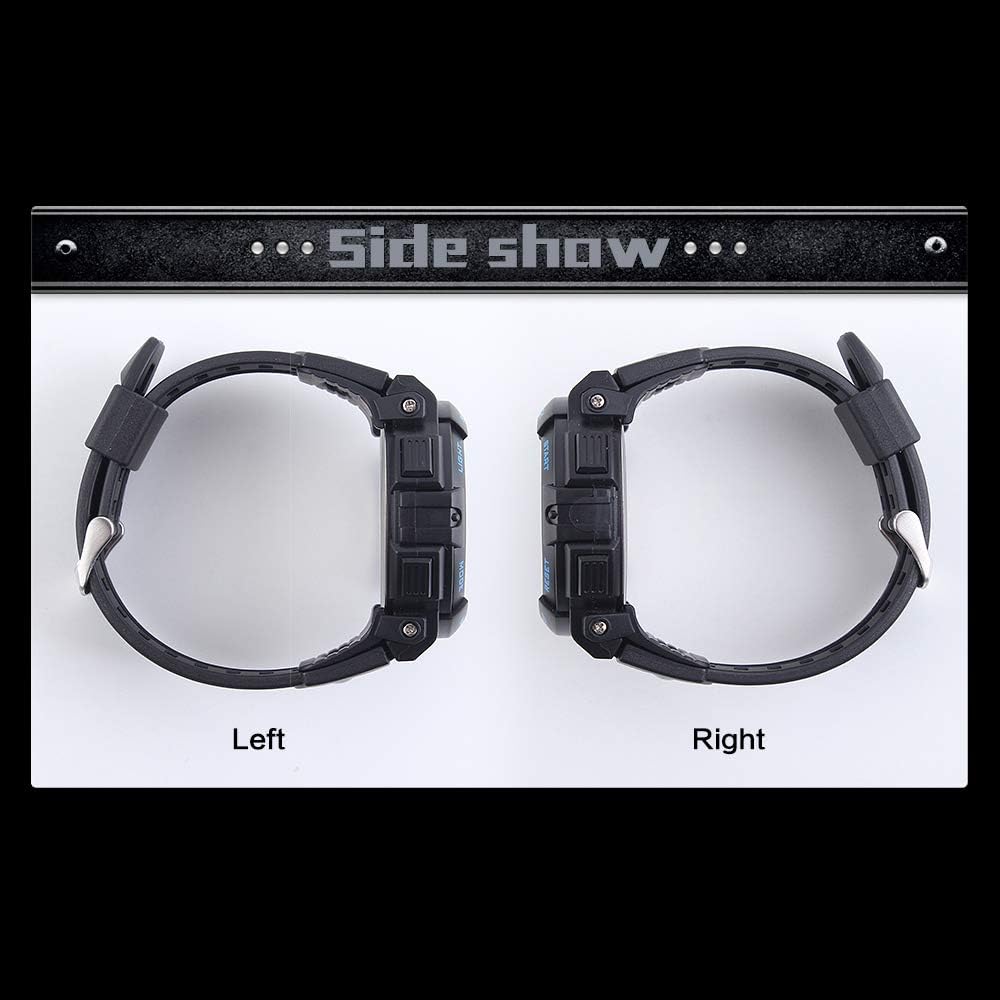
Image: Side view of the SKMEI 1258 Digital Sports Watch, highlighting the placement of the control buttons on both sides of the watch case.
- LIGHT Button: Activates the EL backlight for illumination.
- MODE Button: Cycles through different modes: Time Display, Stopwatch, Alarm Setting.
- START/STOP Button: Used to start/stop functions in Stopwatch mode and adjust settings.
- RESET Button: Used to reset values or confirm settings.
Initial Setup
Setting Time and Date
- From the Time Display mode, press the MODE button three times to enter Time Setting mode. The seconds will flash.
- Press the RESET button to cycle through the settings: Seconds → Hours → Minutes → Month → Date → Day of Week.
- Use the START/STOP button to adjust the flashing value.
- Once all settings are correct, press the MODE button to exit Time Setting mode.
12/24 Hour Format
In Time Display mode, press the START/STOP button once to switch between 12-hour and 24-hour (military) time formats.
Operating Modes
Stopwatch Mode
- From Time Display mode, press the MODE button once to enter Stopwatch mode.
- Press the START/STOP button to start the stopwatch.
- Press the START/STOP button again to pause the stopwatch.
- Press the RESET button to reset the stopwatch to zero while paused.
- Press the MODE button to return to Time Display mode.
Alarm Mode
- From Time Display mode, press the MODE button twice to enter Alarm Setting mode. The hour digits will flash.
- Press the START/STOP button to adjust the hour.
- Press the RESET button to select the minute digits. The minute digits will flash.
- Press the START/STOP button to adjust the minutes.
- Press the MODE button to exit Alarm Setting mode.
- To turn the alarm ON/OFF, in Alarm Mode, press the START/STOP button. An alarm icon will appear/disappear.
Backlight Function
Press the LIGHT button to illuminate the display for a few seconds, making it visible in low-light conditions.
Maintenance and Care
Water Resistance
This watch is rated for 5 ATM (50 meters) water resistance. This means it is suitable for swimming, showering, and hand washing. However, to prevent water ingress:
- DO NOT press any buttons while the watch is submerged in water.
- AVOID using the watch in extremely hot water, such as hot springs or saunas, as this can damage the seals.
Battery Replacement
The watch uses 1 CR2 battery (included). The battery life is approximately 18-24 months. When the display dims or functions become erratic, it's time to replace the battery. We recommend having the battery replaced by a qualified watch technician to ensure water resistance is maintained.
Cleaning
Wipe the watch case and strap with a soft, damp cloth. For stubborn dirt, a mild soap solution can be used, followed by rinsing with clean water and drying thoroughly. Avoid harsh chemicals or abrasive cleaners.
Troubleshooting
| Problem | Possible Cause / Solution |
|---|---|
| Display is blank or dim. | Battery may be low or depleted. Replace the battery. |
| Time is incorrect. | Re-set the time following the "Setting Time and Date" instructions. |
| Buttons are unresponsive. | Ensure the watch is not in a locked mode (if applicable, though not a feature of this model). If submerged, wait until dry. If problem persists, battery may be low. |
| Water inside the watch. | This indicates a breach in water resistance. Avoid further water exposure and seek professional repair immediately. Ensure buttons were not pressed underwater. |
Specifications
- Model Number: 1258 (SWQ-1258)
- Display Type: Digital
- Movement: Digital
- Case Shape: Round
- Case Diameter: 57 mm
- Case Thickness: 17 mm
- Band Material: Polyurethane (PU)
- Band Width: 22 mm
- Band Color: Black
- Dial Color: Black
- Water Resistance: 50 Meters (5 ATM)
- Special Features: Alarm, Stopwatch, Backlight (Note: The original product data mentioned "Roman numerals" as a special feature, which is incorrect for this digital watch. The actual special features are digital functions like alarm and stopwatch.)
- Battery: 1 CR2 (included)
- Product Dimensions: 8 x 7.8 x 7 cm; 40 g (Package Size)
Warranty and Support
For warranty information or technical support, please refer to the retailer where you purchased the product or visit the official SKMEI website. Keep your purchase receipt as proof of purchase.
Ask a question about this manual
Ask about setup, troubleshooting, compatibility, parts, safety, or missing instructions. Manuals+ will review the question and use this page’s manual context to help answer it.