
1. Introduction
Thank you for choosing the XYC MP-D056 12V Motorcycle Waterproof Bluetooth Amplifier Sound System. This system is designed to provide high-fidelity audio for your motorcycle, UTV, or ATV, featuring Bluetooth connectivity, FM radio, USB, and TF card playback. This manual provides essential information for proper installation, operation, and maintenance of your new audio system. Please read it thoroughly before use and retain it for future reference.
2. Package Contents
Carefully unpack the box and ensure all items listed below are present and in good condition. If any items are missing or damaged, please contact your retailer.
- 1x Main Amplifier Unit
- 4x 3-inch Waterproof Speakers
- 1x Mounting Bracket for Main Unit
- Mounting Pads for Speakers
- Remote Control
- Wiring Harness
- Installation Hardware (screws, bolts, etc.)

Image: Package contents of the XYC MP-D056 audio system.
3. Product Features
The XYC MP-D056 system offers a range of features for an enhanced audio experience:
- Color display for clear information.
- Alarm function for security.
- FM radio function with full-band support (87-108MHz).
- USB and TF card playback for MP3 music.
- Wireless remote control for convenient operation.
- Sound processing function for optimized audio.
- Wire control function for integrated vehicle controls.
- Function buttons on the main unit for direct control.
- AUX In function for external audio devices.
- Four-channel audio output for comprehensive sound.
- Car park searching function.
- Three kinds of police voice function (Note: Use responsibly and in accordance with local laws.).
- Bluetooth V3.0+EDR for wireless audio streaming and hands-free calls.
- Built-in high-sensitive MIC for hands-free communication.
- Warning bell for incoming calls and voice prompts for mode changes.

Image: Front panel features and display of the amplifier unit.
4. Specifications
Detailed technical specifications for the XYC MP-D056 audio system:
| Feature | Specification |
|---|---|
| Input Voltage | DC 12V (36V-72V models require an adaptor) |
| Output Power | 4 x 25W |
| Speaker Impedance | 4-8Ω |
| Frequency Response | 20 Hz - 20 kHz (Amplifier), 2.402GHz - 2.480GHz (Bluetooth) |
| Work Temperature | -30°C to +60°C |
| Remote Control Distance | >10 meters |
| Bluetooth Version | V3.0+EDR (supports AVRCP1.0, GAVDP1.0, AVDTP1.0, A2DP1.0) |
| FM Frequency Range | 87-108 MHz |
| Main Unit Dimensions (LxWxH) | Approx. 100mm (4") x 60mm (2-3/8") x 44mm (1-3/4") |
| Speaker Size (DxH) | 83.5mm (3-1/8") x 102mm (4") |
| Speaker Cable Length | 250cm |
| Material | ABS plastic (shell) |
| Water Resistance Level | Waterproof |
| Model Name | MP-D056 |
| UPC | 753706698162 |

Image: Amplifier unit diagram with specifications and port labels.
5. Safety Information
Please observe the following safety precautions to prevent injury or damage to the device:
- Power Source: Connect the system only to a DC 12V power source. Ensure correct polarity to avoid damage.
- Installation: Professional installation is recommended. Incorrect wiring can cause electrical shorts, fire, or damage to your vehicle's electrical system.
- Waterproof Rating: While the system is waterproof, avoid submerging the main unit or speakers in water for extended periods.
- Volume Levels: Do not operate the system at excessively high volumes, as this can cause hearing damage or distract you from your surroundings, leading to accidents.
- Operating Temperature: Do not expose the unit to extreme temperatures outside the specified operating range (-30°C to +60°C).
- Cleaning: Use a soft, dry cloth for cleaning. Do not use harsh chemicals or abrasive cleaners.
- Modifications: Do not attempt to modify or disassemble the unit. This will void the warranty and may cause damage or injury.
6. Setup and Installation
Proper installation is crucial for optimal performance. Refer to the wiring diagram and follow these steps:
6.1 Wiring Connections
- Power Connection: Connect the red wire to the positive (+) terminal of your vehicle's 12V battery and the black wire to the negative (-) terminal or a suitable ground point. Ensure a fuse (not included, recommended 10A) is installed on the positive power line close to the battery.
- Speaker Connections: Connect each of the four speakers to the corresponding output jacks on the amplifier unit. Ensure correct polarity for each speaker (positive to positive, negative to negative). The speaker cable length is 250cm, allowing flexible placement.
- Remote Control Line: Connect the remote control line to the designated port on the amplifier.
- AUX Input: If using an external audio device via AUX, connect it to the AUX IN port.
- Wire Control (Optional): If your vehicle supports wire control, connect it to the designated port.
Image: Rear connections of the amplifier unit, including power and speaker outputs.
6.2 Mounting the Main Unit and Speakers
- Main Unit: Use the provided mounting bracket to secure the main amplifier unit in a safe, accessible, and well-ventilated location, away from direct heat or excessive vibration.
- Speakers: The 3-inch speakers can be mounted on any roll bar with a size of 20cm-25cm using the included mounting pads and hardware. Ensure speakers are securely fastened and positioned for optimal sound dispersion.
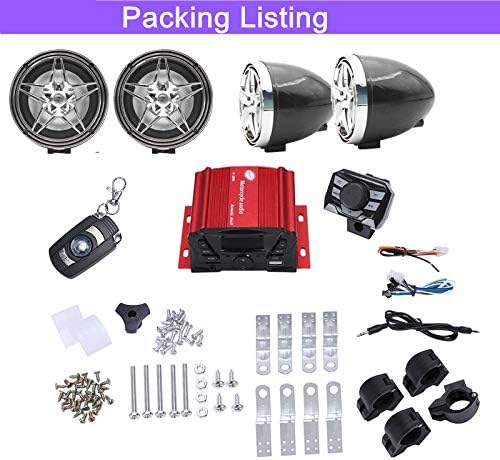
Image: One of the 3-inch waterproof speakers.
7. Operating Instructions
Familiarize yourself with the controls on the main unit and the remote control for easy operation.
7.1 Main Unit Controls
Image: Amplifier front panel controls.
- POW (Power): Press to turn the unit on or off.
- MOD (Mode): Press to cycle through available modes: FM, Bluetooth, USB, TF, AUX.
- PREV / NEXT: In FM mode, short press to tune to the previous/next station. In USB/TF/Bluetooth mode, short press for previous/next track. Long press for fast forward/rewind.
- VOL- / VOL+: Adjust the volume level.
- MUT (Mute): Mutes or unmutes the audio.
- CLK (Clock): Displays the clock. Long press to set the time.
- USB Slot: Insert a USB drive for MP3 playback.
- TF Slot: Insert a TF (Micro SD) card for MP3 playback.
- AUX IN: Connect external audio devices using a 3.5mm audio cable.
7.2 FM Radio Operation
- Press the MOD button until "FM" is displayed.
- Short press PREV or NEXT to manually tune to the previous or next station.
- Long press PREV or NEXT to automatically scan for the previous or next strong station.
7.3 Bluetooth Pairing
- Press the MOD button until "BT" (Bluetooth) is displayed. The unit will enter pairing mode, indicated by a flashing Bluetooth icon or similar indicator on the display.
- On your mobile device, enable Bluetooth and search for available devices.
- Select "XYC Audio" or a similar name from the list of devices.
- Once paired, the unit will confirm with a voice prompt, and the Bluetooth indicator will become solid.
- You can now play audio from your device through the amplifier.
7.4 USB/TF Card Playback
- Insert a USB drive into the USB slot or a TF card into the TF slot.
- The unit will automatically switch to USB or TF mode and begin playing MP3 files. If it doesn't, press the MOD button to select the correct source.
- Use PREV and NEXT buttons to navigate tracks.
7.5 Hands-Free Calling
- When your phone is paired via Bluetooth, incoming calls will trigger a warning bell and voice prompt.
- Use the remote control or specific buttons on the main unit (if available, refer to detailed remote instructions) to answer or end calls.
- The built-in microphone allows for hands-free conversation.
8. Maintenance
To ensure the longevity and optimal performance of your XYC MP-D056 system, follow these maintenance guidelines:
- Cleaning: Regularly wipe the main unit and speakers with a soft, damp cloth. Avoid using abrasive cleaners, solvents, or harsh chemicals that could damage the finish or electronic components.
- Connections: Periodically check all wiring connections to ensure they are secure and free from corrosion. Loose connections can lead to intermittent audio or power issues.
- Exposure: While waterproof, prolonged exposure to extreme weather conditions (e.g., heavy rain, direct sunlight for extended periods, extreme cold) should be minimized when possible.
- Storage: If storing the vehicle for an extended period, consider disconnecting the power to the unit to prevent battery drain.
9. Troubleshooting
If you encounter issues with your audio system, refer to the following common problems and solutions:
| Problem | Possible Cause | Solution |
|---|---|---|
| No power | Loose power connection; Blown fuse; Incorrect wiring. | Check power and ground connections. Inspect and replace fuse if necessary. Verify wiring according to Section 6.1. |
| No sound from speakers | Loose speaker connections; Incorrect mode selected; Volume too low; Damaged speakers. | Check all speaker wire connections. Ensure the correct input mode (FM, BT, USB, AUX) is selected. Increase volume. Test speakers individually if possible. |
| Bluetooth not pairing | Unit not in pairing mode; Device too far; Bluetooth disabled on device; Interference. | Ensure the unit is in Bluetooth mode. Move your device closer to the amplifier. Enable Bluetooth on your device. Try restarting both the amplifier and your device. |
| Poor FM reception | Weak signal; Antenna issue; Interference. | Relocate the vehicle to an area with better signal. Check antenna connection. Avoid areas with strong electromagnetic interference. |
| USB/TF card not playing | Unsupported file format; Corrupted files; Card/drive not inserted correctly; Card/drive capacity too large. | Ensure files are in MP3 format. Reinsert the USB drive/TF card. Try a different USB drive/TF card. Check for maximum supported capacity (not specified, but common issue). |
| Remote control not working | Dead battery; Obstruction; Out of range. | Replace the remote control battery. Ensure no obstructions between remote and unit. Operate within 10 meters range. |
10. Warranty and Support
The XYC MP-D056 audio system comes with a limited warranty. Please refer to the warranty card included in your package for specific terms and conditions. For technical support, troubleshooting assistance, or warranty claims, please contact your retailer or the manufacturer directly using the contact information provided with your purchase.
Please have your model number (MP-D056) and proof of purchase ready when contacting support.