
1. Introduction
This manual provides comprehensive instructions for the safe and efficient operation, installation, and maintenance of your Emerson Quiet Kool 15,000 BTU Smart Window Air Conditioner. Designed for rooms up to 700 square feet, this unit offers advanced features including Wi-Fi connectivity and voice control compatibility with Amazon Alexa and Google Home, ensuring optimal comfort and convenience in your home or office environment.
Please read this manual thoroughly before using the appliance and retain it for future reference.
2. Important Safety Information
WARNING: To reduce the risk of fire, electrical shock, or injury, read and follow all instructions and warnings before using this appliance.
- Always ensure the unit is properly grounded.
- Do not operate the unit with a damaged power cord or plug.
- Do not insert fingers or objects into the air discharge area.
- Ensure proper ventilation around the unit.
- Disconnect power before cleaning or servicing.
- This appliance is not intended for use by persons (including children) with reduced physical, sensory or mental capabilities, or lack of experience and knowledge, unless they have been given supervision or instruction concerning use of the appliance by a person responsible for their safety.
- Do not drill holes in the product. Drilling holes in the product can cause the air conditioner to not function properly and may void the warranty.
3. Included Components
Your package should contain the following items:
- Window Air Conditioner Unit
- Window Mounting Kit (including side panels, top bracket, screws, and hardware)
- Remote Control
- User Manual
- Warranty Card

Figure 1: Front view of the Emerson Quiet Kool 15,000 BTU Smart Window Air Conditioner unit.
4. Installation
The Emerson Quiet Kool window air conditioner is designed for easy installation in most standard double-hung windows. Follow these general steps for proper setup:
- Prepare the Window: Ensure your window opening is suitable for the unit. The unit is designed for window sizes between 28" and 41" wide, with a minimum height of 17.9".
- Attach the Top Bracket: Secure the provided top bracket to the top of the air conditioner unit using the included screws. This bracket helps the unit sit securely against the window frame.
- Install Side Panels: The side panels are designed for tool-less installation. Simply slide them into the grooves on the sides of the air conditioner. These panels expand to fill the gaps on either side of the unit, preventing air leakage and blocking insects.
- Position the Unit: Carefully lift the air conditioner and place it into the window opening. Ensure the top bracket is securely seated in the window frame.
- Secure the Unit: Use the provided screws and hardware to secure the unit to the window frame as per the detailed instructions in the full user manual.
- Seal Gaps: Utilize the included foam insulation to seal any remaining gaps around the unit, preventing air infiltration and improving efficiency.
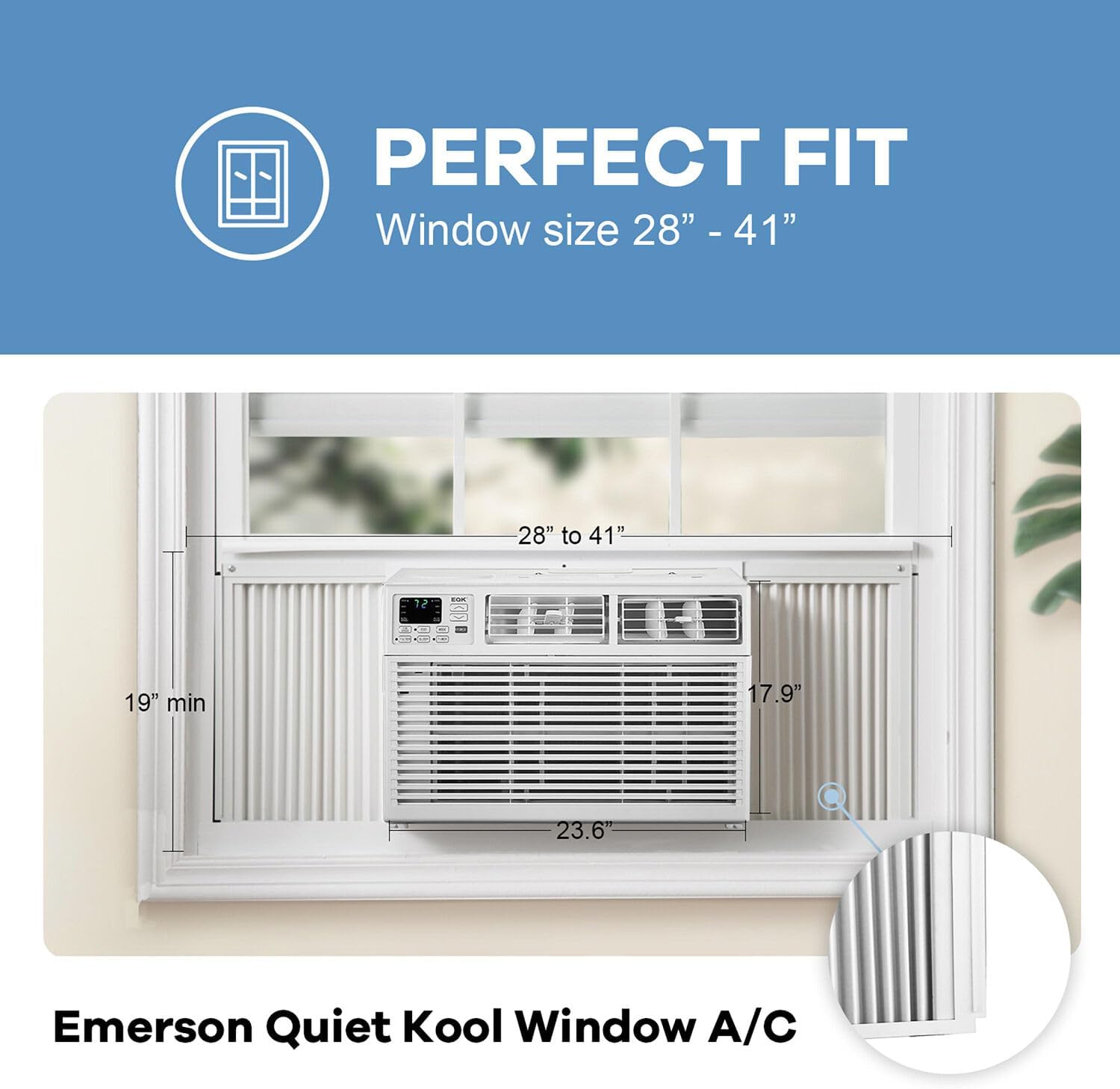
Figure 2: Window dimensions for proper installation. The unit fits window widths from 28" to 41" and requires a minimum height of 17.9".

Figure 3: The air conditioner unit properly installed in a window, showcasing the side panels extended to fit the window frame.
5. Smart Features Setup
Your Emerson Quiet Kool Smart Window Air Conditioner can be controlled via the HE Smart app, Amazon Alexa, and Google Home. Ensure your Wi-Fi network is 2.4GHz for successful connection.
5.1. HE Smart App Setup
To control your AC unit from your smartphone, download and set up the HE Smart app:
- Download the "HE Smart" app from your App Store or Google Play Store.
- Register a user account and log in.
- Ensure your phone is connected to a 2.4GHz Wi-Fi network.
- In the app, click "Add Device" or the "+" icon.
- Select "Window Air Conditioner" from the device list.
- On the AC remote control, press the "DISPLAY" button 6 times within 6 seconds to activate Wi-Fi setup. The display will show "CF".
- Follow the on-screen prompts in the app to connect to your Wi-Fi network and input the password.
- The app will automatically match and add your product.
Video 1: Smart Application Setup Guide. This video demonstrates the process of setting up your Emerson Quiet Kool smart product with the HE Smart app, including Wi-Fi connection steps.
5.2. Amazon Alexa Setup
Integrate your AC unit with Amazon Alexa for voice control:
- Download and install the "Amazon Alexa" app.
- Sign in with your Alexa account.
- Go to the Alexa menu (upper left corner) > Settings > Device Settings.
- Click "+" to add a device, then select "Add a Device" and choose "Echo" (or your specific Echo device).
- Follow the prompts to connect your Echo device to your Wi-Fi network.
- Once connected, go back to the Alexa menu > Skills & Games.
- Search for "Smart Life" and enable the skill.
- Input your HE Smart account credentials to link the accounts.
- Once linked, Alexa will discover your AC unit, allowing for voice commands.
Video 2: Amazon Alexa Setup Guide. This video provides a step-by-step guide to connect your Emerson Quiet Kool smart product with Amazon Alexa for voice control.
5.3. Google Home Setup
Connect your AC unit to Google Home for seamless voice control:
- Download and install the "Google Home" app.
- Sign in with your Google account.
- In the app, click "Add" to set up a new device.
- Turn on Bluetooth on your phone or connect to the Wi-Fi hotspot named "Google Home".
- The app will scan for nearby Google devices.
- Choose your Wi-Fi network (must be 2.4GHz) and input the password.
- Enter the Google Home account menu > Home Control.
- Click "+" and search for "Smart Life" in the list.
- Input your HE Smart account credentials to link the accounts.
- Once linked, your AC unit will appear in the Home Control page, ready for voice commands.
Video 3: Google Home Setup Guide. This video illustrates how to set up your Emerson Quiet Kool smart product with Google Home for convenient voice control.
6. Operating Instructions
Your Emerson Quiet Kool air conditioner offers multiple modes and settings for personalized comfort.
6.1. Control Panel and Remote Control
The unit features electronic controls with a clear LED display. A full-function remote control is also included for convenient operation from a distance.
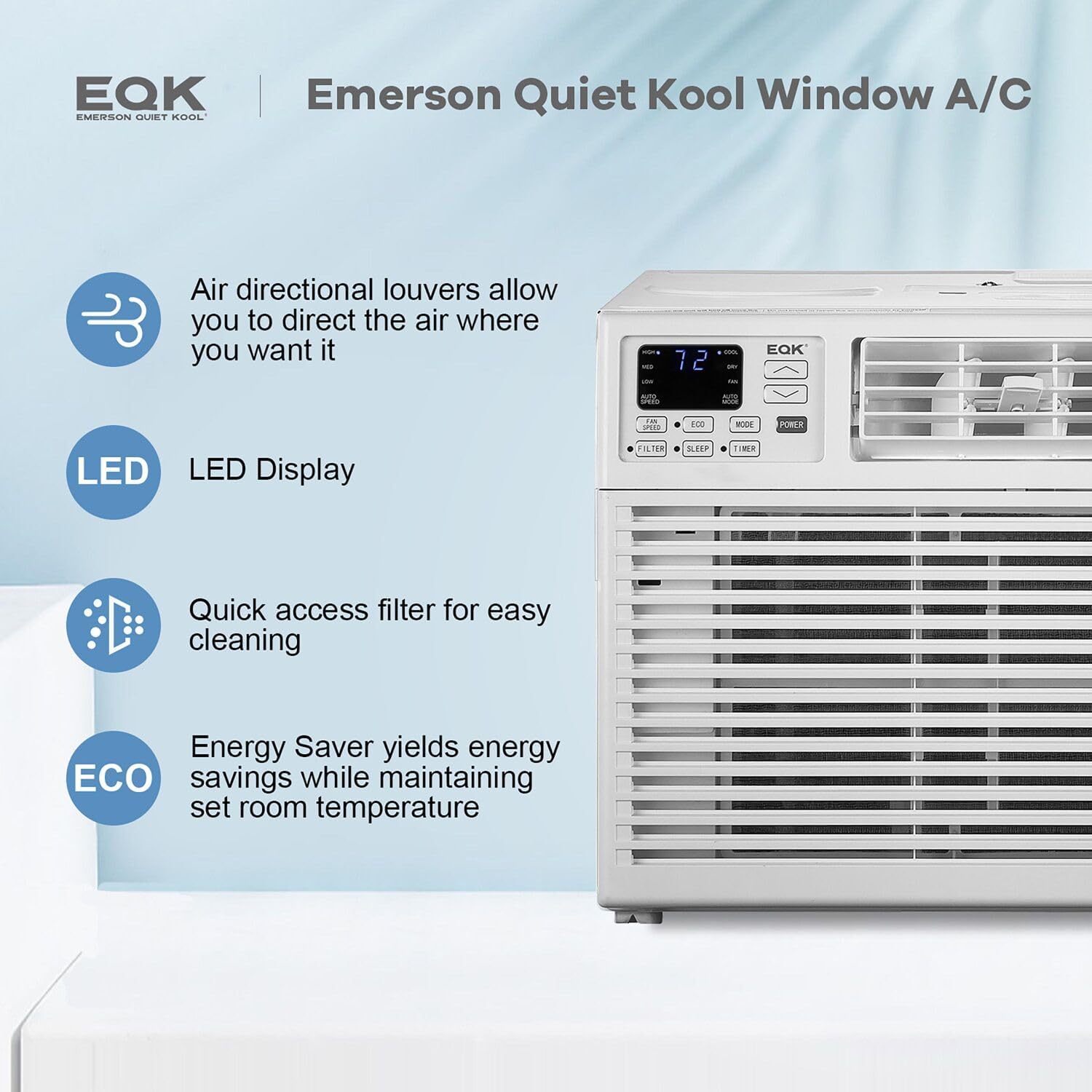
Figure 4: Control panel features including air directional louvers, LED display, quick access filter, and Eco mode for energy savings.

Figure 5: The full-function remote control allows convenient operation of the unit. The unit uses a 15A, 115V/60Hz plug.
6.2. Modes and Settings
- 3-in-1 Functionality: The unit offers Cooling, Fan, and Dehumidifier modes.
- Cooling: Provides 15,000 BTUs of cooling power with 3 speeds (High, Medium, Low) and adjustable temperature settings.
- Fan: Circulates air with 3 fan speeds without cooling.
- Dehumidifier: Removes excess moisture up to 4.1 pints per hour, ideal for humid environments.
- 24-Hour On/Off Timer: Program the unit to turn on or off automatically.
- Eco Mode: Optimizes energy consumption by adjusting cooling based on room temperature.
- Sleep Mode: Adjusts temperature and fan speed for comfortable sleep while conserving energy.
- Quiet Operation: Operates at a low noise level of 52dB on low setting, making it suitable for bedrooms and living rooms.
- Auto Restart: In case of a power outage, the unit will automatically resume operation at its previous settings once power is restored.
Video 4: Emerson Quiet Kool Smart Product Operation Guide. This video provides a detailed overview of the operational features and smart controls of your Emerson Quiet Kool AC unit.
7. Maintenance
Regular maintenance ensures optimal performance and longevity of your air conditioner.
7.1. Filter Cleaning
The unit features a washable and reusable easy-access filter. A filter light reminder will alert you when it's time to clean the filter for optimal efficiency.
- Turn off the air conditioner and unplug it from the power outlet.
- Open the front panel or grille to access the filter.
- Remove the filter.
- Wash the filter with warm, soapy water. Rinse thoroughly.
- Allow the filter to air dry completely before reinserting it.
- Once the filter is clean and dry, place it back into the unit and close the panel.

Figure 6: The easy-access washable filter, designed for simple removal and cleaning to maintain air quality and unit efficiency.
7.2. General Cleaning
- Wipe the exterior of the unit with a soft, damp cloth.
- Do not use harsh chemicals or abrasive cleaners.
- Ensure the unit is unplugged before any cleaning.
8. Troubleshooting
If your air conditioner is not operating correctly, refer to the following common issues before contacting support:
| Problem | Possible Cause | Solution |
|---|---|---|
| Unit does not turn on | No power, tripped circuit breaker, power outage. | Check power connection, reset breaker, wait for power to restore. |
| Not cooling effectively | Dirty air filter, blocked air intake/outlet, room too large, open windows/doors. | Clean filter, clear obstructions, ensure room size is within unit capacity, close windows/doors. |
| Unit is noisy | Loose installation, fan obstruction, normal operating sounds. | Check installation for tightness, clear fan area, some noise is normal. |
| Wi-Fi connection issues | Incorrect Wi-Fi password, 5GHz network, router too far. | Verify password, ensure 2.4GHz network, move router closer or use extender. |
9. Specifications
| Feature | Detail |
|---|---|
| Brand | Emerson Quiet Kool |
| Model Number | EARC15RSE1 |
| Cooling Power | 15,000 BTU |
| Voltage | 115 Volts |
| Noise Level | 52 dB (on low) |
| Floor Area Coverage | Up to 700 Sq. Ft. |
| Moisture Removal Capacity | 3.5 Pints/Hour |
| Product Dimensions (D x W x H) | 25.4" x 23.6" x 17.9" |
| Item Weight | 119 pounds |
| Form Factor | Window |
| Special Features | Remote Controlled, Filter Light Reminder, WiFi Enabled, Dehumidifier |
| Seasonal Energy Efficiency Ratio (SEER) | 11.8 |
| Certifications | UL Listed |
10. Warranty and Support
Your Emerson Quiet Kool 15,000 BTU Window Air Conditioner comes with an exclusive 1-2-5 year warranty:
- 1 Year: Labor
- 2 Years: Parts
- 5 Years: Compressor
For technical support, troubleshooting assistance, or warranty claims, please refer to the contact information provided on your warranty card or visit the official Emerson Quiet Kool website.