
1. Product Overview
The FITTRACK Dara Smart BMI Digital Scale is designed to provide comprehensive body composition analysis. Utilizing Dual BIA Technology, it measures 17 different body metrics, including weight, BMI, muscle mass, and body fat percentage. This smart scale connects to a dedicated mobile application for iOS and Android devices, allowing users to track their health progress, set reminders, and manage data for up to 8 individuals.

Image: A smartphone screen showing the FitTrack app interface with 17 body composition metrics listed, including Weight, BMI, Body Fat Percentage, Muscle Mass, Body Water, Bone Mass, BMR, Protein Mass, Metabolic Age, Visceral Fat Index, Subcutaneous Fat, Standard Weight, Weight Control, and Fat Mass.
2. Setup Guide
2.1. Battery Installation
- Locate the battery compartment on the underside of the scale.
- Open the battery cover.
- Insert 4 AAA batteries, ensuring correct polarity (+/-).
- Close the battery cover securely.
2.2. App Download and Pairing
- Scan the QR code provided on the manual or the back of the scale to download the FitTrack app (available for iOS version 8.0 or greater, Android version 5.0 or greater, and Bluetooth version 4.0 or greater).
- Ensure your smartphone's Bluetooth function is turned on.
- Launch the FitTrack application.
- Navigate to "Me," then click on "My Devices."
- Click the plus (+) icon at the top right to initiate device search.
- Step onto the scale to turn it on. The app will automatically sync your measurements.
- Once successfully connected, your scale will appear in the "My Devices" list. "Connected FitTrack" will be displayed on the app's homepage.
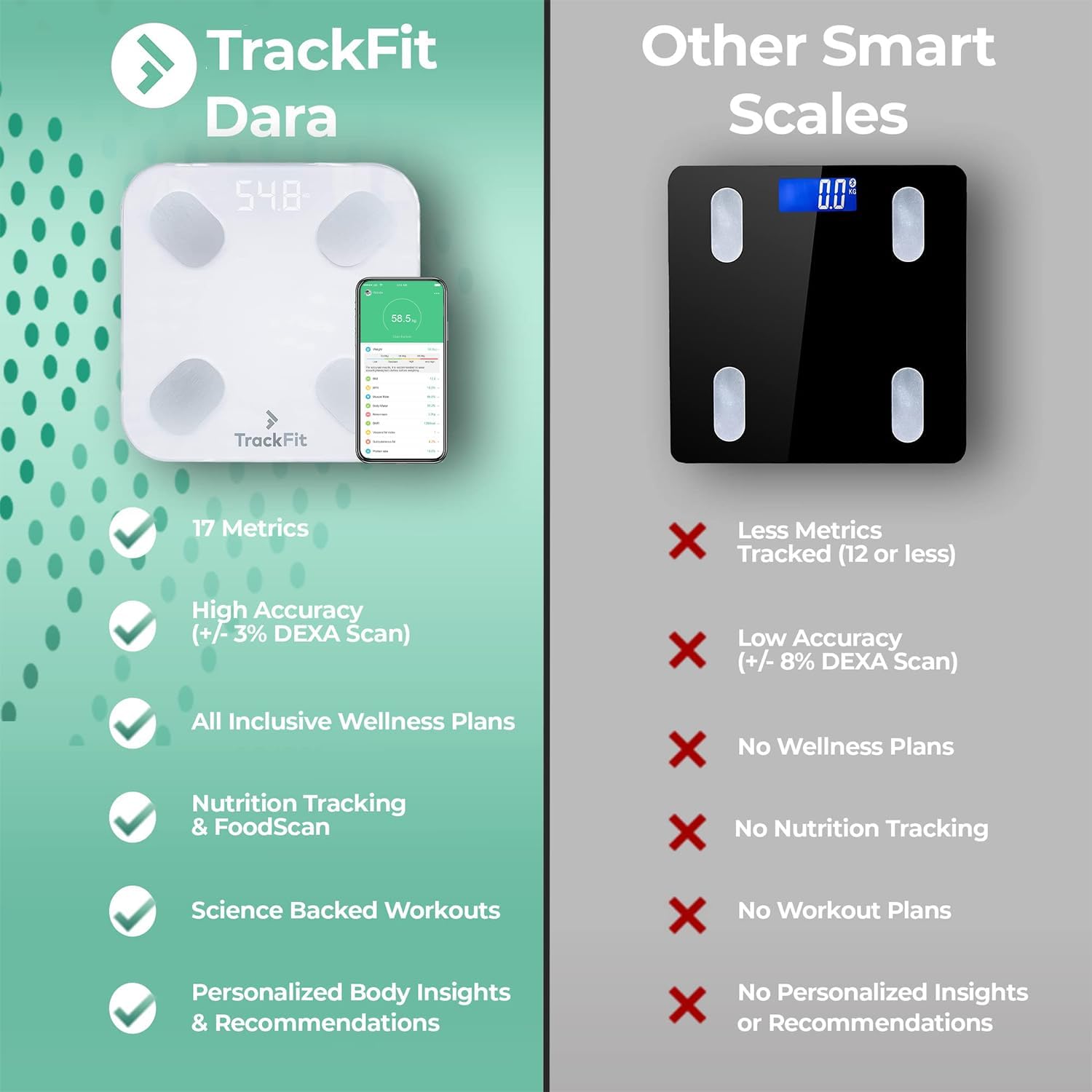
Image: The white FitTrack Dara Smart Scale is shown next to a smartphone displaying the FitTrack app, illustrating the connectivity between the device and the application.
3. Operating Instructions
3.1. Measuring Body Composition
- Place the scale on a hard, flat surface. Avoid carpets or uneven flooring for accurate readings.
- Ensure your feet are clean and dry. Step onto the scale barefoot, positioning your feet on the four metal electrodes.
- Stand still until the digital numbers stabilize. The scale will first display your weight, then flashing zeros while analyzing your body composition.
- The app will automatically sync your measurements. You can view your detailed health report in the app.

Image: A close-up of bare feet on the FitTrack Dara Smart Scale, demonstrating the correct foot placement for body composition analysis.
3.2. Changing Units of Measurement
To change the unit of measurement (pounds or kilograms), use the small button located inside the battery compartment on the underside of the scale. Alternatively, you can change this preference within the FitTrack app by navigating to "Me" and selecting your preferred unit.
3.3. Multiple User and Infant Modes
- Multiple Users: The FitTrack Dara scale can recognize and track results for up to 8 different users, keeping individual results private within their respective profiles in the app.
- Infant Mode: For weighing infants, activate "Infant Mode" in the app. You can then step on the scale while holding your baby to determine their weight.

Image: A family portrait featuring a mother, father, and their baby, symbolizing the scale's ability to track health data for up to 8 users, including an infant mode for baby weighing.
4. Key Features
- 17 Different Body Measurements: Dual BIA Technology provides accurate readings for body mass index, muscle mass, obesity level, and more.
- Up to 8 Users Per Device: Automatically recognizes users and tracks individual results privately.
- Integrated App for iOS and Android: Track health indicators, set weigh-in reminders, and sync with Apple Health or Google Fit.
- Weight Management: Helps users understand how diet and lifestyle affect body health, with Athlete & Infant modes for diverse needs.
- Award-Winning Precision Technology: Ensures high accuracy in body composition measurements.
5. Maintenance and Care
To ensure the longevity and accuracy of your FitTrack Dara Smart BMI Digital Scale, follow these maintenance guidelines:
- Keep the scale clean by wiping it with a soft, damp cloth. Avoid abrasive cleaners or harsh chemicals.
- Store the scale in a dry place, away from extreme temperatures and direct sunlight.
- Avoid dropping the scale or subjecting it to heavy impacts, as this can damage the internal sensors.
- Replace batteries promptly when the low battery indicator appears to maintain optimal performance.
6. Troubleshooting
6.1. Error Messages on the Scale Display
- ERR: Indicates scale overload. Step off the scale immediately to prevent damage.
- ERR1: Indicates failure in measuring body metrics.
Possible reasons:
- Wearing socks during body metrics measurement. Please measure barefoot.
- Failure to connect to the application.
6.2. Troubleshooting Bluetooth Connection
- Ensure your device's Bluetooth is turned on and the FitTrack app is open.
- If the app fails to find the device, stand on the scale to weigh yourself, then try searching for the device again in the app.
- If the device is already added to "My Devices" but "Connected FitTrack" is not displayed on the homepage, return to "My Devices" and click "Sync the device."
7. Specifications
| Feature | Detail |
|---|---|
| Product Dimensions | 10.5 x 10.5 x 1 inches (26 x 26 x 2.5 cm) |
| Item Weight | 3 Pounds (1.36 Kilograms) |
| Weight Capacity Maximum | 400 Pounds (181.437 Kilograms) |
| Readout Accuracy | +/- 3% |
| Display Type | LED |
| Material Type | Glass |
| Batteries | 4 AAA batteries required |
| Special Features | Smart, Bluetooth Connectivity, Body Composition Analysis |
| Measurement Type | Weight (lbs/kg), Body Fat %, Muscle Mass %, Bone Mass %, BMI, Body Water, Metabolic Age, Visceral Fat Index, Subcutaneous Fat, Protein Rate, Standard Weight, Weight Control, Fat Mass, Weight Without Fat |
8. Safety Information
- Do not use this device if you have a pacemaker or other internal medical device.
- Do not use this device if you are pregnant.
- Always place the scale on a hard, flat surface. Using it on carpet or uneven surfaces may affect accuracy.
- Keep the scale dry. Avoid exposure to water or excessive moisture.
- Do not jump on the scale. Step on and off gently.
- This scale is not intended for use by children under the age of 18.
- Consult a healthcare professional before making any changes to your diet, exercise, or health regimen.
9. Warranty and Support
For warranty information, technical support, or further assistance, please refer to the official FitTrack website or contact customer service through the FitTrack app. Keep your purchase receipt for warranty claims.

