
ebm-papst 119x38mm 24V DC Fan
User Manual: Ebm-Papst 119x38mm 24V DC Fan
Model: 119x38mm 24V DC Fan | Brand: ebm-papst
1. Introduction
This manual provides essential information for the safe and efficient operation, installation, and maintenance of your Ebm-Papst 119x38mm 24V DC Fan. This fan is designed for various cooling applications, providing reliable airflow for electronic components and systems. Please read this manual thoroughly before installation and use.
Safety Precautions
- Always disconnect power before installing, cleaning, or performing maintenance on the fan.
- Ensure the power supply matches the fan's voltage requirements (24V DC). Connecting to an incorrect voltage can damage the fan or power supply.
- Avoid touching the fan blades while the fan is operating or connected to power.
- Install the fan in a location with adequate ventilation and away from excessive moisture or heat sources.
- Keep fingers and foreign objects away from the fan blades and housing during operation.
2. Setup and Installation
Proper installation is crucial for optimal performance and longevity of your Ebm-Papst fan.
Components
- Ebm-Papst 119x38mm 24V DC Fan (with 2 wire leads)
- Mounting screws (not included, typically M4 or similar, depending on application)
- 24V DC Power Supply (not included)
Mounting Instructions
- Identify Mounting Location: Choose a flat, stable surface or enclosure opening that matches the fan's dimensions (119x119mm). Ensure there is sufficient clearance for airflow on both sides of the fan.
- Determine Airflow Direction: The fan typically has an arrow on its side indicating the direction of airflow. Position the fan to draw air from the desired area and exhaust it where needed for effective cooling.
- Secure the Fan: Align the fan's mounting holes with the corresponding holes on your mounting surface. Use appropriate screws to secure the fan firmly. Avoid over-tightening, which can warp the fan frame.
Wiring Instructions
The fan comes with two wire leads for power connection.
- Identify Polarity: The fan typically has a red wire for positive (+) and a black or blue wire for negative (-). Refer to the fan's label or specifications for exact polarity if unsure.
- Connect to Power Supply: Connect the red wire to the positive (+) terminal of your 24V DC power supply. Connect the black/blue wire to the negative (-) terminal. Ensure connections are secure and insulated to prevent short circuits.
- Verify Connection: Double-check all wiring before applying power. Incorrect polarity can damage the fan.
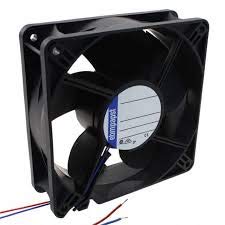
Figure 2.1: An image showing the Ebm-Papst 119x38mm 24V DC fan, a black square fan with a central label and two wire leads (red and blue) extending from one side. This illustrates the fan's physical appearance and wire connections.
3. Operating Instructions
Once properly installed and wired, operating the Ebm-Papst 24V DC fan is straightforward.
- Apply Power: Connect your 24V DC power supply to a power source. The fan should begin to operate immediately, providing airflow.
- Verify Operation: Confirm that the fan blades are spinning smoothly and that air is flowing in the intended direction. Listen for any unusual noises.
- Continuous Operation: This fan is designed for continuous operation within its specified voltage and temperature ranges.
To turn off the fan, simply disconnect or switch off the 24V DC power supply.
4. Maintenance
Regular maintenance helps ensure the longevity and efficient performance of your fan.
- Dust Removal: Periodically inspect the fan blades and housing for dust accumulation. Dust can impede airflow and cause the fan to work harder. Use a soft brush, compressed air, or a vacuum cleaner (on a low setting) to gently remove dust. Always disconnect power before cleaning.
- Inspection: Check for any signs of physical damage, loose connections, or obstructions around the fan. Ensure the fan is securely mounted.
- No Lubrication Required: This fan features sealed bearings and does not require lubrication. Attempting to lubricate the bearings may cause damage.
5. Troubleshooting
If you encounter issues with your Ebm-Papst fan, refer to the following common problems and solutions:
| Problem | Possible Cause | Solution |
|---|---|---|
| Fan does not spin. | No power, incorrect wiring, faulty power supply, or damaged fan. |
|
| Fan is unusually noisy. | Obstruction, loose mounting, or worn bearings. |
|
| Reduced airflow. | Dust accumulation, obstructed intake/exhaust, or fan running at lower than expected RPM. |
|
6. Specifications
Detailed technical specifications for the Ebm-Papst 119x38mm 24V DC Fan:
| Feature | Value |
|---|---|
| Brand | ebm-papst |
| Dimensions | 119x38mm (approx. 4.69 x 1.5 inches) |
| Voltage | 24 Volts DC |
| Wattage | 4 watts |
| Air Flow Capacity | 108 Cubic Feet Per Minute (CFM) |
| Maximum Rotational Speed | 3300 RPM |
| Noise Level | 42 dB |
| Power Connector Type | 2-Pin Wire Leads |
| Material | Fiberglass (Frame) |
| Cooling Method | Forced Air |
| Compatible Devices | Desktop (and other systems requiring 24V DC cooling) |
| Item Weight | 7.99 Pounds |
| Manufacturer | EBM-PAPST |
| First Available Date | March 20, 2019 |
7. Warranty and Support
For warranty information or technical support regarding your Ebm-Papst fan, please refer to the documentation provided with your purchase or visit the official Ebm-Papst website. Contact details for customer service are typically available on the manufacturer's website.
When contacting support, please have your product model information (Ebm-Papst 119x38mm 24V DC Fan) and purchase details readily available.
Ask a question about this manual
Ask about setup, troubleshooting, compatibility, parts, safety, or missing instructions. Manuals+ will review the question and use this page’s manual context to help answer it.