
1. Introduction
This manual provides comprehensive instructions for the setup, operation, and maintenance of your Marantec M3-2312 (315 MHz) 2-button Garage Door Opener Remote. Please read this manual thoroughly before using the product to ensure proper function and safety.
2. Safety Information
- Keep remote controls out of reach of children.
- Operate the garage door only when it is in full view and free of obstructions.
- Never allow children to play with or operate the garage door opener.
- Ensure the garage door is fully closed before leaving the premises.
- Do not attempt to repair the remote control yourself. Refer to qualified service personnel.
3. Package Contents
Verify that all items are present in your package:
- Marantec M3-2312 2-button Remote Control
- Visor Clip
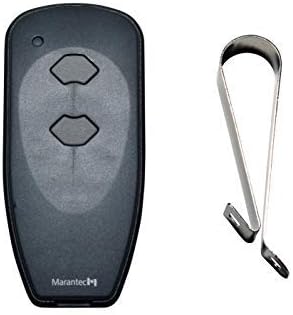
Image: The Marantec M3-2312 2-button remote control (left) shown alongside its accompanying metal visor clip (right). The remote is black with two grey oval-shaped buttons.
4. Setup: Programming Your Remote
The Marantec M3-2312 remote control operates at 315 MHz and is compatible with Marantec garage door openers. Programming typically involves using the "Learn" button on your garage door opener unit. The exact location and appearance of the "Learn" button may vary by opener model. Refer to your garage door opener's instruction manual for specific details if these general steps do not apply.
Programming Steps (Common Method):
- Locate the Learn Button: On your Marantec garage door opener motor head unit (usually mounted on the ceiling), locate the "Learn" button. This button is often red, orange, or purple and may be labeled "Program" or "Learn".
- Activate Learn Mode: Press and immediately release the "Learn" button on the garage door opener. The indicator light on the opener will typically illuminate or flash, indicating it is in programming mode. You usually have about 30 seconds to complete the next step.
- Program the Remote: Within the 30-second window, press and hold the desired button on your new Marantec M3-2312 remote control.
- Confirm Programming: Continue holding the remote button until the garage door opener's light flashes or clicks, or the garage door moves. This indicates successful programming.
- Test the Remote: Release the remote button. Press the programmed button again to test if the garage door responds.
- Program Additional Buttons (Optional): If your remote has multiple buttons and you wish to control other Marantec openers or functions, repeat steps 2-5 for each additional button.
If you encounter difficulties, ensure the remote has a fresh battery and that you are within range of the garage door opener during programming. Consult your specific garage door opener manual for detailed programming instructions.
5. Operating Instructions
Once programmed, operating your Marantec M3-2312 remote is straightforward:
- Opening/Closing the Door: Press the programmed button on the remote control. The garage door will begin to open or close. Pressing the button again during operation will stop the door. Pressing it a third time will reverse its direction.
- Range: For optimal performance, operate the remote within a reasonable distance from your garage door opener, typically within 50-100 feet, depending on environmental factors.
6. Maintenance
Battery Replacement:
If the remote's range decreases or it becomes unresponsive, the battery may need replacement. The Marantec M3-2312 typically uses a CR2032 coin cell battery.
- Open the Casing: Use a small coin or screwdriver to carefully pry open the remote's casing, usually along a seam on the side or bottom.
- Remove Old Battery: Carefully remove the old CR2032 battery. Note its orientation (+/-).
- Insert New Battery: Insert a new CR2032 battery with the positive (+) side facing up.
- Close Casing: Snap the remote casing back together securely.
- Test: Test the remote to ensure it functions correctly.
Cleaning:
Wipe the remote with a soft, dry cloth. Avoid using harsh chemicals or abrasive cleaners.
7. Troubleshooting
| Problem | Possible Cause | Solution |
|---|---|---|
| Remote does not work after programming. |
|
|
| Reduced operating range. |
|
|
| Garage door opens/closes unexpectedly. |
|
|
8. Specifications
- Model: M3-2312
- Brand: M MARANTEC
- Frequency: 315 MHz
- Buttons: 2
- Compatible Devices: Marantec Garage Door Openers
- Power Source: CR2032 Coin Cell Battery (included)
- Dimensions: Approximately 3 x 1 x 1 inches (Package Dimensions)
- Weight: Approximately 1 pound (Item Weight)
- Color: Black
9. Warranty and Support
For warranty information and technical support regarding your Marantec M3-2312 remote control, please contact M MARANTEC directly. Details can typically be found on the manufacturer's official website or through the retailer where the product was purchased.
Keep your proof of purchase for warranty claims.


